Get an empty info box when trying to listen to a tune

I had my app working until two days ago. Now, every time I select a tune I get an empty Info dialog box with the only option to click OK. Then nothing happens and no music starts. Any suggestions?
Accepted answers


All comments

I got the same thing and still trying to figure that out.

That's quite strange--anyway either of you could send us a screenshot so we can take a look?

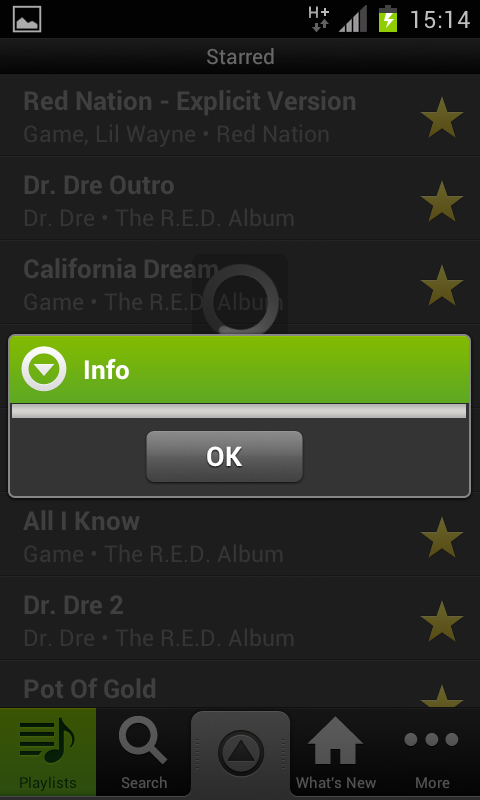

Same problem with Android on GalaxyTab 10.1n

I am having this identical issue. I'm on a Verizon Galaxy Nexus and have the free account. It worked earlier today and suddenly gave me this blank info box everytime I wanted to listen to any song.

Exactly the same issue with my two devices: Samsung Galaxy Nexus & Sony Tablet S1
😞

This happens on both my Samsung Galaxy Nexus and my Samsung Galaxy Tab 10.1 tablet.
Yet it works perfectly on my wife's Samsung Galaxy Nexus.
Could it have anythinig to do with using the same account on two different devices?
I've completely uninstalled and resinstalled on both devices.
Please help!!!!
I've just gone through and look at a number of your accounts here. It seems that you are currently all on the free, advert supported version of Spotify.
In order to use the full set of features on the mobile version of Spotify, you will need Spotify Premium. When you first log into Spotify on a mobile device, you will automatically get a 48 hour Spotify Premium trial - this is why you were previously able to play music.
You can find out a little more about the Spotify subscriptions right here - http://www.spotify.com/get-spotify/overview/

The issue can often be the case if you're a free user. Theoretically, you can be logged into the mobile version and view your playlists. When you try to play a track, the lightbox comes up.
However, in the case of Heras8's screen shot, I think this might be that the local files aren't synced yet. The tracks behind the screen don't look greyed out.
I should also take this moment to admit that this isn't the most desireable user experience.
@Heras8. Are the "RED Album" tracks local files?
David,
I'm a little confused. It appears, from what you say, is that I'm using the premium version of Spotify instead of the free one. Was there a choice when I downloaded the app? Is there a way for me to get back to the free one?
In any event, an empty dialog box is no way to handle the situation on Spotify's part. Doesn't give me much confidence in Spotify's ability to write apps. Makes them look like they're bumbling. Especially worrisome since I've given Spotify permissions to my Facebook account.
Rorey,
I get the same empty dialog box as the screen shot shows. I didn't feel the need to repeat the screen shot. My wife, who has Spotify installed doesn't get it.
@Seabiscuit wrote:David,
I'm a little confused. It appears, from what you say, is that I'm using the premium version of Spotify instead of the free one. Was there a choice when I downloaded the app? Is there a way for me to get back to the free one?
Sorry, there might be a little misunderstanding here. The Spotify application is always free to download - however, the amount of features you have access to are different depending on the subscription you have. Streaming tracks to your phone is only available on the Premium subscription of Spotify. Currently, you are on the free version of Spotify.
You can see how the features differ on each subscription on this page.
Would your wife have a subscription on Spotify at all?
David,
Thanks for the clarification. The chart made it clear. If only the app had been so lucid.
My wife would have only subscribed to the premium account by accident. She wouldn't have paid for it. If that's the case how does she cancel her subscription?
I believe the app description in the Google Play store does make reference to the 48 hour Premium trial - but I imagine that could be made a lot clearer.
Your wife may also be encountering the 48 hour free trial too - if that's the case, the tracks should be greyed out when browsing through the application. If she's made a subscription, however, she can cancel over at the subscription page, and selecting "View Your Options" at the bottom.

Hi Guys,
I recently upgraded my phone to a HTC One X and am getting this exact issue after using the App successfully for 2 days. I have restarted un-installed re-installed etc. all songs are greyed out although it will let me search for new tracks / artists etc.
ty
haha good shout, ty


@cham wrote:
Hi I have the same problem with my HTC sensation XE. I thought the Info box was due to my free trial ending but I upgraded to the £4.99 plan but still get the same problem 😞 any idears?
You need to subscribe to Spotify Premium to listen on your mobile


I have this same problem, but i have spotify unlimited.will i have to upgrade to premium in order to resolve this?
Thanks
Hi amy55- Yep that's correct, you'll need a Premium subscription in order to use the app on your device. However
I can see you just upgraded yesterday, how is that working for you?
Thanks for your time.
Tablets are considered mobiles though - in that they run mobile operating systems. Get a pure Windows tablet running Win7 and you could install the Spotify desktop client and use that.
Dave
I've just gone through and look at a number of your accounts here. It seems that you are currently all on the free, advert supported version of Spotify.
In order to use the full set of features on the mobile version of Spotify, you will need Spotify Premium. When you first log into Spotify on a mobile device, you will automatically get a 48 hour Spotify Premium trial - this is why you were previously able to play music.
You can find out a little more about the Spotify subscriptions right here - http://www.spotify.com/get-spotify/overview/