Onkyo reciever not showing in Spotify Connect list.

Hi there,
I have an Onlyo NR-616 with the latest firmware, when I open Spotify Connect on my mobile device (Samsung S3) my Onkyo reciever is not listed. How can I remedy this?
Thanks in advance
Jevon
Accepted answers

know.

The solution that
luigidelgado1
posted worked for me. TX-NR636. Changed the Name to TXNR636 under the IP of the Onkyo Receiver and in the Router Menu (FritzBox). DHCP was on. Bevore that I already did a Reset of the Onkyo and Firmware update. Also reinstalled the app on the ipohne. Which was without sucess. But the renaming solved it!
Thanks man!
has done nothing to solve this.
Somehow I see ANOTHER older post here marked as solution.
So please to you and everyone that found the solution to work: To help
others please mark the solution that worked for you clicking on "ACCEPT AS
SOLUTION".

I have Integra 20.4 have problem.
Use browser open the device IP.
Change the Friendly Name from "DTR-20.4" to "DTR20.4"
It is work !!!!!
Bravo!!
All comments

Make sure both the Onkyo and your phone are connected to the same WiFi network.
Hi Matt,
Thank you for your quick reply. I can confirm my onkyo reciever and my mobile device are both on the same network. I can play music that is on my phone directly through my amplifier no problem over wifi, however when i open Spotify on my mobile device and touch on spotify connect my reciever is not in the list of devices. My desktop and laptop are and work ok. Any other ideas?
Cheers
Jevon
I did some searching and Onkyo made a recent press release stating that there is a new firmware for 2014 models that will make them support Spotify Connect.
Unfortunately, your model is not listed:
This is a list of all the receivers that currently support Spotify Connect:
http://spotifygear.com/type/hifireceivers/
I found this article on the Spotify support section regarding Onkyo:
https://support.spotify.com/problems/#!/article/Onkyo
"Spotify can be operated from any television screen connected to Onkyo’s home cinema receivers. Click here for a list of Onkyo A/V Receivers supporting Spotify." http://www.eu.onkyo.com/en/spotify-and-onkyo-50268.html
Looking at the receiver product page, it says it has Spotify built into it which shows up to your TV and you can use the remote or an Android app to control it:
http://www.eu.onkyo.com/en/products/tx-nr616-76093.html?tab=Community&category=features
http://www.uk.onkyo.com/faq/index.php?action=artikel&cat=2&id=438&artlang=en
This receiver came out before Spotify Connect was ever a Spotify feature. To be able to see a device in the Spotify Connect menu on your mobile device, that product has to specifically support "Spotify Connect".
If you want, http://spotifygear.com/type/streamers/ lists the https://gramofon.com as a Spotify Connect device. You connect it to your receiver, and then you will be able to stream to that using the Spotify app, and the music will come out of your speakers.
Hopefully this information was helpful. Sorry for the confusion!
Hi Matt,
Again I thank you for your quick reply. The most recent firmware for the nr-616 has my tv screen displaying this message.
"To play a Spotify stream on your device, open the Spotify app, press the Spotify Connect icon, and select the desired device. . Once selected, spotify playback will start on the Onkyo product. For additional information please visit www.spotify.com/connect"
also in the link you provided http://www.eu.onkyo.com/en/spotify-and-onkyo-50268.html my device is listed. This http://www.intl.onkyo.com/support/firmware/tx-nr616.html also states "
Notice of Firmware Update for TX-NR616 /TX-NR616AE
A firmware update for the TX-NR616 network A/V receiver is available through the unit’s network connection or USB input. The latest update includes the following content:
Latest Firmware Number (12 digits):1171-6110-0500 (TX-NR616)
Latest Firmware Number (12 digits):1171-6110-0501 (TX-NR616AE)
As of 18 Dec 2014
| Information Concerning Firmware Update for Onkyo Network Receivers |
|---|
|
Onkyo has discovered there is a possibility of failure when updating receivers to this new firmware package via ethernet in certain network environments. For this reason, we are now only releasing a firmware file for installation via USB port / flash memory device. Users should first check to see if their network receiver is running the firmware (1130-9106-0300 or 1130-9106-0301 released August 10, 2012) before installing this update via USB. If your network receiver is not running firmware version 1130-9106-0300 or 1130-9106-0301, please update your receiver to this version via the network facility before proceeding further. If your receiver is running more newer firmware, there is no need to update via network facility. You can judge whether older or newer by the first three digits. To check your firmware version, press the “Home” button on your remote control. Highlight “F/W Update” or select the “Firmware Update” icon and press enter. Your current firmware version will be displayed on the front panel of your A/V receiver as well as your TV screen. Should you encounter any difficulties when performing this update, please contact us. We appreciate your understanding and apologize for any inconvenience this issue may cause. |
- Adds support of Spotify Connect;
- * Please download the Spotify Music app from the iTunes or Google Play store prior to installing this update.
- * After installing this update, Spotify will no longer be able to be controlled through the receivers OSD menu.
- * All control of the Spotify service will be done through the Spotify Music app.
I have installed this firmware, but to no avail will it appear in the spotify app on my mobile device.
Attached a pic of the message displayed on the tv by the onkyo reciever when trying to open spotify.
Thanks for helping me out.
Cheers
Jevon
haha I apologize. I missed the part that showed your model being compatible with the new firmware. Trying to solve problems with devices I have never used can be challenging.
In the past, 2 people have posted a similar problem with their Yamaha receiver. What solved the problem for them was to unplug their receiver and then plug it back in and turn it on.
Try this:
Exit out of the Spotify app on your phone.
Then unplug your receiver, and then plug it back in and turn it on.
Once it is connected to WiFi, open the Spotify app on your phone and check the connect list.
If that doesn't work, let me know and I'll try to think of what else you could try.
Hi Matt,
Good news, a hard power cycle on the amplifier has made my Onkyo receiver appear in the list of my devices on my phone. 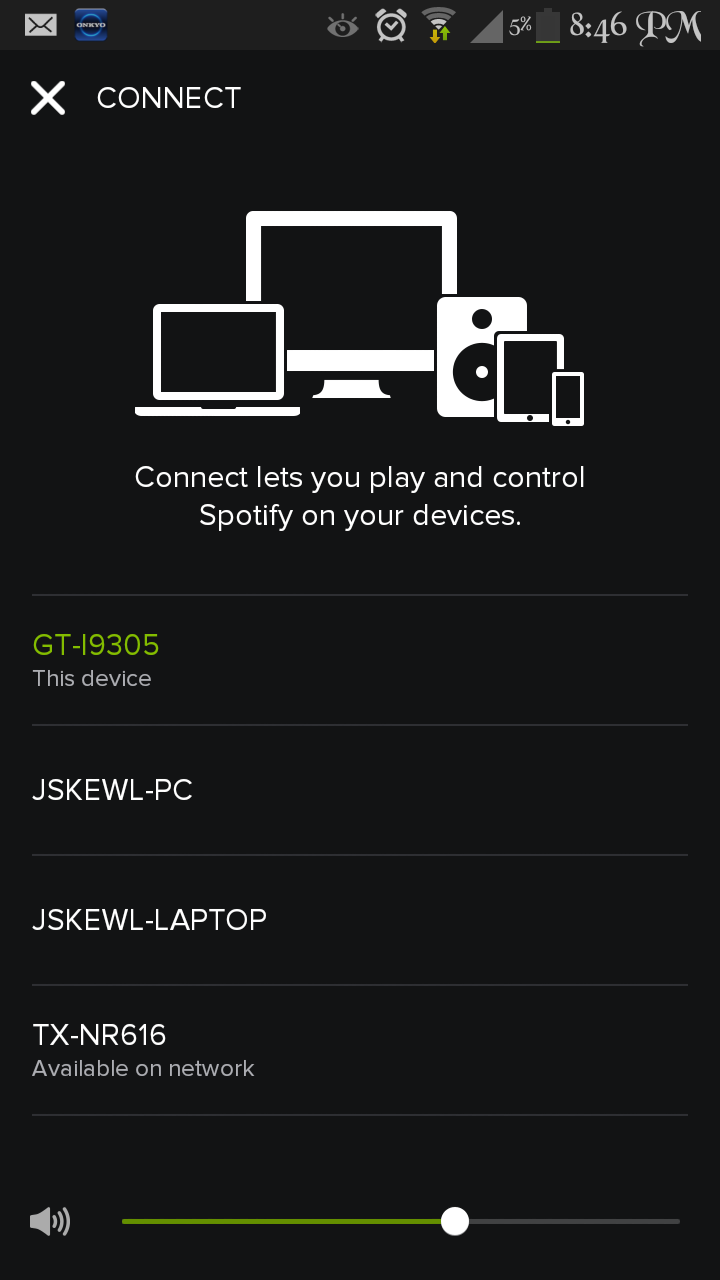
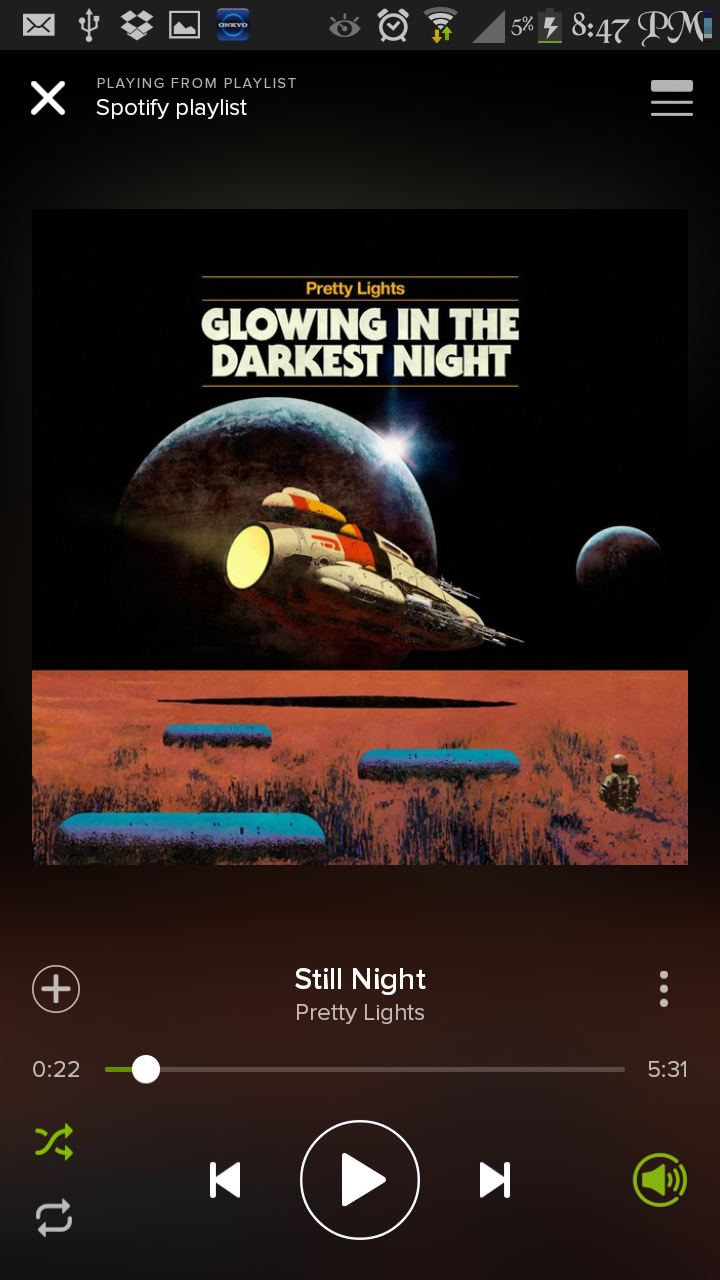
I guess you have fixed my first issue and I thank you, however when I select TX-NR616 the Spotify Connect icon flashes green 16 times, but no playpack occurs. Pushing the play button plays spotify on my phone, if I just wait nothing happens. I really do appreciate all your help.
Cheers
Jevon
You're welcome! 😃
To me it sounds like now there is a connection problem between the devices. Now you just need to find out why it's not transfering playback over to the receiver.
Can you try logging out of the Spotify app on your phone and then logging back in?
(You won't loose any data)
Also try disconnecting the WiFi on your phone, and then reconnecting to the WiFi.
Let me know how things go.
Mr Suda,
You are the man. 🙂 I had tried cycling power on my Samsung S3 to no avail, but signing out of Spotify on my phone, then signing back in (using username and password, not facebook in case anyone else is experiencing similar problems and wish to recreate my steps) has worked perfectly. Many many thanks.
Jevon
Enjoy! 😃

I'm having similar problems with my TX-NR525 in combination with spotify connect on my iphone and ipad. Neither of them shows the onkyo receiver in the connect list. My TX-NR525 is in the same network and has the latest firmware.
I tried the following solutions in this thread, unfortunately they don't work in my case:
- Exiting out of the Spotify app on my phone. (also tried logging out and back in, even tried reinstalling it)
- Unplugging my receiver, and then plugging it back in and turn it on. (also tried a factory reset).
- Once it is connected to WiFi, open the Spotify app on your phone and check the connect list. (still no onkyo showing up)
- shutting down my phone and iPad and restarting them.
- connecting my onkyo directly to the modem.
I can see the onkyo in my network, i can control the onkyo through the network with the onkyo remote app on my phone/ipad. Spotify is the only app that cannot see the receiver right now...
Any idea's?
[edit: I have a premium account, and logged in with regular username and password)
[edit 2: also tried shutting down my modem en restarting it]

I have the same problem. (NR-616)
I tried to get help via Twitter:
https://twitter.com/dopert3/status/555670307709923329
But so far no luck.
I also did everything you sugested, but also no luck. It is quit enoying. I used the spotify function on a dally basis, now i play it with DLNA, but that's far from ideal.

Hi Matt! sorry to get a little offtopic here, but I noticed your menu grapics (and those pic's from people who replied), I own a Onkyo TX-NR535 and when I go to my NET feature to play spotify music, there are NO graphics, just play white text in black background, no pictures just raw cheap white test. And I also did opdate the firmware.
I hope it is not permanent! 😄
thanks!

Same problem with NR616. 2 out of 3 times it doesn't appear in the connect list. Sometimes when I connect a phone to a laptop the onkyo suddenly appears and then I can select it. But without some kind of magic trigger it doesn't work.

Hi all,
I just bought an Onkyo TX8050. Does Spotify Connect work on this receiver?? Looked all around the internet but unsure if it will.....
Really really hope so!
Could anybody please let me know??
Thanks

Same problem here with the NR-616
Is there anyway to check that the receiver has actually logged in?

Thanks for all the work you guys did. I had the same problems with a new TX-NR626 (old model but great price on Amazon and perfect if it all works out). Went through all your steps and still could not see my receiver on the spotify ap. Ultimately unplugged the receiver and my router and rebooted everything. Everyone's playing nicely together now.

Hey dude - Is this still working on your ONKYO? Please post if it happens again. My Yamaha RX-V677 will not show up as an available device...
I'm using a different setup now, I bought a blue sound system to stream my audio via my Onkyo receiver and everything is working like a charm....so for me its solved, hope for you guys it should work out! Good luck!
So if I am reading this correctly, your solution to SPOTIFY CONNECT not working was to completely abandon it and go with a new sound system called "blue sound" instead? You perhaps are using Pandora now or satellite radio or some other alternative so you no longer have to deal with Spotifail Failnect?
Yep, that's correct. I know its not the solution to this topic, but I wanted to have a seamless solution and not fidde!ing around with onkyo apps on the phone or firmware issues etc, so my uncle recommended me a system called "Bluesound" which is fantastic. It can stream from all major services like Spotify (connect) Tidal, Deezer, And also Tunein. It's connected to my Onkyo using an optical cable and the box itself is connected via an Ethernet cable to my router. Its like a stand-alone system which is linked to my receiver.
Sorry for being so off topic....
Regards
Jeroen

I had the same problem here on my TX-NR626.
My receiver had a wired LAN connection, and never showed up as a Spotify Connect device.
But after I tried to use WiFi on my receiver, it's listed in Spotify. It's still buggy, sometimes it stops playing and don't show up anymore. When I unplug my 626, as mentioned above, it will work again fo a while.
I'm happy it works now, but still prefer to use a wired connection..
Before I found out it works on WiFi I have sent an e-mail to Onkyo about this.
Onkyo Customer Care:
this issue seems to be a Spotify cash problem. With an Android device it is possible to clear the cash. Unfotunaly not with iOS. We are in contact with Spotify to solve this problem.
They also gave me advice to do a full reset on my receiver, reset my router and reinstall the Spotify app, but didn't solve the problem.

Hello there,
I have the same problem with my Onkyo TX-NR626. I can´t view my amplifier form my android mobile using Spotify Connect, but if I try to connect from my PS3 that is connected to the same router I don't have any problem, I can play and control everything from my mobile. Please anyone can tell what can I do to resolve this issue with my Onkyo Amplifier?
Thanks.

Hi,
I have an Onkyo TX-8050. It won't show up in the Spotify Connect, though the device is listed in:
http://www.eu.onkyo.com/en/spotify-and-onkyo-50268.html
I have installed the latest firmware; the device is in the same WiFi network; and the Onkyo is listed in the multi-media devices in the network environment on my PC.
From the Onlyo-device itself it is possible to connect to Spotify.
However, if I start Spotify on my PC and press "connect" , the Onkyo doesn't show up. Other devices (my android phone, an iPad) do show up, but the Onkyo remains invisible.
I have tried several things, like switching the Onkyo on and off; disconnect the wifi and reconnect it; restart the app on my PC. Nothing works until now.
It would be great if you could help me out, here.
-- Karel

Hi,
Just bought 535 and trying to connect it to Spotify.
Onkyo does not appear on the list of devices, however it mentioned, that only Premium accounts can use this feature.
Playing music through blue tooth now.

I bought a Onkyo NR535 yesterday just because it claimed to be Spotify compliant but it didn't work through Connect.
Today I followed your suggestion several times but nothing ..
Finally, I tried ti configue WiFi instead of the cable connection and now IT WORKS perfectly (even though this is nonsense!!)
Thank You !!!!!!

I installed Spotify on the PS4 to go that way and now the PS4 comes up on the connection list AND my ONKYO 1010. Now playing direct through the receiver no problems at all
Absolutely no reason this should work but does anyway

My tx nr515 doesn't show up either.... Worked after I upgraded the firmware...the onkyo Android app connects OK....very annoying

Ditto what msellars said. TX-NR515. I swear that it *has* worked, but not in the past week.
My solution was to buy a decent pair of speakers and attach them directly to my computer through the sound card and a dedicated amplifier. But I'd rather be playing through my Onkyo and Polk towers.
fwiw, I actually have two TX-NR515s. One is connected to wireless network, one is Ethernet wired directly through the router. On the one wired directly through the router, the receiver's network connection is stable, and all network services work EXCEPT Spotify. One the one with the Onkyo wireless dongle, the network connectivity is "sporadic", but when it does connect, it usually also shows up on the Spotify list.
My PC and Android phone are both on the wireless network, and they both play Spotify and I can send the audio from the PC to the phone and vice versa.
I can't think of why wireless vs. wired would make a difference since both are on the same subnet, i.e. IP address range, but perhaps that has something to do with it.


It seems the only way to remedy this issue is to purchase the "Onkyo UWF-1 Wireless LAN Adapter" in order to play your Spotify music which is quite bothering but upon doing some research on this issue as I have tried several times until I purchased it myself. Now it works smoothly without any problems which is quite ridiculous as it's on the same internet network even with an ethernet connection but for some reason when it is connected that way, Spotify cannot detect the device unless it's on the same frequency. I believe that to be an issue with the Onkyo software or the way the receiver was configured. Hope that it something that Onkyo would be able to remedy in the near future as I really enjoy my Onkyo TX-NR525. Hope that helps to clarify some of those issues that everyone has been having. Thanks


My problem first was that even though the receiver was found by my Spotify app it would not connect. But then the Onkyo receiver will even disappear from the Spotify app.
To solve this I used a laptop to connect to the web configuration interface of the receiver (simply open your browser and go to the IP assigned to your receiver) and changed the name in the network by removing any special character, specifically I removed the hyphen so I went from TX-414 to TX414. Avoid special characters and spaces. Also make sure you are using DHCP.
This made the trick for me.
Edited: to make it more clear to understand.