[Android] Lock Screen Buttons: 'Exit' and 'Skip' should not be so close together

I run spotify on a Nexus 5. When I am listening to music at home/office or in my car the ability to use the lockscreen widget to pause, or skip is very handy. BUT...
the spacing, size, and location of the buttons within the widget make it very diffficult to use.
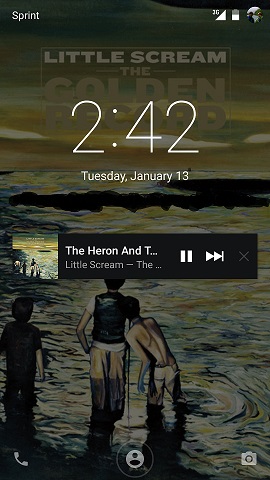
Many, many times, I find myself intending to "skip" a song in a playlist and instead touch the "Close" button immediately to the right of the skip button (see attachment). This closes the widget and obviously turns off the music. It's extremely frustrating, especially when driving.
Seems like it would be incredibly easy to reposition the "close" button on the opposite side of the widget, away from the music controls.
Please and thanks.
And for the heck of it if you want to add a "previous track" button, that'd be fine too.
Comments


THIS!
This is my biggest gripe with the new Lollipop/Spotify app update.
I too would like both ideas implemented. Please fix! 🙂

This is my biggest problem about the android app, i've written exactly the same topic in feedback mail.
Please relocate(or remove) the close button.

agree conpletely. very annoying

Please, change the close position or remove it from minimized view.
Close is already show in the expanded notification, pulling down when locked.
That will looks nice to me:
Minimized = Back, Pause, Forward
Expanded = Close, Plus, Back, Pause, Forward
Thanks!

do you listen to spotify while commuting?
Well, wouldn't you wisht that the spotify lockscreen player buttons would be bigger and that the "X" {close} button would not be really close in space to the ">>" {next} button. Well I would.
Its frustrating when I'm listening to a song I don't like, while im driving, then i click the next button but i accidentally click the close button and the music stop. Now I can't listen to my music because I'm driving and now it involves unlocking my phone and going back to spotify while i'm driving /; not so safe.
Attechment shows a comparison between Spotify and Google Music in the lockscreen

Happens too often please move or remove the close button. Thanks!

Yes please, this would be a very welcome change.

I'd like to suggest to implement the same behavior as Google Music when minimized:
Back, Pause, Forward buttons and swipe closes app if currently not playing music

Definitely great idea, especially the "previous track" one. This has been a problem for me too.
I've accidentally closed Spotify a half dozen times in the past week, usually when running at the gym. For the love of all things holy, make this change.

I actually don't understand why there is a close button. Most apps' notifications can be closed by swiping to either side, correct? If that doesnt suit here, I still think it's uneccesary to be able to close from lock screen.
It seems like a very obvious user-unfriendly overlook.
I say remove the close button in favour of a previous track button, to the left of the pause button! 😄

Yes please! This is exactly what I came onto the forum to suggest.
Your post is pretty much word for word what I'd suggest. Had to check it actually wasn't me who wrote it and forgot 🙂

The close button needs to go somewhere else, bigger buttons for commuters too. Android mobile, lollipop,htc




Updated: 2016-01-14
Edit: This idea has been reposted here.
Hello!
Your idea has been submitted a while ago but unfortunately hasn't gathered enough kudos (50 per year). In order to keep an overview of the active & recent ideas in this forum, we will close this idea for now. However this does not mean that your idea has been declined by Spotify.
If you still feel strongly about your request, we encourage you to post your idea in a little different form again! Maybe now is the right time to receive the support of our community for your suggestion! 😉
Do you have any further questions on how the idea exchange is managed? Just click here!
Marked as new idea, included the image and edited the title so it's easier to find. 😉