Support Windows 10 Change-Volume-UI

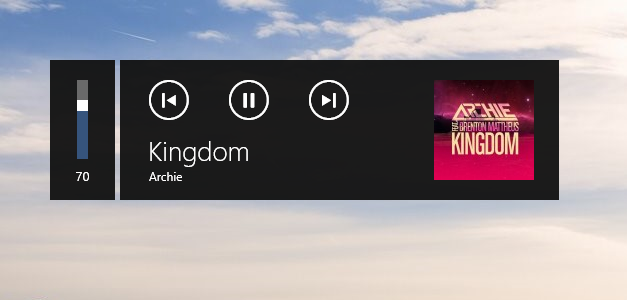
When using the volume knob/button on keyboard in Windows 10 and a song is playing in Windows Media Player, it looks like in the image above. Not only does the systems volume level indicator show up, but also the current song with metadata, cover art and simple controls.
It would be really great if music playing in Spotify showed up here too.
Comments

Really nice idea! OuO

Would be really nice, is something i've been looking forward since I have the app on my PC

Totally agree, I have been wanting this for a while now. It would make using Spotify on my tablet SO much easier!

We need this now! 🙂 This would be insanely useful. iHeartRadio also has this feature. I would've expected Spotify to have it as well since the app integrates so well in Windows 10. Was disappointed to see it was missing.

Really good idea!
I like this feature in Groove Music!
2015-02-25
New Idea
2016-08-20

Hey folks, we think this is a really great idea. We're marking this as 'Under Consideration'. We'll just back in here if we have any updates for you all. Thanks!
Hey folks, we're excited to let you know this status is now 'Watch this Space'. We'll be back as soon as we have more info for you all!

Can i deactivate them somewhere? -.- Would have been nice if you gave people the option for that... i REALLY don't need it since i have other controls for that

Not very useful, but very annoying.
It covers a large section of the screen, terrible for gaming considering that you may adjust the volume several times while you play.
Please make this "trendy" idea as an option and not force this.
If this is an option, please let me know how to turn this off.

Why is this not an option? Completely unnecessary. If you have the desktop application open on a second display, the overlay takes up a significant portion of the top left corner of the main display, which is prime real estate.

This is awful. Found the following in another thread regarding the volume icon, but looks like the minimum timeout you can set is 5s. Checking the box doesn't help 😕
Please add an option to disable. It is not condusive to playing video games.
control panel
all control panel items
ease of access center
make it easier to focus on tasks
turn off all unnecessary animations
show for 5 seconds (minimum available)

Please let us turn this off. It takes up so much space on my primary monitor, and I don't need to be reminded of what I'm listening to every time I change the volume.

For goodness sake HOW DO YOU TURN THIS FEATURE OFF !!!!!
I get the facts that some folks might want it, but MAKE IT OPTIONAL.
It takes nothing to give us an option !!!!
Please fix immediately !

Oh no... This is disturbing my workflow!! An option to disable this would be appreciated!
Please fix this.

Yeah this is ridiculously large and completely disrupting my work, to the point that I'm going to have to completely close spotify. Where's the option to disable this?

This idea sucks! At least give people an option to turn this ridiculous feature off. It completely disrupts my workflow as it forces me to look at it for 5 freaking seconds (sometimes even 10). So frustrating!
For those of you who are looking for a temporary fix (at least on Windows 10), I would recommend this tool http://www.addictivetips.com/windows-tips/how-to-disable-the-volume-on-screen-display-in-windows-10/. This turns off the volume popup in Windows all together, so it's not an ideal solution. But at least it works for now. The good thing is that you can start and stop this small app any time you want (i.e. the effect is not permanent).

This absolutely must be optional. I don't want to have to close Spotify every time I want to watch a movie or a stream because when I change the volume a giant banner pops up on the top left of my screen. Why do you guys insist on having the most unconfigurable desktop app imaginable? Sometimes I really consider why I have a premium membership with you guys. Guess I'll use the web player for now even though I can't use my keyboard's media keys for that. /facepalm

Please, please make this an option ASAP. I understand why some people wanted it but the rest of us were totally blindsided by a large and disruptive display. I use Spotify as ambient noise at work among other things, and it blocks a large part of my screen! As others have said, I also don't always want to let me coworkers see what I'm listening to.
Please make this a priority! It's clear I'm not alone in hating this feature.

This just happened to me today, and I would really like it to be removed. Like stated above the display covers much of the screen which makes it hard to run most applications.
Please add an option somewhere to disable/enable this feature.

Remove this sh**. I'm looking for an regedit tweak to remove this **bleep**... any one found a way to disable this entirely, or make it visible for less than 5sek? Hey Spotify devs... one checkbox as an option, sooo hard... so many lines of code, so many variables, so many loops... so hard...

Spotify: Remove this feature or make it optional. It's very annoying!
I had no option but to disable the volume notification using this tool: HideVolumeOSD

Very disappointed with this addition, covers a very large portion of my monitor and stays up for way too long. I looked into settings for both windows and in spotify and didn't find a single thing. I refuse to download 3rd party programs for a temporary workaround, this should be optional not mandatory. Honestly I don't see how this got past a quality control team upon first testing.

I renamed C:\Windows\SysWOW64\Windows.Media.MediaControl.dll to something else, so Spotify can't access it. This prevents the media info and controls popup from showing. Didn't seem to break anything else.
Keyboard media keys and volume control still works. The vertical volume slider also still works, and pops up normally when adjusting volume. This may be used, AT YOUR OWN RISK, as a (hopefully temporary) workaround until Spotify makes this optional.
EDIT: doing this will now apparently block your Spotify from opening, but they added an option to disable the overlay in the settings. If you did this, just rename the file back to what it was. Thanks Spotify.

Is it possible to disable this function?
Thanks,

How do I turn this off? It's annoying for gaming and is extremely disruptive.
I beg you Spotify Team, I beg you, please REMOVE this feature, I got the update today, and can't use spotify becasue of this feature. Please make it optional or remove it.

How can you remove this pop up is the question?
It's really annoying as it shows up on top of ALL applications and stays on for WAY too long. And if you hover over it too quickly it wil reappear.
Maybe a good idea if you can toggle it on/off, but without the toggle off it's plain terrible in my experience.

how to get rid of it?
adjusting the volume a little breaks my workflow for 5 seconds now (it displays right over the most important UI of almost any application beneath)
Also who thought it was a good Idea to add buttons you have to click with the mouse to an UI that can only be invokey through keys?
edit: thx to another commenter: renamed C:\Windows\SysWOW64\Windows.Media.MediaControl.dll
works, but you need to claim ownership over the file, than change permissions, than rename.
Marked as new idea.
This idea will also stand for the same request in Windows 8 in order to continue this inactive idea. 😉