Bring back artist/song info in the title bar (Desktop)

Why would you remove that feature? Now it just says "Spotify Premium". I'd honestly like to hear the logic behind this.
Comments

Hello!
Just to make sure: You mean the little window that pops up when you hover of the app icon in the taskbar of the Windows desktop app?
This is what I mean:
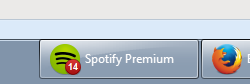
Marked as new idea and added the image in the description to make it clearer. 😉

Just *another* thing that they broke that could have been avoided with decent QA.

Lol at marking this as a "New Idea"... Nothing new about it at all, you guys just broke it! Same problem on the Mac. Removing the artist and track from the title bar also makes it not visible in my Dock when I mouseover the Spotify icon. I don't like the app taking up screen real estate, even if in the background, while I'm at work. So I minimize it to the dock. Before the latest update I could just move mymouse over the Spotify icon on the dock and the current track would pop up when I was curious as to what was playing. Now it just says Spotify.

I would like too to remove the Play Icon in Radio Stations. It is in the front of the Album Arts.It can be placed in other place.

I listen to spotify at work and usually play some random radio station to discover new music. I often check the title to see the track name and/or artist. Now it just says "spotify premium" and I have to open spotify to see the artist. Really annoying!

Another annoyance this change did: I can't tell (without sound) if Spotify is playing or not. I have to either put on my headphones or open Spotify to see if it is playing.

@Skumberg wrote:Why would you remove that feature? Now it just says "Spotify Premium". I'd honestly like to hear the logic behind this.
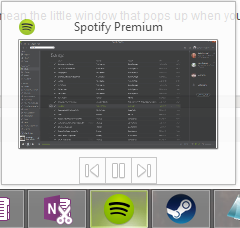
Having the song title and arist show up on the top of this would be fantastic as well. Can we make that happen at the same time?

I love Spotify and as many others here use it to listen to music while at work, so having a preview of artist/song is handy.
I just can't think how replacing this info with a static title would be an improvement. I'm really curious to know why that decision was made and the thinking behind it?
Otherwise, keep up the good work.
Cheers
@Skumberg wrote:Why would you remove that feature? Now it just says "Spotify Premium". I'd honestly like to hear the logic behind this.

Why on earth would you do this? It's annoying to have to open up the actual Spotify window in order to see what is playing. Bad idea 😞

Pleaseeeee bring this back. I would right click the icon while at work just to quickly see what was playing. Didn't realize how often I did it until it was gone!

Please bring this back.
My idea: Do a beta test or something so users can leave feedback before you release the update 🙂

Why did they do this? It's strange and not logical! Please bring it back. What use does it have to see that I own spotify premium (I already know this) all day, every day......

Also very annoyed about this! Lost the artist & track title info from the dock on a Mac. I use this feature constantly throughout the day at work.

I'm really missing this feature. I tend to listen almost exclusively to Radio and so being able to see what random song happens to be playing without opening the full app was really nice. A simple glance at the task bar shows me what song is playing. Or at least, it used to.

2015-03-16
Hey everyone, we have plans to bring this feature back to the Desktop app. For that reason I'm going to freeze the kudos on this idea and update you all here when this returns. Thanks folks!

So after 93 kudos you are bringing this function back, but the idea to return to the system tray has almost 600 and has been given the status of "not right now"? Devs at Spotify need to pull their heads out of their asses and pay attention to what function seems to be more popular with their customers.
Don't get me wrong, I do want this display function to return, but not as much as some others that were removed with this horrible update.

yeah,i'm using Spotify in windows 7 and xp,the app in the XP looks slow now,the spotify icon in the toolbar disappears,and i don't see the artist/song info in seven and xp.please fix it,this new design is very slow and ploblematic.sorry for my english..

Great, i need this feature really for my LED sign software

QA calling this a New Idea is an absolute nono in customer satisfaction (apparently you don't know how your product works). I've stopped my subscription untill you've fixed this BUG.

Goodness sake, Spotify: it's a few variables in the title bar. Could you just stick them in and send out the update please instead of taking out a feature that everyone expects in a windowed media player? When you're listening to a new album we don't want to tab into it all the time to see what we're listening to.

I'm not sure how to Kudo a post (is there a time limit from the initial post?) but I wanted to echo everyone's request to bring back this function.

Any time frame for this ?

I'd love to have this back. Any update on eta?

One of the worst updates ever for Spotify. There could be no reasonable explanation for why it was implemented. What do I care that it tells me I have Spotify Premium; I already know that. What I want is the song title back in that space.

I was prompted to restart Spotify to install an update, and after that, this feature was back. Version 1.0.5.178.
Just FYI...
That update fixed my issue. I can now have my Arduino lcd screen show spotify info again.
2015-05-18
Hey everyone, this feature returned to our Desktop app with the 1.0.5 update. Thanks for continuing to bring your feedback to the Spotify Community.
Yeah, just the "Spotify Premium" bugs me. I don't need the app's titlebar to let me know I pay for the thing. Give me useful information.