SOLVED [Linux] Spotify DBus MPRIS2 support not fully working

Hi,
first, thanks for your effort in regurlarly releasing linux builds!
With the recent 1.0 betas the DBus support is back...more or less. But many of the advertised properties can not be retrieved and time out. The only property which is working is "Metadata" (please see the screenshot).
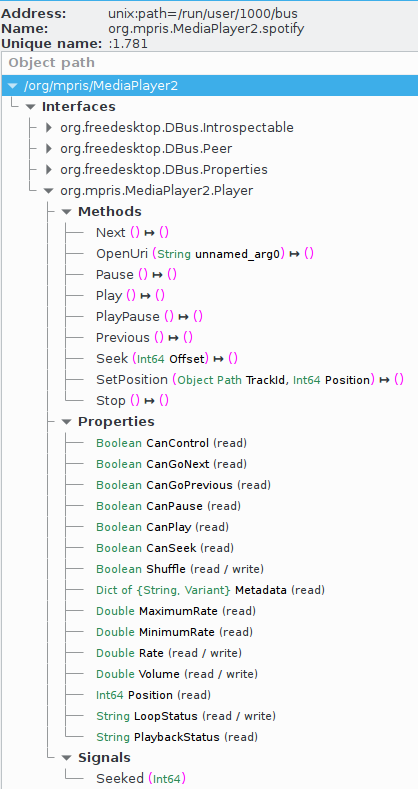
If I call for example:
qdbus --literal org.mpris.MediaPlayer2.spotify /org/mpris/MediaPlayer2 org.freedesktop.DBus.Properties.Get org.mpris.MediaPlayer2.Player CanControl
I get this:
Error: org.freedesktop.DBus.Error.NoReply
Did not receive a reply. Possible causes include: the remote application did not send a reply, the message bus security policy blocked the reply, the reply timeout expired, or the network connection was broken.
Am I doing something wrong or is this indeed a bug? Thanks for looking into that!
Accepted answers
All comments
With the recent version 1.0.15 the problem still persists!
Is there any ETA for full DBus MPRIS2 support?

There is unfortunately no ETA for full D-Bus MPRIS support.
It looks like 1.0.15 implemented the PropertiesChanged signal. However, the only property available is Metadata.

I'm also hoping, that full mpris support gets added soon. (Or al least all the features, that were present pre 1.0)
I've written my own popup menu for my desktop environment, which heavyly relies on dbus, to work. Especially the status property.
I'll probably stay with 0.9.17 until this is added back.

Hi all,
I can confirm fetching metadata works over dbus:
qdbus --literal org.mpris.MediaPlayer2.spotify /org/mpris/MediaPlayer2 org.freedesktop.DBus.Properties.Get org.mpris.MediaPlayer2.Player Metadata
I was wondering if there is anyway at all to get the current playback state from Spotify in Linux, from the command line? I'm working on some scripts and would like to automate Spotify on my HTPC.
Unfortunately the problem still persists in the most recent version 1.0.19!
Are there any news regarding a reimplementation?
As the very useful plasmoid Playbar2 (http://kde-apps.org/content/show.php/PlayBar2?content=168944), which allows to control media players via the MPRIS2-Interface, still doesn't work because of the partial implementation of MPRIS in Spotify: Is there any time horizon when we can expect MPRIS fully working again?
Thanks in advance and please keep up working on supporting Linux!
Thanks for the new release 1.0.23.93 but, there is still no proper MPRIS2 support! Are there any news now, when this will be implemented again?
No. There is still no ETA on proper MPRIS2 support, since there are no developers working directly on the Linux desktop client, just like before. I am trying to keep track of and triaging internally and externally reported linux specific bugs, so if time is allocated to work on the linux desktop client, this is very high up on the list. I will poke people again and see if we can get anywhere with some Linux desktop love.
The reason we can deploy new releases at all is because 99% of the code is shared with Windows, OS X and the build system builds a new version on every new commit. If that build would fail on Linux, it would be considered bad enough and would need to be fixed before the Windows and OS X clients could be released.

The Linux client is THE reason for me to be a Spotify subscriber. So a *big* thanks for this software!
Actually I had already unsubscribed and evaluated Deezer after Spotify's unfortunate terms of service change last year, but returned just because of the properly working Linux client after the terms of service had been clarified. (There are still some paragraphs in the TOS I don't like, but in some cases I had the impression that Spotify is just more honest than the competition with some of these statements...)
A recent "apt-get upgrade" now took me from Spotify 0.9.something to 1.0.something and while the updated UI looks shinier, I lost the ability to remote control Spotify using my keyboards multimedia keys, which is kind of annoying... 😉 It used to work flawlessly with the older client and I got used to control my musik this way in case of an auto-locked screen - now I have to re-login, activate the correct window and hunt for the GUI buttons with my mouse... Also when doing something else and listening music in the background, I now have to dig for the spotify window whenever a song plays which I want to skip...

First, thanks for your efforts with Linux client.
I have the same issue here, +1 for the fix

Thanks for your sincerity as to the current status of this port. It's great that so much code is shared by all platforms, that makes it much easier to maintain and all versions behave more similarly. Good job! Now we just need that some developer time is allotted regularly for Linux so specific issues can be dealt with. This issue is key for a good desktop experience.

Please fix this.
Try 1.0.27 just uploaded to testing now and see if it works better. This change doesn't implement seek and volume change, but should make it work like it did in 0.9.x at least and be usable in the controller apps in most desktop environments.

@jooon wrote:Try 1.0.27 just uploaded to testing now and see if it works better. This change doesn't implement seek and volume change, but should make it work like it did in 0.9.x at least and be usable in the controller apps in most desktop environments.
@jooon Still doesn't work here. Version 1.0.27.71. For instance when I'm playing a playlist, and run this command, previous versions (0.9) would play the album by running this command:
qdbus org.mpris.MediaPlayer2.spotify /org/mpris/MediaPlayer2 org.mpris.MediaPlayer2.Player.OpenUri spotify:album:4R3tXoorBpHji6Jdms8a4Q
Now it just opens it like the problem described before.
EDIT: PlaybackStatus works though! Progress...
I can confirm.
The client behaviour of opening uris has changed on purpose over the years. Right now pasting uris and clicking spotify links don't autostart playing, unless it is a track and the client is paused.
The reasoning went probably something like this. Previously, it was the only way to start playing music in spotify by clicking links on the web and it was thus deemed worth having even if it was very disruptive, since you couldn't click on external links without interrupting playback, if you just wanted to browse around. After Spotify Play Button was released (now integrated on the open site), there was an official spotify way to start playing things from the web and the autoplay behaviour on links was dropped.
OpenUri just opens them the same way the client does, which means it also does not autoplay unless it is a track and the client is paused. There is no good reason why it should follow in-client behaviour, especially since MPRIS is externally defined, even though it is quite vague what load and open really mean.
It could be changed so it autoplays on DBus OpenUri for a few uri types, but keeps the in-client behaviour the same way.
@jooon wrote:I can confirm.
It could be changed so it autoplays on DBus OpenUri for a few uri types, but keeps the in-client behaviour the same way.
@jooon I see that, but when people use D-Bus in scripts and such to open URIs it is mainly to play it, no matter what type it is. I have seen none asking for it just to open the album, artist, etc. page. Would be great if you could restore the old behaviour for D-Bus, or at least as you say, restore it for non-track URIs.
@jooon Can a possible workaround to let us open URIs and play them automatically be to first run the Stop method (which works), then OpenUri?
Another method that is not working that used to work is Quit.
It is fixed with the recent release 1.0.28! Thank you very much!
It's working again. I can see the song and album playing, and the buttons work too. My desktop is fully functional now. Thank you very much!
It wasn't obvious for me that I had to change the repository from stable to testing to get the newer versions. I'm using 1.0.28 now.
Thank you very much, it's working again 😄
I didn't have to use the 'testing' repo, just upgrade the default 'stable' repo. Current version is 1.0.28.89.gf959d4ce.

Hi,
I am using release 1.0.28.89.gf959d4ce that should have the issue fixed but OpenUri doesn't start to play the songs in the new playlist..
It just opens up the playlist page on the client and nothing more..
Anything else I could be missing?
Thanks,
@kawamura wrote:Hi,
I am using release 1.0.28.89.gf959d4ce that should have the issue fixed but OpenUri doesn't start to play the songs in the new playlist..
It just opens up the playlist page on the client and nothing more..
Anything else I could be missing?
Thanks,
1.0.28 has a few DBus issues fixed, mostly around PlaybackStatus and the properties, but unfortunately not all.
The OpenUri function is still broken. It has always called an internal uri opening function. The call to that function has never changed. The behaviour of that internal function has however changed, mostly because it is only used together with the open.spotify.com site on the other platforms.
From 1.0.29 there was another OpenUri regression introduced this way:
ok, I've moved back to 0.9.4.183-2.
Is there a plan to have openURI fixed?
@kawamura wrote:ok, I've moved back to 0.9.4.183-2.
Is there a plan to have openURI fixed?
Yep. The behavior is already fixed and will roll out with version 1.0.37 in testing in a few days.
As a workaround before that one is released, you can make it auto play by append track offset time greater than 0 after the track uri. Appending #0:00.001 to the end of a track uri to make it auto play from "almost" the beginning of the track. Only works for tracks though.
With 1.0.37 you should be able to start playing albums, artists, playlists as well. Radio and a few other views still don't work.
1.0.37 is now out in testing

Hey @jooon!
Many thanks for keeping this alive and thriving. Ubuntu is my OS of choice and it's great being able to use Spotify on this device as well.
Keep it up!
Fred
Thanks for the notification jooon.
I confirm OpenUri works as expected. cool!

thanks jooon
but what about Position?
it still only returns 0
Hi,
glad to hear that DBus is back!
With spotify-client 1.0.14.124, the methods work fine.
However I see a similar message for the playback status
Error: org.freedesktop.DBus.Error.NoReply
Did not receive a reply. Possible causes include: the remote application did not send a reply, the message bus security policy blocked the reply, the reply timeout expired, or the network connection was broken.