[Connect] Show Chromecast on Desktop's Device List

The idea is simple. Why create new features and options for connecting to a new device when its already developed?
Spotify can currently change the device playing music within a LAN in a way that is so seamless I jumped the first time when there were no delay. Why not use this already impressively implemented feature for chromecast? If chromecast was available as a device then it would make it a lot easier for us to use on the computer too, which is the main music player when anyone's home.
My guess is that a chromecast can't truly act as a device, but there should be a way to do this through some back-end trickery. Especially if there are unlicensed 3rd party programs that can cast (popcorntime for example).
Comments
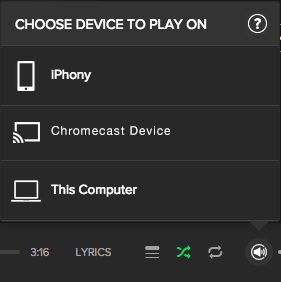
What you would gain is the seamless integreation with the current user interface. Here is my suggestion of how it might look on a computer:

The mobile spotify app is currently able to find chromecast devices and play music on them. This means two things:(1) playing music on chromecast is possible from spotify, (2) the problem of multiple devices accessing the same chromecast has already been adressed.
After all the chromecast is only able to play music from one source at a time, and spotify is also only able to play music from one source at a time. You are correct when you say that "You don't log in inside the Chromecast's Spotify app and make it 'yours'", but is it neccessary?
Playing music from the chromecast is currently not very different of an experience than playing music from your computer and controlling it from your phone. What I suggest is just that instead of having a new button for the chromecast, why not just add it to the list of available devices? Sure, there might be systems that will need different input in the chromecast than what a computer running spotify might need, but that is something for the front-end programmers to take care of 😃

Marked as new idea and edited the title slightly to make it easier to find via search. 😉
Right now it's only possible to get it to work on Desktop with a workaround.

For paying customers an essential feature, since its advertized as a spotify capable device it should be able to be used with any spotify client.
Multiple customers allready mentioned that when these kinds of things arent implemented they will consider switching to google play music.
And to be honest im not into that idea, however its a shame spotify will lose customers over this.
WHOAMI Made a good point and it would be very nice to see a cast icon with the chromecast link.
Keeping my hopes up that this idea will be implemented quickly! Goodluck guys!

The work around is counter intuitive, support for casting should be integrated into the application.
Really hoping that this will be fixed.

I'm really disappointed that this isn't possible. I'll often times have my phone in a different room because it's charging, and I will be unable to stream music to my Chromecast and therefore will not be listening to Spotify and unhappy.
Look forward to having this feature implemented.

The workaround of using mobile works, but this should just be built into the desktop app directly.

I bought a chromecast audio to cast my desktop sound to my old (but quality) hifi in another room.
It's ridiculous my chromecast doesn't show up directly on my desktop.
I never play spotify on my mobile, always on my PC so I had to install spotify on my mobile just to get this workaround going...
update: I found out volume control doesn't work neither !

I was able to use my phone as an intermediary as well but come on, if it already works from the android/ iOS apps, and it actually does work from spotify desktop app, then just make it available. Thank you.

Hugely frustrating, btu I believe this is a google API issue, not a Spotify one.

I've been using 8tracks for music and decided to try out Spotify Premium. But the lack of Chromecast support from the Desktop player, really is a bummer and I'm starting to look back. Please implement this as the workaround is sloppy and counter intuitive.
Thanks.

Hey everyone, Spotify Staff here. We definitely like this idea, but it isn't something that is coming soon. Please continue to leave your votes here and if this comes up in our pipeline I will change this to 'under consideration'. Thanks!
Disappointing.

@meahtenoha: Can you comment on what "soon" means in this context? At the rate at which Spotify seems to implement community suggestions, this is likely to be years. Please help us set our (low) expectations accordingly.
This thread exists on Google's product forums as well, maybe we're all just watching a battle of which company can communicate the least effectively about this. Winners: definitely not the users 😞

Hey Spotify Support - you already have tiny vendors supported (e.g. ROCKI, Beep, etc.) - how did Google's Chromcast Audio sneak up and surprise you folks?
To end a positive note, the multiroom mode (via phones) works beautifully.

I definetly would love to see this feature!!! Spotify on Mac => Chromecast without my Mobile Phone.

I bought a chromecast yesterday and was disappointed to end up having to use the web player to cast instead of the dedicated player. Not ideal.
In my situation, I launch from the Chrome browser, and then pick up from my player (Spotify on my Android).
Here's more info, and even one post where Spotify supposedly told someone they only support Chromecast Audio on mobile!

Is this a chromecast problem of is it that sportify didn't build it in because the focus for them is mobile?

Same there, please add native support of chromecast from the desktop app in order to avoid the need of first connect chromecast from the mobile app.
Thanks.

I want to be able to start Spotify playing through my Chromecast from the Windows Spotify client.
At the moment I have to
- Find my tablet
- Start spotify app, select the chromecast, start playing
- I can now control Spotify (playing on the Chromecast) from my windows laptop just fine.
- I can even turn off the tablet again as soon as the Chromecast starts playing.
PLEASE fix it so I can start the chromecast playing directly from the Windows spotify client, without involving other devices.
Thank you!

PLAESE ADD THE CHROME CAST SUPPORT FOR DESKTOP SPOTIFY APPLICATION AND FIX THE PROBLEM
i have premium account on spotity , i have payed, and without a phone i can not play music on chromecast device. its so bad
i payed for preminum account and without a phone i cant play spotify con my device..its so bad. PLEASE FIX IT SOON
any news????


Unbelievable that the desktop app doesn't support casting. I just bought this thing today.. And now I need to find out that spotify and/or google makes paying customers beg on a forum for something that should have been present in the first place.
I think i'll return the stupid thing and use a nice bluethooth solution instead.

Please fix this

So odd that Spotify requires you use a phone or tablet to start casting, then you can control via the desktop app. Obviously, you can control the chromecast via the desktop app, just add the ability to start it from the desktop app.
So frustrating I have to get my phone when I'm using my laptop.
"Any other device" is your device - you're logged into the app and as long as the app is opened, it shows in your Connect devices list. The thing with Chromecast is that everyone in a local network can use it. You don't log in inside the Chromecast's Spotify app and make it "yours". I'm pretty sure that is the main difference.
Also, what would you like to gain by making it act as a, say, mobile app?