Child Item
I cant save on my external sd card

I read all the topics here but nothing works. The instructions says i must upgrade spotify and then select settings-storage and then select sd card, but i find that theres not any "storage" option,so??😞
Child Item
Child Item
Child Item
Accepted answers
All comments

Hey @Radha84,
Welcome to Spotify Community!
Can you please let me know the following so I can help you:
1. Your device.
2. Your device's operating system.
Thank you!
Moto e lte 4g with android 6.0
Hey @Radha84,
Storage should be located at the bottom under "Others".
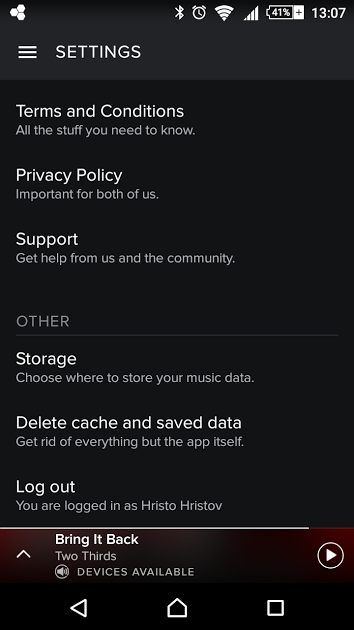
If you still can't find it, let me know : )
No,my options Have the other two but not "storage"
Hey @Radha84,
Alright : ) Can you try the steps below and let me know if the issue persists?
- If your device contains an SD card, try removing it.
- Follow the steps here to reinstall the Spotify app.
(Important: Make sure you restart your device during this). - Check this thread for troubleshooting connection issues.
Also, is your SD card converted to Adoptable storage?
Child Item
Child Item
Hey @Radha84,
Alright : ) Can you try the steps below and let me know if the issue persists?
(Important: Make sure you restart your device during this).
Also, is your SD card converted to Adoptable storage?