Voice control on Android

Ride a motorcycle and would like to be able to change songs etc by voice control over bluetooth. Spotify will start playing a track of my choice when I start up, but if I request a new track "play xxx by xxx in Spotify" I get the Android voice acknowledgement but the current track keeps playing.
It works occasionally, but mostly just does nothing. Experimenting, I can occasionally get it to switch tracks after giving a null command to google (i.e. press to talk, say nothing, then it finishes, then Spotify plays the next track) or by telling Spotify to "stop music", and it then starts the new track. Very inconsistent though.
Recently switched from Google Play Music All Access which worked perfectly. Will switch back if can't get this 100% operational in the next 30 days (premium trial period).
Any out there any help?
Luke
Accepted answers
All comments


I am having the same issue. However, when I issue a voice command over my bluetooh headset, Google Voice recognize and processes the command. For example, "Play [artist] on Spotify". But it will not actually start playing the music. I have to wake up the screen / unlock the phone then it works. That defeats the whole point of handsfree.


Bump. It's frustrating for someone who drives as much as I do. Google Play Music does this very well.
When I ask Google to "play la la land soundtrack," The search result correctly matches this to "La La Land (Original Soundtrack)."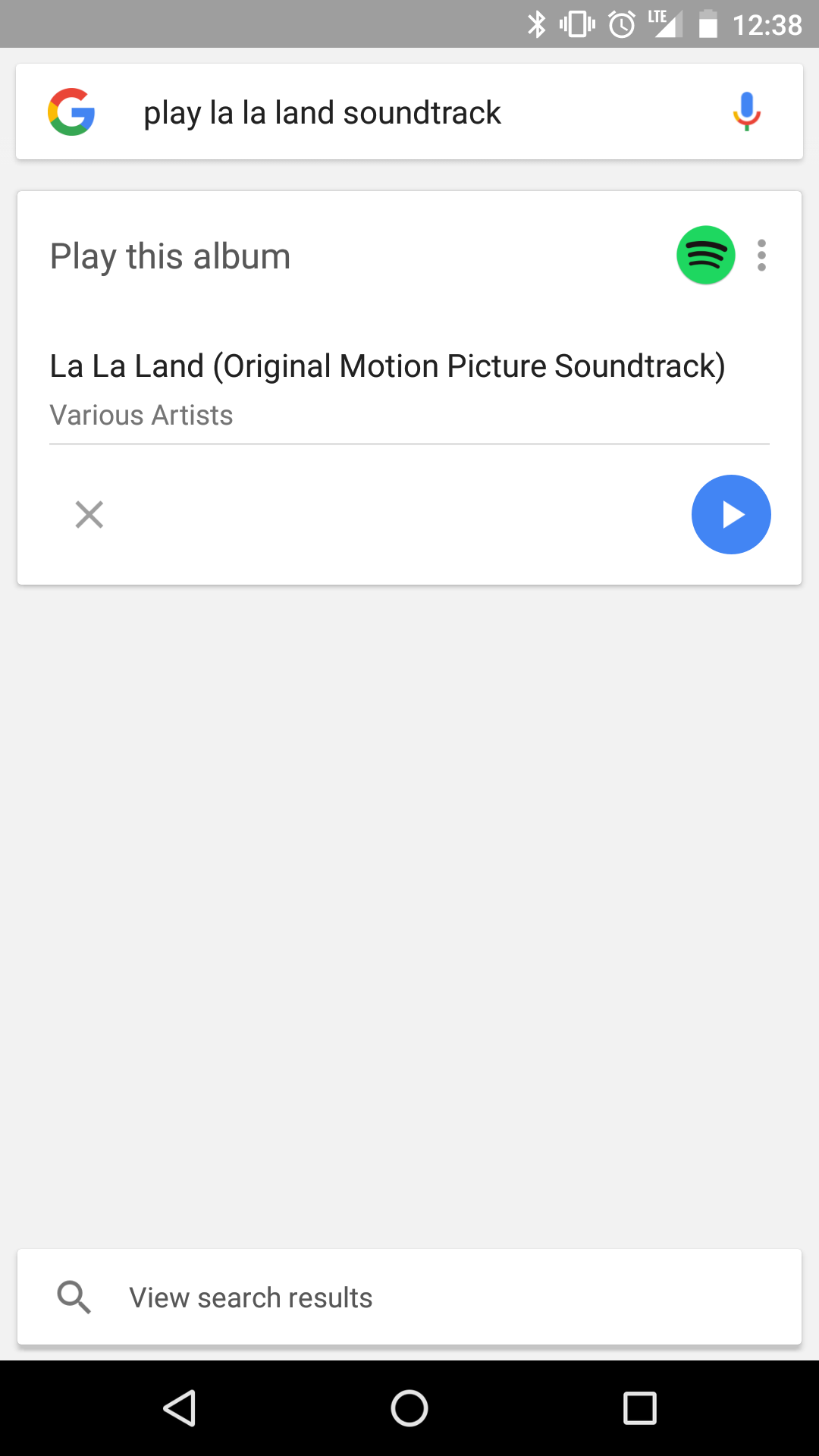
When it opens Spotify, however, it has only searched for "la la land." It sometimes won't play at all, or it will just play songs from the list of results.

If Google can match this with Spotify, it should be able to open directly to that matched result rather than opening the search page.

same issue here, please spotify fix your darn app
same !!

Same here .(

please fix


More than 6 months after original post, still no answer from a spotify employee... 😕

Melody Voice Assistant can now do this for you (full disclaimer: I work here). Once you start the app and connnect it to your Spotify account - you can play a song, artist, album, genre, mood, playlist and also control your music simply using your voice.

Here's something, for you, since you ride. Cool idea

Thanks for the tip on this app. I will definitely use it. I actually had a screen pop up when I opened Spotify on my phone yesterday that said something like "Now you can control Spotify with your voice. Tap to learn more". When I tapped my screen nothing happened though and I never saw anything else about it. It looked like Spotify was anouncing native voice capabilities, from the screen.


I'm an app developer, and I've made an app that allows you to use voice commands to control Spotify on Android: https://play.google.com/store/apps/details?id=com.tmacstudios.spotifyvoice
Original poster here back a year later to see whether this is still a problem. Would consider moving back to Spotify if they've now fixed it, any idea?
Luke

If it doesn't work, I had this issue from having a low-quality wire on my earplug or no microphone on the headset.
To solve the issue, I bought a cheap bluetooth headset with no microphone. I don't have a lot of time on the battery use, but it works without bluetooth plugged to the phone with a wire 1/8 "jack" (regular headphone's size of plug).
For the plug, I got a good-quality wire for the headset (it has a microphone onto it, "ubeat headset wires" on internet). Since it is made for the microphone to work, it can be used when calling.

Same issue. Have premium and handsfree is essentially useless in a car if i have to pick up, unlock, and press play on my phone.

It always asks me about using voice with a wired headset which I am not even using!

If I ask for a specific song it works only after unlock the device, so not hands free at all.
If I ask for artist won't autoplay even with device unlocked.
I listen to music at 90% while driving, this is a must have feature and I think I need to go back to Play Music...
I've tested the 2 third part apps suggest in this discussion but both can't catch the Bluetooth voice command.

The top result is always an exact match for what I want to play, but for some reason the playback starts with the random songs.
Why would the Top Result not be what gets played? How does that make sense?

I just want to play some song randomly from my library but I don't see any tp do it by voice... I actually can't find any way to play anything even if I say the name of the song. I only get a search result... I even thought that his was a premium feature but now I see that's just lazyness from them to fix the isse. They might just be taking their users for granted.

^ exactly my experience. On 3 different smartphones I've tried. With several different Bluetooth headsets.
Spotify - at least talk to us about what's going on here, please.

I can't stand Google play but it has to be my new one . Leaving spotty after this horrible lack of customer feedback response


Standard Spotify customer service isn't it? Take money, ignore users.
Waited for six months, now I'm back to Google Play and in-car experience is simply perfect.
Bye bye Spotify, luckily never did a smash until now and I will not take the risk in future!
I'd just like to confirm having the same issue on a Nexus 5x running Android 7.0, and Spotify version 6.3.0.882. Also, as per the thread below, there appear to be several other people having the same issue, across a number of devices (including the Galaxy S7), and other Android versions (Marshmallow specifically). See: https://community.spotify.com/t5/Android/Google-Now-doesn-t-play-Spotify-music/td-p/1421087