MetaData Problem with iPhone App on Honda Car Displays

This isn't just for Honda, but all cars from the look of it. The Spotify app is quite terrible in displaying metadata correctly or consistently, now even more so with iOS 10.0.1. Earlier, with 9.3.5 and prior, it was inconsistent in showing metadata/track info, but in iOS 10.0.1, it absolutely/completely doesn't work at all. Just shows No Title all the time, every time. Given the number of iPhone users in the market who constantly have their phones hooked to their cars via bluetooth, this is incredibly frustrating. Especially when the Music app (formerly iTunes) has had no issues whatsoever in displaying track data *all* the time and consistently. Why is Spotify doing so bad in fixing something that is a seemingly trivial fix (for rather an important issue) in your app, I have no idea. I wouldn't even want to get started on the UX flows of the app itself, the forums are filled enough with those as it is.
General-rant-that-makes-no-difference-to-Spotify-anyway: The only reason I (and several thousand) in Canada are using Spotify is because Rogers is offering it for free. The instant my contract is done with them, I'll be switching to Apple Music for sure. Even when I wasn't in a contract with them and I tried the Spotify for $0.99 for 3 months promo, I wasn't really pleased at all with the UX and general user flows within the app when compared to Apple Music.
I, alongside several million users, really REALLY hope they do a revamp of the app for easy UX flows and fix obvious issues like metadata to retain customers over time.
Comments
Hi Fabian!
This happened in both these scenarios:
Scenario 1:
I had the latest version of Spotify installed on my iPhone 6S 128 GB with iOS 9.3.5.
The metadata was working intermittently fine (intermittent = sometimes shows metadata, and sometimes doesn't).
I updated the iPhone to iOS 10.0.1, stable, and no metadata shows now at all.
Scenario 2:
I had an older version of Spotify on iOS 10.0.1 on my iPad Air 128 GB.
I updated Spotify version to the latest version.
Same scenario as above.
So I don't think this was related to an app update, but the OS update.
Also - it not randomly showing metadata (intermittently) was an existing issue much before this. I'll test it out on an Android device tonight and re-comment back.
As for screenshots - there's nothing significant to post really, it's just "No Title" in all fields on the Honda display screen now, post upgrade to iOS 10.
Again - with iTunes/Music on both the iPhone and the iPad, it has no qualms displaying metadata.
Attached are photos from Android and iOS. Works perfectly fine in stock Android Marshmallow and shows No Title in iOS 10.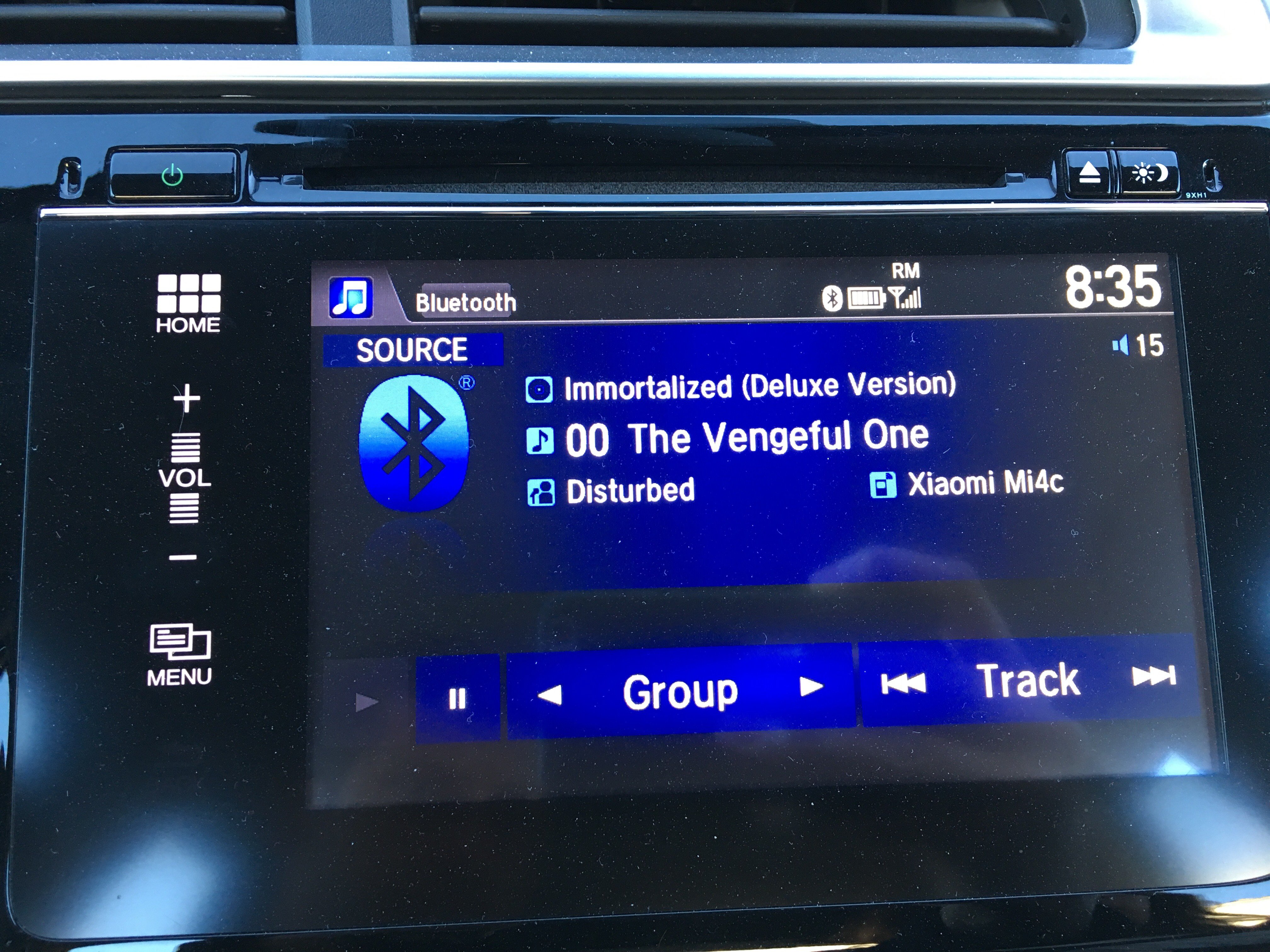 Android Marshmallow
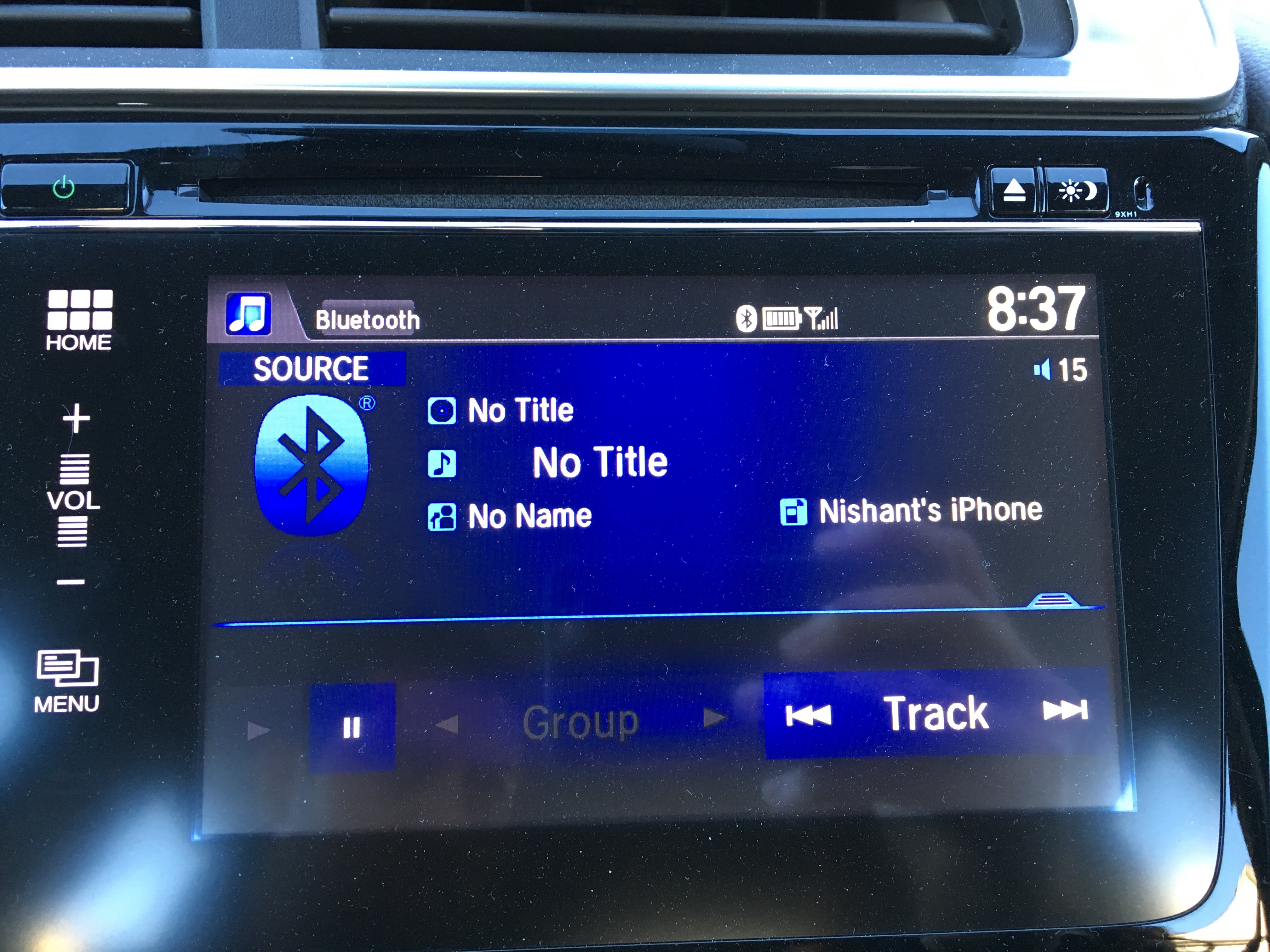 iPhone 6S on iOS 10

Thanks for that info @user-removed!
A new update for the Spotify app was just released for iOS, can you try updating it by reinstalling the app? Does that help?
Let us know if you're still experiencing the same issue 🙂
Just tested with both iPhone and iPad. Issue still persists. Tried a bunch of these actions:
- Uninstalled Spotify and clean installed to the latest version.
- Removed and readded devices afresh from car and phone Bluetooth lists.
- Removed app from memory and tried with phone and car restarts.
Metadata still doesn't show on 2015/2016 car models' Honda Link.
What I do appreciate is the menu redesign/buttons placement which makes for easy access without swiping left, and leads to a slightly quicker flow.

Thanks for the extra info @user-removed!
We've passed on all the information to the relevant folks. We hope to have a fix soon.
Keep us posted.

Hey @user-removed!
Our Tech team is still working on a fix. We'll let you know once we have an update to share.
Thanks for your patience.

@Anyk17 Is there an update on this issue?

Hey everyone!
The tech team are still looking into this, but we'll update you as soon as we have any info. Thanks for bearing with us. 🙂
Kayleigh

I had the same issue with my iPhone so I bought a android again just to find out metadata doesn't transfer to my civic with the new Android but works perfectly fine with other apps. I have tried everything I hope a update comes out very soon for this problem all my music is on spotify and I don't want to transfer it all to a different app. As a premium user I expect a premium expeirence. Thank you very much!

Hey,
If you're still struggling, are you able to download iOS 10.2 and see how things go from there? Keep us in the loop.
Cheers,
Jake
I think you meant iOS 10.1. And in any case, no such luck. I think that update just included Bluetooth connectivity improvements, not anything to do with metadata.
Thanks,
Nishant

Hey folks!
Thanks for bearing with us. Our tech folks are still investigating this issue backstage and we hope to have an update from them soon.
In the meantime, we'd suggest keeping your iPhone's firmware and Spotify up to date.
Cheers.

Hey!
Just checking in to keep you all in the loop, we hope you're well!
All updated info in this thread's now been passed onto our best tech folks.
They're still working hard, but fingers crossed we'll have more news for you very soon 🙂
Thanks, and stay tuned
/M

Hi folks!
Just to keep you all updated - the team are hard at work to get this issue resolved. We don't have any news right now, but fingers crossed we'll have things back up and running soon.
Thanks for bearing with us!
Hey all!
Thanks for bearing with us. Our teams backstage are still investigating this issue at the moment. We haven't any updates just yet but hope to have some news to share soon.
In the meantime, please make sure you have the latest version of Spotify installed on your device.
Thanks again for your patience
Hey all!
We hope you're well.
We just wanted to check in to let you know our best team are still working hard backstage.
If you're seeing any changes in the meantime, let us know.
We really appreciate your patience 🙂
/M
Hey there,
The Tech team are still looking into this right now. We'll be sure to update you all as soon as we have any info from them.
Thanks for bearing with us.
Kayleigh
Hey all,
Just a quick update to let you all know that the Tech team are still on the case right now. Rest assured, we'll be updating once we have some info.
Thanks,
Kayleigh
Happy New Year folks!
Just keeping you all in the loop. We haven't received an update from the tech teams just yet but hope to have some news to share soon. Thanks for your patience.
In the meantime, please make sure you're rocking the latest version of Spotify and iOS.
Thanks again for bearing with us. Stay tuned 🙂

I have exactly the same problem with Android App (running on Android 6.0.1) and Samsung Galaxy S6.

"Just tested with both iPhone and iPad. Issue still persists. Tried a bunch of these actions:
- Uninstalled Spotify and clean installed to the latest version.
- Removed and readded devices afresh from car and phone Bluetooth lists.
- Removed app from memory and tried with phone and car restarts.
Metadata still doesn't show on 2015/2016 car models' Honda Link.
What I do appreciate is the menu redesign/buttons placement which makes for easy access without swiping left, and leads to a slightly quicker flow."
I have the same issue... it´s frustrating!
Im seriously thinking to change to other music streaming service.... 😕

Hey folks, we're still on the case. We will post here when we have more info. Thank you!

When I first signed up for Spotify a couple months ago the metadata was showing fine in my car. I switched from pandora where I didn't have any issues with the metadata being displayed in my vehicle. Now I'm lucky if once a week it'll show up for me. I have an iPhone and my 3 months at .99 is up next month and I don't think I'm going to let it renew unless this gets resolved. It seems I'm not the only one with this problem. I enjoy using Spotify but this is kind of a deal breaker for me. Hopefully something gets fixed sooner rather than later.
I figured out open itunes first, play a song & then open spotify and play any song.. it works... but its annoying to do this procedure every time.

Perfect joseanataren! Worked like a charm!

I'm wondering where things are at with this. I used to have Google music and it worked perfectly always. Then Rogers offered Spoitfy with my contract for free so I switched. Now I no longer get Spoitfy free with Rogers but have continued to use it and just pay for it monthly myself. I love the app for many things, including that I can sync the app to my playstation and listen to my music while I am playing. However, this metadata problem has been ongoing for close to a year now, that I know of, and still no fix. I have a 2014 Honda Civic and have the same issues. It used to work randomly periodically but now, since ISO 10, nothing, ever. Respectfully, I'm running out of patience and am seriously considering changing to to IMusic or back to Google Play as neither have this issue. Holly
I tried your trick last night joseanataren...............you are a genius! Works like a charm everytime. It is a bit of a pain and frankly I feel a little silly giving my money to Spotify when it's Apple Music that is helping me out but at least this gives me a cheat until I decided whether I'm switching for good or not. Thanks a million! You're awesome.
Hey folks!
Thank you for letting us know about this.
We're afraid we don't have any new info from the team just yet, however we've passed this info directly on.
We hope to have some more news for you soon.
Regards,
/M

This is a bit silly that you guys can't fix this issue. It's been 5 months since this post started. As stated above, playing something from Apple Music and then switching to Spotify works 100% of the time but that workaround is quite annoying and to be fair, unnecessary. Are you guys actually working on the issue or just giving customers a canned a response of "we've passed this on to the appropriate teams." Seems like a fairly big issue to just be overlooked.
Hey @user-removed!
Thanks for letting us know about this. We'd like to gather some more info about it.
Do you recall if this started to happen after an specific updated of the app? Let us know if it's the same using an Android device. If possible, send us a photo or screenshot and we'll see what we can do for you.
Keep us posted.