Play <All Songs> button/link missing from folder with multiple albums on new iOS app

Just downloaded v 8.1.0.623 and when I access my playlists -> folders the Play <All Songs> button is gone!
Now, there's no way to play ALL the songs in a folder/playlist. Instead, I have to play one album or playlist at the time rather than listening to all songs at once.
Given that I have daily long drives, this is terrible as I have to keep reaching for my phone to change playlist
Accepted answers
All comments

Thanks for opening this because I have the exact same "problem".
I'm just writing this here to let Spotify know that I'm leaving the service over this. They just don't listen to their users and now patch useful functions away. For **bleep**s sake Spotify, what are you even doing?

Why did you have to remove this feature Spotify? Please, please add it back!

Please please put play all back, this is making me consider cancelling my premium account.

Agree. I need this back or will have to quickly look at other options.

Another useful feature Spotify got rid of...


I've had it confirmed on Twitter by @SpotifyCares that this was an intentional removal of functionality and not a bug.
Absolutely ridiculous. Clearly an attempt to force people to use the radio and/or their own curated playlists.
Funny that it came from @SpotifyCares. It should be @SpotifyDoesntCare!
Also, I'd add that creating a "folder" with playlists/albums inside of it is a form of creating a playlist and much easier/faster at that too!

+1 -- this removes a key feature for me. Please put it back.

It's funny, I thought about switching to Apple Music when Spotify started making it difficult to side-load music that wasn't in their library, but playlist folders and "all songs" prevented me from doing so. Now I see little reason to stick with Spotify.

How can we get organized to try to get Spotify to revert this back?
Does anyone have any ideas why they made the change? What's driving it?
It seems such a simple yet useful feature. I see no reason why they'd just remove it


This is just stupid.
That was the most used feature. Please put it back!
Just found this: https://community.spotify.com/t5/Live-Ideas/Mobile-Bring-Back-quot-Shuffle-All-quot-for-Playlist-Folders/idi-p/1603026. So it doesn't sound like the feature is coming back.


This was one of my favorite features. I don't understand the utility in minimizing user options.
The crazy thing is that the Desktop version still has this feature (which btw, I use every single day!)
Spotify, there's no reason why you'd remove this feature from the mobile app but leave it on the desktop one.
I talked to the support via twitter, their solution was "make a playlist with all the songs" effin geniuses!
Worst is, I love spotify and I've kept paying premium despite this issue, do you guys know if Apple Music has this same feature?
@eveluka wrote:
Worst is, I love spotify and I've kept paying premium despite this issue, do you guys know if Apple Music has this same feature?
No, they have folders for playlists but you can't shuffle tracks. Not a big deal IMHO but it was a useful feature.

I created a folder called "by year" in which there are "2010's", "2000's", "1990's", etc. In "2010's" there are 10 playlists, one for each year.
There was a feature I liked when you were at the folder level, it was called "play all songs" and enabled you to play all the songs of the playlists located in the folder. It was great coz if I wanted to listen to 2010's or 1980's music it was very simple and efficient.
But the feature has gone, now I can only listen to my playlists by year. I'm very disappointed and upset you removed this feature.
Would be great if you put it back!
Actually I had Deezer for free with my phone provider, but I still paid for Spotify because it enabled me to do playlists folders and "play all songs" and was therefore more in line with the way I listen to music. Now that that feature is gone I may consider what the competitors have to offer.
Thanks
Antoine

@dschmunis @Vanderg @Lorenzo_NGG @eveluka @nala1026 @Random81 @bretthall @giggitnf @Jwb428 @Jorsyv @ax42 @teamcooperuk @philgnash @NessK @eveluka @Luka5 @prc322 @Vanderg
Good news!
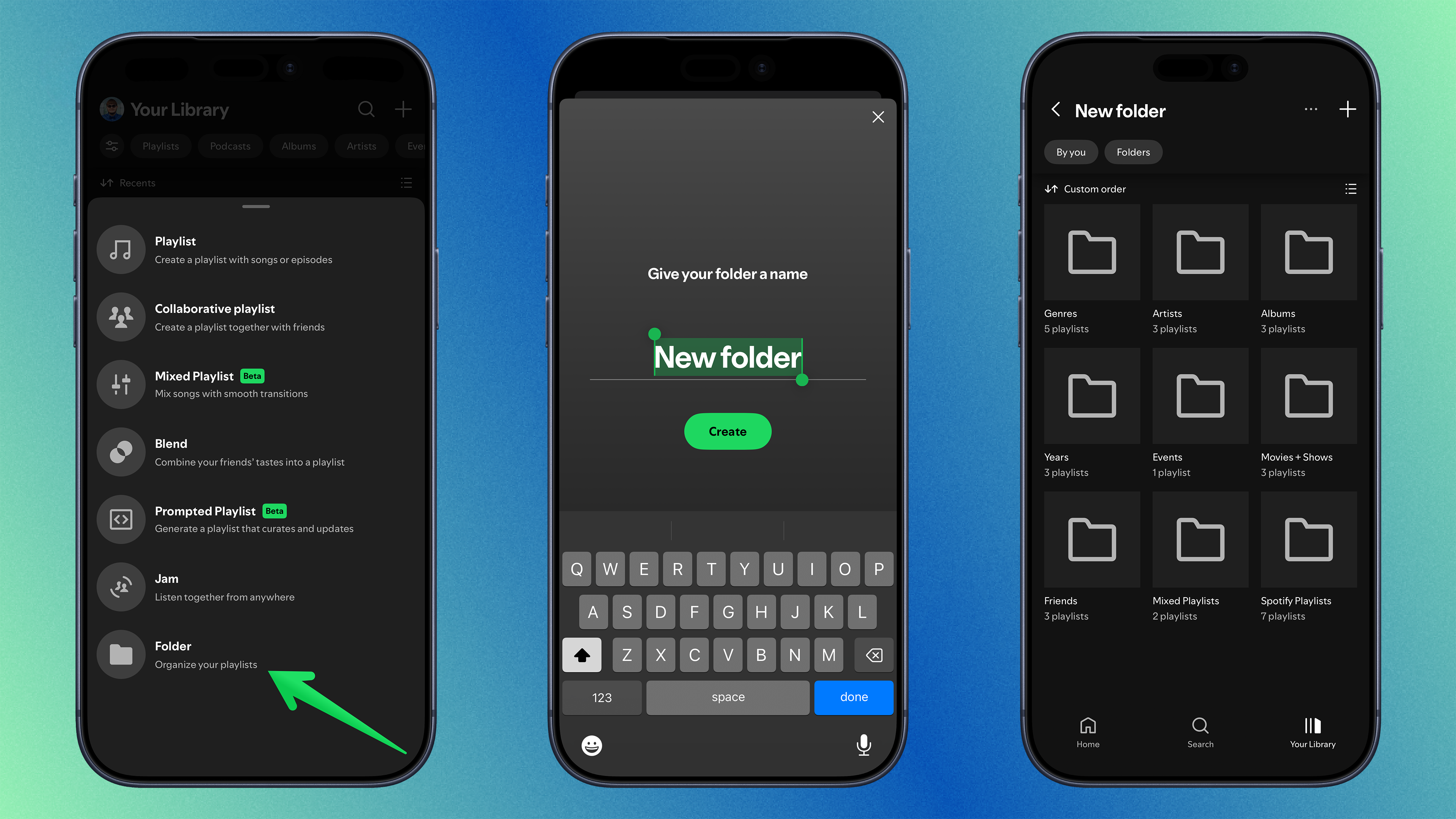
Playlist Folders can now be created and managed in the Spotify mobile app in addition to the desktop app and Web Player.
Playlist Folders in the mobile app can also now be played in order or shuffled. When you play a Playlist Folder, you will be playing through all of the playlists in the folder, starting with the first playlist and then onto the next playlist. When you Shuffle play a Playlist Folder, you will be randomly playing through all of the songs from all playlists that are in the folder.
Check out this post to see what's new and get tips for organizing your playlists:
➜ Playlist Folders are Now Available on Mobile – Here’s How to Organize Your Playlists
The ability to create and manage Playlist Folders in the mobile app has been one of the most requested features, and now it's rolling out globally to all Free and Premium users. 📱 📁
Playlist Folders are a great way to organize the playlists in Your Library. If you have a lot of playlists that you've created or saved, then it can sometimes be a challenge to quickly find the one you're looking for. Playlist Folders help you clean up Your Library so that you can spend less time finding your playlists and more time listening.
Playlist Folders sync across the mobile and desktop apps. Folders that you create and any changes you make will show up across both platforms.
@dschmunis @Vanderg @Lorenzo_NGG @eveluka @nala1026 @Random81 @bretthall @giggitnf @Jwb428 @Jorsyv @ax42 @teamcooperuk @philgnash @NessK @eveluka @Luka5 @prc322 @Vanderg
Good news!
Playlist Folders can now be created and managed in the Spotify mobile app in addition to the desktop app and Web Player.
Playlist Folders in the mobile app can also now be played in order or shuffled. When you play a Playlist Folder, you will be playing through all of the playlists in the folder, starting with the first playlist and then onto the next playlist. When you Shuffle play a Playlist Folder, you will be randomly playing through all of the songs from all playlists that are in the folder.
Check out this post to see what's new and get tips for organizing your playlists:
➜ Playlist Folders are Now Available on Mobile – Here’s How to Organize Your Playlists
The ability to create and manage Playlist Folders in the mobile app has been one of the most requested features, and now it's rolling out globally to all Free and Premium users. 📱 📁
Playlist Folders are a great way to organize the playlists in Your Library. If you have a lot of playlists that you've created or saved, then it can sometimes be a challenge to quickly find the one you're looking for. Playlist Folders help you clean up Your Library so that you can spend less time finding your playlists and more time listening.
Playlist Folders sync across the mobile and desktop apps. Folders that you create and any changes you make will show up across both platforms.