Restore Recursive "Play" button for Playlist Folders on mobile

The user experience with Spotify on mobile was just greatly reduced.
Removing the ability to shuffle-play through a whole hierarchy in a Playist Folder was a key benefit. That's exactly how I used to consume my own MP3s before Spotify, and Spotify came along and delivered the same experience, plus all it's other benefits. That made me a longtime customer. Now I'm reconsidering, and thinking about going back to MP3s. Saving my Premium Family plan at $15/mo would let me buy new music that I own outright and can control the playback myself. And many services, like Bandcamp, are happy to supply me. No more "unable to play this track" issues, either.
Now that this is gone, my consumption of Spotify is likely to be vastly reduced on mobile, which was the reason we stopped maintaining our MP3 collections in the first place. Storage is cheap now, while carrier bandwidth isn't. One more reason for locally storing music on your device and ditching Spotify.
This is a big step backwards in the product design. I'm baffled by Spotify's removal of this after having it at the core of its service for many years. There's been no good explanation for this. Spotify customer care said they are collecting feedback on this, but have nothing to say except this one lame suggestion: start your Playlist Folder playback on the desktop version of Spotify, then switch over to your mobile device.
THAT'S A RIDICULOUS WORK AROUND. What was wrong with how it worked before? You know, conveniently.
Besides, how does one do that while you're driving or traveling? The fact that it works indicates that this is not something that is impossible (now) for mobile to do. They just took away the ability to initiate that mode of consumption from within the user interface of the mobile device. Creating one flat playlist from your Playlist Folder is a total hack and not convenient at all.
Why? Usually, the answer is money. If Spotify is trying to reduce its bandwidth usage costs (it costs them, too, to push music out to the Internet), then increase the subscription fees to cover your real expenses. Offer a middle tier of service at a lower price, and enable Playlist Folders as a Premium-only feature. But please don't start taking away features that are a critical component of the customer experience.
We have lots of other options if you turn up the friction.
Accepted answers
All comments
Totally agree! Why would they take away such a BASIC function of any music provider. Stupid!

I couldn't agree more. I'm quite displeased that this function has been pulled.

Thanks for the workaround.
I hope they will put it back, it was really usefull since the implementation of folders.

After being a premium subscriber for years, I started looking at new services this morning due to this change. Throwing playlists into a folder and shuffling the folder already seemed like an obtuse way of allowing multi-list shuffling - especially since you can't modify folder structure on mobile - but I played ball. And now the feature is gone on mobile, which doesn't bode well for the desktop version. I use(d) this feature regularly on both platforms.

We have all been ignored with this!.🤡

@roberttrs999 @neubadger @giggitnf @1214799960
Good news!
Playlist Folders can now be created and managed in the Spotify mobile app in addition to the desktop app and Web Player.
Playlist Folders in the mobile app can also now be played in order or shuffled. When you play a Playlist Folder, you will be playing through all of the playlists in the folder, starting with the first playlist and then onto the next playlist. When you Shuffle play a Playlist Folder, you will be randomly playing through all of the songs from all playlists that are in the folder.
Check out this post to see what's new and get tips for organizing your playlists:
➜ Playlist Folders are Now Available on Mobile – Here’s How to Organize Your Playlists
The ability to create and manage Playlist Folders in the mobile app has been one of the most requested features, and now it's rolling out globally to all Free and Premium users. 📱 📁
Playlist Folders are a great way to organize the playlists in Your Library. If you have a lot of playlists that you've created or saved, then it can sometimes be a challenge to quickly find the one you're looking for. Playlist Folders help you clean up Your Library so that you can spend less time finding your playlists and more time listening.
Playlist Folders sync across the mobile and desktop apps. Folders that you create and any changes you make will show up across both platforms.
@roberttrs999 @neubadger @giggitnf @1214799960
Good news!
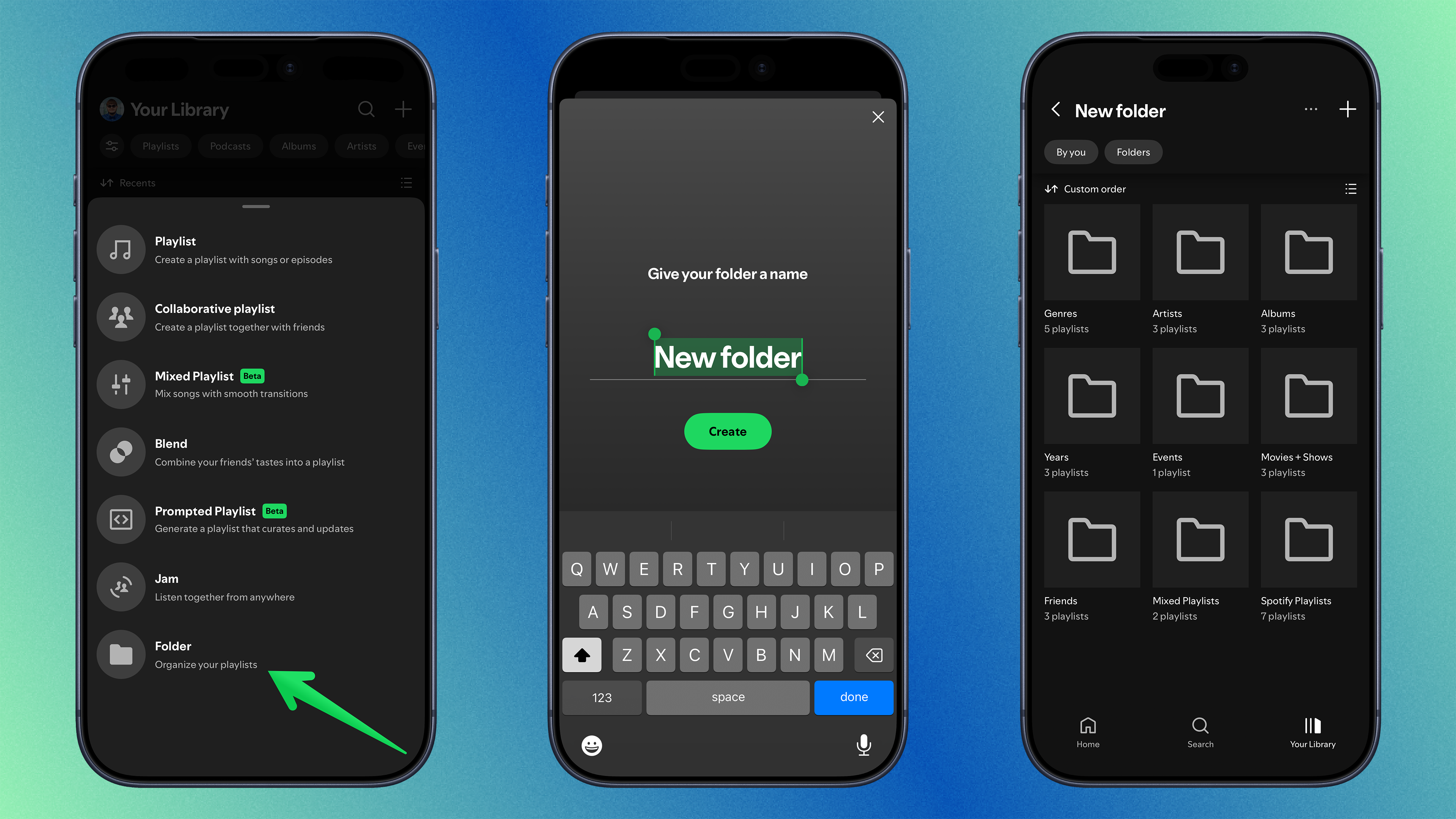
Playlist Folders can now be created and managed in the Spotify mobile app in addition to the desktop app and Web Player.
Playlist Folders in the mobile app can also now be played in order or shuffled. When you play a Playlist Folder, you will be playing through all of the playlists in the folder, starting with the first playlist and then onto the next playlist. When you Shuffle play a Playlist Folder, you will be randomly playing through all of the songs from all playlists that are in the folder.
Check out this post to see what's new and get tips for organizing your playlists:
➜ Playlist Folders are Now Available on Mobile – Here’s How to Organize Your Playlists
The ability to create and manage Playlist Folders in the mobile app has been one of the most requested features, and now it's rolling out globally to all Free and Premium users. 📱 📁
Playlist Folders are a great way to organize the playlists in Your Library. If you have a lot of playlists that you've created or saved, then it can sometimes be a challenge to quickly find the one you're looking for. Playlist Folders help you clean up Your Library so that you can spend less time finding your playlists and more time listening.
Playlist Folders sync across the mobile and desktop apps. Folders that you create and any changes you make will show up across both platforms.