Playing entire Playlist Folders

I have several Playlist Folders, with multiple playlists in each. (For instance, I have a Playlist Folder titled "The Hits" with 5 Playlists from 5 different decades of hits). Up until recently, there was an option to "Play All Songs" which would randomly select various songs within that entire Folder (it would jump from Playlist to Playlist within that Folder, which would enable me to listen to all decades of hits at once). That option now seems to be gone on my iPad and iPhone. Now when I choose "The Hits" on those devices, I see my 5 playlists within that Folder, but I can only play ONE playlist at a time. Similarly, every one of my Playlist Folders is within a "master" Playlist Folder called "Complete Song Library", and, if I choose "Complete Song Library", there was an option called "Play All Songs" which would enable me to play EVERY SONG within my Complete Song Library (all Folders and Playlists within those Folders, as well as stand alone Playlists). Again, gone. I noticed, however, that that option is still available on my desktop. Was there a change to just IOS devices? If so, is there a way I can play EVERY SONG in my entire song library randomly (or in order, if I choose that)?? HELP.
Accepted answers
All comments

Hello @soultsunami, thanks for posting!
Unfortunately, this feature has been removed from the mobile devices.
You can leave your vote and comments in support to this idea : )
2 workarounds I can suggest here:
- Make a playlist containing all the songs from the folder
- Start to play trough the desktop app, then transfer the playback to your mobile device

They removed the ability to do this on mobile last month and honestly it is the last straw for me. Spotify has been going into the ground removing all its functionality. If you were to compare it from when i first started paying premium 2 years ago then you would find that Spotify was better and did more back then than it does now.
Switching to Apple Music.

Why would Spotify want to make their service worse by removing handy features? How can I transfer my Spotify playlists to iTunes?

"Unfortunately, this feature has been removed from the mobile devices. "
**bleep**...PLEASE PLEASE PLEASE Put this back - you are RUINING Spotify - this is enough to make me start shopping for other services.

Would be good to see this feature otherwise I don’t see the point of folders.

Hi everybody,
Thanks for sharing your opinions!
Spotify constantly strives to improve the user experience with its features and the easiest way to achieve this is by regular app updates. That’s why we appreciate you taking the time to share your suggestion with the Community.
At this point, I'd suggest that anyone who feels the same, try and submit an idea in the Community Ideas Exchange page. As a heads-up, it's good to know that the higher the number of votes an idea gets, the more likely it is for the idea to be implemented 
You can click here to start submitting it.
Make sure you read the guidelines to submitting ideas for Spotify so that we make the most of these precious input from the discussion!
Have a great day!

@soultsunami @MitchellKivits @strannik @cfotland @Motafota
Good news!
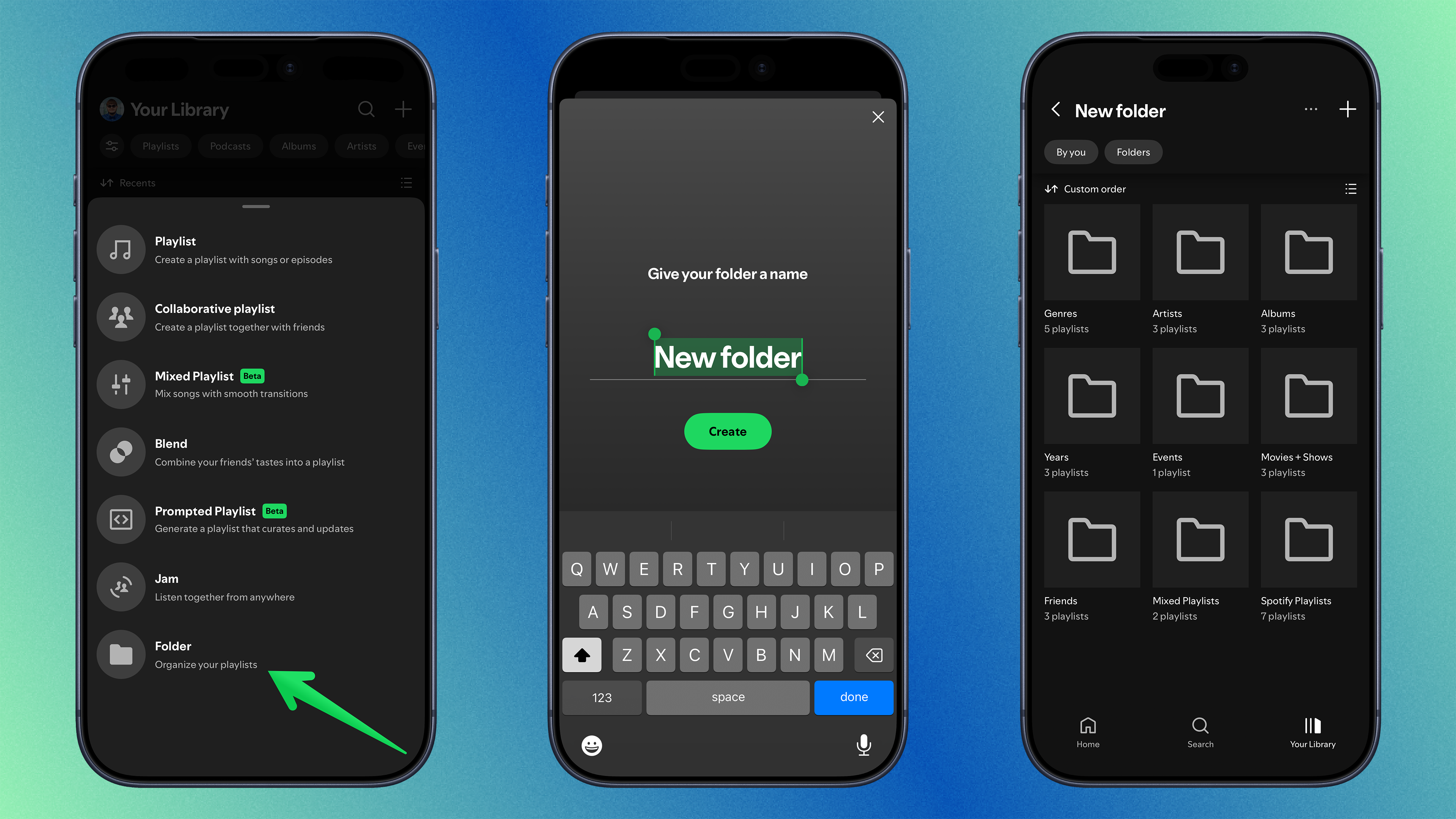
Playlist Folders can now be created and managed in the Spotify mobile app in addition to the desktop app and Web Player.
Playlist Folders in the mobile app can also now be played in order or shuffled. When you play a Playlist Folder, you will be playing through all of the playlists in the folder, starting with the first playlist and then onto the next playlist. When you Shuffle play a Playlist Folder, you will be randomly playing through all of the songs from all playlists that are in the folder.
Check out this post to see what's new and get tips for organizing your playlists:
➜ Playlist Folders are Now Available on Mobile – Here’s How to Organize Your Playlists
The ability to create and manage Playlist Folders in the mobile app has been one of the most requested features, and now it's rolling out globally to all Free and Premium users. 📱 📁
Playlist Folders are a great way to organize the playlists in Your Library. If you have a lot of playlists that you've created or saved, then it can sometimes be a challenge to quickly find the one you're looking for. Playlist Folders help you clean up Your Library so that you can spend less time finding your playlists and more time listening.
Playlist Folders sync across the mobile and desktop apps. Folders that you create and any changes you make will show up across both platforms.
@soultsunami @MitchellKivits @strannik @cfotland @Motafota
Good news!
Playlist Folders can now be created and managed in the Spotify mobile app in addition to the desktop app and Web Player.
Playlist Folders in the mobile app can also now be played in order or shuffled. When you play a Playlist Folder, you will be playing through all of the playlists in the folder, starting with the first playlist and then onto the next playlist. When you Shuffle play a Playlist Folder, you will be randomly playing through all of the songs from all playlists that are in the folder.
Check out this post to see what's new and get tips for organizing your playlists:
➜ Playlist Folders are Now Available on Mobile – Here’s How to Organize Your Playlists
The ability to create and manage Playlist Folders in the mobile app has been one of the most requested features, and now it's rolling out globally to all Free and Premium users. 📱 📁
Playlist Folders are a great way to organize the playlists in Your Library. If you have a lot of playlists that you've created or saved, then it can sometimes be a challenge to quickly find the one you're looking for. Playlist Folders help you clean up Your Library so that you can spend less time finding your playlists and more time listening.
Playlist Folders sync across the mobile and desktop apps. Folders that you create and any changes you make will show up across both platforms.