Listening to playlist within folders

An update to mobile the ability to listen to a folder with playlist within it was removed. Before when you opened a folder with playlist in it the folder would have an extra playlist will all the that are contained in the folder. I think that this feature should be put back in because I really liked to be able to make a folder for things like best songs of the year then put them in a playlist for each band. This gave the ability to listen to all songs but also filter them by band easily.
Accepted answers
All comments

It seems that this was also removed from the Android version. Much needed feature, please bring it back Spotify!

Yes, unfortunately this feature was removed for the Spotify mobile apps.
Good news!
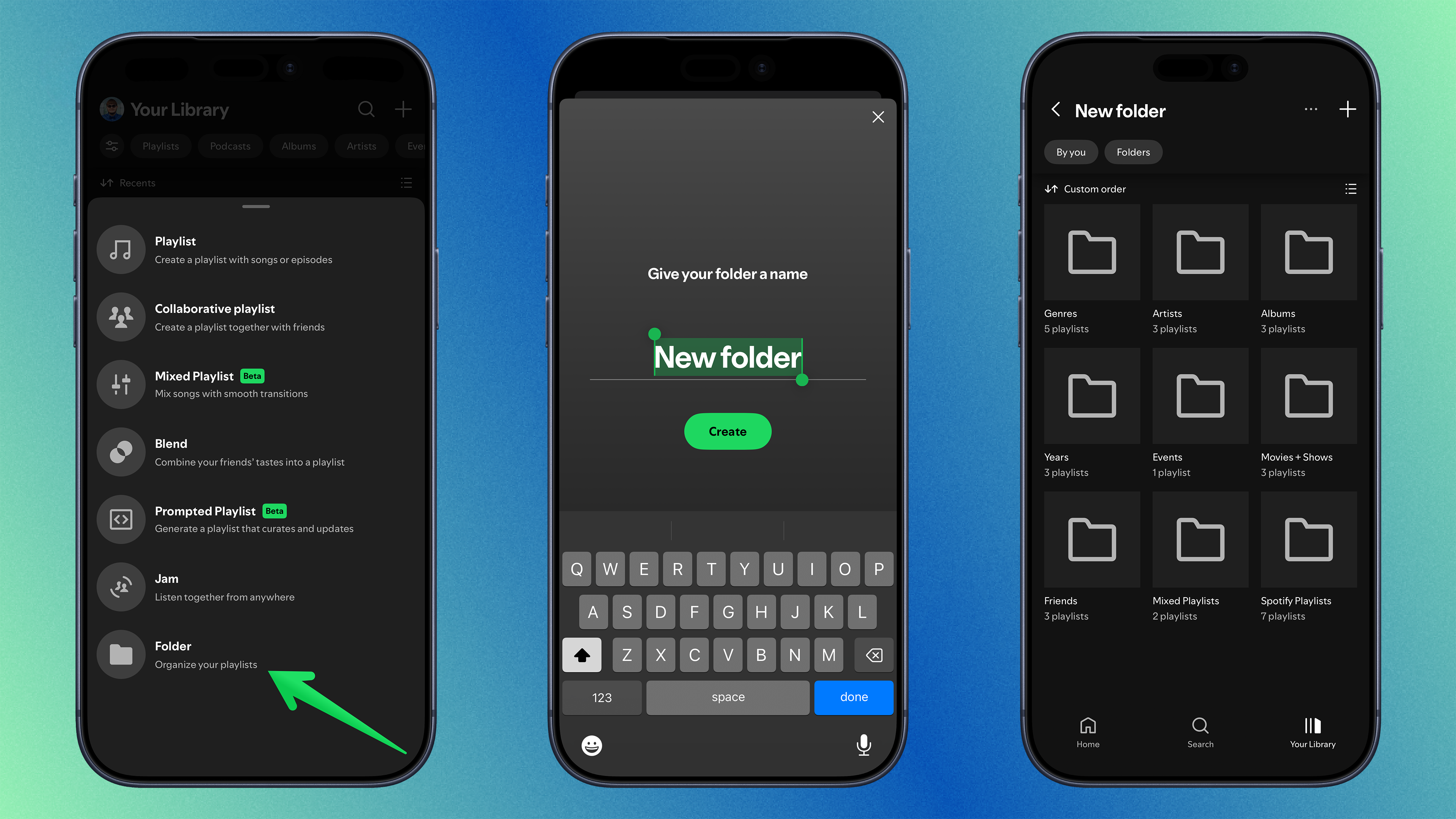
Playlist Folders can now be created and managed in the Spotify mobile app in addition to the desktop app and Web Player.
Playlist Folders in the mobile app can also now be played in order or shuffled. When you play a Playlist Folder, you will be playing through all of the playlists in the folder, starting with the first playlist and then onto the next playlist. When you Shuffle play a Playlist Folder, you will be randomly playing through all of the songs from all playlists that are in the folder.
Check out this post to see what's new and get tips for organizing your playlists:
➜ Playlist Folders are Now Available on Mobile – Here’s How to Organize Your Playlists
The ability to create and manage Playlist Folders in the mobile app has been one of the most requested features, and now it's rolling out globally to all Free and Premium users. 📱 📁
Playlist Folders are a great way to organize the playlists in Your Library. If you have a lot of playlists that you've created or saved, then it can sometimes be a challenge to quickly find the one you're looking for. Playlist Folders help you clean up Your Library so that you can spend less time finding your playlists and more time listening.
Playlist Folders sync across the mobile and desktop apps. Folders that you create and any changes you make will show up across both platforms.
@brandonrobert @tombazza
Good news!
Playlist Folders can now be created and managed in the Spotify mobile app in addition to the desktop app and Web Player.
Playlist Folders in the mobile app can also now be played in order or shuffled. When you play a Playlist Folder, you will be playing through all of the playlists in the folder, starting with the first playlist and then onto the next playlist. When you Shuffle play a Playlist Folder, you will be randomly playing through all of the songs from all playlists that are in the folder.
Check out this post to see what's new and get tips for organizing your playlists:
➜ Playlist Folders are Now Available on Mobile – Here’s How to Organize Your Playlists
The ability to create and manage Playlist Folders in the mobile app has been one of the most requested features, and now it's rolling out globally to all Free and Premium users. 📱 📁
Playlist Folders are a great way to organize the playlists in Your Library. If you have a lot of playlists that you've created or saved, then it can sometimes be a challenge to quickly find the one you're looking for. Playlist Folders help you clean up Your Library so that you can spend less time finding your playlists and more time listening.
Playlist Folders sync across the mobile and desktop apps. Folders that you create and any changes you make will show up across both platforms.