Not showing all songs from public playlists

Hi. I found a playlist I'd like to listen but it's lacking some songs on my desktop app (Windows). For example there's a playlist that contains 19 songs but it's showing only 13 (like on the pics below). Did someone had similiar problem and know how to fix it?
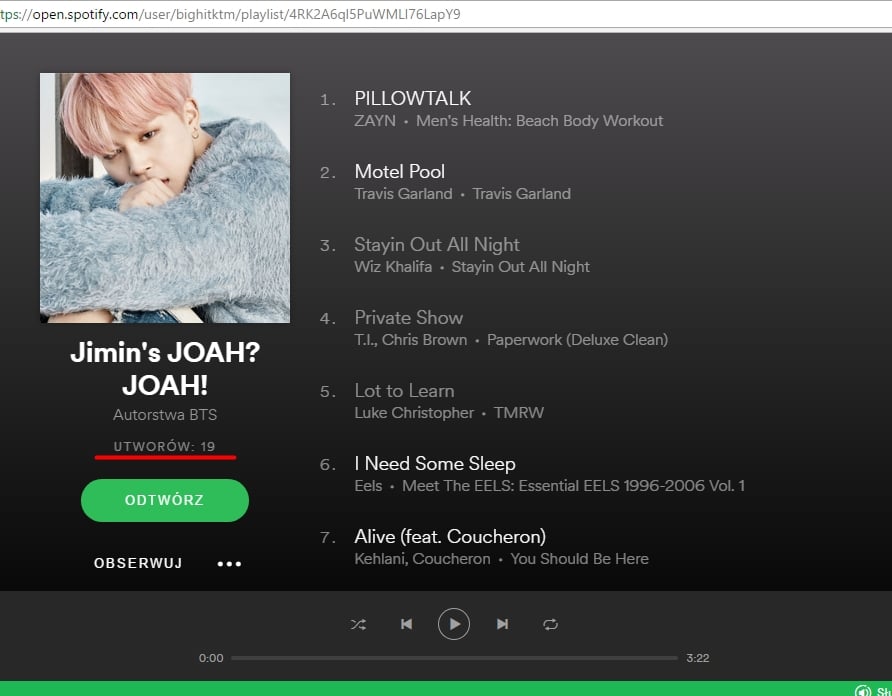 spotify web player - 19 songs
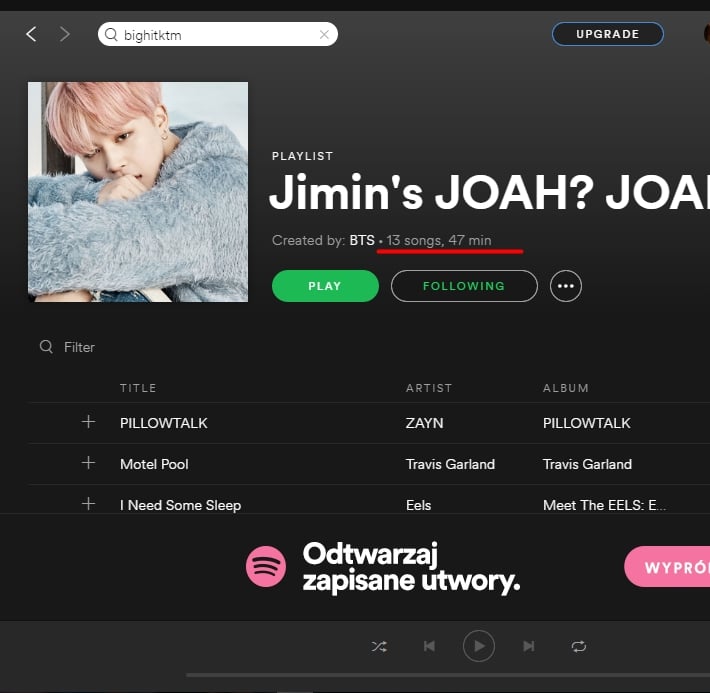 spotify on windows - 13 songs
Accepted answers
All comments

Hey @Vanalammothien
It looks like in the web player some songs are greyed out. Songs are usually greyed out because they are unavailable to play. Songs can be unavailable when the artist has restricted the music to certain countries or has removed it from Spotify.
The Spotify desktop app does not display unavailable songs by default. When songs are hidden, it will also decrease the number that shows the total amount of songs.
You can go into the Spotify desktop app settings and scroll all the way down to "Display Options" and turn on "show unavailable songs in playlists"
Does that help?
Yes! Thank you very much! 🙂
You're welcome!
Hey @Vanalammothien
It looks like in the web player some songs are greyed out. Songs are usually greyed out because they are unavailable to play. Songs can be unavailable when the artist has restricted the music to certain countries or has removed it from Spotify.
The Spotify desktop app does not display unavailable songs by default. When songs are hidden, it will also decrease the number that shows the total amount of songs.
You can go into the Spotify desktop app settings and scroll all the way down to "Display Options" and turn on "show unavailable songs in playlists"
Does that help?