Oooops, something went wrong. Reload

The error "Oooops, something went wrong. Reload" appears everytime I open the browser app (open.spotify.com) and I can't listen to any music.
Windows 10
Firefox 53.0 (32 bits)
Adobe Flash Player 25,0,0,148
No AdBlock
Accepted answers
All comments

Hey pol29,
That is annoying, have you tried any other browsers or just Firefox? Is your Firefox updated to the latest version? I just tested and had no issues using Chrome.
Let me know how you go and good luck!
Best,
Jordan.

Hi!
I had the same issue. Didn't work no matter what browser I used and how updated they were. Add-ons weren't an issue either.
I managed to rid myself from this problem by doing that:
Close Spotify before doing the following.
1. Open Notepad with administrator rights.
2. Choose Open from File menu.
3. Paste the following into the File Path (navigation bar): C:\Windows\System32\drivers\etc
4. Choose 'All Files' instead of 'Text files' in the bar next to the file name bar. The previously empty window should now show a handful of files. Choose one that's named as 'hosts'.
Explanation: Hosts is a Windows system file for redirection of addresses. It's possible to redirect addresses to another IP or to void (0.0.0.0).
Now, if you can see entries such as the following example:
0.0.0.0 spclient.wg.spotify.com
0.0.0.0 weblb-wg.gslb.spotify.com
0.0.0.0 sto3-accesspoint-a20.ap.spotify.com
0.0.0.0 ap.gslb.spotify.com
0.0.0.0 lon3-weblb-wg6.lon3.spotify.com
0.0.0.0 weblb-wg.gslb.spotify.com
0.0.0.0 prod.spotify-heads.map.fastlylb.net
0.0.0.0 audio-sp-lon.spotify.com
0.0.0.0 beta.spotify.map.fastly.net
0.0.0.0 prod.b.ssl.us-eu.fastlylb.net
... then you should either put a # in front of each line (that's called commenting out) or delete the line entirely. Do this for every single entry that has either fastly or spotify in the address.
I am pretty sure you won't see as much as I did, but a single line can do as much harm as 30 of them. ; )
Save the changes and see what happens. No restart required for the computer.
Let me know how it goes!
Seb

it **bleep**ing worked. love you so much!

My Hosts file doesn't have those addresses. This is all I've got:
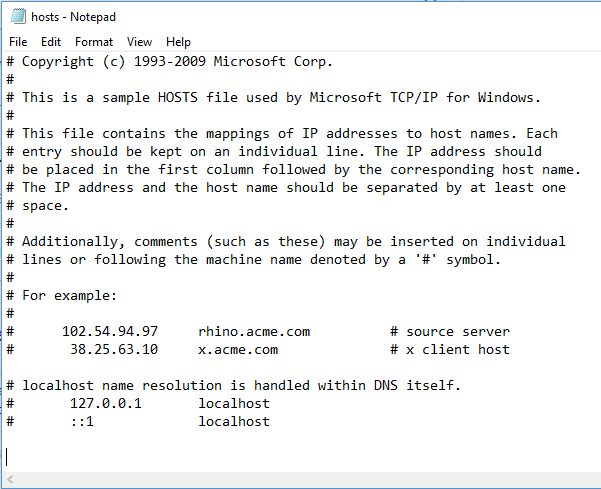
Yeah... 😄 hosts file is kind of important for example when you need to work on a website that's not yet live, or other occasions. 🙂
@Ruruskadoo Mm, I don't really know what else to suggest other than keeping your eye on this issue. Possible updates and information will be posted there.
Seb

Works!

I have the same issue and pretty much the same exact file...Nothing works...
Hi!
I had the same issue. Didn't work no matter what browser I used and how updated they were. Add-ons weren't an issue either.
I managed to rid myself from this problem by doing that:
Close Spotify before doing the following.
1. Open Notepad with administrator rights.
2. Choose Open from File menu.
3. Paste the following into the File Path (navigation bar): C:\Windows\System32\drivers\etc
4. Choose 'All Files' instead of 'Text files' in the bar next to the file name bar. The previously empty window should now show a handful of files. Choose one that's named as 'hosts'.
Explanation: Hosts is a Windows system file for redirection of addresses. It's possible to redirect addresses to another IP or to void (0.0.0.0).
Now, if you can see entries such as the following example:
0.0.0.0 spclient.wg.spotify.com
0.0.0.0 weblb-wg.gslb.spotify.com
0.0.0.0 sto3-accesspoint-a20.ap.spotify.com
0.0.0.0 ap.gslb.spotify.com
0.0.0.0 lon3-weblb-wg6.lon3.spotify.com
0.0.0.0 weblb-wg.gslb.spotify.com
0.0.0.0 prod.spotify-heads.map.fastlylb.net
0.0.0.0 audio-sp-lon.spotify.com
0.0.0.0 beta.spotify.map.fastly.net
0.0.0.0 prod.b.ssl.us-eu.fastlylb.net
... then you should either put a # in front of each line (that's called commenting out) or delete the line entirely. Do this for every single entry that has either fastly or spotify in the address.
I am pretty sure you won't see as much as I did, but a single line can do as much harm as 30 of them. ; )
Save the changes and see what happens. No restart required for the computer.
Let me know how it goes!
Seb