7 second gap - playback issues when using Chromecast

I stream from a Android tab to chromecast 1e gen, yesterday de layout was changed from:
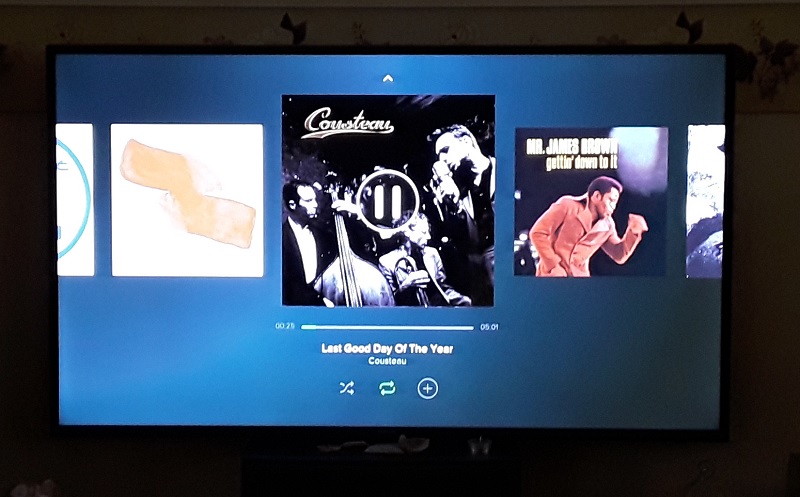
To.....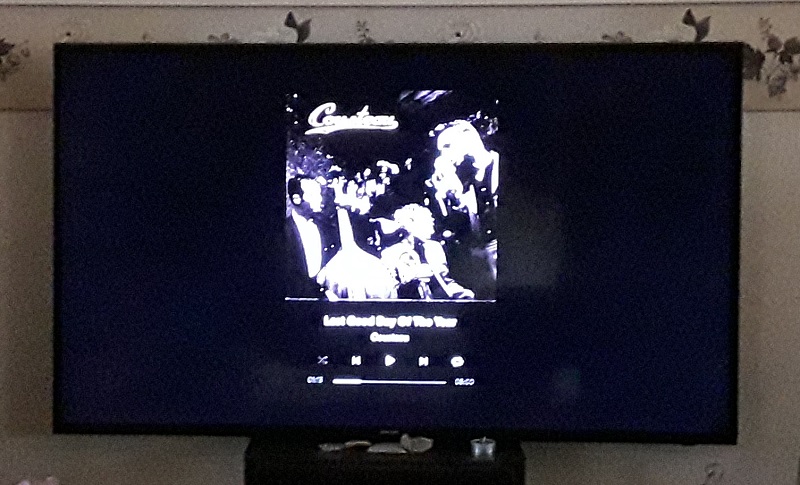
There is also a +/- 7 sec gab between the songs, the song starts until 7 sec with no sound, than restarts at 0 with sound, I also have a chromecast audio witch works fine and dont have the gab problem.
Someone any idear wahts going on ?
Comments

Same from iOS, except for the gap
Scratch that, there's a about 7 seconds gap. The counter starts at 0, counts silently to 7 and then reverts to 0 and the song starts playing. What a **bleep** 😞

I noticed this, too - very weird visual update, IMO.
Spotify, please revert back to the old slicker row of album arts (or an improved version of it), not the current one with a plain black background which is really not good to look at.

Hey @Gooffy72! Welcome to the Spotify Community!
Spotify is always trying to improve by testing new features. That's why you might see some changes in the layout. For the gap problem, could you let me know if this is happening with a specific song or playlist? Let me know! 🙂
Have a great day!
The gab problem is by every song change, no mather if its a album or playlist.
Hey @Gooffy72!
Hmm, what device are you casting from? Could you reinstall the Spotify on your device with these steps? Let me know how you get on! 🙂
Have a great day!
i'm using 3 diverrent android devices, a samsung galaxy s2 and s4 and a samsung galaxy tab 10.1, with all 3 devices i'l get the same result.
I did de reset on the tablet like you say, nothing changed, the gab still appears.
When i listen to spotify directly on one of the 3 devices everything works fine.
When i'm using spotify on my Samsung smart TV there is also no gab.
Have a nice day,

Hey @Gooffy72!
Thanks for letting us know. Try restarting your router to see if it makes a difference with the gap.
Be sure to keep us posted on the results 🙂

The new layout seems pretty bad. I also liked to see previous/next songs when using Chromecast. Can you please reconsider reverting it back or adding it to the new version
I restarted my modem and router, it makes no difference to the gab. I was happy with the previous version and never experienced the gab before, now i'm not so happy using spotify at my home because of the gab and the crappy layout, hope there will be a fix very soon.
I will keep you updated.

Is it possible back to the previous version with all the covers? This new interface experiment several cuts during cast, to avoid this problem I´m duplicating my phone on tv with chrome without cuts, then clearly the problem is due to Spotify interface.

Same thing on iOS including the gap. It's as though the chromecast has to phone home back to Spotify after every track rather than assembling a local playlist like it used to. The old Chromecast Spotify experience wasn't perfect, but this feels like a feature phone experience stretched onto my TV.

Same here with iPhone 6s. Why would an app worsen instead of improving. I really didn't understand the reason if this update

Hey spotify will you fix this or what? Very disapointing. 2 weeks now.
it stop playing randomly, useless!!
Fix this or i cancel my subscription

Hey folks!
Just to confirm, what country are you all rocking Spotify from? Also, what's your current internet service provider?
About the layout, we'll pass the feedback on to the right folks.
Keep us posted.
It's not only about layout, I cannot control songs when playing on chromecast now. Next and Previous song buttons don't work but shuffle button works. What an update, you must be kidding us, really.
Canada, Bell Fibe 100mbs

Also experiencing the 6–7 second gap here, whether casting from Android phone or iPad. I'm on a 100 Mbps fibre connection through the Danish Research Network, which is very stable in virtually all other contexts.
I don't really care too much about the screen layout, but the lack of gapless (or even near-gapless) playback is a big issue, and is making me reconsider switching from Google Play Music to Spotify. Please investigate and address this.

Germany, Vodafone Kabel Deutschland.
Netherlands, Ziggo, 200 Mbit/s.
Hey folks, thanks for all the info provided so far!
Let's try enabling Crossfade from the app before using connect to your chromecast to see if it helps at all.
In the meantime, we've reported this on to the right folks. We'll keep you guys on the loop.
Cheers.

Hi,
while I am listening to a live album, in which tracks are linked together without silence, I can hear consistent gap (1-2 seconds) between them, while I am listening on Chromecast Audio.
I don't encounter the problem if I listen to the same album using my Android device directly.
Thanks in advance,
Riccardo

That is a problem with the Chromecast Audio. It will not play back gaplessly. Nothing much you can do about it.

Hey folks!
Thanks for the recent comments.
We've reported this gap in playback to our best tech folks now.
In the meantime, if you could let us know the below that'd be great. We'll continue passing on as much info as possible:
- Device
- Operating system + version
- Version of Spotify
- Chromecast version
- ISP (Internet service provider)
- Country
Many kind thanks,
/M

At least you can still listen to spotify over chromecast.
On the other hand, Google Audio Cast is no longer supported 😞
Device 1:
Phone Samsung galaxy S2
Adriod 4.1.2
Spotify 8.4.7.1108
Device 2:
Phone Samsung galaxy S4
Android 5.0.1
Spotify 8.4.7.1108
Device 3:
Tablet Samsung galaxy Tab A6 (2016)
Android 7.0
Spotify 8.4.7.1108
Chromecast version 1
ISP Ziggo 200Mbit/s
Country Netherlands
It feels like Spotify is stalling, but here it goes:
Netherlands, Ziggo 200mpbs (speedtest down 161.23 Mbps, up 20.00 Mbps, ping 8ms)
Devices:
- One Plus X (latest patches installed: android 6.01, kernel 3.40, oxygenos 3.1.4)
- iPad Air 1 (latest patches installed, ios 10.3.2)
- Chromecast 1, firmware 1.25.90308, both on wifi and on ethernet through an adapter.
Hey!
Thanks for the recent posts.
We've passed this new info on to the team. We really appreciate the detail.
Stay tuned,
/M
Hey @FourStringer198, welcome to the Community!
What Chromecast version are you using? Also, how long has this been happening? If you've tried any troubleshooting, let us know what you've tried and we'll carry on from there.
Be sure to keep us in the loop 🙂
Same here on ios 10 iphone 6s
Plus various connectivity problems. I have to restart all devices many time before it works, very painful. All was ok before last update