Unable to find Facebook friends despite Spotify account being linked

Please help if you can
I signed up to Spotify using my Facebook accound and if I click on the "find friends" button it just comes up with "None of your Facebook friends are on Spotify", but i know this is incorrect.
It's been an issue ever since I signed up to Spotify but is more recently bothering me as there are people who I want to connect to. Issue is both on the desktop application and the app on my phone.
Any suggestions?
Comments

Hey there!
Could you let us know the operating system and Spotify version you're running? Also, can you let us know when did this start happening? Was it after a specific update or event?
Keep us posted.

I just recently signed up for Spotify Family Premium. My daughter has had
it for a while and was trying to help me find her so I could follow her and
see her playlists. However, no matter what we did, we could not find any
friends. I tried through facebook as well. I first tried using my iphone,
then I went to my PC using windows 10 and could not find friends either. I
am also not able to use my Sonos system with Spotify, which it should do.
Spotify recognizes the system, but when I try to play a song, from my phone,
it just skips to the next song, tries to play it, then skips to the next
song, and the whole process repeats. My daughter who has her own account
does not have this trouble.
Thank you,
Tracey Shickluna
I just recently signed up for Spotify Family Premium. My daughter has had
it for a while and was trying to help me find her so I could follow her and
see her playlists. However, no matter what we did, we could not find any
friends. I tried through facebook as well. I first tried using my iphone,
then I went to my PC using windows 10 and could not find friends either. I
am also not able to use my Sonos system with Spotify, which it should do.
Spotify recognizes the system, but when I try to play a song, from my phone,
it just skips to the next song, tries to play it, then skips to the next
song, and the whole process repeats. My daughter who has her own account
does not have this trouble.
Thank you,
Tracey Shickluna

Thanks for the info, @MathMomof3!
We're still waiting on @JD_22's info, but it'd be super awesome if the both of you could give Spotify a clean reinstall with these steps. Give that one a shot and let us know if the app behaves any differently.
We'll keep an eye open for your reply 🙂
Thanks for the replies, an update....
I'm running Windows 10 on my computer which is up to date.
My spotify is alsso up to date.
The issue is a bit of a long standing one, it's never found any of my facebook friends ever since i signed up to Spotify. In the past I have just let it go, but as i've recently signed up to premium as part of "Premium for Family" I decided it was a feature that I was determined to have/use.
I'll give the re-install a try and report back.
Tried the uninstall and reinstall as per the instructions. Didn't fix the issue, I still get the exact same message when I click on the "Find Friends" button it simply comes up with "None of your Facebook friends are on Spotify" which i know is not true.
Other ideas?

Hey @JD_22
Could you check that you have the appropriate option selected in your Facebook settings? Just follow these steps:
- Head to facebook.com/settings.
- Select Apps in the left column.
- Select Spotify (you might need to select Show all to see it).
- Under Info You Provide To This App, make sure the Friend list is checked.
- Restart your Spotify app and try searching.
Hopefully, that should do the trick! Let us know how it goes.
Now, Can I find friends that don't use facebook?
Now, Can I find friends that don't use facebook?

Great news!
We're glad to hear it's working. In this case, you can find the accounts from your friends that use Spotify without Facebook by their usernames. You can also type "spotify:user:yourfriendusername" in the app's search bar to find their accounts.
Let us know if you have any other questions.
Hi MaryS
Thanks for that idea, so i gave it a try and got to the right spot in Facebook settings. It looks like this is likey the cause of the issues, as under "Info you provide this app" "friend list" is not checked.
However the new problem is i'm not offered a way to change this. It's non clickable and if i follow the facebook link for "choose the info this app can use" it only tells me about how to do it when i am initially connecting up the app.
How do i go about adding friends list to these permissions?
There is an option to remove the app, however i was wary of this as i don't want to lose my spotify account connected with premium.

No worries @JD_22!
Once you go to Apps in the Facebook settings, look for Spotify and select it. There should be window showing all the options including the friends list. If you're still not able to see it, let us know and we'll see what else to suggest.
Take care!
Same as before..
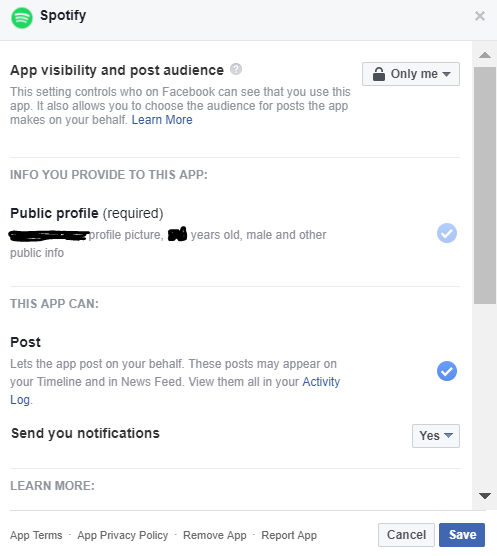 Screenshot of the Spotify app settings window.I had no trouble getting to the Facebook settings, the spotify app and the window for the spotify app options like you have described. The problem is that there is NO friends list option at all. The only options I have are: "App visability and post audience" with a drop down box; "Public profile (required)" with a permanently ticked option; "Post" with a tick box; and "send you notifications" with a ye/no drop down box.
I've included a screenshot to show you what i mean, i've just blacked over my name and age to retain privacy.
What's next?

Thanks for the screenshot @JD_22!
We've checked and it looks like you're missing most of the options under the "Info you provide to this app" tab. In this case, you should be able to see other options as date of birth or email address with the list of friends option. For this reason, we think it might be related to your Facebook privacy settings. Could you check them for us and try again?
Keep us posted.
Hi Maria,
Ok, so i've been back over my Facebook privacy settings and through my Facebook settings in general, cause your request is pretty broad. I've done an extensive look and as far as I can see, there is nothing within my settings that woukld restrict the options within the Spotify app. All of my settings allow at least my friends (if not public) to see details like my friends list and email address.
I've returned to the "Info you provide this app" tabb and there is no change in my available settings.
Next idea?

Thanks for letting us know!
If you created your account with username and password, we'd recommend disconnecting your Facebook profile following the steps here.
On the other hand, if you did it through Facebook, we recommend that you contact us via email here or through our official social media channels on Facebook or Twitter. This way, we'll be able to take a closer look at your account and see what happened there.
Let us know how it goes 🙂
So I am very happy to repor that the person who i spoke to through Facebook was very helpful and can now report that the issue is solved.
Although i am sure there was likely other things the helper did in the background, what i did to fix the issue (under their instruction) was: i had to remove the spotify app from my Facebook account, go onto a "incognito window" and go to the spotify signup link and ask it to connect with my Facebook. After logging in it prompted me to accept permissions and i was able to allow "friends list". When i reconnected to Spotify the issue was solved.
That's awesome to hear, @JD_22!
We're glad it all worked out for the best. Since you mention that everything has been taken care of, we'll be closing this post now. If you need a hand with anything else, feel free to create a new thread and we'll help you out.
Have an amazing weekend 🙂
I'm having the same trouble and would love some help. My friends cant find me either. Oddly, 2 of the "friends" are part of my Family on my Spotify Account. So I know they are on spotify and on facebook!