Tip Of the Month......: Repeat a track tip!

We know we are all waiting for the real repeat track mode option, and I hope all of you guys know this idea is now
"under consideration"!!  ......
By the way...thanks Mattjsrules for creating one of the most popular ideas in our Ideas exchange section:
In the mean time, here you guys have a workaround which will let you enjoy your favorite song over and over again!
1.Turn on the repeat mode for the playlist which contains this track.

2. Press Comand (or Control) + F and filter the track.
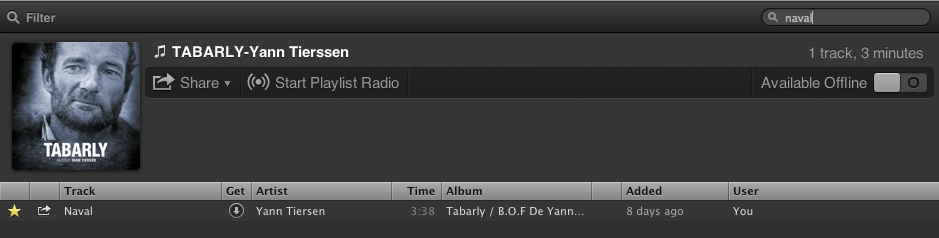

3. Thats it! Just play the song!
I hope you guys enjoy this little tip, I will update you as soon as we have news about the real "repeat track mode" feature.
Thank you all!
Comments

Laughable tip.This is not answer to create a playlist for one track mthat need to be repeated sometimes...

Waiting for the real feature! 😃
It's still shocking that this idea is not at the planned stage yet... =(
So this won't be coming anytime soon will it?
=(
Rdio has had it since launch.
Sick of waiting...
Comment removed


shame on spotify for not putting this **bleep**ing feature after all the posts and all the people voting for the idea of having it. And this tip works for computer based web player not for the mobile app.
@PitNeo This tip works for the current version of the app (0.9.0) on IOS. All you have to do is scroll up to see the filter bar within your playlist.
@hpguru The tip listed here is stating to use the filter bar to cut down all but one song in a playlist temporarily. It is not telling you to create an entirely new playlist just for one song. (Although that would work as well, it would just be way less efficiant.)
Simply typing in a few letters to single out a track is not really that far off from scrolling down to the bottom to hit the repeat button. IMO this is a great tip and a totally acceptable solution until they put in the repeat one button for the uninformed masses.

filter idea works great... unless the track you want to repeat shares the name of the album.
it's pretty pathetic that there's no repeat track option. unless your software is programmed in a most convoluted way, it's an incredibly simple thing to implement.
or maybe there's some weird licensing issues legally preventing this feature?
some transparency would be great along these lines, oh, and some swift action in implementing a rudimentary feature of any music player.

A Q&D fix. And now I know how to filter playlists. Thanks form a total newbie! 😄

Just FYI everyone, this is no longer needed! Repeat one has been implemented in the desktop client from v0.9.7 onwards! 🙂

Yay! Thanks for the info! About time to be honest 😛

"Just FYI everyone, this is no longer needed! Repeat one has been implemented in the desktop client from v0.9.7 onwards! "
I have 0.9.14 (that is > 0.9.7) and there no such option
you can see releases notes here and the word "repeat" is 0 times 🙂
http://community.spotify.com/t5/Spotify-Announcements/Release-Notes-Spotify-for-Desktop/td-p/392150
I had never thought of that! Kudos to this post and Mattjsrules! 🙂
Still think this should have been implemeneted long ago though!
Peter