Offline Song Loss

Spotify, are you aware of a number of people suffering from offline song loss? This thread is buried in the Android area, even though it's got iPhone user complaining as well, and is marked as solved, which it definitely is not. I can't find any satisfactory response from Spotify on this long running issue.
Spotify Thread here
Please read the full thread and respond, if it lands in the Not An Issue, Closed or Won't Fix bucket, I'll know to move on. I am new to Spotify Premium and shocked this situation is occurring without any decent response. I won't stay much longer without a sign you are doing something to help your customers.
And when you do release app updates can you say something about what's in them in the Whats New section, instead of just telling me to stay up to date because you always make improvements. That way I might actually believe you.
Comments

Thanks Andy for this new thread.
Issue should be escalated, for sure.
Its just inacceptable bug!

Hi @AndyUK, @un-bel-di and @TechManiac!
Welcome to the Spotify Community.
This doesn't sound right! We'd suggest checking out the steps under “Downloads unexpectedly removed” here. They should help with this. Give it a try and let us know how you get on.
Keep us posted.

We understand @TechManiac!
In this case, our Accounts team can take a closer look at this. You can get in touch with them from any of our social media help sites: @SpotifyCares on Twitter and Spotify Cares on Facebook. Just send them a private message with your account's email address and username.
Hi @AndyJoel!
Thanks for your response.
If you really interesting in this problem, please look at "solved" thread:
https://community.spotify.com/t5/Android/Offline-Songs-Disappearing/m-p/1930652#M88503
People continue to write there, and get no attention.
Maybe that thread need to be "un-solved" and reverted to ACTIVE state?
There are A LOT usefull information about reproduction of the bug, situations of its occurance etc...
Please use it (there are definitely "more info")

Myself and probably hundreds of users have provided MORE DETAILED INFO to Spotify tech support and then they direct all of us all to the same "SOLUTION" page and we have followed the very time consuming procedures... deleting the Spotify Cache from the device - Uninstalling Spotify - reinstalling the newest version of Spotify - Backing up SD Card, Reformating the SD card. And after all of this hassle, Spotify continues to delete all of your downloaded offline music, over and over. and Spotify Tech Support is DONE assisting and closes the trouble ticket. PROBLEM NOT SOLVED!! I don't think they care or want to "waste" any resources fixing this problem. I think the problem involves the slow read/write response time between device and SD card which causes Spotify to Turn Off the SD Card Storage Option and delete all of the offline music.
To Solve the problem for myself, I ended up buying a newer Kindle Fire 8" HD, and I was able to download offline Music to the 32 GB internal storage without it being deleted. The 8" Fire tablet is pretty big to be carrying around, so I also spent $400 on an Apple Ipod Touch (like an iphone, but without the phone) with 128 GB internal storage, and I am also able to download music without it being deleted. Finally I just upgraded from an older android phone to a $900 iPhone 7 Plus with 256 GB and I can download Music to it without it being deleted. Those are quite costly solutions to fix the problem.
Another very annoying feature of Spotify, is when you have 3 devices registered for downloading music, and accidentally click the Download Button for a playlist on a 4th device... Without Warning Spotify chooses one of your 3 registered devices and deletes all of the music on it. They could easily have a warning message appear when you accidentally click the download button, "YOU HAVE REACHED THE LIMIT OF 3 DEVICES REGISTERED TO DOWNLOAD OFFLINE MUSIC. DO YOU WISH TO UN-REGISTER ONE OF THE OTHER 3 DEVICES AND REGISTER THIS DEVICE TO DOWNLOAD MUSIC (all music on the unregistered device will be deleted) YES OR NO?" But then this would be too logical for Spotify to engineer. (and I really do believe that they intentionally delete music so that they can reduce the number of PLAYS for all of those deleted songs, THUS SAVING MONEY ON ROYALTY FEE PAYMENTS TO THE ARTISTS)
Thanks @Kirkshoe for such analisis.
Want to disagree with you about last part--its just bad engineering and UX (I mean, make no warning and delete some offline song). Because spotify loose no additional royalties, because they take their share before any song processing by formula "TOTAL_$_INCOME * 0.7", and what is left processed by (simplified): ($_LEFT/TOTAL PLAYS) x PLAYS_OF_SPECIFIC_ARTIST. So in the case there are some additional PLAYS, its just reduce "($_LEFT/TOTAL PLAYS)" part. No additional money will be spend by Spotify. So they shouldnt care here and vivid proof of it -- "autoplay" option, where spotify allows you to play non stop 24/7.
Also its good for you, that internal storage solved the problem, but I read some posts, where people struggles even with internal one.
ps: just for info about myself. I got two removal of offline songs in a month from SDcard. Seems it was connected to mobile was turn-off by out of power state. But now its 2 month of good work. So I cant add anything here for now.
well, my last post (about 2 month of good work) clearly brought me the problem--today I had my offline songs erased (~90%).
Phone was not powered-off, so smth else is happened.
Actually seems its related to the limit of 3 devices for offline songs downloading.
In my account there are all three devices--are the same Android phone (i have it only one, obviously).
Quite strange behaviour of offline device list--to show the same device 3 times.
Combine this with the fact, that adding 4th device will automatically erase offline songs on one of devices (without warning or some dialog! Nice UX Spotify!)...so do you see what i see? What could possibly go wrong here)))))
And yes. Actually I got erased NOT ALL my offline songs, but some small part of EARLIEST ADDED is left.
But Ok. Lets go step-by-step. Maybe we will find smth. Since Spotify seems do not have testers.
@AndyJoel Do you know, is it OK to have in your account list of offlline devices -- the same device 3 times?
Just as a proof. And yes. Today were added "another" offline device--the same mobile. And clearly that some "another" mobile were erased. And all this the same mobile.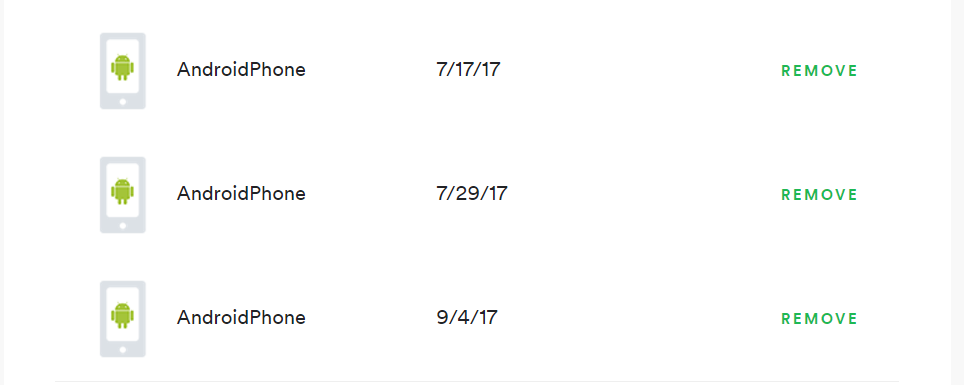
My talk to support:
Hi! I want to ask, why in my list of offline devices is shown the same device 3 times? Is it Ok? Seems no. By which criteria Spotify ads there devices and why my AndroidPhone listed there triple times? What can I do with it? thank you

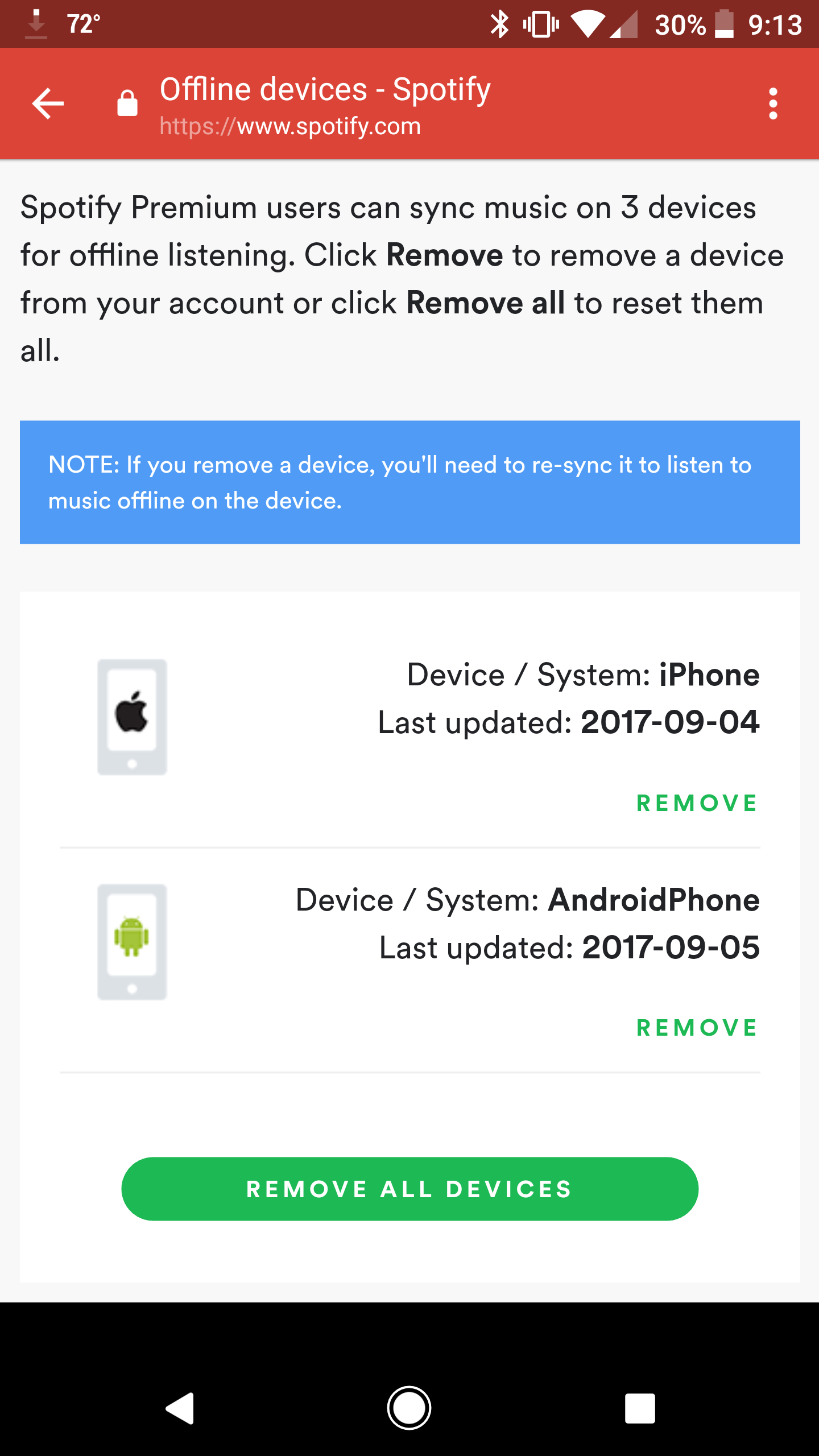
I have 2 devices. My songs were forced to re-download again today.
There must be someone I can send log files to in order to analyze this issue?
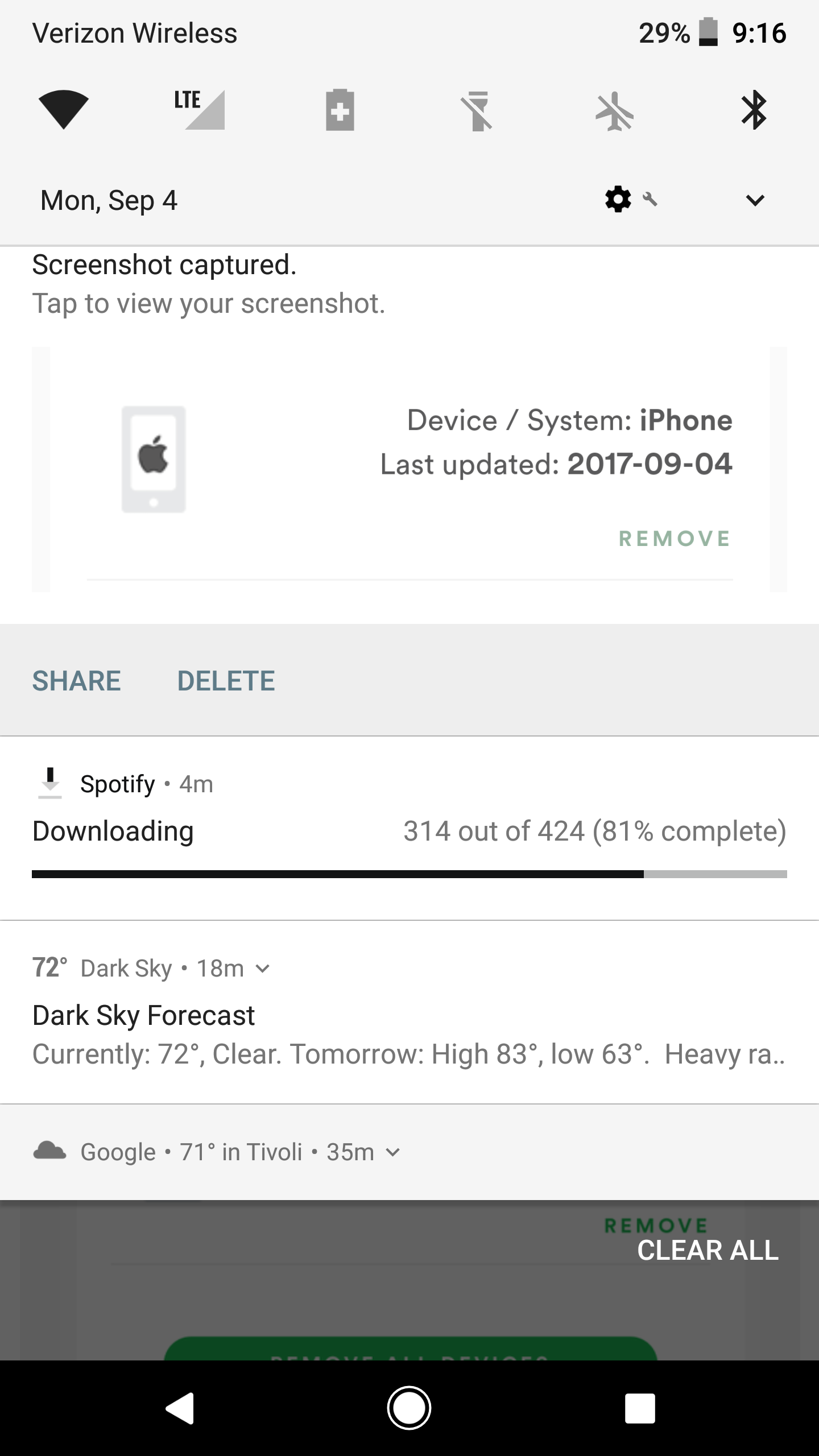
Here is Spotify re-downloading my songs. Again
Thanks for contacting support and the info un-bel-di . It's good to know the area of the issue has been identified. It definitely needs design improvement. If it's Spotify that's Bulk downloading due to loss of connection how can the solution be to not bulk download. I don't see how you have a choice. The app is designed for mobile devices, mobile devices are going to lose connection as you move around, it really needs to handle loss of connection it better. You drop in and out of Wifi all the time when you walk around the town these days with all the hotspots.
I checked the offline devices and see 3, but it doesn't provide enough information to identify the right device to delete. I have 2 Android devices, they are named and that name shows up on other tech that talks to them. eg. Andy's S3 and Andy's S4 in Spotify it's just AndroidPhone. How do I know which one to delete?
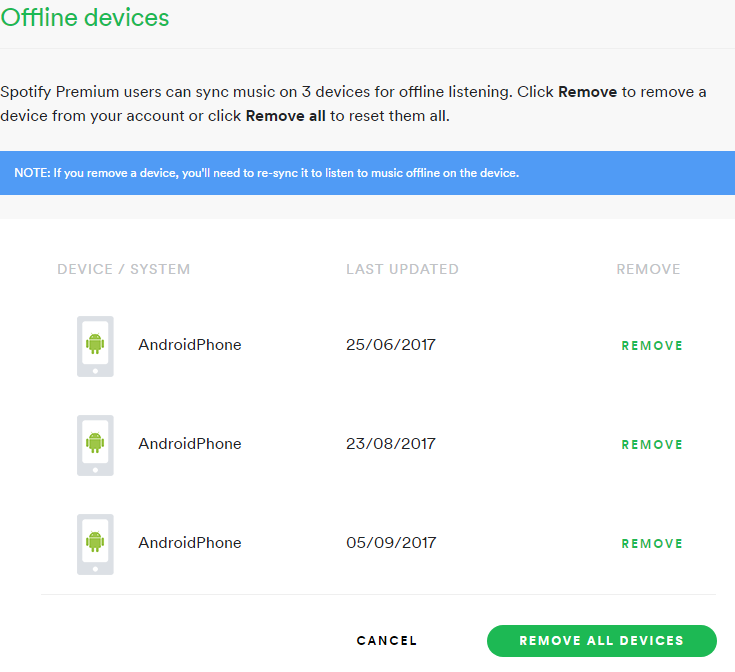
I was also surprised by the line "Normally, this happens when you lose your internet connection while downloading your music." Why is that normal? that sounds ridiculous to me. The process needs to be able to identify the right device and resume properly.
Well, @Grifforama case made everithing more complicated, since there are only two devices...
@AndyUKI am agree, this is ridiculous!
No bulk download! But usually it is, some nice playlist etc.. Also some mistirious "disconnected offline devices"...

This is also happening to me for countless of times. I have to redownload all my songs time and time again. I am an iPhone 6s user.

Spotify, please fix this. It drives me nuts and I would leave were I not on a family account!
It sometimes happens randomly without any apparent reason or precipitant.
But I also found out that it happens if I remove my SIM card, even if I remove it and re-insert it with my phone off the whole time.

Hey everyone!
We have more info we recommend checking on this thread:
https://community.spotify.com/t5/Ongoing-Issues/Spotify-randomly-deleted-downloads/idi-p/1724878
We'll close this one for the moment.
All the best.
I've cancelled my premium subscription for this very reason. Sporify doesnt get a single cent out of my pocket before solving this issue. this is THE ONLY reson why i paid for premium.