Spotify Web Player only loading some musics and no Scrollbar

Hello,
Since we didn't get any reply so far at the this topic, i'm here to report this problem.
I have tested the Webplayer in the following browsers:
- Chrome v60.0.3112.113 (64bits);
- Firefox v52.1.0 (32bits);
I'm with Windows 10 Enterprise (64bits)
This problem happens in both.
The scrollbar doens't show up/exist: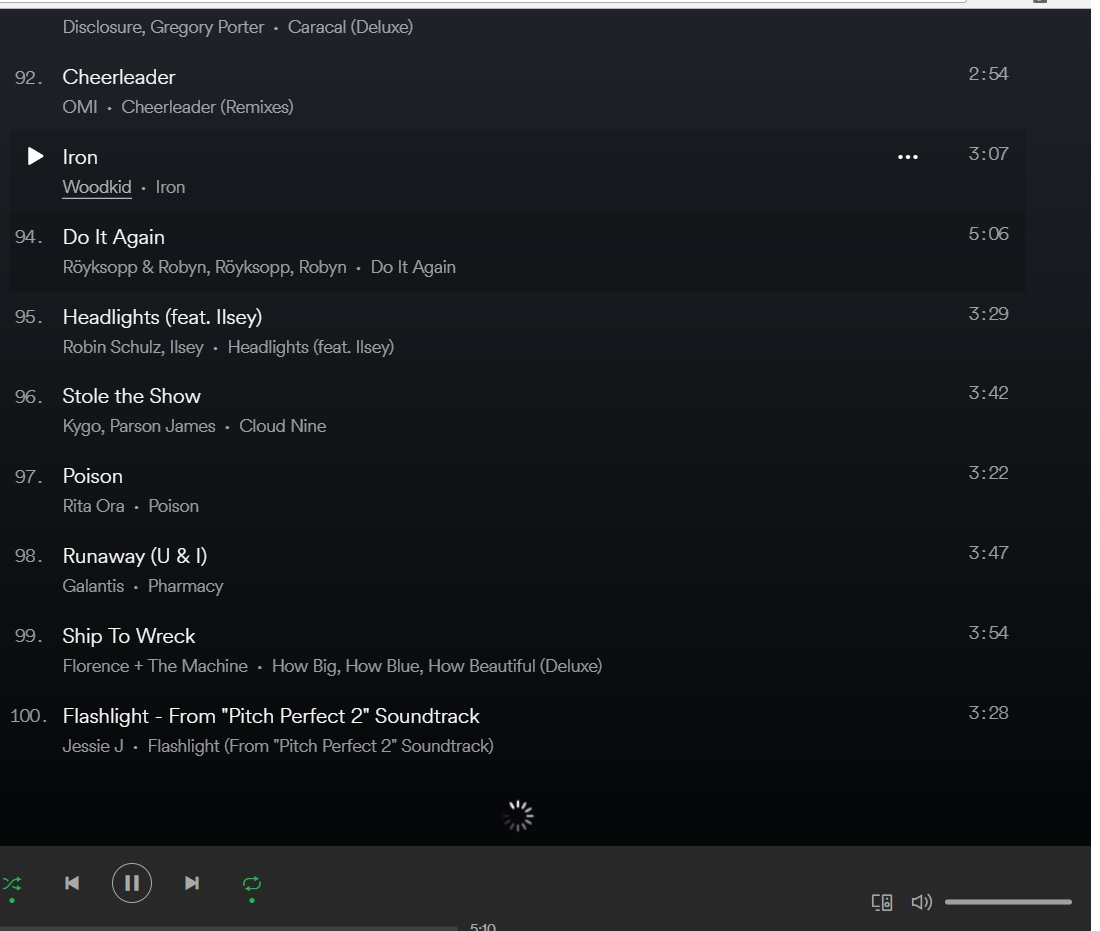
Since this is happening (for 1 or 2 weeks), i can't go pass the song Number 100. As you can see on the pic, that wheel stays there spining and spining, but doesn't load anything.
I can't select a music over the Nº 100, because they won't show up. The unique way to go over the Nº 100 is by using Shuffle or Select song Nº100 and keep pressing "Next" until i find any music i want to hear.
Since this playlist is about 300 musics... this isn't very nice ^^
Been waiting for 1 or 2 weeks for this problem to be fixed because you guys are fast fixing this issues. Since today the problem is still existing, i started wondering if it would be only me, but it seams it also happens to aloot of people.
Can you guys give a look into it and let us know if anything is being done to fix it?
Thank You
Comments

I hate being the guy who says me too, but this affects more than pyjamal1ama.
My web gui only loads the first 100 songs. I am able to play the next song (#101), but it wont display it on the playlist.
Added pic of list loading, stuck on 100 songs.
Browser:
Version 60.0.3112.113 (Official Build) (64-bit)
OS:
w10

Spotify web player won't show all of my songs. When I open my playlist it only loads the first 100 songs, and on my saved songs only the first 50 will load. It just has a loading symbol at the bottom, but they won't load.

I had to seek this out to see if anyone else is experiencing this. Started yesterday and happens on chrome (Version 60.0.3112.113 (Official Build) (64-bit)) and Firefox (53.0.2 (32-bit)). Does not happen on IE 9 but it seems to be using different/older interface entirely. OS is Windows 7 Enterprise 64 bit
I'll also supply a pic of chrome and firefox stuck loading.

This is happening to me, too! Maybe it was triggered by a Spotify update or something.

Same problem, I have a tip, go to the application directly it solves a lot of problems related to the web player.

This exactly happens to me too! it's stuck loading song #101, seems to have started happening this week. I'm using web player on Chrome.

This is the problem I have been having since yesterday. I can't get passed song 100 on my playlist. I have to rely on shuffle to get to songs farther down on the list. I've tried different browsers as well as logging in and out. Nothing seems to be working.

I am experiencing the same problem, the scroolbar is missing and my web player will only load up to the 100th song and will not load anymore, even when you use the shuffle button it will not play more than the 100 songs that are on display on that playlist, has anyone got the solution yet????
Is this simply an update problem????

Same situation for me!

Me too!

Glad to see I'm not the only one with this issue! Hopefully that means it'll get fixed soon.

Same problem

Me too, I have to use the shuffle button to get past the 100 songs. Also using latest Chrome and W10.

I have the same issue, but with only 50 of my saved songs or albums appearing. Strangely though 100 songs will appear in a playlist though before the interminable loading icon appears.
Same problem.
I'm pretty sure this is happening to everyone.
I use WebPlayer every day while working. This is happening atleast for a week now.
I have been waiting for them to fix it, but it seams they don't know this is happening...
Would be nice to have some information about if they are fixing this or not.

Hi @annaborbely! Welcome to the Community.
Let's try opening the web player using a different browser or with an incognito window to see if this helps.
Let us know how it goes.

Oh yeah - happening to me too. Thought I was going mad, and kept refreshing browser...
Hi @user-removedI just tried both and it still wouldn't load.

also happening to me

"Most of my albums have disappeared and won't load. There is a little buffering icon but no albums. What happened? Dwayne R."

Also seeing this issue.

Have they acknowledged this issue?
Doesn't feel like they're doing anything about it.
Hey everybody!
We've gathered all your posts and merged them into one thread in order for us to report this to the right team. We'll make sure to post any updates here.
Thanks!

Same problem for a few days already. How is this acceptable?
I have been having the same trouble as you Annaborbely. Changing browsers and going incognito doesn't do anything. I'm going on 4 days of this.
Is something being done about this then?
Doesn't look like there is

Same thing here, it won't load my playlists. This is absurde, do something about it. It's been a couple of days.


I've been having this same problem for a while now. I've tried everything but nothing seems to be working. Really hope this is just a bug and that it'll be fixed soon. 🙂
Well it looks like we're all in the same boat huh?
I first experienced this issue yesterday and tried a few different things to fix it (logging in and out again, trying a different browser, completely restarting my PC etc.), to no avail. Today I updated Chrome to see if it made a difference, which it didn't.
In my songs tab, the player will only load the first 50. I only have one playlist, but when I open that, only the first 100 songs load. And in my main library it only loads up to a certain album (same one every time).
If I search for something I have, it still shows as being added to my library, I just can't get to it from where I should be able to. It's incredibly annoying and I hope something can be done about it.
I'm using Linux Fedora, Chrome Version 62.0.3198.0 (Official Build) dev (64-bit), and the other browser I tried it with was Firefox. I've attached a screenshot of an example of the issue.