Re:Profile Picture not visible

Moderator ChrisC Moderator
Wednesday
Status changed to: Fixed
Hey folks,
We've just heard back from the tech team, and can confirm that this should be fixed now.
Thanks for bearing with us!
Not for me. I like how they lock the thread so we cant comment to let them know it hasnt been fixed.
Comments
I tried the suggested method but the power feature he suggested is not a feature on my tablet. Its just an empty icon though.

No worries, we'll help you out.
Can you let us know what device, operating system, and Spotify version you're using? We'd recommend restarting your app. Also, could you send us a screenshot of how you see your profile picture?
Take care 🙂
Thank you for your help.
I always restart my app and the profile picture I have is, the only place I think I would see my avatar is my library which is the only place I see the type icon feature and it looks just like it would if I didnt have an avatar. The reason I dont send a pic is cause I know how. I believe I have the last spotify version and the previous version did show the icon that is the only way I know its missing. Once I updated it it disappeared hence my concern. Regarding your other questions I will quote myself from a previous post.
" The spotify version is 8.4.11.1283 I dont know what is the OS version number is. This is what I have in my tablet. Model Number T1 7.0 Andriod version 4.4.2 I dont think you need any more info like emui version 3.0, baseband version, kernel version, build number, status, custom version, or sutel certification."
Thanks for the info!
It's not ideal, but we'd recommend reinstalling your app once again by following the steps here. Also, can you log in to another device and let us know if you're able to see the picture?
Take care 🙂
I did more than 5 times and that didnt do anything. The icon appears in all devices well.
It appears in this one as well but only on the account section on this one.
That doesn't sound right.
We'd recommend updating the profile picture from another desktop. You can see how to do it here: https://support.spotify.com/article/profile-picture/.
Let us know how it goes 🙂
I cant do that. It took me forever to upload that pick and adjust just right. I was wondering why it cant be looked internally by you guys.
We understand.
However, we can verify that this issue has been resolved. It looks like it might be an account or device related issue. We strongly recommend updating the image from another device.
Let us know how it goes 🙂
I think when the next spotify update might fix it. Any idea when?
It could be an account thing but I doubt it. If anybody else comments we´ll know for sure.
We don't have any info about that.
The best option would be to give it a go from another device and let us know how it goes.
Take care!
The only other device I got is a pc which works fine from web player. But not on my tablet. If anybody else responds. I'll know its not me.
Thanks for letting us know!
Just to confirm, are you able to see your profile picture on the web player? If possible, could you install the Spotify app on your PC and let us know if you have the same issue with the picture?
We'll see what we can suggest.
No in the web player it works fine, I can see the picture. Its only on the tablet where its invincable unless I go to the account place. Then I can only see the whole picture.

We understand.
Just to make sure, could you try to log in from a different account using your tablet and check if this is still happening?
Keep us posted.
Great Idea! I actually like this one as its fresh, never suggested. I just dont have another account. Sorry. Though I remember logging off and on several times and that didnt work. Would try with another account if someone gave me one.
No worries!
We'll need to take a look at how you see the profile picture on all the devices. Can you help us out with that? Here you can check how to take a screenshot on your tablet.
Also, could you let us know the exact model of your Android tablet? We'd like to gather as much info as we can.
Take care 🙂
I'd like to thank you because of you now know how to use the use the screenshot. I went to the link you posted and in that it gave me several ideas on how to take the shot. Though none work the top screen menu had the option and thats how I took it. As you can see its blank. Nothing in the entire tablet shows my avatar except when I go to the account page. Now I am sending the avatar that shows up on my web player on the account section since you said you wanted to see my profile picture.
About your andriod question I have posted this message several times.
" The spotify version is 8.4.11.1283 I dont know what is the OS version number is. This is what I have in my tablet. Model Number T1 7.0 Andriod version 4.4.2 I dont think you need any more info like emui version 3.0, baseband version, kernel version, build number, status, custom version, or sutel certification."
The spotify website(spotify.com) also doesnt show any avatar. It comes out blank and it doesnt give you an option to change it.
I finally got all of that I hope all of this helps and we can finally have a resolution.
I just tried to save the avatar from web player. It wouldnt let me. I had to do a workaround. The full pic came up without the cropped up version spotify uses so that you know.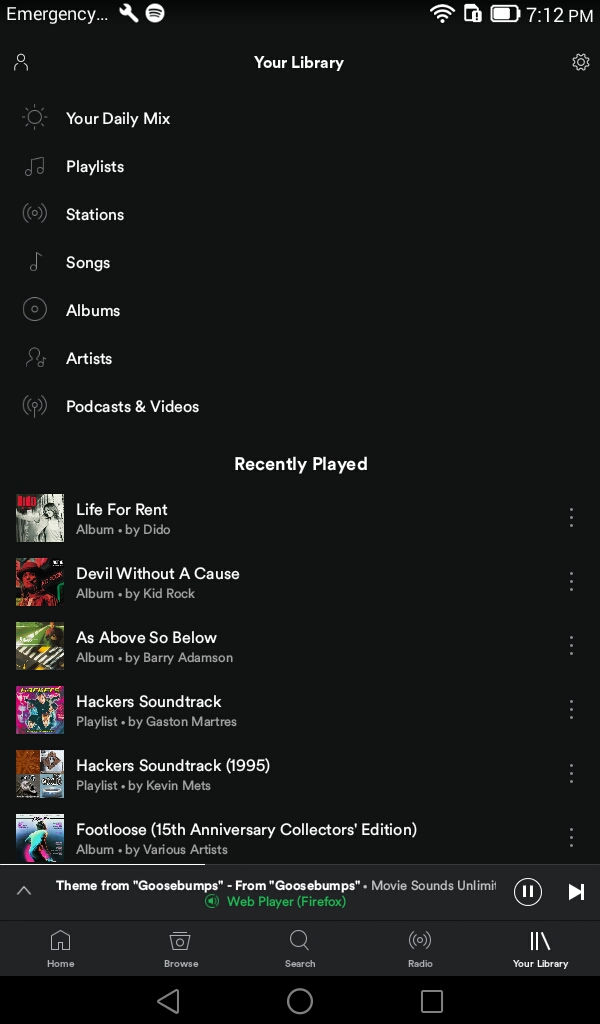


Hey @Threesom666!
We've recently released a new version of the app (8.4.19). Could you try updating/reinstalling the Spotify app?
Let us know if that helps.

Hey!
We're closing this thread as we didn't receive an answer from you. If you're still having the same issue, just give us a shout.
All the best 🙂
Hey @Threesom666!
That's not cool! I've taken a look at your previous posts and see that someone from Spotify asked if you could send over a screenshot of what you're seeing? Could you send one over? I'd love to take a closer look. Let me know! 🙂
Have a lovely day!