[Tutorial] How to Disconnect Spotify from Facebook

Hey there,
To disconnect your Spotify account from Facebook:
- Open the Spotify desktop app.
- In the top-right corner, click the dropdown menu arrow, then Settings.
- Under Social, click DISCONNECT FROM FACEBOOK.
Note: It’s not possible to complete these steps on mobile.
If you’re not seeing this option, it means you created your account with Facebook, so it’s not possible to disconnect. If this is the case, check out your next steps at this support article.
I hope this helps!
Accepted answers
All comments

There's a small step in your guide that could be easier.
You can drag a subscribed playlist to the "New Playlist" button which will instantly copy the playlist and make it owned by you.
Added, thanks for the feedback! I did not know that was possible! 🙂
Peter

Thank you very much for posting this!

So, how long are we expected to wait before there is an official way to disconnect my premium spotify account from my old facebook account that I wish to delete? I appreciate this unofficial method, but I would feel more comfortable with official steps from the Spotify team.

Hi!
I'm trying to disconnect my spotifyfrom my facebook so i can shut my facebook down. I used your tutorial however could not find the social network tab, The only option is to uncheck "Share on Facebook what i listen to" which is unchecked BUT sharing on Facebook anyways. I'm also on a premium account. How the **** do i do it? I just want to get rid of facebook. Let me goooooooo.....
@user-removed wrote:Hi!
I'm trying to disconnect my spotifyfrom my facebook so i can shut my facebook down. I used your tutorial however could not find the social network tab, The only option is to uncheck "Share on Facebook what i listen to" which is unchecked BUT sharing on Facebook anyways. I'm also on a premium account. How the **** do i do it? I just want to get rid of facebook. Let me goooooooo.....
Hey 🙂
Did you read step 1?
If you created your account using Facebook, you won't have the disconnect from Facebook option, since your account is tied to Facebook. In that case you will need a new account as described in the tutorial.
Peter

Hey!
I tried doing what u said, and reinstalled spotify. But my facebook name is still in the corner instead of my spotify username!
What do i do to get rid of it?
@Sacklitch wrote:Hey!
I tried doing what u said, and reinstalled spotify. But my facebook name is still in the corner instead of my spotify username!
What do i do to get rid of it?
Sometimes it can take a little while for the data to disappear from the Spotify servers. What is your spotify username?
Peter
sebastian.oster
Okay, just checked out your profile, it does not show any Facebook information or your real name.
Try another clean reinstallation maybe?
Peter
ok. so it just says sebastian.oster?
Can i still have a shared playlist with someone else without a FB account?
Yup, see:
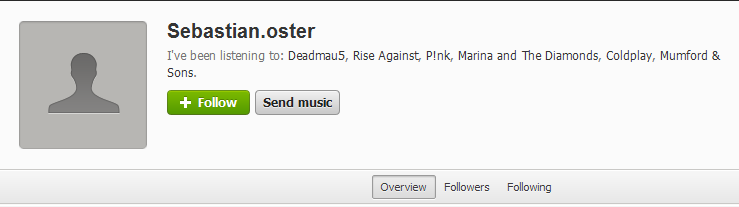
And yes you can, it becomes a little more difficult if you need to find your friends though since you will need to search for their Spotify usernames if you want to follow them (via spotify:user:USERNAME).
Peter
thank u very much!
Peter
I have to do all this? now I'm mad!
this is stupid. I have to do all this. why not make a link where I can download my playlist and then import that into the app? this is so much work and confusing. I tried drag and dropping my playlist. that didn't work. I'll just start all over again.
This was written as a do it yourself kind of guide, if you need help in migrating the customer services team will be able to help you out if you email them.
Peter

Wow. This is really an unecessarily compled situation. Can't Spotify handle some of the gruntwork for people who wish to migrate/disconnect?

I'm not sure, but I might have found something useful for accounts created with Facebook.
It is not possible to log in to your account via Facebook on some devices (like speakers). Over here, you can see your account number and set a device password to work with. I tried to use these to log in to the Spotify desktop and web apps, and it worked, even after changing my Facebook password! The only noticeable difference, strangely, was the disappearance of the preference option to share activity on Facebook. My music, home page, account picture, and Facebook friends were still as they used to be.
Since I don't want to delete my Facebook account now, I can't verify whether this would indeed be an nicer way to disconnect from Facebook.
@florean wrote:I'm not sure, but I might have found something useful for accounts created with Facebook.
It is not possible to log in to your account via Facebook on some devices (like speakers). Over here, you can see your account number and set a device password to work with. I tried to use these to log in to the Spotify desktop and web apps, and it worked, even after changing my Facebook password! The only noticeable difference, strangely, was the disappearance of the preference option to share activity on Facebook. My music, home page, account picture, and Facebook friends were still as they used to be.
Since I don't want to delete my Facebook account now, I can't verify whether this would indeed be an nicer way to disconnect from Facebook.
It wouldn't work unfortunately, using those details to log in still logs you into a Facebook account (just means the authentication is taking place on the Spotify systems rather than the Facebook ones), so if you deleted your Facebook account your account would still become inaccessible.
Peter

I wish I had seen this post a few weeks ago. I deactivated my FB account and with it went Spotify and all my playlists. I'm now considering reactivating FB for a bit just to recover those playlists.
Thanks for the Info!
@Ma_Ria wrote:I wish I had seen this post a few weeks ago. I deactivated my FB account and with it went Spotify and all my playlists. I'm now considering reactivating FB for a bit just to recover those playlists.
Thanks for the Info!
If you still have your Facebook details, create a new non-Facebook ("Using my email address" option) Spotify account from the signup page and then get in touch with the team and they will be able to get the playlists moved over to that new account for you 😉
If you get an automated email reply back directing you to the community or help pages, you need to reply directly to that email (even if its from no-reply) and one of the customer services agents will get back to you as soon as possible.
Peter
That would be wonderful! Thank you again

Hi, and thanks for your tutorial,
When I first created my spotify account, it was with spotify, my username was alisonsghost and everything was (very kindly) free. I was away for a year or so and when I came back, in order to access this account they a) made me pay, and, possibly get to it via facebook, Or I may have used it again first through the facebook spotify app. I've been upset by the fact that my username has been replaced by my real name, which doesn't feel safe and interferes with my warm, musical bubble:).I didn't realise it was going to happen as I had no idea that facebook had bought spotify. .I'm about to get rid of facebook (again) but very much want to keep my spotify account.
The reasons I'm still confused are a) that in trying to check which category my account fell into, I followed your advice on going to edit , to disconnect from facebook, to find that I already was disconnected, even though my real name still appears. I got rid of the spotify app on facebook last night which might explain it. And b) I've just tried to log in using my facebook details to check the 10 digit advice, and got first a message asking me to sign in as alisonsghost (as usual) followed by a full screen suggestion that I might like connect with facebook and bring all my friends!
I'm not too bothered about playlists as I've been able to play very little since paying for the service in contrast to the amount I was able to play before, but I'm reluctant to get rid of this account in case I can't start another with my email address . I would be grateful for any help 🙂
@alisonsghost wrote:Hi, and thanks for your tutorial,
When I first created my spotify account, it was with spotify, my username was alisonsghost and everything was (very kindly) free. I was away for a year or so and when I came back, in order to access this account they a) made me pay, and, possibly get to it via facebook, Or I may have used it again first through the facebook spotify app. I've been upset by the fact that my username has been replaced by my real name, which doesn't feel safe and interferes with my warm, musical bubble:).I didn't realise it was going to happen as I had no idea that facebook had bought spotify. .I'm about to get rid of facebook (again) but very much want to keep my spotify account.
The reasons I'm still confused are a) that in trying to check which category my account fell into, I followed your advice on going to edit , to disconnect from facebook, to find that I already was disconnected, even though my real name still appears. I got rid of the spotify app on facebook last night which might explain it. And b) I've just tried to log in using my facebook details to check the 10 digit advice, and got first a message asking me to sign in as alisonsghost (as usual) followed by a full screen suggestion that I might like connect with facebook and bring all my friends!
I'm not too bothered about playlists as I've been able to play very little since paying for the service in contrast to the amount I was able to play before, but I'm reluctant to get rid of this account in case I can't start another with my email address . I would be grateful for any help 🙂
Hey! Welcome to the community 🙂
Just had a quick look at your account (from my limited view) and I can confirm it is not connected to Facebook.
Be sure you are logging in using your username "alisonsghost" and your Spotify password and you should be good to go. If you are still seeing your real name in the desktop client, a quick clean reinstallation of the client should sort that out for you.
Also just a note, Facebook does not own Spotify 🙂
Peter
Thanks for your reply. Weirdly, I just went back to my spotify page - and found that I had to disconnect it again, even after I'd just turned down the kind offer to connect with facebook. Apologies for the long post, but I was awake til 4am trying to sort this out and my brain no longer works. I'm also very very pleased to hear that facebook does not own spotify:)

I have the very same problem. There MUST be some other reason why Spotify makes things so damned complicated! Just a button
" Disconnect from Facebook" would do the trick. I do hate makers that want you to obey to their orders for undefined reasons.
I might leave Spotify forgood and go back to the old ways and keep in charge of my computer rather than others who obviously benefit....can't think of any other reason. Same goes for Facebook and their developers.
Willem
There is a reason why you can't disconnect, as Rorey outlined in my Ideas topic about this issue here.
Thanks so much to everyone!

At the moment, we're unable to implement the idea suggested above for a few reasons. As a few of you have noticed, our system currently doesn't support the changing of usernames since playlists are tied to usernames. Many folks who created accounts via Facebook before we implemented an email registration option would like the option to "transfer" their account to another.

You can indeed follow the instructions in Peter's aforementioned guide to transfer your account. Moreover, we understand the want for a simpler way to move to an email created an account instead of a Facebook created account. However, we won't implement an option to "transfer" your account at this time.

If you have any questions about how to transfer your account, follow Peter's guide for the quick fix or contact customer support.
With that in mind, I do understand why its not possible but it is a real pain!
Peter

I am tired of having to change my preferences on sites that decide to expose my information to the public, (HELLO, DID YOU NOT LEARN FROM FACEBOOK?) without my permssion. SPOTIFY, I pay 9.99 per month; I have many other options out there, and the only thing keeping me using your product is that you product WAS reliable, and I will have to start over again with my play lists. That's not a lot to keep me paying you money for a broken, insecure product. Kind of like Facebook. It's a reoccurring theme here. Again, your product WAS reliable. As in I cannot use your app on my phone any longer, and I'm not the only one. Get your product fixed, otherwise people will wise up and change to the google version of your product, or go back to good old fashioned CDs. Which I never had to worry about connecting to my anything without my permission. How in the world did we get to the point that we can't feel secure even listening to music without that being shared without us knowing???
Signed,
A very unhappy and disgruntled customer
Hey folks, we're going to stop new replies on this thread as it is very old.
To disconnect your Spotify account from Facebook:
Note: It’s not possible to complete these steps on mobile.
If you’re not seeing this option, it means you created your account with Facebook, so it’s not possible to disconnect. If this is the case, check out your next steps at this support article.
I hope this helps!