High CPU usage (Windows 8.1)

* Laptop Asus K55VJ with Windows 8.1 x64
* Spotify Version: 1.0.65.320.gac7a8e02
* Clean Installation didn't fix it.
* No Firewall problems.
I've been using Spotify at least since last year, never had such problem.
This happened out of nowhere. Opened the program, played some songs then i realized the fans were making too much noise. Opened the task manager and i see an average 30% of CPU usage (see attachment).
Terminating the problematic task makes Spotify fade to black but then unfades to its normal aspect, that specific Spotify task also ressurects. This takes less than a second.
While i do this, the music doesn't stop either, just keeps playing like nothing happened.
Thanks for the support.
Rafael
Comments

Hello,
I got a similar problem with this Desktop app version and windows 8.1 64-bit. Sometimes the spotify.exe processes start using a lot of CPU, as you can see in this screenshot. If I close spotify, this stops the high CPU usage immediatly. And I don't use spotifywebhelper.
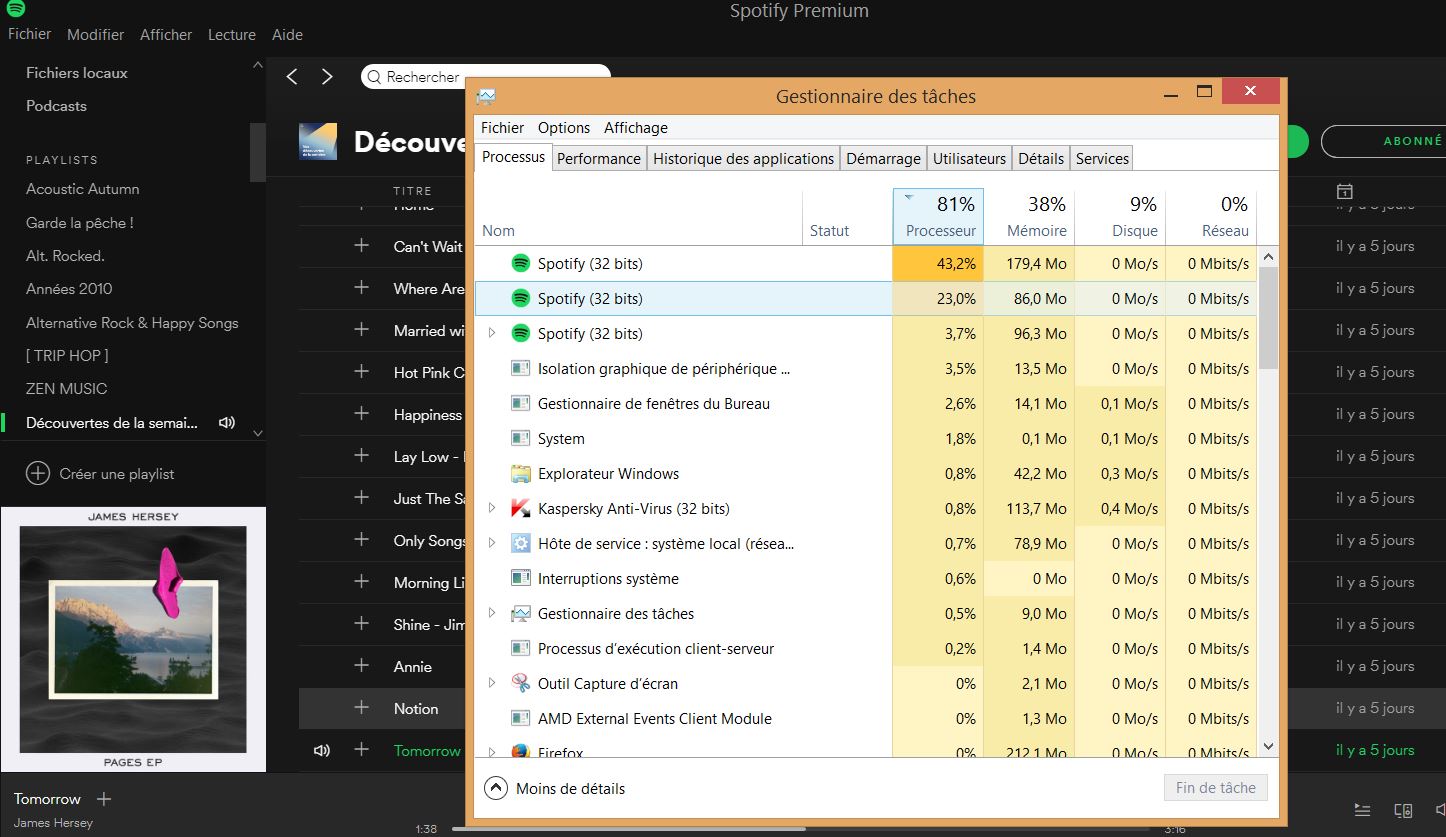
If I stop the playback, nothing changes, the CPU is still very busy.
Could you please take a look at win 8.1 and your app?
(I don't have an external monitor)

Hi everyone!
We'd like to gather a bit more info regarding this:
- Have you used the Download option in a public playlsit?
- How frecuently do you guys see this is occuring?
- When was the first time you noticed this started happening?
Can you try reinstallig Spotify using the full installer from here? To install it, just make sure to right-click it and select "Run as Administrator". Also, try temporarily disabling any anti-virus or firewall you have running on your computer (you can update Spotify after this has been done).
Keep us posted.
Hi!
- Have you used the Download option in a public playlsit?
I've never used the Download option...
- How frecuently do you guys see this is occuring?
It's unsettled, sometimes I get this problem twice a hour, sometimes only one time in a hour.
- When was the first time you noticed this started happening?
I think it started happening with the update 1.0.65.320.gac7a8e02 or the update just before.
I've just reinstalled spotify with your .exe, I'll see what will happen...
😉

Thanks for all the info @S3ndG.
Be sure to let us know how it goes with the reinstall.
We'll be right here waiting on the results.
OK so I listened music with the latest spotify software and no issues happened about CPU usage since the reinstall.
I hope it will continue like this 🙂
We're glad to hear this @S3ndG!
If the app starts acting up once again, let us know. We'll see what we can suggest.
Cheers!


Hello 😕
Today a few minutes after launching spotify for windows, the app started to use a lot of CPU (80%).
Maybe it's the auto-update process? THere is no new version but maybe the app checks that... I don't know but this issue is boring.
app version : 1.0.66.478.g1296534d
When I close the process which is causing high CPU usage, spotify continue working, and the process is restarted automatically. That stops the high CPU usage.
Hey @RafaelCC!
That's strange. Does the CPU usage drops when you exit your internet browser? Also, do you have an external monitor attached?
We'll see what we can suggest.