Tracks not playing on Google assistant when phone is locked and controlled from a car

Hi there, I have a button in the car which, when my phone is connected via bluetooth, it activates my Google assistant, even when the phone is locked.
I've noticed that when I ask for a song to be played while another song is playing and the phone is locked, Google assistant says it's putting the song on for me and the same song keeps playing, and doesn't change, so after about a minute of the song I didn't want, I paused it and left it off.
Weirdly, when I got home and unlocked my phone, maggot brain (the song I had asked for) was sitting in the now playing section and was paused about a minute in.
The car is a 2017 Citroen C3 but I doubt that makes a difference since I doubt that Bluetooth control isn't standardised.
Comments


Hi Monica_L,
Thanks for looking into this issue.
I'm using Spotify version 8.4.23.784 armV7 on Sony Xperia XZ - android 7.1.1
There is no difference if I add or remove Spotify to Battery optimizations.
And I've recently started to use Google assistant with Spotify and noticed this issue.
Google Assistant works fine with google play music when phone is locked.
Hi, I'm using a galaxy S8, android 7.0 and Spotify 8.4.23.784 (latest update). I only just set up the Google assistant to use Spotify so I don't know when it started sadly

Thanks for the info, @liddad and @yuri_k!
Just to check, does this happen when you're under a different internet connection, such as a WiFi network, or another mobile data connection (via tethering)? It's probably obvious, but we'd also like to know if you're telling the Google Assistant app to play music with explicit commands (i.e. "play David Bowie on my bluetooth headphones", or "play Michael Jackson on my Citroën). If so, please tell us if the same happens when you connect your devices directly via our app, instead of Google Assistant.
We'll keep an eye open for your reply 🙂
Hi @JulianA_Bogota,
There is no difference which connection is used, I've tried wifi and 4g. It works fine when phone is unlocked and stops working next second after phone is locked. Also it works fine with Google Play Music with music which I don't have on my phone. It looks like Spotify isn't allowed to play music when the screen is locked.
It's not required to ask Google Assistant to play music on my bluetooth headphones as it's connected as default media output device, so all sounds goes there once it's connected.
Also if ask Google Assistant to play, for instance, Coldplay on Spotify when phone is locked, it says: - Allright, asking Spotify to play Coldplay and nothing happens, but after phone will be unlocked, there will be Spotify with Colplay artist page opened, but audio is paused and artist/track name is what was played previosly. Here is the screenshot: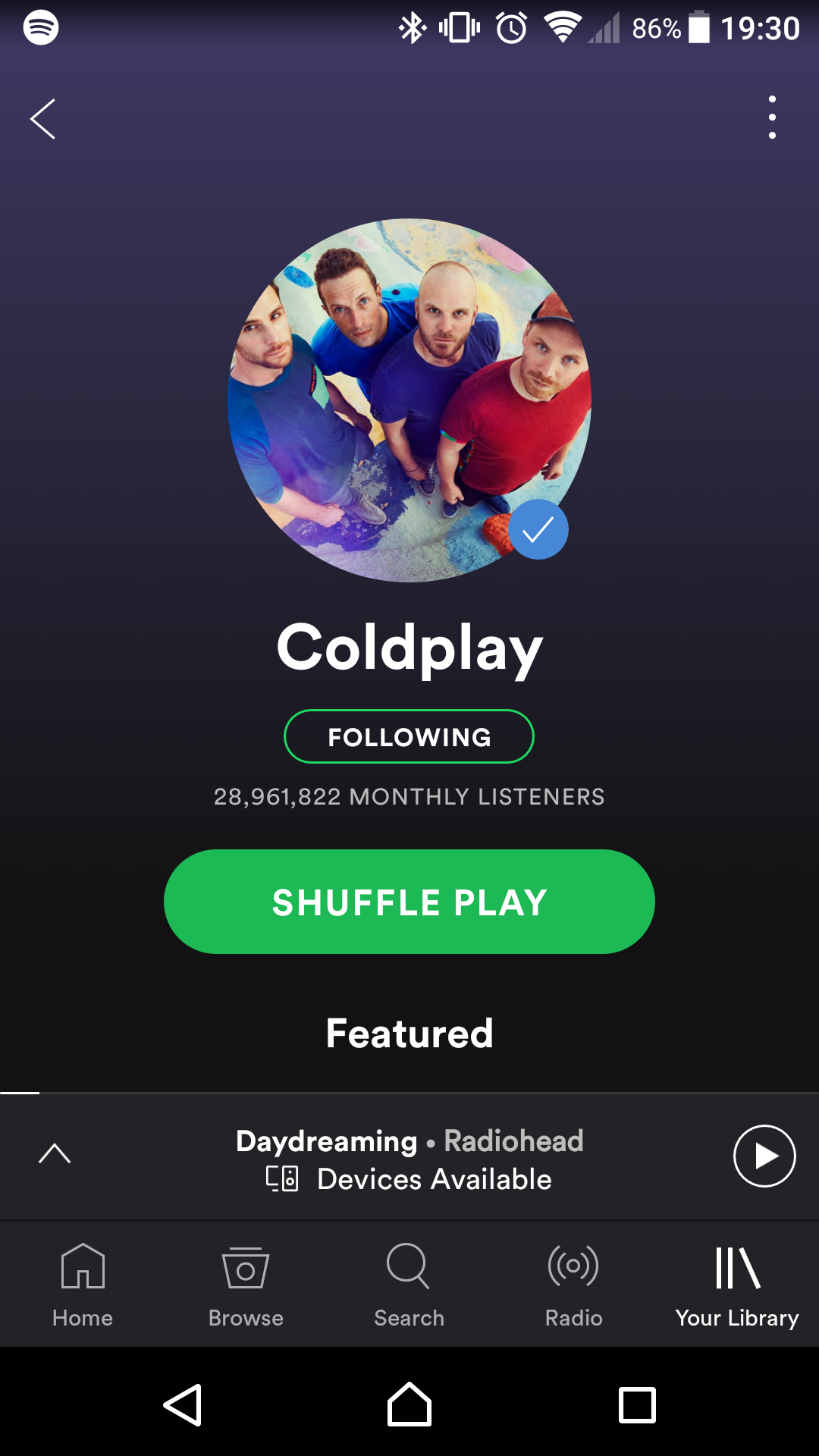
Hi @JulianA_Bogota, it's the exact same as @yuri_k here! Except (iff I have paused the song through the car and not the phone) when I unlock the device afterwards the UI says that the requested song is being played as opposed to the previous song as in @yuri_k's situation. (ie for yuri's example I'd still have heard daydreaming by radiohead, but coldplay would be shown as paused instead of radiohead). I've not tried unlocking the device while the song is still playing, or pausing it in another way yet, but I'll put a post up later with what happens.
It all works when the phone is unlocked, and it works through my earphones when I set the google assistant to unlock the phone when it hears "OK Google" through the earphones.
I just tried it on another bluetooth device but couldn't do it while the phone was locked sadly, although I did notice that whenever I did play something through google assistant while I had a play queue (from an unlocked phone), the album picture was the one from the next item in my play queue instead of the song that started playing. Could this be related to it?
P.S. @yuri_k you could solve your problem by changing the google assistant settings to unlock the phone when it hears "ok google" through your bluetooth headset. I know using a button to activate the assistant may be easier for you but this would allow you to operate handsfree on an unlocked phone so it would work in your case.
Hi @liddad
Thanks for the suggestion, but this aption only allows Google Assistant to respond to voice commands when device is locked but with screen ON, so you have to press power button on the device, or put it to charger.
Otherwise it will consume too much battery as it will be listening for voice command 100% of the time while not on charger.
In my case there is dedicated button on bluetooth headphones which activates Google Assistant with screen OFF and locked, which is very convinient as I could control the phone without getting it out of the pocket.

Thanks for the extra info folks!
It's odd that this happens, but most likely we'll report it to the right team to take a closer look. However, we'll like to gather as much info as possible. Can you try a clean reinstall of the app with these steps? Let us know if it makes any difference when using Google assistant.
Keep us posted.
@FabianS_Bogota sadly I've had to send my S8 away for repairs last week, but I'm using an S7 edge right now and it doesn't happen, which is odd. I'll give that a shot when I get my S8 back and keep you updated 🙂


Hi @ZullyB! I got my phone back yesterday and the problem still happens after a reinstallation. Although I've now realised that it seems to only happen after Google doesn't understand me properly, it'll only fail after thats happened! That might narrow it down a bit hopefully!

Hey @liddad, thanks for checking!
It's worth trying the Google Assistant on your car with other apps to see if the issue is related to the voice commands. In case it's only with Spotify, could you try with a different mobile device?
Be sure to let us know how it goes 🙂
Hey folks!
Hopefully everything's working fine now. It's been a while since the last update on the post, so we'll close it for now. If you still need help, we'll be right here for you.
Take care!
I have exactly the same issue when trying to control Spotify using Google Assistant on my Android phone with Bluetooth Headphones