Ad pops up at the bottom of the web player (raisin bran...) - slowing up Spotify

there is this raisin bran ad that pops up at the bottom of the player. I dont know whether its a flash ad or something else, but it slows all of spotify and somehow the rest of my pc down to a considerable amount. This has happened 5 or 6 times, each resulting in me having to restart spotfy- hoping this ad wont pop up and slow my packet tracer software, google, etc down to a snails pace(i click on pause and the action doesnt complete for about 2 minutes, and thats if it does).
I await your help and advice, but im just asking for a rework on the ad itself. The logo has the raisin bran cereal in the background with the smiling sun in the front taunting and pissing me off in a very mild way.
Please get rid of this ad, or see what you can find is wrong in the html
im not even a raisin bran kinda guy
come on
Comments
OS: Windows 7 Home Premium
SPotify Version: 1.0.65.320gac7a8e02

Thanks for letting us know!
Are you having the same issue after trying with the suggestion @MonicaM_Bogota sent? Just to check, if you log in to another device, do you get the same issue?
We'd recommend giving it a go from another account and let us know how it goes 🙂
Take care 🙂
tried the suggestion, and spotify seems to not respond at all when i click uninstall, i'm not too sure what logging into another device would do for my situation. Say if i conjured up another account, id still run into the same ad that slows virtually 70% of the processes on my machine like its doing currently? whats the logic on that one, i dont get it. thanks for the suggestions but ill probably just revert back to an older version for now

Thank's for trying @la_soupe!
If you weren't able to uninstall Spotify, we'd like you to try to download a new installer here. Then run that new installer even though Spotify is already installed in your device. This should help refresh the app in your device.
If you get the same ad again, can you send us a screenshot where we can see it? We'd like to gather all the info we can in order to check what's going on.
Keep us posted.
Did the reinstall the other day, decided not to touch spotify. And this is what i run into after playing a 2nd song...took me 15 minutes to snip a screenshot and upload it because of the outrageous spike in resources hit my pc took from this.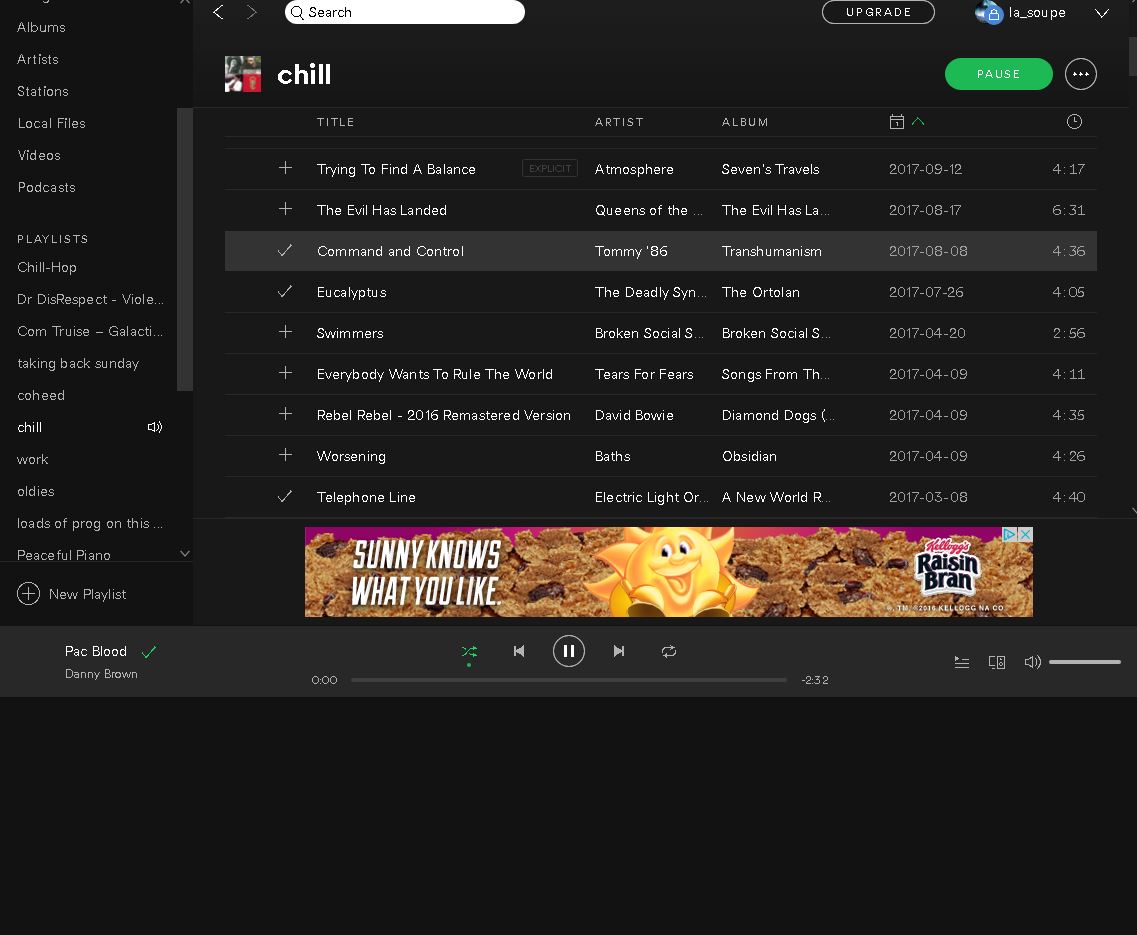

Thanks for the information you've provided so far @la_soupe!
Just a couple of questions:
- Is this happening just with the Raisin Bran ad?
- When did you noticed this started happening?
We'll take a closer look into this.
About a month ago, and its only been with just this ad.

Thanks for letting us know! Before we pass this on to the right team, could you tell us the exact make and model of your device? We'll get to the bottom of this.
All the best,
/L
Windows 7 home premium
amd quad core 3.4 ghz
no other devices used besides the desktop
Thanks for the info @la_soupe!
However, @Leo is referring to your device's maker and model rather than your operating system and processor information. Is this a self-built PC or a laptop/built PC? If you know your PC model, let us know. On the other hand, if it is a self-built PC, let us know all available specifications for it.
Keep us posted.

I also have this issue with the same raisin bran ad, and considering my computer is a luxury 2000 dollar pc with top tier hardware, this is something sketchy in this raisin bran ad.
OS Name Microsoft Windows 7 Home Premium
Version 6.1.7601 Service Pack 1 Build 7601
Other OS Description Not Available
OS Manufacturer Microsoft Corporation
System Name OWNER-PC
System Manufacturer Gigabyte Technology Co., Ltd.
System Model GA-78LMT-USB3 6.0
System Type x64-based PC
Processor AMD Phenom(tm) II X4 965 Processor, 3400 Mhz, 4 Core(s), 4 Logical Processor(s)
BIOS Version/Date Award Software International, Inc. F2, 11/25/2014
SMBIOS Version 2.4
Windows Directory C:\Windows
System Directory C:\Windows\system32
Boot Device \Device\HarddiskVolume1
Locale United States
Hardware Abstraction Layer Version = "6.1.7601.17514"
User Name Owner-PC\Owner
Time Zone Central Daylight Time
Installed Physical Memory (RAM) 4.00 GB
Total Physical Memory 4.00 GB
Available Physical Memory 1.06 GB
Total Virtual Memory 7.99 GB
Available Virtual Memory 4.33 GB
Page File Space 4.00 GB
Page File C:\pagefile.sys
Hey @la_soupe,
Thanks for the update! We've reported this to our devs; hopefully they'll have it sorted soon.
In the meantime, if you have any questions or updates, just let us know 🙂
Leo

Hey @Devann
Sorry to hear that this is also happening for you!
Could you confirm your exact...
Device (make/model):
Operating system (+ version):
Browser (& version):
Screenshot of the issue if possible:
We'll get this reported to the team who are looking into things too.
Many thanks,
/M

Hey there!
Thanks for your reports about this.
As we've not heard from you in a number of weeks, and after hearing back from the developers, we've decided to close this.
If you reinstall the app to ensure that you're now on the latest version, things should look good with the adverts on the Free Tier.
Hi, @la_soupe!
Welcome to the Spotify Community.
Could you let us know what device, operating system and Spotify version you're using? Also, cCan you try the steps here for us? They should help with this.
Let us know how it goes.