Why are my playlists/searches over-printed on each other?

Since my last Spotify update I am having issues with both Playlists & (Recent) Searches overprinting across each other making reading any line almost impossible.
Even after accepting the iOS update from Apple this didn’t resolve the issue, but made it worse. I’m using an iPhone 6S.
Can you help?
Comments

I am having the same issue
It worked thank u
Great news

Hey @cittauk! Thanks for letting me know about this.
That's not cool! Could you send over a screenshot of what's happening? Also, could you let me know your Spotify, OS and device versions? Let me know! 🙂
Have a great day!
This seems to fix the issue but will mean your Texts etc will return to normal size. It’s only a solution until Spotify address the issue that many iPhone users will opt to change their phone texts to larger texts etc.
Hi Spotify,
Many iPhone users will change their phone settings so they can have Larger Text sizes.
Unfortunately this has the effect that their Spotify playlists etc over print on each other making it difficult to read their playlists & tracks.
I use an iPhone 6S with iOS version 11.1.2, & opted to change my settings so I could enlarge the size of font on my texts, but this messed up my Spotify Playlist & Searches.
The solution I offered Devan seems to rectify this until Spotify resolve this with an update.
Hey @cittauk!
Thanks for letting me know! I definitely would love to take a closer look. Could you send over a screenshot of what's happening? Also, could you let me know your Spotify, OS and device versions?
Have a great day!
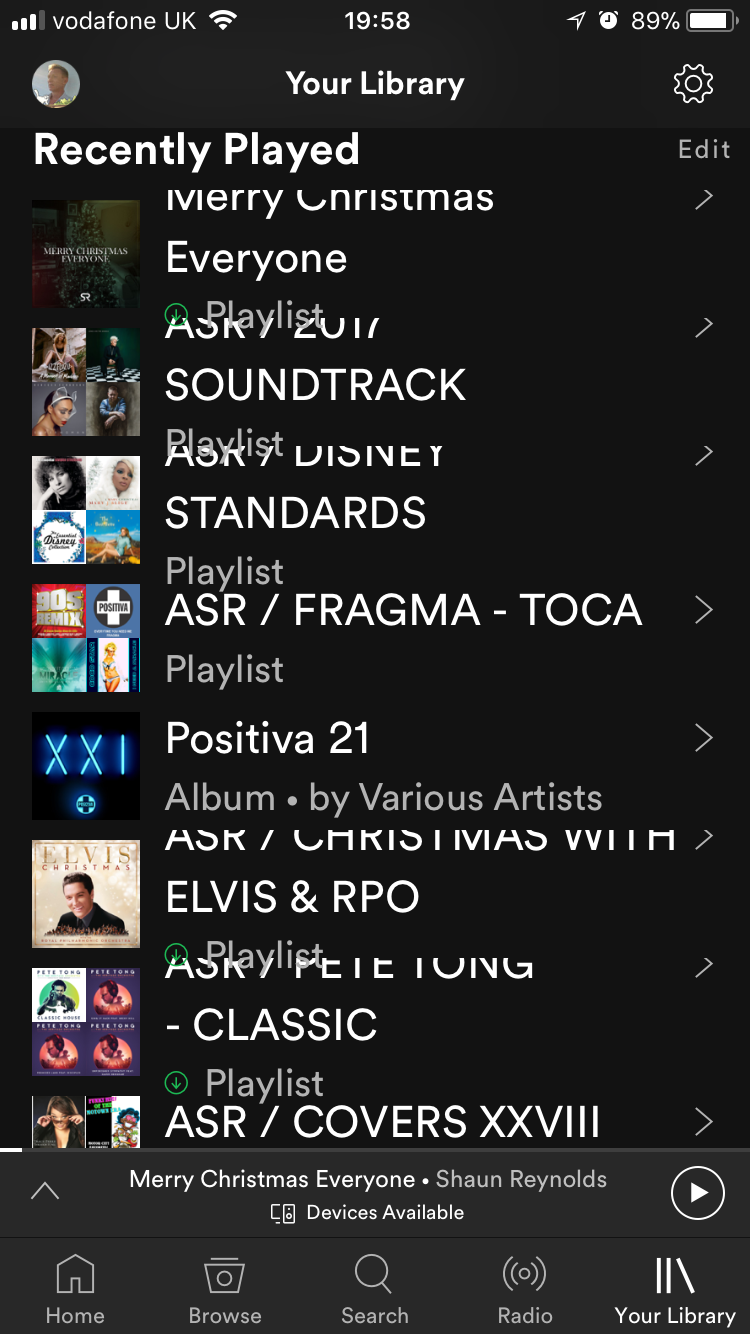
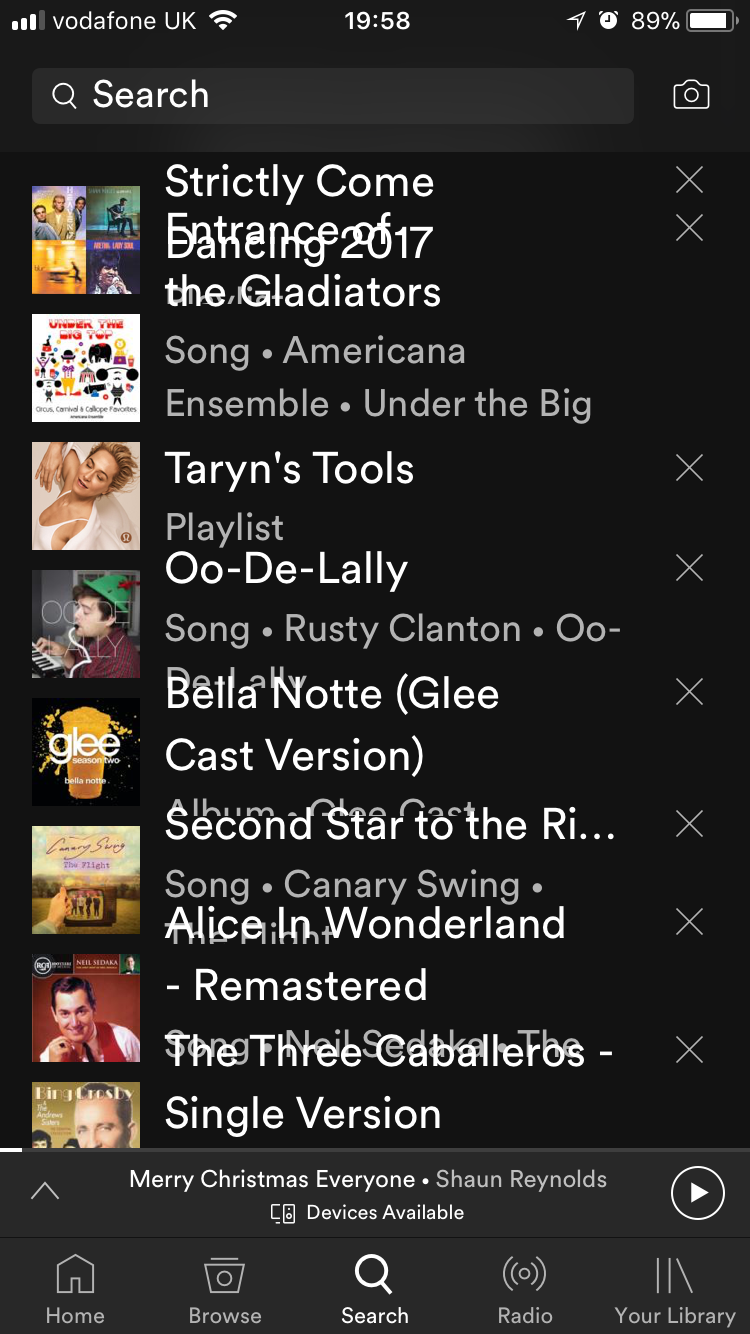
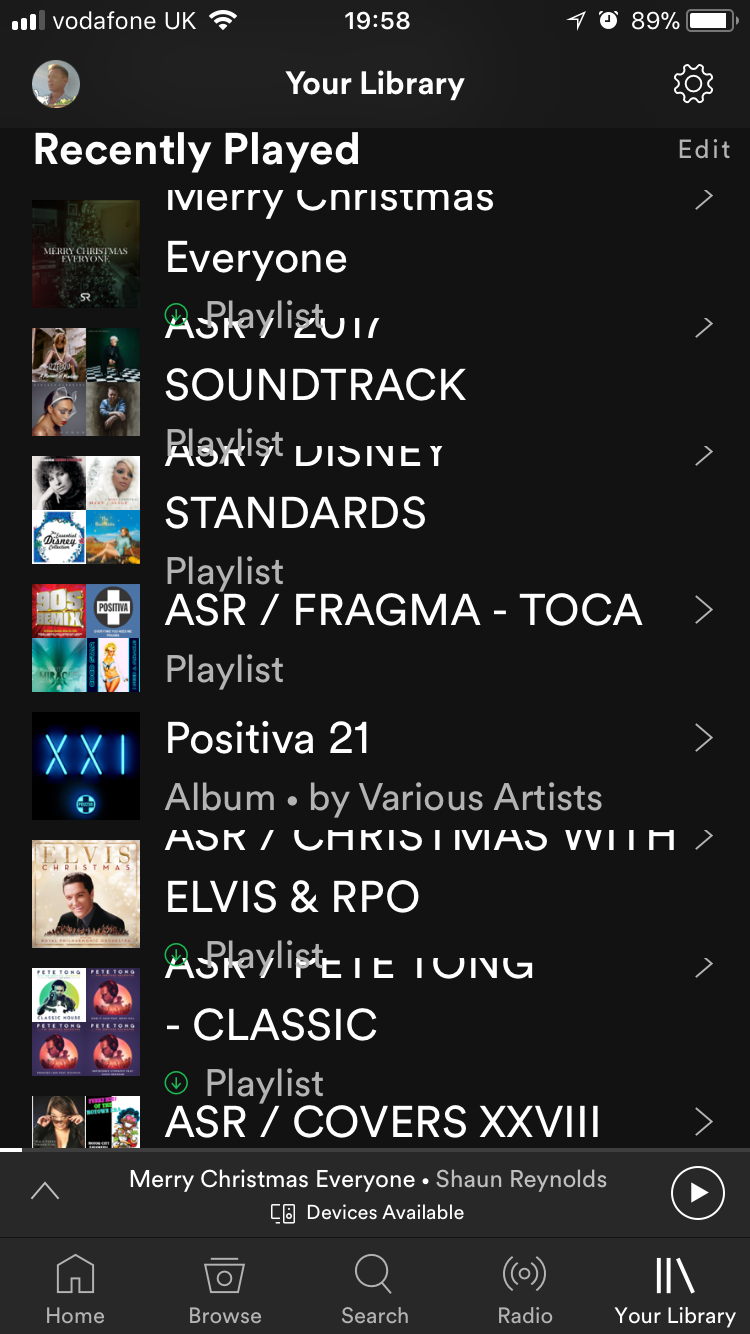
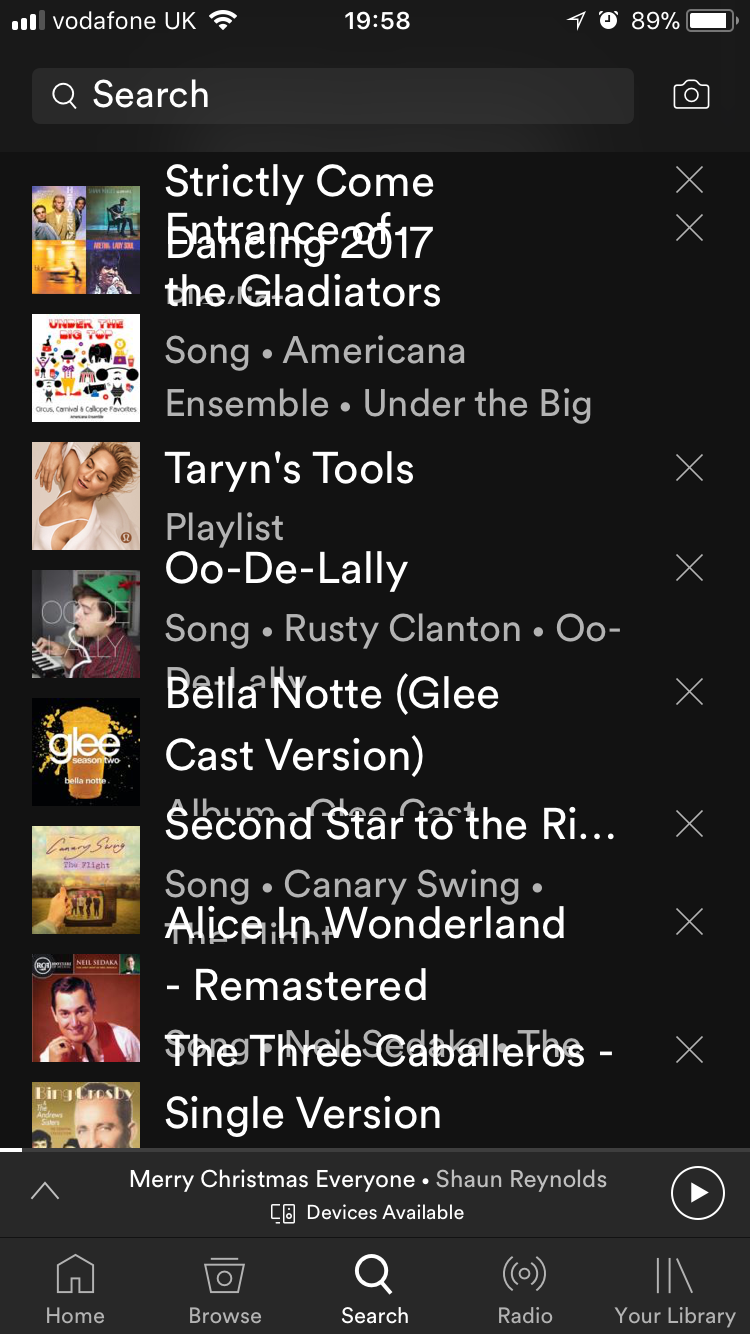
Hey @cittauk! Thanks for sending those over!
That doesn't look right! Could you try to reinstall the Spotify app with these steps? Also, could you send over your Spotify and device versions? I'd love to take a closer look.
Thanks, take care! 🙂
iPhone 6S using iOS 11.1.2

Thanks for the info @cittauk.
Could you also let us know the exact Spotify version you're using on your iPhone 6S? We'll be waiting for your reply.
Spotify version: 8.4.28.1104

Same problem here
Hey everyone!
Just to confirm, does reinstalling the app help at all? To do that, just follow the steps you'lll find here.
Try restarting your device by holding Home + Lock for 10 seconds. Does that help?
Let us also know if this happens only when using Spotify or if it's also affecting other apps.
Keep us posted.

This does not affect other apps just Spotify. Resets do not seem to help. Please find an iPhone and duplicate this error. Then you can fix it.

Thanks for the info @Not2soon!
We've tested on our end and everything seems to be working fine with the latest version of Spotify and iOS. Can you test a friend or family member's account on your device and let us know if the same thing happens?
Keep us posted 🙂
I have tried both my own account & then my partners Spotify account using my iPhone.
When I signed in I had my text size on my iPhone 6S as normal & both Spotify accounts seemed fine... until I then went into my iOS system to change the text size. Once I changed the text (General > Accessibility > Larger Text > On > used Zoom to increase text size), & went back to Spotify the overprinting returned - on BOTH of the Spotify accounts. (See attached uploads).
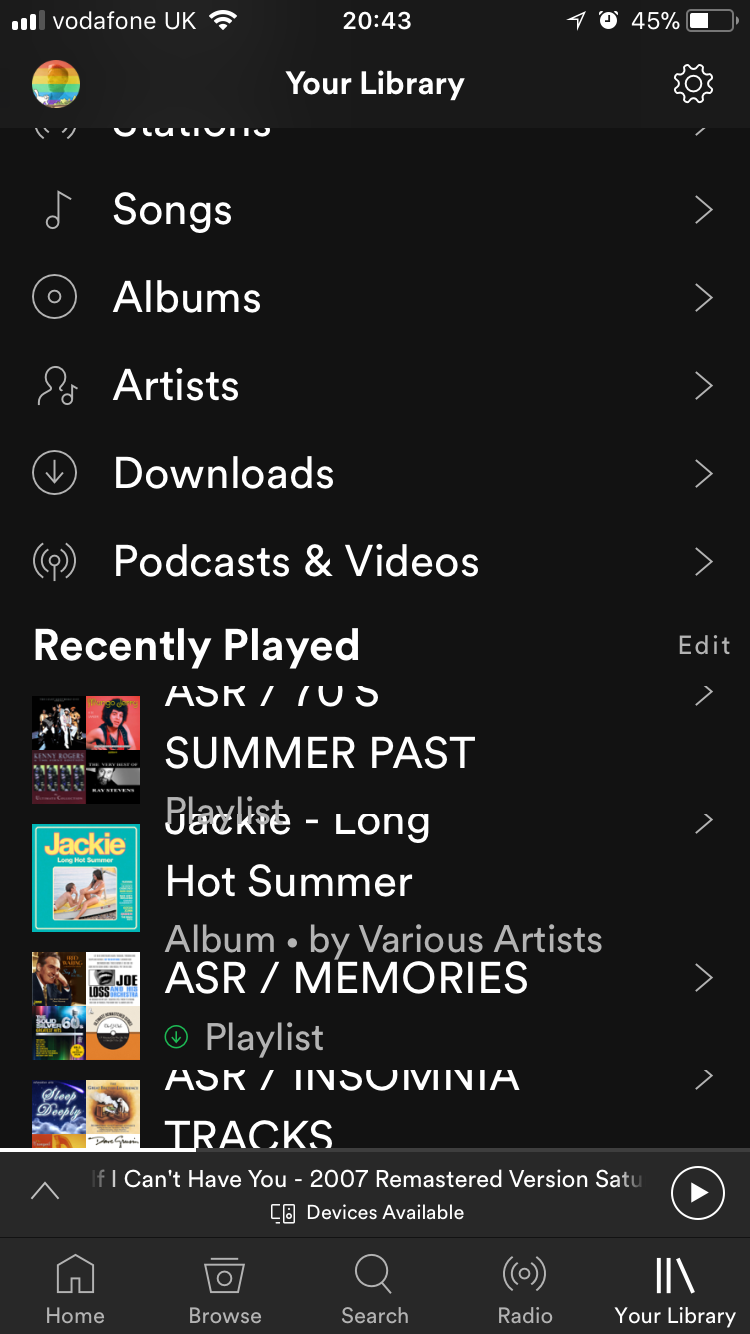 My account
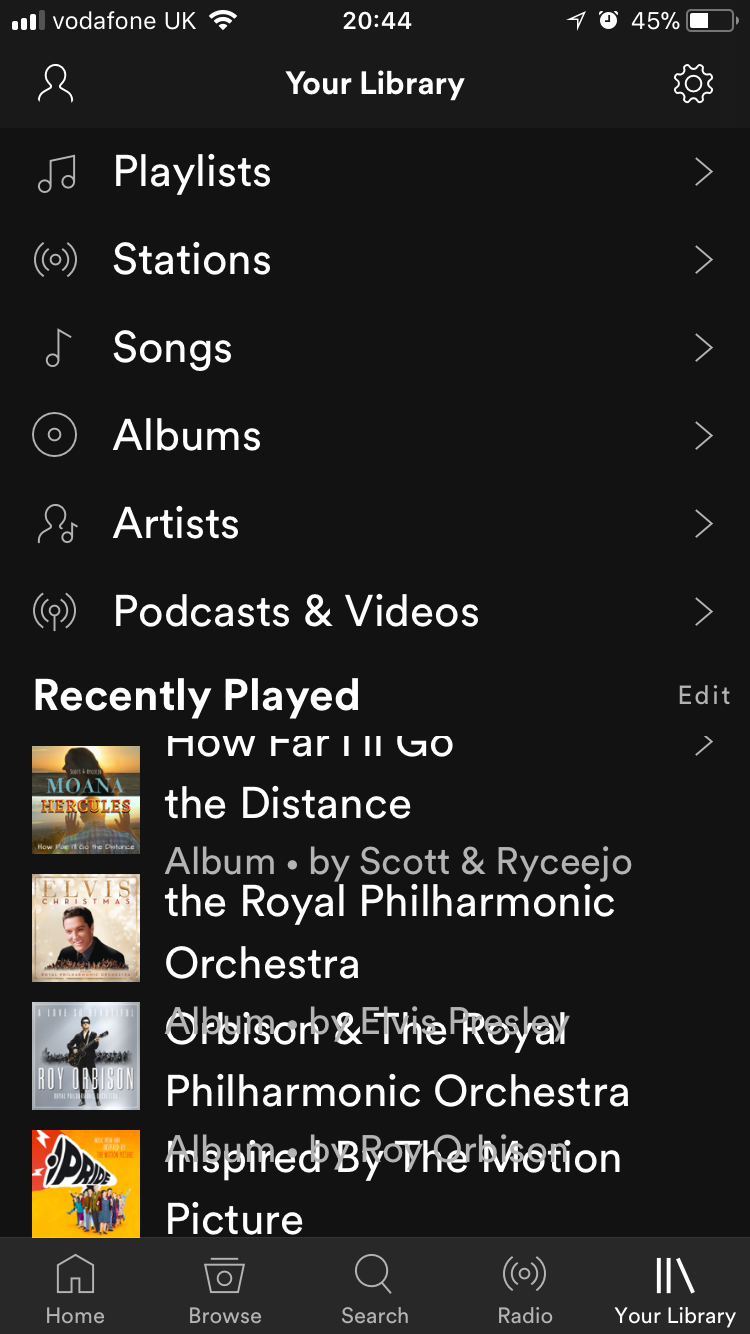 Partners Account
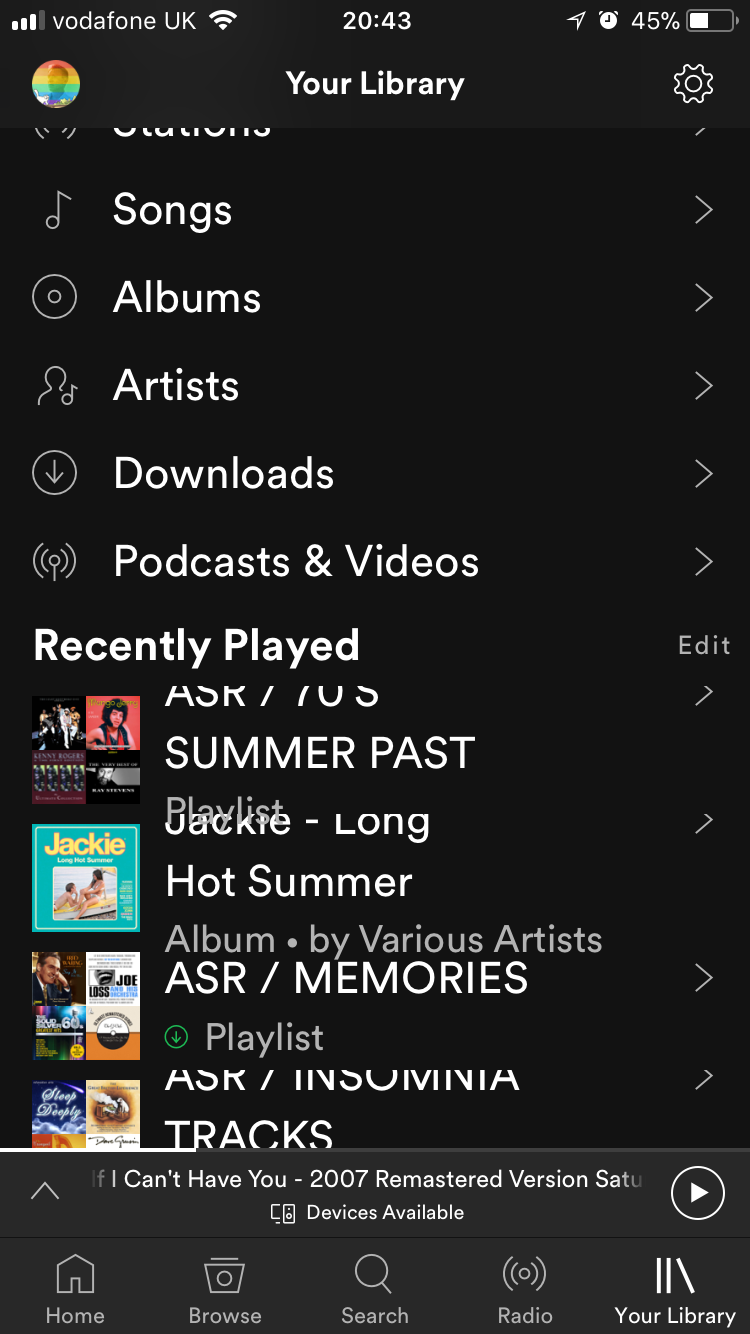
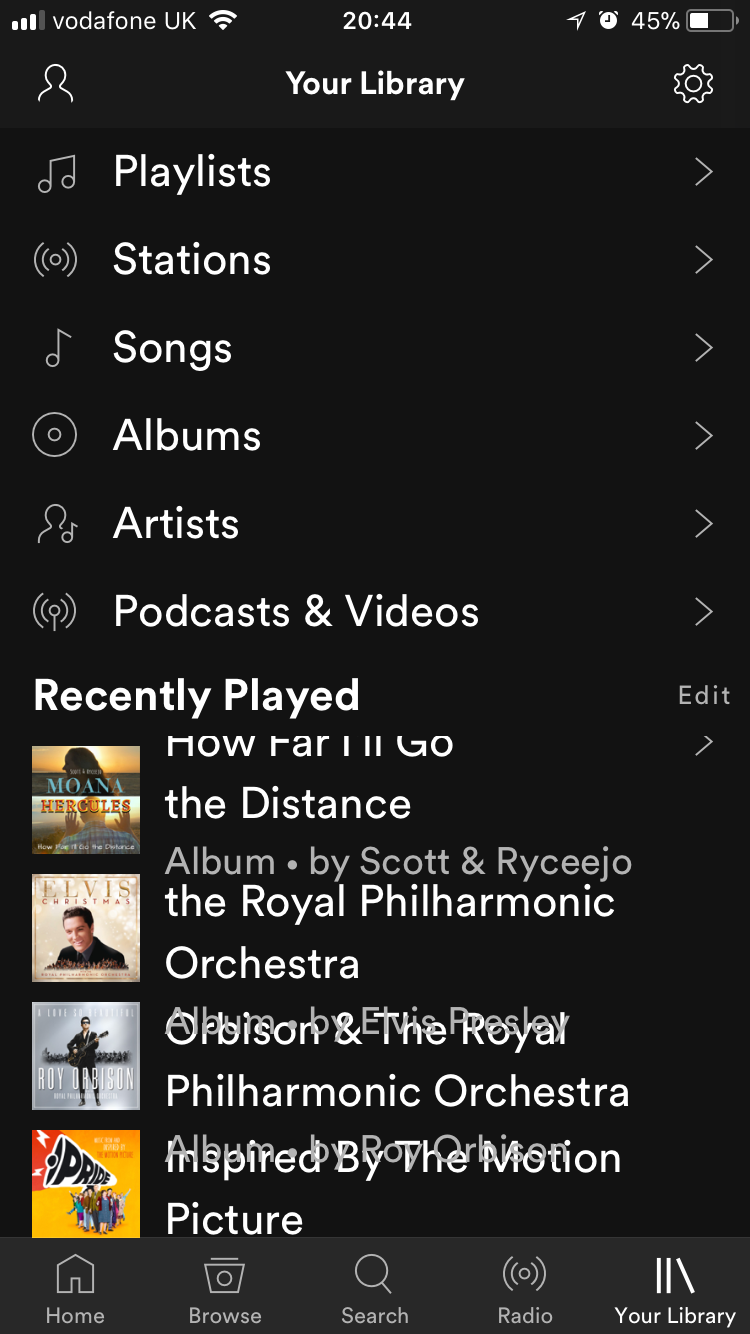

Hey @cittauk, thanks for sending these screenshots over!
Do you happen to have a different iPhone you could use to see if this is only related to the 6S? Also, is this only happening on the Recently played section or is it the same if you go into your Playlists?
Keep us posted.
I’ve tried it on my partners 7S (Plus) & when it’s changed to Larger Text the same thing happens. I noticed that there was something mentioned saying “Apps that support Dynamic Type will adjust automatically”.
Does Spotify support this Dynamic Type?
Why are Premium Members having to do the work for Spotify? Surely Spotify should know if it’s systems & Apps are in sync with Apple products!
I’m attaching as many screenshots as I have managed to take of every screen in Spotify’s App, from Library to Podcasts/Videos through to Home - Your Library tabs along the bottom of the screen.
Hey folks!
We've reported this on to the right team to take a closer look.
We'll keep you posted with any updates.
Cheers.
Remember Moderator you have to go into General Accessibility and choose larger text then bump it up. You aren’t doing that and likely why you can’t create the issue.
Hey, thanks for bearing with us!
We were able to reproduce this issue on our end and our Tech team are looking into it.
Any updates will be posted here in the future, so stay tuned.
All the best.
Thank you Spotify Team/Mods,
It’s been frustrating for me/us non-tech types to see the issue on our phones but not been able to persuade or articulate the problem, yet have to see it clearly on our phones. Not all of us are as familiar with the tech as we were when we were younger.
I recall how astounded I was with my Mum not getting to grips with the timer record function on a VHS machine, & how pleased I was when she finally learned.
So thanks for bearing with us. We just want it fixed as Premium Members, but hopefully you’ve learned too & future updates will incorporate Dynamic Text tests.

We understand! We can assure you the team are investigating this.
Hopefully they'll have some news for us soon.
As soon as we have an update, we'll let you know. Stay tuned!
I’ve discovered that it’s caused due to me having selected “Larger Text” on my iPhone 6S.
To resolve this whilst Spotify work out a fix I advise folk check their Settings on their iPhones.
Go to SETTINGS > GENERAL > ACCESSIBILITY > LARGER TEXT > Toggle this OFF.
I know this will reduce your text size etc, & is a pain, but seems to make Spotify Playlists & (Recent) Searches resort to normal.
Hooe this helps.