Albums (and Artists) cannot be played in offline mode on Samsung Gear Fit 2 Pro

Hi,
following scenario:
- Looking for an Album online via search function. ==> works
- Setting the Album to "Download" downloads all the songs. ==> works as well
However, when I go into "My Music" (don't whether this ais translated correctly actually it displays "Meine Musik") I cannot see any Albums at all.
The only items displayed are
- "Your Collection" - which displays a flat list of all downloaded songs - including the just marked ones.
- "Your Playlists" - which displays all available downloads.
If I compare this to the standard Spotify App on the my mobile, I miss at least Album, and Artist.
Any clue on how to play Albums (or Artists)?
Is this a bug of the Spotify Gear app for Samsung Gear Fit 2 Pro?
Thanks for any help.
Best,
Sven
Comments
Hey @SergioDavid,
it happens since using the app on the device (means Christmas this year). The Album tab is not visible at all - of course it is visible in the search menu, but not in the tab "Deine Musik" where I would expect it. Only "Your Collection" and "Your Playlists" are available.
Take also a look at the following screenshots:
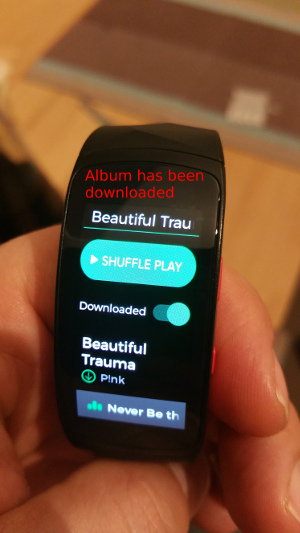 Album marked as downloaded (and waited for being downloaded) via the "Search" tab.
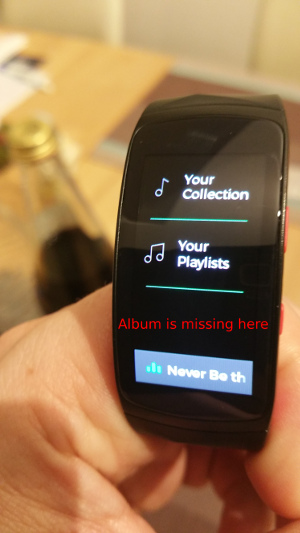 Content of "Deine Musik" - I miss "Album" here.
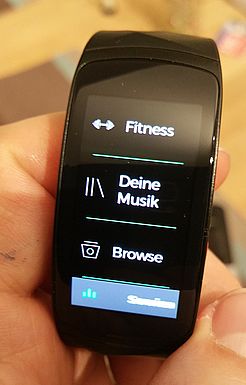 Downloaded Albums I would expect under "Deine Musik".
Best,
Sven

Hey @SvenFlossmann!
Are you saving the album to your collection, like following a playlist, or just downloading it to use offline? Also, are you able to see this album under the Albums section of the Spotify app on a different device?
Keep us posted.
Hi @Alfredo,
actually, I don't see any option to do following and downloading separately. I just press "Downloading".
If I look on other players (Smartphone, Webplayer), the Album has been added to My Music - so I assume, this works correctly and the "Downloading" button does both: downloading and adding it to my music.
btw: The songs are available for offline playing, but not the album.
Q: Did you ever saw an the Album tab within "My Music" - I cannot imagine that I'm not able to handle this correctly, nor can I imagine that this feature is missing...
Best,
Sven

Thanks for that info.
Could you try reinstalling the app on your Gear Fit 2 Pro? Let us know how it goes.
We'll be waiting.
Hi,
I reinstalled it twice.
==> Same issues. Albums are not displayed in Offline mode respectively in "My Music".
btw:
Is it supposed to work? Does the current version of Spotify for Samsung Gear Fit 2 Pro display Albums in Offline mode? I would expect yes, but can anybody confirm that it should work?
If you are unsure, can you please get information from software development on whether this is supposed to work and how?
If it is not supported, can you please get information on when this will be available?
Thanks for your help.
Best,
Sven
Dear Moderators,
do you have any updates for me?
Thanks,
Sven

Hi all,
There's no album view on the Samsung Gear Fit watch for downloaded content.
A workaround for this is to create a playlist with the contents of the album.
We hope this helps!
Hi,
What a pity!
... but thank for your answer.
Do you think, there is a chance of getting this in one of the next versions?
I think this would definitely improve usability and in my opinion is something the users are expecting.
Best,
Sven

Hi @SvenFlossmann. If you'd like to suggest an improvement, please have a look at our ideas section, here.
If you find that someone has already suggested it you can add your vote. If it hasn't yet, you can be the first to post that suggestion.
Hi @Goodman,
thanks for replying. Actually I consider the missing Albums tab a bug in the current Spotify App for Samsung Gear and honestly I already spent a lot of time into this case here.
Although I understand your proposal and motivation, my expectations on Spotify are different:
- Taking care on the already provided feedback here and automatically feed this to the developping teams instead of asking the customers of doing this.
- Provide an App that simply does the things a customer would expact - this issue belongs to that.
I do have too less time for managing that issue, looking for similar issues in Spotify's idea section, voting or respectively creating another ticket there for finally getting the bug resolved.
btw: I just tried to follow your tip of creating an idea - but it seems that I'm not able of doing this. If I look in the idea section for "album offline samsung gear" I get exactly this topic. I've no glue how to create / convert this into an explicit idea nor do I know how to vote for it.
I would kindly ask you to take care on this issue and to pass that feedback to the developers.
Your helps is really appreciated.
Many thanks and best regards,
Sven

>A workaround for this is to create a playlist with the contents of the album.
Actually is there any fast way to add whole album into playlist from iPad/iPhone? Going through songs one by one isn't exactly great solution.

Last year the application didn't get an update. Maybe some developers should focus on this app too and add, e.g., this feature to the app. It is unfortunate that I cannot see all my albums/artists in my Gear and it is excruciating with all album to create a playlist. Because I used the playlist for songs across albums, I want to have albums separately by playlists.
Hey @SvenFlossmann, welcome to the Community!
How long has this been happening for? Also, are you able to go into an Albums tab or is the tab not visible at all?
We'll see what we can suggest.