Desktop App Outputting only 50% of max volume

The desktop app on Windows only outputs 50% of my current max volume.

It doesn't matter at what volume, it is always half of max.
I'm using a DAC + Amp over USB, no weird driver issue or anything since it is using plain Windows audio drivers. All enhancements are off, no communication volume lowering or anything; the issue is with the Spotify app. Different settings in the app do not help either.
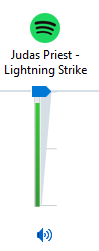
The web player does output 100% volume (see attached image).
Comments
I installed the Spotify app from the Windows Store and it seems to be working (ver. 1.0.72.117.g6bd7cc73 (Windows Store version)).
I'm on Windows 10 ver. 1709 and my hardware is a FiiO E9 desktop headphone amplifier and portable FiiO E7 headphone amp and USB DAC. Connected to a B350 Ryzen 1600 system.

Thanks for that info.
Just to check, are you still having trouble or is working just fine after you reinstalled the app from the Windows Store? If you want, you can test it for a few days to see if it's totally fixed. In case you have trouble again, just let us know.
We'll be waiting.



Hey @Rynji, welcome to the Spotify Community!
Could you let us know what device, operating system, and Spotify version you're using? We'd recommend reinstalling the app by following the steps here.
Let us know how it goes 🙂