Connection Issues for users with the ISP Windstream

Hello
I've been trying to get into my Spotify web player on my work PC. (Work PC - hence the web player and not the desktop app)
The entire screen shows as white with all of the menu options mashed to the left just under my profile picture.
I have cleared the cache. I have tried on a few different browsers. Other co workers do not have the same issue. Help.
< thread title updated for clarity >
Comments

Hey, @MicoWazzle -
Does disabling Hardware Acceleration fix the issue? Go to Edit > Preferences > Compatibility and uncheck Enable hardware acceleration.
Tell me how it goes 🙂

Spotify premium user here. I've also had this issue past 3-4 days. Over my wifi network, no images show up! But if I use the android app over my mobile network, it works just fine.
Even when I try to browse the spotify website, it doesn't display images. I'm also on Windows 10, and I'm not using a proxy. Disabling hardware acceleration made no difference too.

Hey @methodair06
That's weird!
Have you tried deleting cookies as well? Sometimes faulty page information gets saved in cookies.
Let me know what happens! 🙂
Yes sir. Tried that as well. No luck.

Across all of my devices Spotify won’t load images, including codes that correspond to sharing a song. Across these devices I am using the same account and I need a fix to this issue. After various attempts to reinstall the application, relogging into the application, and restarting the corresponding device nothing has proven to show substantial results. I humbly ask for help.

I have turned hardware acceleration off and it did not fix the issue.
Another thing I could suggest is wiping the DNS cache. However, this needs you to open Command Prompt with Administrator rights, that's often not really possible at work.
DNS records' lifespan is usually about 24 hours maximum before they get renewed.
However, if you can use Admin rights for Command prompt, do it and enter this
ipconfig /flushdns
and hit Enter.
It's possible to erase DNS cache for browsers too. See this OpenDNS article.
Keep me posted. 🙂

Mine has been like this exactly for the last 5 days.... I can't seem to figure anything out. It works fine on my phone's app for Spotify but not on my Web Player...
I've attached a picture of what it looks like
@Sebasty, I'll see if I can get one of the IT people to help me out. 50/50 shot with that lol.
@Greenteamachine, that's exactly what mine looks like

I've experienced the same issues for several days now. I contacted Spotify Cares on twitter and they eventually sent it to their tech team but I haven't received any updates from them or even a guess at what could possibly cause it. Have you tried to access the Spotify main website or any pages within that domain? If so, are they loading for you? On mobile devices they simply won't load for me. On my PC I get a stripped version, the upper screen looks like this: 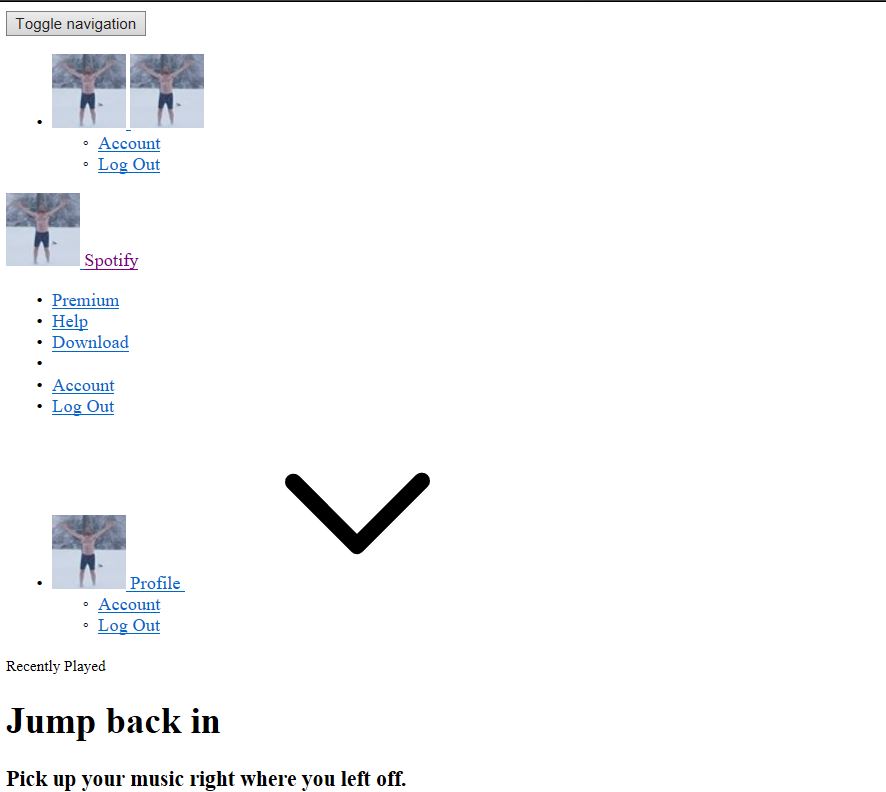 All of the links on the page, including the Help page and the Download page are within the domain and therefore appear very similar to this. This issue is spread across 2 PCs, 3 iPhones (including one with a different Spotify account) and a Kindle Fire HDX Android tablet, the Spotify Web Player included as well as at least 4 websites and blogs that use Spotify iFrame embeds (including Swarm.fm and the Spotify New Release Sorting Hat). Spotify is the only website I'm having the issue with. I'm sorry you're experiencing this inconvenience but frankly I'm glad to know I'm not the only one with the issue. I probably should have come to the community sooner but had hoped Spotify Cares could take care of it sooner. I've always had great support service via the Spotify Help page but, as I mentioned, it is one of the domain pages that are **** up. Hopefully you'll continue to post any progress that's made in your case, as I will with mine.
I appear to be having the exact same issues with the Spotify main website Jack, as for my mobile devices it won’t even load and as for the desktop version I am getting a stripped down version. I’m very happy this issue is not me alone as the only other posts about this problem I could find are dated back in 2013 and were solved with an update to the application. I am at a loss for any current change in pace for progression residing the issue at hand but I will keep you updated if the website is up and running again for me or the latter of finding a fix for the missing images.
Hey @methodair06 and @greenteamachine
It really seems like a connection issue. One more thing that might help here is restarting your computer.
Does it look the same in incognito mode?
Restarting the router might help too, but in work environment it's sadly out of question. :') If you're at home and having this issue, then definitely try that too!
Trying a different network is a good suggestion as well. Sometimes network restrictions are applied which lead to Spotify not working well.
Keep me posted! 🙂

Experiencing the same issue as well.
One of the IT people are saying that it's probably an outdated Flash player. Putting in for an update. I'll keep you updated.

I have this exact same problem also for about the last few days. Please keep us updated!

Just a week ago my Spotify client has stopped displaying all album artwork and images. I can still play music so I know there is no issues with my network connection, proxy, etc. When I switch to my phone wireless hotspot all images load fine. How come on my routers wireless network images are not loading? Placeholder images do display, they are just gray boxes with music notes. I have also tried reinstalling the client. Like I said, when I switch to my wireless hotspot images load as normal. Images also load on other networks just not my home one. Music does play fine on my home network.
Hey, @MicoWazzle and @craigdry -
Sorry for the late reply; Have you tried out deleting your cookies? Some faulty cookies save corrupted data.
You can also try out connecting to a different network/proxy or disabling softwares such as AdBlock - It is possible that your network prevents Spotify from loading certain resources.
Tell me how it goes 🙂
Same issue is happening with me. My way around it was to use VPN; that made it work. However, it shouldn't be the case and it's inconvenient.
The album covers aren't showing on my android phone, work PC or home PC. However, they show up when I cast onto chromecast.
I've updated the flash player, restarted my computer, tried deleting cookies, resetting my settings in chrome, firefox and even internet explorer... it doesn't work on this computer or even on my personal laptop...
Ugh, I hate Pandora and really don't want to have to resort to it...
Just had my IT department check the Flash and it's up to date. NOT a flash issue.
Well, folks, I was able to download the desktop player. No need for the web player any longer. I hope someone is able to figure out how to fix the white screen issue.
Oh, and for those that might be in the same situation as I am (on a work computer and limited on what they can/can't do) I went to download.com (since Spotify.coms menus weren't working at all) and got the applicable file and it loaded right up. Didn't need my IT department to install anything.
Hey all!
I would be surprised if updating Flash would have fixed it, but it's always worth trying things 🙂
I'd suggest resetting your browser. See this HowToGeek guide on how to!
Switching to another browser might help as well.
Let me know what happens!

I've had this exact same issue as well on my work PC. Viewing https://open.spotify.com/ shows only entirely white page, or sometimes basic black-on-white text with a 'Log in' button that does nothing. I've tried Firefox, Chrome, Chrome incognito session, IE11 with all cookies and cache cleared, restarted the computer twice, and same results.
I've used Spotify Web Player on this computer for over a year just fine, but have not been able to get back to it at all in the past week. Something had to have changed on Spotifiy's end.

WHen going into the website, and inspecting the page, it looks like things are getting blocked. Please get you rengineers on this as everything that you said does not work. See below: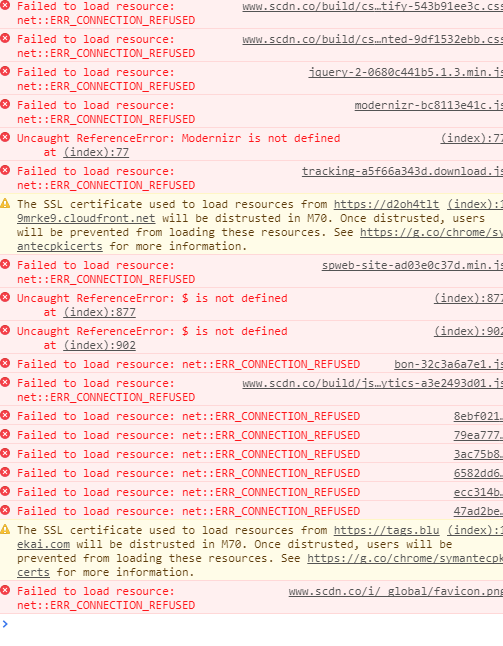
I don't get connection refused, but it doesn appear to be a problem on Spotify's end and just in the last week.
Hey all!
Thank you for uploading your screenshots!
I looked up the 'ERR_CONNECTION_REFUSED' error, there are ways to solve it.
If you have different errors in your console or haven't looked into that stuff, you should still try out the steps below.
To figure out if it's the computer itself being the issue, or the network, I suggest trying another network. If wifi is possible, try using your phone as a hotspot.
If it's still blocking, try these.
Method 1: Make sure your Firewall or antivirus is not actually blocking some Spotify addresses. I came across an antivirus software that was really eagerly blocking half of the Spotify web player as well as the file hosting site I use.
Method 2: Using Command Prompt (requires Administrator rights)
1. Open Command Prompt as Administrator and run the following command
netsh winsock reset
Then restart your computer to finish the reset process.
In case this didn't solve it yet, open Command Prompt again with Administrator rights and enter these lines. Use one command at a time!
ipconfig /release
ipconfig /all
ipconfig /flushdns
ipconfig /renew
Method 3: Proxy settings (in case your machine is using one)
1. Search Windows for 'Internet Options'. You should see a small window called 'Internet Properties' and with lots of tabs (General, Security, Pricacy etc)
2. Click on 'Connections'.
3. Downwards, there is a button for Local Area Network settings (LAN settings). Click on it.
4. Untick all the boxes (three of them).
5. Click OK.
Additional possible causes:
Malware infections
Some registry flaws (that's rare and hopefully not your case).
Keep me posted. 🙂


I have an iPhone 7, always update my iOS, but for the last week my Spotify does not show any arts from albums, songs and artist when I am connected through Wi-Fi. When Connected with my phone service provider all the images appear. Music alway works fine with wi-fi and phone service.
Snowman,
Are yous till having the issue? If so who is you ISP?
We are still having the issue.
Good question, @porter224!
ISP or the network admin may be the reasons too, if some kind of traffic filtering is done.
(In fact, reading about err_connection_refused, one of the tips was exactly that - asking the ISP or network admin about it.)
I've downloaded the spotify app threw microsoft store, but recently images won't display anymore. I've tried uninstalling and reinstalling, changed my proxy, and some other stuff. Any solutions?
P.S.
I'm using windows 10