Facebook picture on avatar not rendering on spotify.com

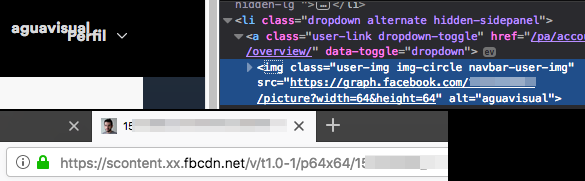
Not sure if anyone else is experiencing this problem, everytime I visit my profile in spotify.com the avatar is not rending. The image is returning a 302 (Moved Temporarily).
If I visit the image url (http://graph.facebook.com/XYZ), facebook does the redirection to a different url and the image loads (http://scontent.xx.fbcdn.net/XYZ).
This problem is not happening in support.spotify.com where the right link is included (http://scontent.xx.fbcdn.net/XYZ).
See attachment where the avatar is not loaded and instead the alt attribure apears. Below the correct links shows the image.
Comments
Hi!
> how much time has passed since you last updated your Facebook's profile picture?
December 2016
> if you log out and back in, does it make a difference?
No. Same problem.
> Let us know what device, OS version and Spotify version you're currently running.
The problem is not in the Spotify application, but in the web site spotify.com (anyway I use macOS).
The problem is only existent in Firefox (58) for macOS (10.13).
I verified that it works in Chrome for mac, in Firefox for windows and in Safari iOS!

Hey @2915545!
Thanks for getting back to us with this information.
Let's try clearing your browser's cache and cookies before logging into Spotify, or using an incognito window. If that doesn't help, try updating your Facebook profile picture to a different one and then back to the same one.
Let us know if that does the trick.
> Let's try clearing your browser's cache and cookies before logging into Spotify, or using an incognito window.
I tried that, cleared cache and "Forget about this site" in Firefox History. It didn't work.
> try updating your Facebook profile picture to a different one and then back to the same one.
Same problem, either with the new or the old one.
I assume the problem is with the link https://graph.facebook.com/[facebookProfileId]/picture?width=64&height=64 (Being [facebookProfileId] a 10 digits id).
As I mentioned in the first post, the image is loading in the page support.spotify.com, but there you have a different link (http://scontent.xx.fbcdn.net/XYZ).
I finally find out what is going on.
If I disable the tracking protection in Firefox the image works.
So the title of this issue should be, "Firefox users (macOS and Windows) with Tracking protection enabled won't not see the profile picture in spotify.com"
Edit: Previously I said in Firefox windows the image loaded, that was because I had the tracking protection disabled. Once I enable the protection I can see the image is missing too.
Hey @2915545, welcome to the Spotify Community!
Just to confirm, how much time has passed since you last updated your Facebook's profile picture? Also, if you log out and back in, does it make a difference?
Let us know what device, OS version and Spotify version you're currently running.
Keep us posted 🙂