Search not working

Hey 👋,
Thank you to @Bartel_Debbaut for reporting this!
"
The search function is no longer working in the desktop version. While typing a search, no proposal follows and the reaction stays blank. While trying to reset the recent searches, not happens!
"
-Tom
Comments

Hi there,
I have had similar problems in the past, try closing and reopening Spotify to see if that does anything. If not, try logging out and back in again. If all else fails, then you can try restarting your computer.
Hope this helps,
Thomas

Thanks for the reply Thomas,
Rebooting does (temporarily) solve the problem. But I have the same issues on my iMac too, where rebooting doesn't solve the issue. What I tried yesterday: I opened the webplayer simultaniously while running the desktop version. The search function in the webplayer works fine. Whilest the webplayer is active, the search function in the desktop version was working again. After closing the webplayer, the problem reappeared.

Just following this thread. I'm on version 1.0.75.483.g7ff4a0dc and have the exact same issue.
After a reinstall of the spotify desktop player the search function seems to work fine for the moment!
Unfortunately re-installing did not do the trick for me. I still have the same issues mentioned above. Also search works on desktop client while web player is open... so strange.
May I ask if the version changed for you when you re-installed?
Nope, search function is not working again. During the opening of the webplayer I encountered a '503 error'. Could it be that there are connection issues with the spotify servers?
No change in version. Current version = 1.0.75.483.g7ff4a0dc

You may update the Spotify app to latest one and restart your computer if needed.
Please accept as solution, thank you!
Updating to the latest version did not solve the problem for me. The latest version was already installed. Problem still exist. It's related to the connection with the spotify servers I believe. I received some '503' errors after trying to connect to the spotify webplayer.
Have you tried to reset the network or DNS setting on your mac?
Please let me know if you have any question or just simply accept this as a solution.

Same problem here on 2 macs, restarting, clearing cache, etc, nothing helps. It's only the spotify desktop app. This is one of many problems.
I have been having to switch to the web player because the Mac Spotify App just gives up, won't search, random songs won't play, etc. Terrible and unacceptable. Please just fix it.
Hey @joel2762, @Bartel_Debbaut, @johnni & @ThomasPegler,
Sorry to hear you are having issues with Spotify on your Mac.
I see you have tried some troubleshooting steps. Have you tried resetting the NVRAM on your Macs? Apple has an article on how to do that here.
If that does not work, could you make sure you are up to date, running macOS 10.13.3 and make sure Spotify has no updates to complete, once you have provided me with that I will do some digging and see what I can do for you!
-Tom
Thanks, Tom, appreciate the response.
Currently running 10.12.6 after a disaster upgrade to High Sierra which interfered with work software. Regardless, it didn't work on 10.13.3 either, and it's been an issue across multiple versions of OS for me, and I do always update Spotify when there's a new version. PRAM reset did nothing.
To answer your question from another thread about CPU usage, sometimes I am doing other activities, other times the only program open is Spotify. Same issues persist on both machines.
Just experienced an issue at this very moment. Music plays fine but I tried to search and it just sat there, no loading wheel, nothing. Many minutes later the search finally appears. Then it worked fine again with searches appearing instantly. But then I clicked an artist and it's on the spinning wheel, never ending. Sometimes it will load 10+ minutes later, or just never.
Happy to provide any info necessary to help find a solution.
@chakming: Yep, I did clear the cache, did reset the DHCP lease, resetted the NVRAM, problem still exists.
Yes, did reset the DNS cache, did renew the DHCP lease, did reset the NVRAM, but problem still exists.
Same problem here.
Mac 10.13.3 no spotify updates waiting.
Search function does not work.
Not able to delete older searches either.
Hey @user-removed, @Bartel_Debbaut, @joel2762, @johnni,
Thank you for providing me all the information.
I will merge this thread into a Live Issue and I'll let the right folks know and I should get an update very soon!
-Tom

yep, have the same problem
Thanks! I appreciate

Hey folks,
Thanks for coming to the Spotify Community, and thanks for the reports!
We appreciate many of you have provided this info already, however if you haven't may you let us know:
- Your exact device:
- The version of Spotify you're running:
- Exact operating system (& version):
Also, although most of this has been covered already too, please can you try the steps below for us:
- Restart your device
- Reinstall Spotify
- Make sure your OS is up-to-date
- Restart your router/connection
- Make sure you're not using any cache-clearing or battery-saving apps/programs
If the issue persists, can you send us a screenshot of how things look when this happens?
We'll keep working to see what we can suggest.
Many thanks!
/M
 search function not working, cannot delete old search queries
I'm running a macbook pro 15 inch 2016, high sierra 10.13.3 (17D102)
Spotify's desktop client version: 1.0.75.483.g7ff4a0dc
Gone through all the steps mentioned in this thread.
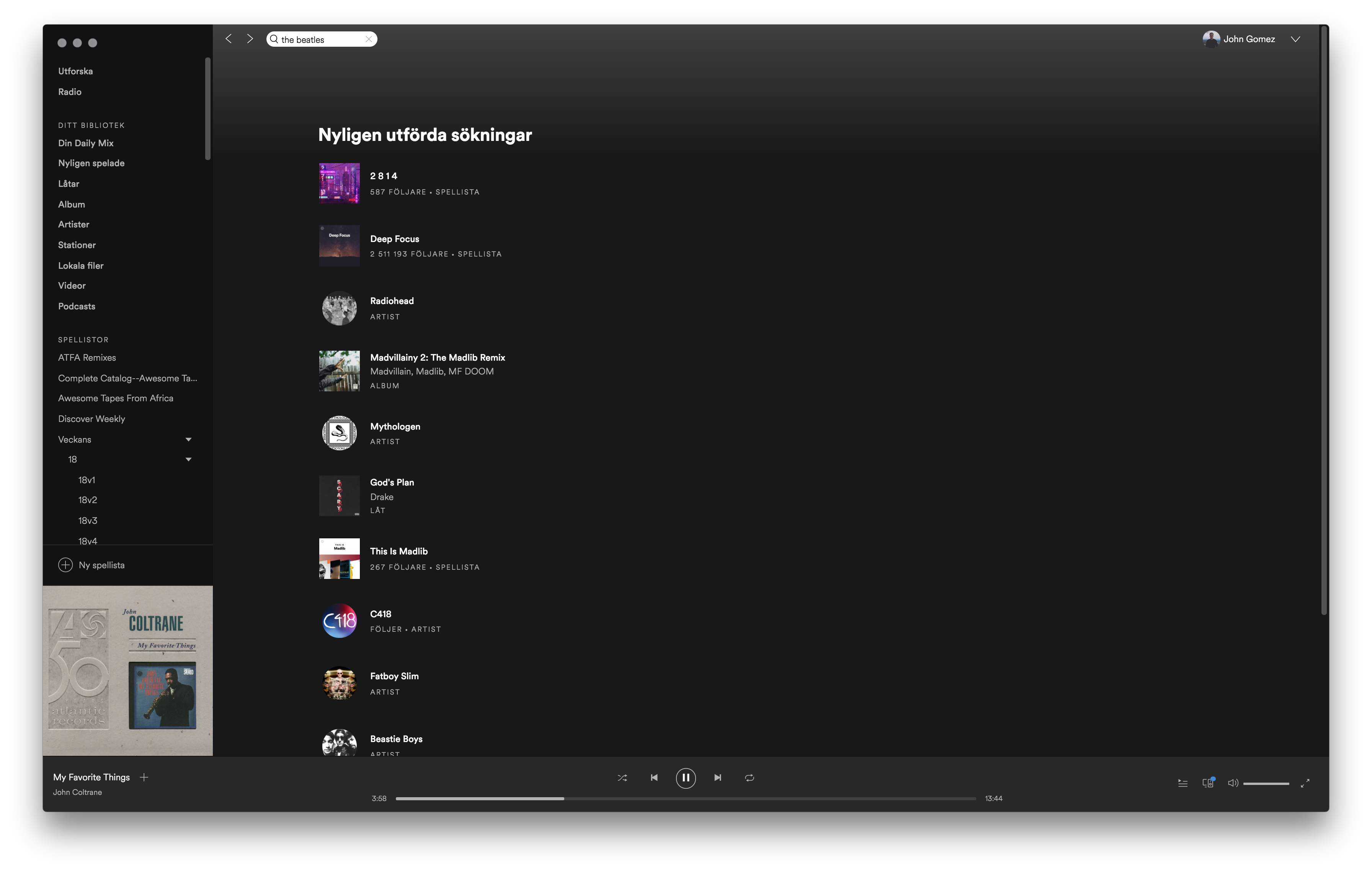

@Melody, @Tom
I have the exact same issue, on two different computers (running windows 10) at two different locations.
Also, some other functions in the search page has stopped working. I can no longer clear the search history or remove individual results.
Computer 1:
Lenovo P50, Intel i7-6820HQ, 16GB RAM, Quadro M2000M
Windows 10 Pro, Build 16299.309
Spotify 1.0.75.483.g7ff4a0dc
Computer 2:
Intel i7-7700K, 16GB RAM, Geforce GTX-980ti
Windows 10 Pro, Build 16299.248
Spotify 1.0.75.483.g7ff4a0dc
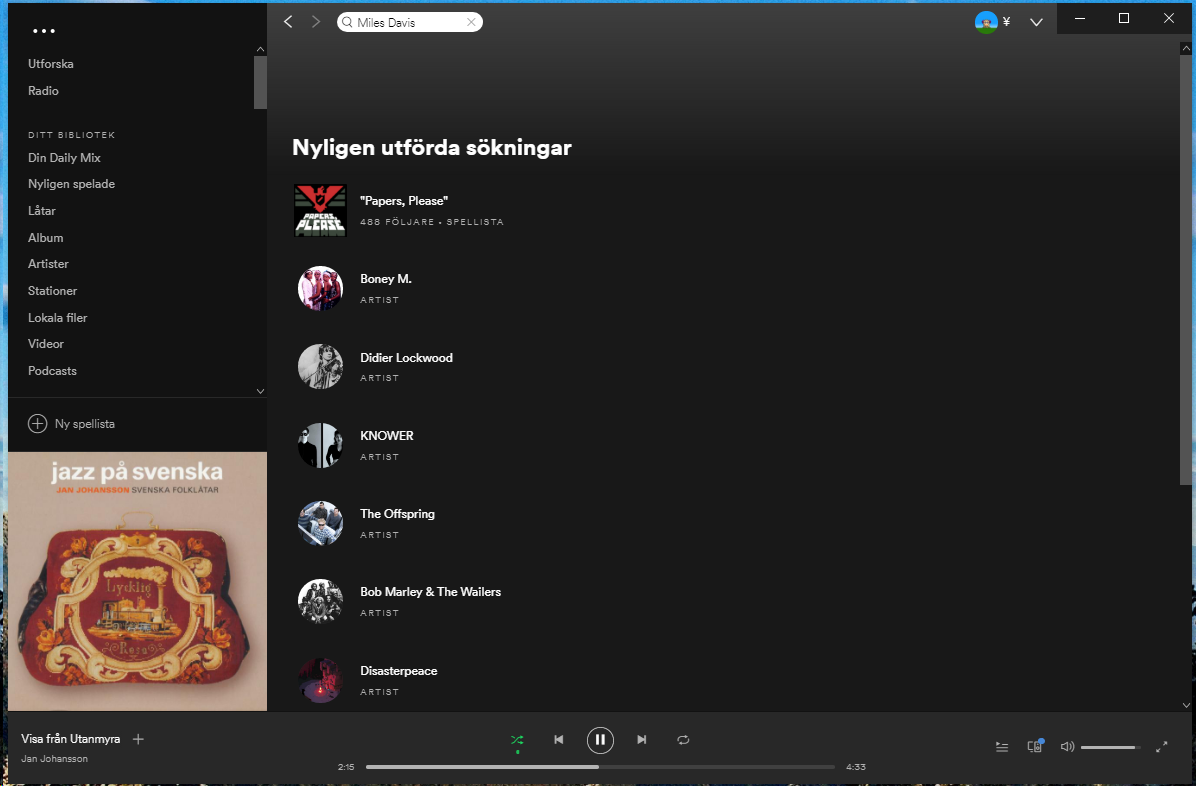
Running on my late 2014 MacMini. Spotify version 1.0.75.483, OS Sierra 10.12.6.
Was also happening on my 2010 MacBook Pro, which I just happened to replace with a brand new MacBook Air. Interestingly, it's working perfectly on that machine.
However, on my MacMini, despite following all the instructions listed, same issue persists. Seemed ok for a while but now it's back with a vengience. I clicked on the artist of the playing song. And 10minutes later as I write this post, still nothing, although it's connected fine and playing music fine.
It won't let me attach the screen shot, but it's just black in the area where search results, etc would normally be displayed. Totally blank.
Thanks for your help!
Hey folks,
Sorry for the delay!
Can you try a reinstall for us, and let us know how things are looking?
We understand many of you have tried this already, however we'd like to know if this is still happening on the latest version of Spotify.
Keep us posted!
Thanks,
/M
Thank you! Just reinstalled following the instructions and will report back in the coming days.
I'm running spotify version 1.0.75.483.g7ff4a0dc on a Macbook Pro Mac OS X High Sierra.
The search function is not longer working in the desktop version. While typing a search, no proposal follows and the reaction stays blank. While trying to reset the recent searches, not happens!
What should I do?