Spotify ICS App, Beta app out now, download instructions here

Finally, the wait is over! Spotify has released a beta app for ICS that hopefully fixes all our problems.
If you want to have it now on your phone, do the following:
- Go into your phone's settings, and click on 'Security' > scroll down and switch on 'Unknown Sources'
- Open your phone's browser and surf to 'www.spotify.com/blog
- Depending on the country you're in, the first post will be about the new beta app. If you don't see it, switch your country (below on the webpage) to Switzerland (German) (I assume it will be posted to all the other blogs later today). You will then see a big green button that says 'Herunterladen'. Press it, and it will start installing the new app on your phone.
If you want to download the apk directly, use this link: http://download.spotify.com/android/PreviewSpotifyAndroid.apk
EDIT: In another topic, a moderator posted the following link, where you can also find the big green button, without having to go through the blog: http://www.spotify.com/download/previews/
Post any questions here, and the community will help you out.
Enjoy!
Accepted answers

@catorr wrote:Really great job on the app guys. Just a few things I feel it would make this app even more awesome.
First couple are on the stickied missing features and wishlist thread: http://community.spotify.com/t5/Mobile-Android/quot-Official-quot-new-application-beta-release-missing-feature/td-p/45383
The issue with being stuck on the now playing screen I raised also, along with a few others: http://community.spotify.com/t5/Mobile-Android/Preview-app-glitches-on-returning-to-app/td-p/47103

Looks good, much better than the very grey look the Android app has. This is much brighter, just what I was missing. Hope for more colours in the finished version. I would very much like to be able to choose between some various colour schemes.


It's starting to like me, but I'd really like to find the option to add a whole Album to my starred music " they lack that boys.!!
I'd like to hear if it's possible to have in the future.
Cheers and keep improving Spotify!
Leo
All comments

I've installed the App, now the old shortcut no longer works,
How do i access the new installation??
@YaaBooty Open your app drawer (the round button in the middle below on your homepage), the app should be there. Then long press it and release it anywhere you want the shortcut to be.

This is great! Looks really cool, and snappy as ever.
Only one thing.. With every new release I'm hoping for subfolders, just like the iOS version has. Will this come to Android soon?

Yea I like the update, looks pretty sweet but there is no way to fully exit the app so I can see..in previous app you go to the main 'home' page and hit menu buttoin then exit spotify. I used this regularly, now gone which mean spotify will run in the background?
@YaaBooty wrote:I've installed the App, now the old shortcut no longer works,
How do i access the new installation??
You can readd the shortcut to your home screen


Looks good. Mine was working (albeit somewhat glitchy) with ICS on my GS2, but the new version seems more reliable initially.
Some questions:
1) I notice there are now "Normal", "High" and "Extreme" quality options for downloading offline music on the phone. I haven't noticed these before, what are the bitrates?
2) The desktop widget has gone - can we have it back...? 😛
3) My app seems to be automatically downloading the music to my SD card, which is good, that's what I want it to do. However, I can't find anywhere an option to chose the download destination. I'm not sure if it's downloading to my microSD card because it's worked out that's the right place (it's a little confusing on the S2, the internal memory is labeled as "sdcard" and the actual SD card is labeled "external_sd"...) or because that's where the app was previously pointed. It used to be a case of logging out, pressing the menu key and the option to chose the download destination would pop up. Where's the option now?
In any case, thanks for finally updating Android guys! 🙂

App is looking really good. But there are some things I don't like:
- no local file import? at least i couldn't find it
- no exit button
- playlists somehow don't sync at all (HTC Desire with GB 2.3.7)
@matze if you longpress a playlist, the option 'download' will come up, that will make your playlist local
I don't have the problem with the playlist syncing, if I add one in my desktop app it pops up immediately on my phone, and if I remove it, it also dissappears immediately.
Has anyone else got the lockscreen widget:
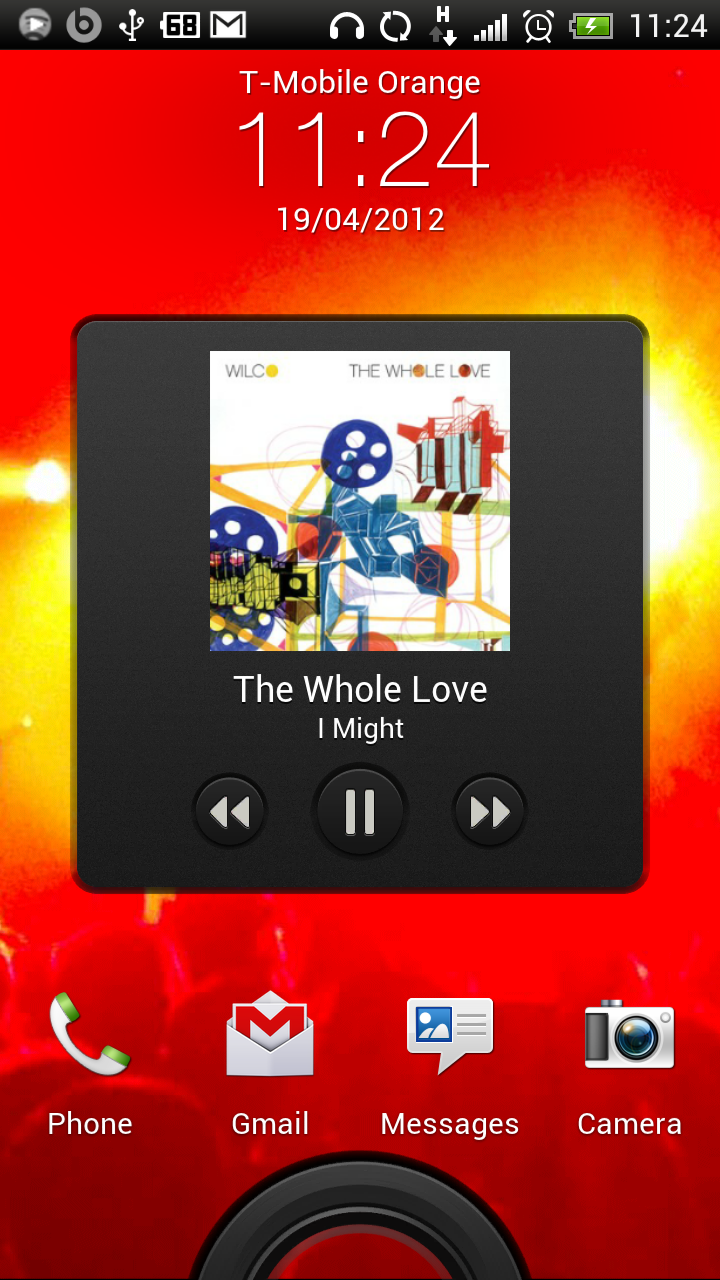
This is on a One X so running Sense. Does the lockscreen widget appear for stock/other ROMs?
I guess I wasn't really clear:
With local file import I mean import of local mp3 files, which are already on the sd-card of my phone.
And I also meant that downloading of playlists doesn't work. It's always stuck at 0%,
@matze Ah, weird, don't have that problem, with the downloading of playlists. Wouldn't know about the local mp3 files on phone. I have downloaded local files from my pc already, that does work.
@Matze wrote:I guess I wasn't really clear:
With local file import I mean import of local mp3 files, which are already on the sd-card of my phone.
Yeah, local files not showing up any more - just playlists
@Rankhar wrote:@licenced no, haven't gotten that on my phone (Google Nexus S, Android 4.0.4)
Ah, OK. My guess is that the Spotify app is now tied in with the stock Android music playing API ... for which HTC have developed the lockscreen widget themslves. So this is not something provided by Spotify.
It's not quite integrated enough to show up as a music player in a third party scrobbling app for last.fm though
BTW, just read on the blog/preview thing that features that are yet to be added before it is going live in Google Play are Folders and Last FM scrobbling.
As a follow up to my last post, I've done a bit more fiddling and the app ISN'T downloading to my external SD card
This is a problem, as I only have limited internal storage...
Although the app appears to work well otherwise, this is a fairly big ommision - unless someone can tell me how you're meant to set the download location using the new app please...?

This is a very delicate matter for me too. I've got 32 GB of a class 10 micro-SD where I want to put all offline tracks. My phone's internal memory is NOT enough. In the old version you were able to press menu at the login prompt and specify where you want to store your offline tracks. Please put it back!

Regarding lockscreen, i think they need to use this.
http://developer.android.com/reference/android/media/RemoteControlClient.html
Edit: And thew seem to use it. Cleared app-cache and now it is visible.
@eriklindskog wrote:Regarding lockscreen, i think they need to use this.
http://developer.android.com/reference/android/media/RemoteControlClient.html
They must already be using that for the HTC Sense lockscreen control to pick it up.
Anyone able to confirm if any other third-party lockscreen music control widgets are working with Spotify now?
Have been listening using the new app for a while now, and am experiencing some glitches in audio every few minutes, Nothing major though. Perhaps the phone is in need of a reboot, it's been a while...
@licenced wrote:
@eriklindskog wrote:Regarding lockscreen, i think they need to use this.
http://developer.android.com/reference/android/media/RemoteControlClient.html
They must already be using that for the HTC Sense lockscreen control to pick it up.
Anyone able to confirm if any other third-party lockscreen music control widgets are working with Spotify now?
Edited my post, works on my Galaxy Nexus now after clearing cache for app.

Used it for a couple minutes. Looks amazing and feels a lot faster.
Can't find a play queue though. Is it me or is it not in there? I can slide to next song in the now playing view, but no way of seeing all (or some) of the songs queued up.

Same problem as the old app: no playlists showing up, despite having a premium account. This happens when I log in using my Spotify credentials. I refuse to ever log in using Facebook. Playlists are showing up just perfectly on the desktop client, by the way.

Finally! I'm trying it out now, looks a lot better and all issues with loging on ICS (Galaxy Nexus) seem to have been fixed.
I'd like some info on bitrates, there's three options now.
Couple of feature requests:
- The long awaited folders
- Equaliser
- Continue play when jack is plugged back in
Looks like "Normal" is 96, "High" 160 and "Extreme" 320 kbps.
It's difficult to tell how much difference it's making without being able to download different tracks at different bitrates (and without being able to interegate the actual cache files to see what bitrate they report) but to my ear they sound OK, maybe a bit more high-end crispness than previously? (Yes, I'm an audio snob...) 😛

@piphil wrote:As a follow up to my last post, I've done a bit more fiddling and the app ISN'T downloading to my external SD card
Well, it seems to be for me. I had the previous version set to save to my external SD card and this new beta seems to have picked up those same settings (I checked my total usage, downloaded a playlist, checked usage again: SD card gone up, internal storage the same).
@yreuvekamp I don't log in with Facebook either, perhaps something else is wrong. I assume you have tried the usual stuff, like clearing cache, logging out and back in, all that jazz?

first of all thanks for the preview version. Here are the "bugs" i got:
- Cannot change the location for the offline files (e.g. move/save them to the external sd-card). This was possible in the old app (by pressing the menu button on login screen).
- Nothing happens when i press the menu button in menu. I would guess the sidebar should open/close if i press the menu button
- Make it possible to search in (offline) playlists for songs/artists/albums (kind of filtering...)
- Please add a view where you can browse through the offline music sorted by artist/album (like itunes)
- Make it possible to sort the playlists (maybe this will come with folder support)
- Use the Tabbed Pane for Downloaded/All Playlists instead of seperated lists (the problem here is that i have lot's of playlists that are offline so i have to scoll a lot to get to the "all" list which is under the "downloaded" list)
@hgss wrote:Used it for a couple minutes. Looks amazing and feels a lot faster.
Can't find a play queue though. Is it me or is it not in there? I can slide to next song in the now playing view, but no way of seeing all (or some) of the songs queued up.
Er, yeah good spot. No way to view the now-playing queue. You can select a song and add it to the queue easily enough but no way to see what's in the queue
Missing widget is reported here: http://community.spotify.com/t5/Mobile-Android/quot-Official-quot-new-application-beta-release-missing-feature/td-p/45383