spotify keeps crashing on iPhone! :(

Plan
free
Country
united states
Device
iphone 8+
Operating System
ios 11.4.1
My Question or Issue
i try opening the app, and it loads for a split second, and then it just crashes. i tried reinstalling the app. it works the first time i open it, but as soon as i close the app, it just crashes every time i try to open it again. i've tried restarting my phone as well, and nothing is working. it only works on my imac and ipad. my ios is up to date on all of my devices. my google home speaker can't use spotify on it either. i'm extremely frustrated by this and really don't want to turn to another app for listening to music on. please help me.
Comments
i'm still having trouble. it's not letting me send the screen recording or screenshot i have to show the version of spotify i'm using.
i'm positive i'm using the real spotify app. the version i'm using is 8.4.67
my ios version is 11.4.1
to quickly clarify, i have repeatedly reinstalled spotify with it working perfectly fine, but as soon as i close it and try reopening it later on, it crashes.
is there anything else i can try??
thank you for the help!

Hey @ajlic,
Could you tell me more about the screen recording thing? What do you mean it isn't letting you send it? Are you having issues uploading it to a cloud drive service?
I can suggest to reset your Settings to see if that helps.
Does this happen if you sign in with another account in your device or if you use another internet connection?
Please let me know 🙂
it says that the images cannot be used because it doesn't end with jpg or any other ones that are listed. it's okay though.
i may have pinpointed the problem. when i have spotify in the dock, (bottom of the screen) it glitches out every time. though, when i have it in other spots on my screen, it works perfectly fine. i don't understand why it suddenly doesn't work in the dock, where i've always kept it all these years.
do you have any idea on why it's like this?

I'm having the exact same issue. Also on iPhone.
Hey @ajlic,
Sorry that it didn't work!
Did you try any of the other steps I suggested?
I've it in the same place, the dock, and no issues with it. I'm on the Beta version of Spotify but installed the official version just to test it and it works fine on my end.
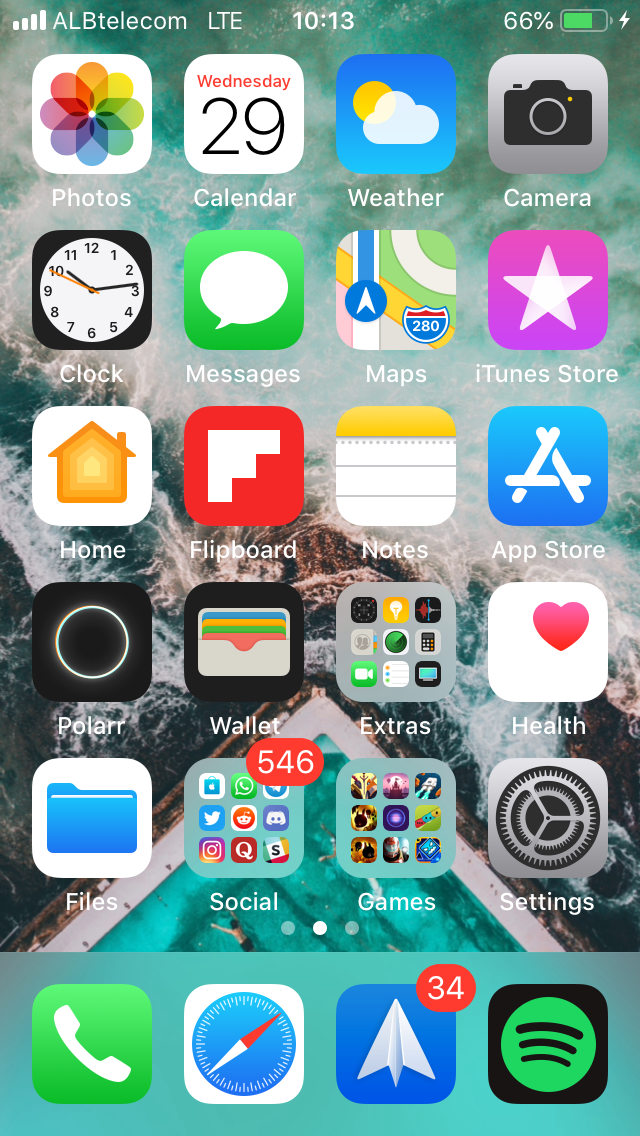
I see that you have the same issue but could you try sharing any video recordings of it?
Thanks to both! 🙂
i've tried everything you've said. i've moved spotify back to the dock, and at this point, it either works or it doesn't. i try opening it, and it glitches and crashes, so i just keep trying to open it until it actually opens and works. it's only a temporary solution.
i'm glad i'm not the only one struggling here, too. is spotify going to be coming out with any new updates anytime soon?
thanks for the help.
Hey @ajlic,
In fact this is the only case I've seen. I'm sorry it isn't working for you 🙂
If you could provide me with what I asked maybe I can look further into that.
For now I don't have any data on when the new update will be issued to everyone but I can offer you to test the next versions of Spotify, by signing up for Spotify Beta 🙂
Hope it helps!
sorry! what is it that you need me to provide?
if there's another way i can contact you to try and fix this, i can then send a screen recording or whatever it is that you need to help me.
this is my first time using this community spotify, so i don't really know how to navigate around it.
Hey @ajlic,
If you can just upload the screen recording in a cloud service, like DropBox, OneDrive or Google Drive and share the link here if you can.
Please let me know if you can do that 🙂
Hey @gallin85,
Yes you can do taht by going to Settings>Control Centre then add Screen Recording by tapping the green +.
Now go to your Home Screen, swipe from the bottom of to reveal the Control Centre next tap the Screen Recording icon and normally use the phone to reproduce the issue.
Thanks! 🙂
I've escalated your message 🙂
Could you try to use the Sign Out Everywhere and remove offline devices from your Spotify account page
Could you also tell me your iOS and Spotify version? If possible, the device you tested it too 🙂
Thanks again!
Tried that, as soon as I log-in back the app crashes again.
iOS version - 11.4.1
Spotify version - just upgraded to 8.4.**bleep**
device: iphone 8+
ios version: 11.4.1
spotify version: 8.4.**bleep**
spotify is still not working. i really need it to work sometime soon. i'm getting tired of constantly having to redownload it to get it working again. signing out of all devices didn't help. i appreciate the help.
Sorry for the delay 🙂
Could you guys try a different internet connection? Try to switch between different Wifi connections and try mobile data and see if there's any improvement.
Also, make sure that they you turn off any background apps that might be disturbing the Spotify app.
Lastly, could you try to reset passwords just to make sure this isn't a password issue?
Thanks and please let me know 🙂
issue.
Spotify on my PC still works fine, so it can't be a password issue, right?
I rather not change my password, it's a pain to memorize a new one.
i've been traveling recently, so i've been using both data and different wifis, yet it doesn't change spotify crashing all the time.
i've changed my password. i'll see what that does.
as for background apps and that, i do not have that turned on for any apps and i try to keep spotify opened always in hopes that it'll still work. it doesn't 😞
thank you

Hey folks!
Thanks for reporting this! We've let our tech folks know.
Make sure first that you've tried the following steps:
- Restarted your device
- Performed a clean reinstall by following the steps here.
- Switched to a different network (eg. if you are connected on a WiFi connection, try instead with a 3G / 4G network)
- Closed all running apps in the background, then restarted your device
- Removed all your offline devices here and performed a clean reinstall on your iPhone device.
If these steps haven't helped, please let us know the following by commenting in this thread:
- Your device
- The operating system version your device is on
- The version of the Spotify app you're running
Also, if you are experiencing this, make sure to click the +VOTE button.
Thanks!
Tried all of the above to no avail.
Device - iPhone 7
iOS version - 11.4.1
Spotify version - just upgraded to 8.4

ios 11.4.1, most recent spotify update, premium account. iphone 6s+, usa
Listen.... i have tried EVERYTHING. I tap the app, logo shows for about 5 seconds and crashes back to my home screen. I’ve rebooted my phone 4 times, I’ve uninstalled and reinstalled at least 20 times by now, I’ve completely deleted the app and waited a week to reinstall, i rebooted with and without the app installed, I’ve searched the internet, I’ve talked to a representative, I’ve changed payment methods. I am at a loss. I love spotify, i hate apple music. And I’ve been having to use it as a substitute. I don’t know what to do and I’m about to McFreakin lose it. I really don’t want to have to cancel but literally nothing has worked and this has been going on for a month now.

Hey @ajlic and @gallin85 are you till experiencing the issue? Could you get back to us with the full Spotify versions?
@Cinnabooty sorry to hear about this. Could you also get back to us with the complete Spotify version so we can have a closer look? We want to make sure to gather as much info as we can.
Thanks!
8.4.6 9
Hey everyone!
We're still looking into this, thanks for bearing with us.
So we can investigate this better, would it be possible to provide us a timestamp of when the app crashes for you?
We'll be keeping an eye for your responses 🙂
/K
happened here? Or is there a crash log we should access?
I click the app, spotify logo shows up anywhere from 3-7 seconds on average I’d estimate. It never leaves the black screen with the logo.
Hi there!
I know it sounds simple, but it's often overlooked. Could you try restarting your device? Sorry as it may sound a bit repetitive but if that doesn't help, try a quick clean reinstall of the app. Just follow these steps. Could you attach a screenshot of the issue you're having or a screen recording? I hope you are not running any tweaked apps of Spotify not released by Spotify themselves, because that's something normal with them 🙂
If you're still having trouble, could you let me know the exact version of Spotify and the exact version of the operating system you're running?
I'll see what I can suggest next!