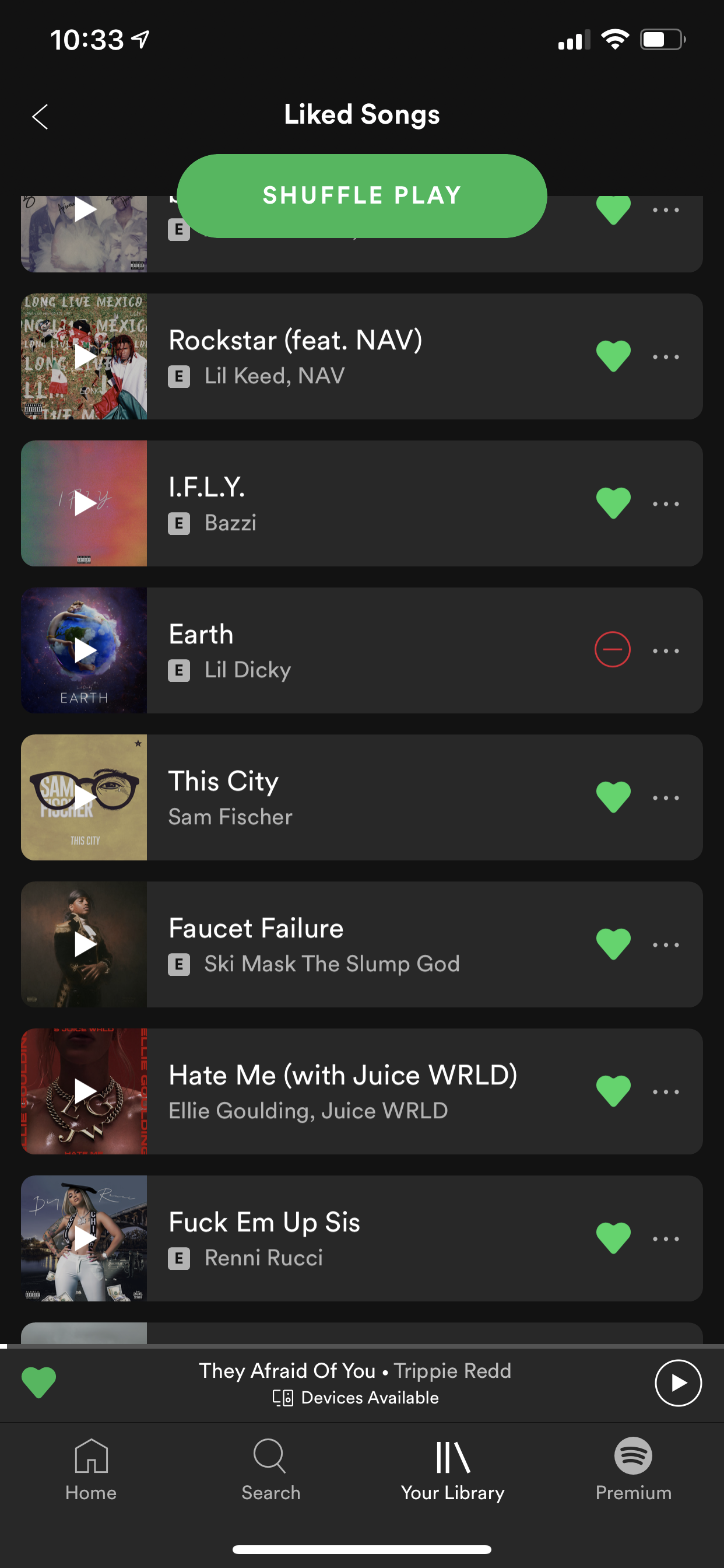
How do I Unhide a song in the android Spotify app. I accidentally clicked the - minus sign next to a song while it was playing which gave me the message song hidden. Also, just to clarify, I'm not talking about a plalist.
Galaxy s8
Hey @micflynn,
Could you tell us where the song you dislike could be found? Keep in mind that you can still search for it in the app and add it somewhere. If it's a Daily Mix that it was removed from, it will be automatically customized to fit your listening experience, so keep listening to your favorite music 🙂
I did the same thing while listening to Spotify's "All Out 80's" playlist. The song I accidently hid was Faith by George Michael, which I surely want to hear again (and again). How do I unhide it, I have a tendency to listen to 80's lists and radio stations and it would be very sad to lose that song.
It wasn't inuitive at first for me, but I found a way to get a listing of songs within an album (finally) on my Android Spotify app (Motorola MotoE4): was able to select the "Album" in question, and then just click on any one of the songs listed below it (they are all in a clump underneath "Shuffle Play"). Once you get that list of songs, each one will have the "hide" minus button next to it, and you can check/uncheck it as needed per-song.
That was one of the most unintuitive tasks:
Only on Android/iOS - go to Library, then to Artists tab, scroll all the way down to Hidden Content. Then click on the red signs next to artist or songs to unhide it.
If you don't see Hidden Content folder, your hidden songs list is empty.
Yeah I accidentally hid a track i wanted to add to a playlist and i cant seem to find any list called hidden content anywhere. I cant even remember the name of the track to find it specifically. I went the path suggested in this thread and other google searches and it doesnt work. Not sure why there isnt just a section in the settings cog for hidden content.
I accidentally hit the minus (-) sign next to the song on a 00's Rock curated playlist. I can't figure out how to get it back. I've tried some of the suggestions in this thread but nothing works. I can't find any sort of 'hidden songs' list.
I have the same problem! How do I see my "hidden" songs und unhide them?!
If you have premium now and hid the song when you didn’t have premium go to the playlist with the song you hid before premium, if you didn’t delete it from the playlist, and tap the “...” on the song and hit the heart and it will add it back to the playlist and it would be unplayable anymore.
Usually the issue seems to be the hidden songs always happen by accident. I have no way of knowing what the song was. Is there a setting to never hide songs?
I have the same problem. This is horridly unintuitive and difficult. Ultra-easy to "hide" and impossible to "unhide". My scenario: I was listening (android phone) to another person's playlist and when trying to add a song to my playlist, accidentally bumpt the "hide" button. The song is gone from the rotation and neither on android app nor windows installation of spotify can I figure out how to get the song unhidden. I do not remember the song name and vaguely remember the album (I think... remember it was another person's playlist). I do not care to have to remember anything, nor drill down 6-steps to find what I need. All I want is a list of hidden songs to unhide under settings or my library. All of the previous suggestions to unhide songs do not work.
Ok so I had the same issue with a song. I couldn't find the hidden songs in the app. I went to the web site and logged in. On the left side menu is an option to recover playlists. You can fix it from there.
.
I had the same issue, what I did was go into “...” and press “like”. It then moves it to the liked songs section instead of the hidden songs and then once you unlike it, it doesn’t return to hidden songs
“Like” the song then remove it from your “liked” playlist. Or “add to playlist” (any playlist will work) then remove from that playlist. Works for iPhone app. Prob for Android too I’d imagine.
This "solution" only works if you know what songs you've hidden. Unfortunately, I have hidden dozens of songs played on radio stations created from playlists. I assumed they would only be hidden for whatever station I was listening to -- not across ALL of my Spotify account. I have searched high and low for a list of songs I have hidden in an attempt to recover them but it does not exist. This has to be fixed.
Yes It is idiotic design and on Android there is even no description of what hide button does.
Really shamefull application design. Way to be cool, not usable.
Also I don't get why liked songs is now playlist and not library like it was before.
I contacted the support and got response:
You can see all these hidden songs by going to your library and tapping the "Hidden" option. Then tap the red button to remove the hidden songs from there.
Same as others - I don't have any "hidden" option, neither pc, nor andorid.
I think it is a bug, hopefully I will be able to escalate it so it gets to the developers. I think it is related to the change with podcasts and liked songs being playlist instead of library section
I can’t unhide from my life’s playlist
I am having the same problem but can’t seem to find the solution.
same here
I clicked "-" minus sign by mistake, but I don't know what song it was.
So now I can never listen to one of my favorite songs ever again.
For Android, the Windows 10 App, and the website there isn't a 'Hidden' option or button to click under 'Your Library'.
'Liked Songs' has the following URL: https://open.spotify.com/collection/tracks
The website displays nothing if I type: https://open.spotify.com/collection/hidden OR https://open.spotify.com/collection/hidden-tracks
I had a "Hidden" Playlist showing in my Spotify Android Library with about 13 songs on it. |I wanted to get rid of this so called playlist.
Eventually I found that the solution was to go through each song one by one, first clicking the red no entry sign next to the song, then on the next screen clicking the heart (like) button. This removed each song from the Hidden list and when complete the Hidden playlist title vanished too.
I hope this helps someone.
Hey guys, i had the same problem, searched a lot for solution. Guys, i just found the solution. Created the account just to tell this.
Just Uninstall the app, and install it again. You will see greyed out songs in "Liked Songs" to be playable again. I found those same greyed out songs to be normal in mac spotify app, so i thought there must be something temporary in my current installation of android app. so reinstalled and tada!! solved.
Thank you! Uninstalling the app was the only thing that worked for me. Once I reinstalled the song started playing normally. It was weird, I was able to listen to the song on desktop, but not on my android. Also this was the first time that I have ever seen the hide button on my android. I even clicked a few other songs, after I figured it out, and it doesn't pop up as an option. Spotify needs to fix this bug. I never had a hidden songs playlist or artist either so I would not have been able to fix this without uninstalling the app.