App runs when headphones/speakers are disconnected (Android)

Hey everyone!
Thanks for your reports.
It appears that the the app is continuing to run rather than pause when any headphones or speakers are disconnected for our Android users. This may be causing a spike in battery usage.
If you're having the same issue, make sure to click +VOTE to stay updated.
You can also try these to see if that helps:
- Reinstall the app by following the steps here.
- Made sure that the app is not running on the background
Accepted answers
All comments

Same problem here too. Got a Pixel 2 XL.

same on google pixel - android pie

Same problem on my pixel 1.st gen, start with android pie update.
Hey folks!
If you're on the latest version of the app and the same issue occurs, make sure to hit the +VOTE button to stay updated.
We've passed this on to our tech folks and they're looking into this currently.
If you want, you can also leave a comment below with the following info:
- Device
- Device OS version
- Spotify version
Thanks for bearing with us!

This resurfaced for me yesterday, had been ok following the update but something still isn't right. Getting very fed up here.

Same here too, Pixel 2 XL

Hey all!
We've released version 8.4.74 for Android yesterday.
Could you make sure you are running the most recent version and let us know if the issue still persists? If it does, please send over the following:
- Your device
- Exact OS version
- Spotify version
Have a nice day!

Is there any way of getting this escalated or to get a response from Spotify? This is obviously a problem given the number of people experiencing issues. There is NO reason I can think of for Spotify needing to ping Google Play Services constantly whilst it is in use. No other app does this and there is no need to do it.
Seriously considering leaving Spotify over this as battery drain like this is a real deal breaker.

Hi! @StringyMCFC, hope you're doing well.
I myself have an Apple product, so I don't know a whole lot about Pixel phones, but I'm happy to help!
This seems like a common problem with Pixels. Maybe it's just something with Google phones?
You could also try closing the app whenever you're not using it , and use of data might cause the app to drain extra battery ; do you have premium?
Also, perhaps your phone is in need of a new inner battery? It might be unlikely since the Pixel 2 is a relatively new model, but there's always a chance.
Again, these are just suggestions to help you save power. I hope they're helpful!

Hey folks,
Thanks for raising this issue with us on the Community.
We have reported this to our tech team and they are looking into it.
In the meantime, could you please leave the following information:
- device and OS version
- Spotify version
- a screenshot showing your battery usage?
If you are experiencing this issue, do click on +Vote so we can get an idea of how many users are experiencing this.
Many thanks!
Hi Peter,
Thanks for the update. I have a Google Pixel 2 running latest software update (Android 9.0 Pie). Spotify version is 8.4.74.463 armV7 (the latest update available).
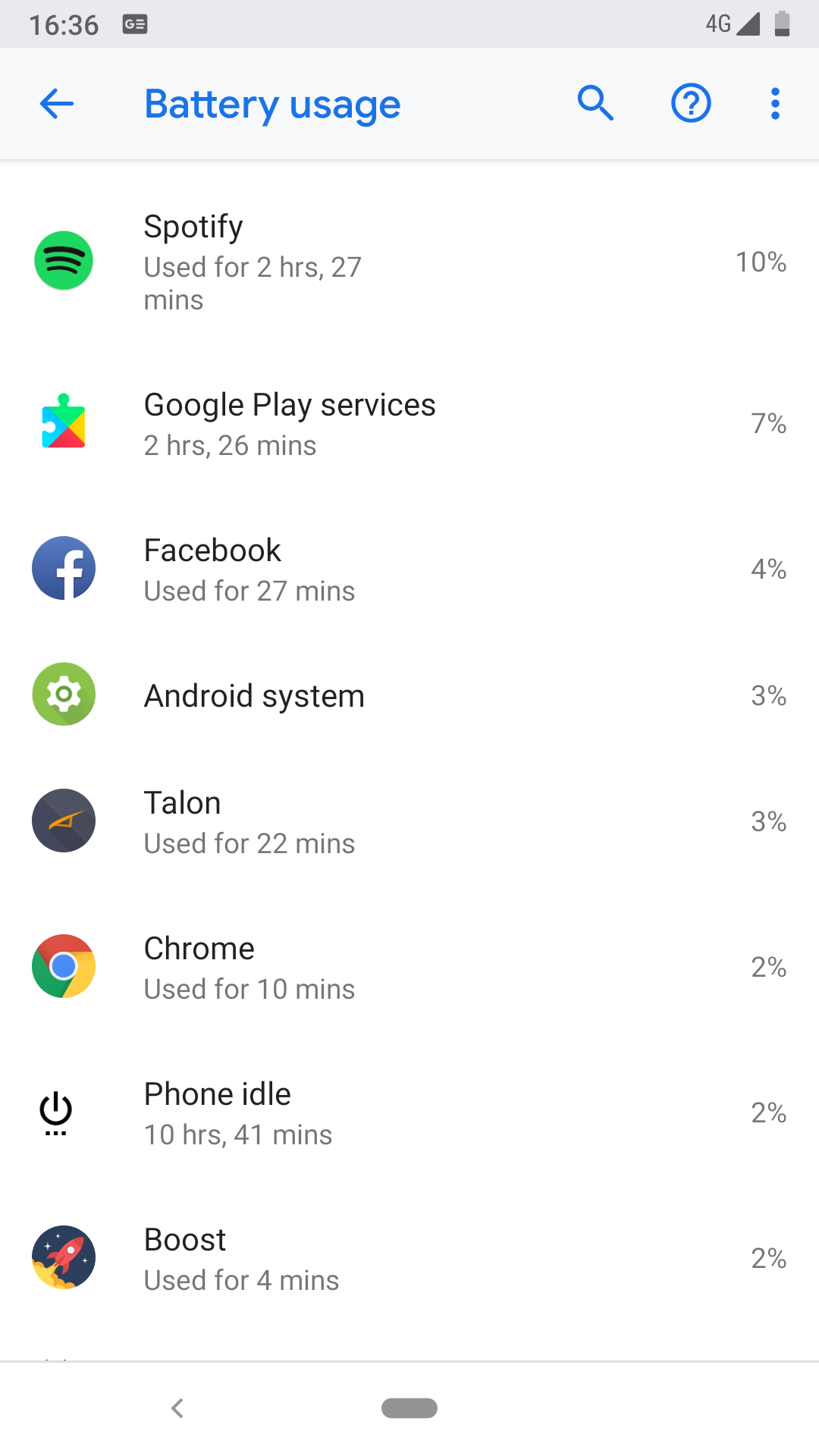
Here is my battery usage today. As you can see, the Spotify usage isn't *too* bad on it's own but it is triggering Google Play Services all the time it is on, effectively doubling the battery usage. There is no other app that does this and no valid reason I can think of for it to need to do this. For comparison purposes, on days where I don't use Spotify, my Google Play Services usage never goes above 1-2%.
More than happy to provide further information as required.
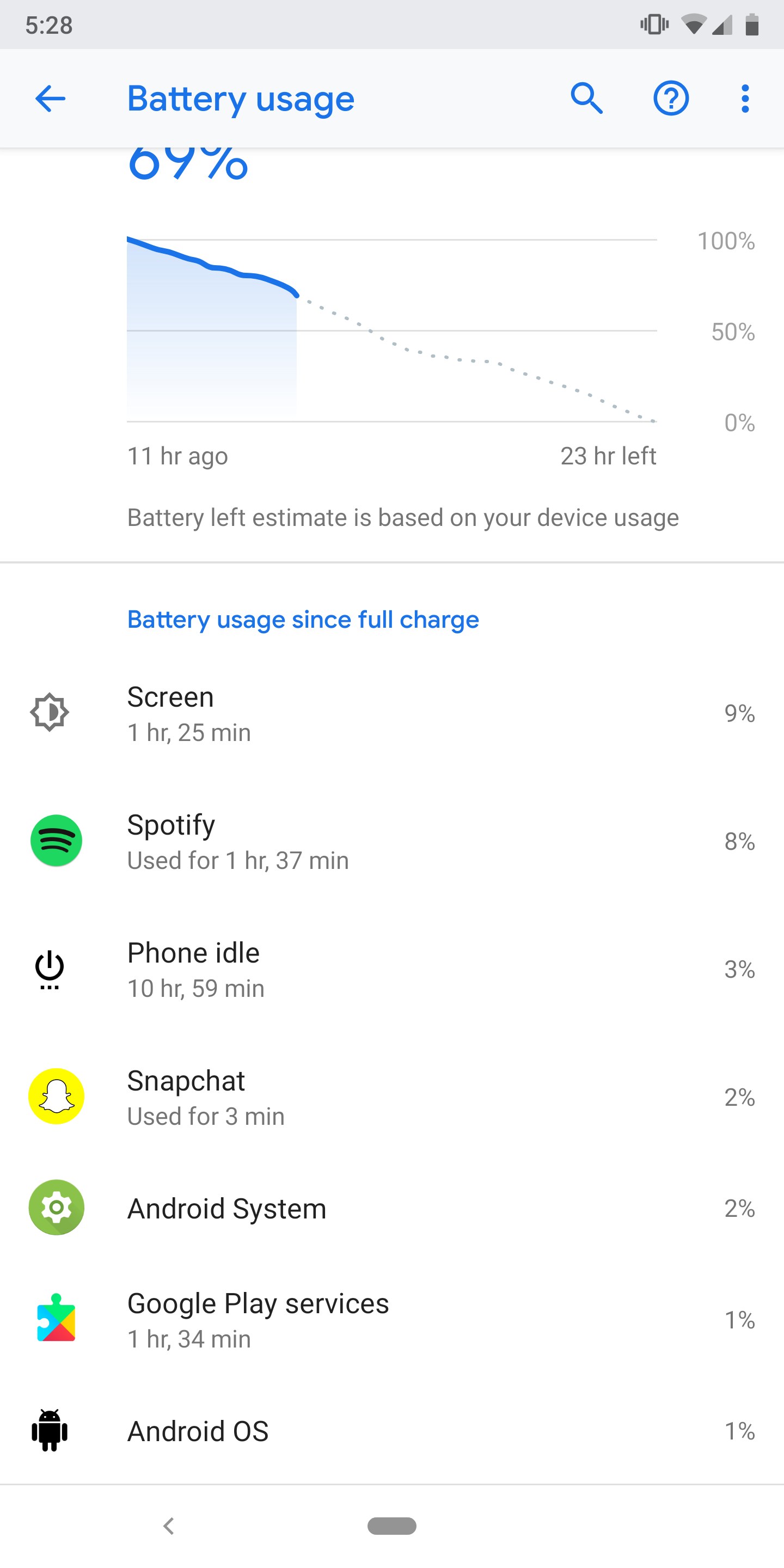
Google Pixel 2 XL, running latest Pie (9.0) version and Spotifys app version is 8.4.74.463
Hey there everyone,
Thanks for your patience.
We can see that there's a new version of the app available. Could you make sure to update the app and let us know if the issue persists?
We'll be keeping an eye for your replies!
Hey everyone,
Thanks for your patience.
We can see that there's a newer version of the app available. Could you update your Spotify app and let us know if the issue persists?
We'll be keeping an eye on your replies 🙂

I am also running a Pixel 2 with Android 9, and my symptoms are just like those of the topic-starter. I have also deleted the app, cleared out the cache, and reinstalled the app, but the problem still remains.
Hi,
Updated the app as requested (now on 8.4.75.670 armV7) and the issue is still there.
Google Play Services remains dormant until Spotify is used at which point it is in constant use.
Absolutely no change at all.
Hey everyone,
We've seen some of you report that you're also seeing a battery usage spike. We've passed this on to the right folks and they're looking into this.
Further, please make sure you are running the most recent version and let us know if the issue still persists.
If it does, make sure to click the +VOTE button and include the following in a comment:
- Device
- OS version
- Spotify version
We'll let you know as soon as we have any updates.
Thanks for bearing with us 🙂

The in-line controls do not work properly, as reported a long time ago by many users in various forums I've found. It's still not fixed, how? why?
To clarify, the controls work on all other apps. And a single button press works for play/pause. Double-press for next song or triple-press, however, does not work.
It worked on my previous Android device on 8.0 Android just fine.
I can get it to work, if I turn the battery optimization off, but after a while, even after that it stops working, and disabling and enabling the setting did not work anymore.
Another workaorund is to ask Google Assistant to play next song, and then suddenly the controls work until the end of the session.

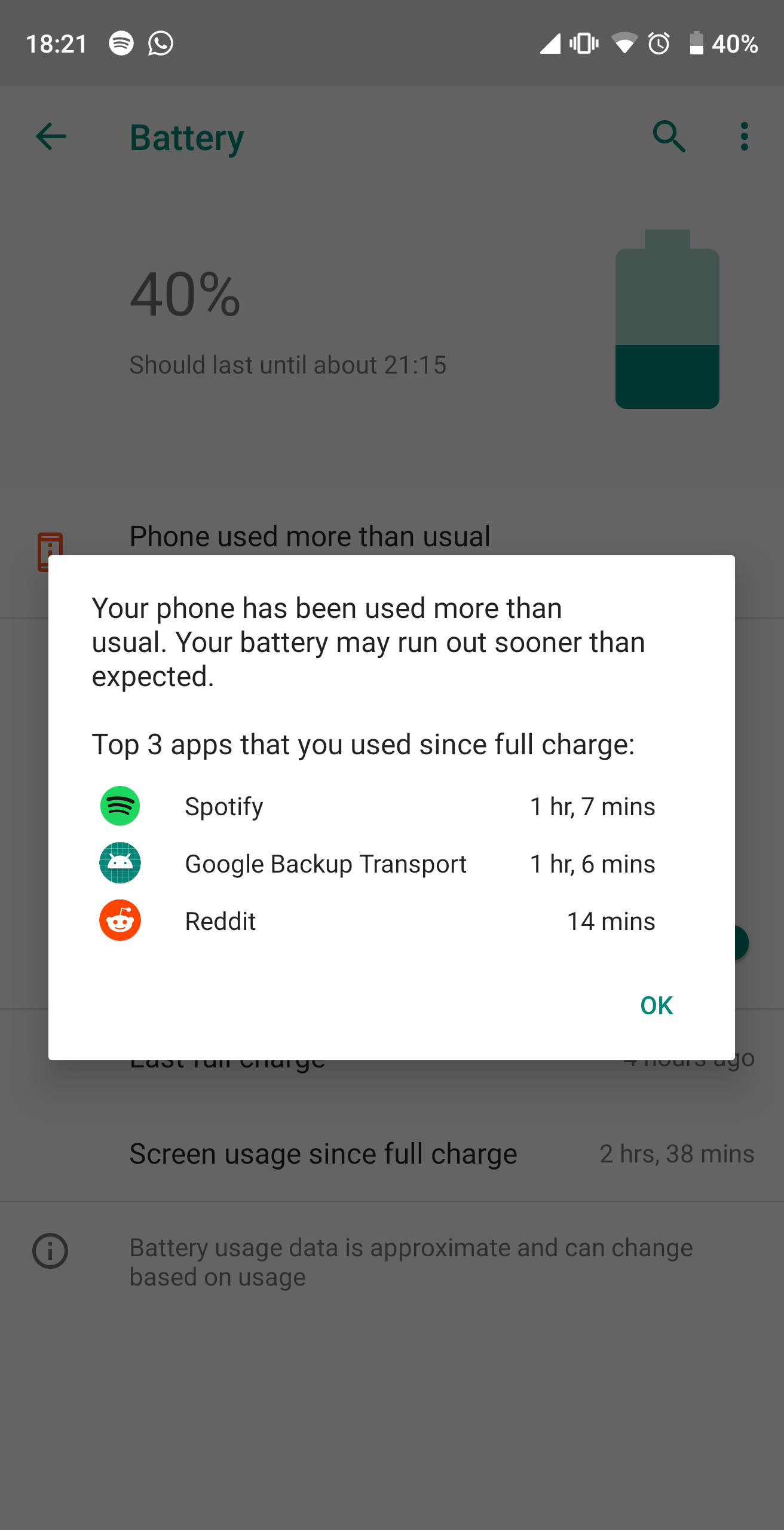
Please fix it, there is no way spotify needs to ping google backup transport

Having the same problem on my OnePlus 6T McLaren edition. Not just a pixel issue.

Galaxy s9+
Android 9.0
Spotify8.4.94.817
Wiped and reinstalled numerous times, nothing is helping. Interstingly on my wife's s8+ this issue doesn't appear...
Hey there @larudnicki,
Thanks for letting us know these details.
There's a newer version of the app available. Just to confirm, could you let us know if the issue persists for your Samsung device after updating to the latest version? If you haven't already, we'd also recommend removing any devices listed here and trying a clean reinstall of the app.
We'll be keeping an eye out of your reply 🙂
Hey there folks,
We really appreciate your patience so far.
After running tests, our tech teams were unable to reproduce this. This could be due to individual device setups with Bluetooth devices and connections.
However, we're continuously working on improving the app, so we'd recommend making sure that you've enabled automatic updates on your device.
Thanks!

Having the same issue on my brand new Pixel3a. All apps up to date. Tried clearing cache and data.
I realized the issue when on airplane mode and listening to a downloaded playlist on a plane, so I suspect Spotify/Google services are causing the problem.

Same issue on a Pixel 2XL running the latest android Pie. Not only does spotify ping google play services but it also uses the linear acceleration sensor all the time when the app is running!. This can be easily checked with betterbatterystats on a rooted device.
Sort the app or keep losing potential premium users because the leftover spaghetti code is carried throughout the updates!

Oneplus 7 Pro here too - battery drain like **bleep** using Spotify.
Google Play services almost identical time used as Spotify.
I think Spotify is using the play services, for chromecast perhaps, and this is just dumb if there is no option to disable.
Just got Premium for Family and I am seriously considering stopping the subscription and moving to something else..
If Spotify introduces a feature to not poll for any connected or available devices, I believe it might fix the problem.. but it seems like you have completely abandoned this thread.

I have this problem too. If I am on a phone call using my Samsung Buds Pro and then take them out and put them back in the case, Spotify comes on my phone speaker and starts playing the last song I listened too. I've searched and not found an issue resolving this problem. I've cleared cache, have the latest software, reinstalled software. I'm running a Galaxy Note 20 Ultra. Every time my headphones are disconnected from the phone, Spotify plays. There is no way for me to close Spotify down unless I open the app and then pause it. It doesn't pop up on the screen and is playing in the background. Very frustrating, especially at work!!!! What is the fix here????????????



Hey @jbyao,
Welcome to the Spotify Community.
We appreciate the troubleshooting you've done so far, but to be sure that we're on the same page - did you use these steps for a clean reinstall? They are more thorough than a regular one. That way you can make sure the cache is not causing this issue.
Also, and if possible, would you mind trying with different headphones to see if this makes any difference. This is because some devices have their own way of interacting with the phone and app based on the type of bluetooth integration and features they have.
If the issue happens with other headphones, include in your next response the OS version of your phone, along with the Spotify version you're currently running to keep investigating your case.
We'll be on the lookout.
Plan
Premium
Country
UK
Device
Google Pixel 2
Operating System
Android Pie
My Question or Issue
Since upgrading to Android Pie I have had excessive battery drain from Spotify. At the same time, whenever Spotify is active, it appears as though it is constantly pinging Google Play Services as the usage (under battery stats) for Google Play Services is *exactly* the same amount of time as Spotify (plus maybe one or two minutes extra for use prior to using Spotify).
I have deleted Spotify cache, fully deleted and reinstalled Spotify, checked settings and even done a factory reset of my device and the problem still remains.
Any advice or support would be appreciated. Happy to provide any screenshots or further info if required to get this resolved.
Thank you.