Sorry we couldn't load friends to follow

Plan
Premium
Country
UK
Device
Huwawei P20 Pro, PC
Operating System
Android Pie 9, Windows 10 pro
My Question or Issue
after linking my Facebook account with spotify I no longer get to see my Facebook contacts and whenever I click on find friends i get Sorry we couldn't load friends to follow message also before my spotify username used to be my Facebook name now it is just a spotify ID number as if my facebook is not really linked with my spotify account and it's the same on my PC
Accepted answers

Thank you!
Turns out my app entry in facebook had expired here.
To renew the ticket you can:
- Click on 'View and edit' on the expired spotify entry
- Press the 'Renew Access' button on the popup window
After this Spotify and Facebook integration worked again and I could follow new friends.

My earlier problem got solved as I renewed the Facebook-settings here:
https://www.facebook.com/settings?tab=applications&ref=settings
Just today, I checked whether my Facebook-friends can be found from Spotify.
It gave that similar error message, so I had to yet again renew the apps settings in the Facebook-settings page. For some reason the Spotify's permission had ended at the end of september. I hadn't changed anything, so I wonder why it wouldn't just continue and use it normally.
So, I think this problem is only happening if the permission goes out of date and you have to renew it by clicking couple times there on Facebook.
All comments

Hey @user-removed,
Welcome to the Community.
I recommend you to confirm if the option "Facebook Processing Data" is enabled here.
Hope this helps 🙂
yes it is i've also turned it off and back on but without anyluck I've also removed the app from my facebook apps and reconnected it and still same issue

I also have this problem and have not yet found a solution
I have solved it by contacting Spotify via the chat, they have had to create a new account and transfer the subscription to my new account since my old one was setup also with Facebook login and I deleted that account ages ago
Hey @q-mv_gu5b5msa ,
Have you tried all the steps I mentioned above? You can also confirm if you enabled the connection between Spotify and Facebook correctly, I recommend you to check this.
Thanks! 🙂

Thank you so much **bleep**!!!! I have looked everywhere and couldn't find a solution. Bless you.
Thank you!
Turns out my app entry in facebook had expired here.
To renew the ticket you can:
- Click on 'View and edit' on the expired spotify entry
- Press the 'Renew Access' button on the popup window
After this Spotify and Facebook integration worked again and I could follow new friends.

Jesus... where is this tab for facebook in my spotify??? I looked and don't see anything. Why is this app so clunky? Did you hire the same folks who designed linked in? The UX is terrible as is the support.

@jbarrieuk schrieb:Jesus... where is this tab for facebook in my spotify??? I looked and don't see anything. Why is this app so clunky? Did you hire the same folks who designed linked in? The UX is terrible as is the support.
Hey @jbarrieuk,
Not sure on which device you are using Spotify but on Windows Desktop it's in the 5th section called "Social". Here's a screenshot of how it looks like.
Best,
Felix

Hello,
Problem not solved for me.
- Facebook connected
- Facebook allowed to process data (it was off but now it is on)
- Apps in Facebook includes Spotify as "Active"
- Application re-installed
- logged out of all devices and then logged in.
can't seem to be able to get the friends to load. still getting the "Sorry we couldn't load friends to follow"
Any other suggestions?
Thanks,
Mahkchoun
I also have the same problem! Nothing worked for me.
Any other tips?
Regards
winklerrr
I noticed recently that I also had this error as I couldn't find any Facebook-friends, but I tried what was told here earlier, I renew the expired entry in Facebook-settings.
And now it works normally, my friends are again visible.

I've tried disconnected my Facebook and reconnecting (from both Spotify side and Facebook side), but nothing seems to work.
If I had to guess it probably has to do with the fact that I made my Spotify account with my Facebook years ago, but for some reason now I can't login with my Facebook, rather I use the email connected to it.
Someone from Spotify please help me fix this.
Thanks

Hey there @user-removed,
Thanks for getting in touch with us and welcome to the Community 🙂
We'd suggest you give these steps a go. After your Spotify account is connected to Facebook, you can also log in through Facebook.
If you receive an error message, you can also send us a screenshot of it. We'll investigate this further.
If you have questions, don't hesitate to reach out to us. We'll be happy to help.
Hey Ver,
I appreciate the response. Unfortunately, I've already seen that thread and tried the solution, but still no dice. I still get the same error message (I've attached a screenshot as well).

Hey there @user-removed ,
Thank you for reaching out about this and for the information you provided.
Could you confirm if the Facebook account you created your Spotify account with is still active?
It would also be great if you could let us know if this occurs on one device or more devices.
What version of Spotify do you currently have?
Keep us posted. We're always one reply away.
Cheers!
Hey @Mario,
For some reason the first 2 times I replied to this it seems they didn't go through. 3rd times a charm:
• The Facebook account is still active, I use it till today.
• This happens on all my devices
•Versions:
iOS - 8.5.78.928
PC - 1.1.43.700
Hey @user-removed,
Thanks for keeping us in the loop!
Just to double-check, did you already perform a clean reinstall of the app on all your devices?
If all is good with your Facebook account, we might want to start testing things out and see if what you've experienced is perhaps a temporary error which can be solved with a freshly installed app.
Give it a try and keep us posted. We'll be here 🙂
My earlier problem got solved as I renewed the Facebook-settings here:
https://www.facebook.com/settings?tab=applications&ref=settings
Just today, I checked whether my Facebook-friends can be found from Spotify.
It gave that similar error message, so I had to yet again renew the apps settings in the Facebook-settings page. For some reason the Spotify's permission had ended at the end of september. I hadn't changed anything, so I wonder why it wouldn't just continue and use it normally.
So, I think this problem is only happening if the permission goes out of date and you have to renew it by clicking couple times there on Facebook.
Hey Mario,
I tried the clean reinstall, but unfortunately it didn't change anything.

Hey @user-removed,
Thanks for getting back to us.
It seems like @Samppa3 might have found a possible solution. Would you mind following the link that they provided and make sure that Spotify has an active permission to access your Facebook data on their website?
Let us know how it worked out, we'll be keeping an eye out for your reply.
Hey Mikhail,
Looks like Spotify has all the necessary permissions:
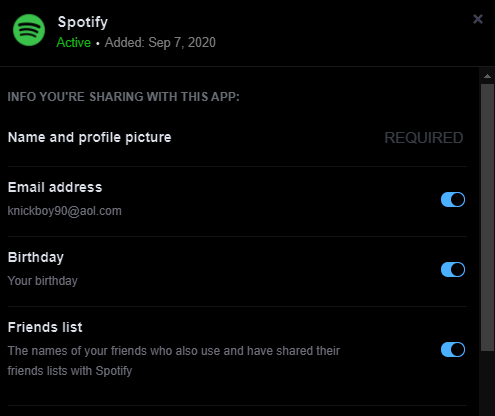
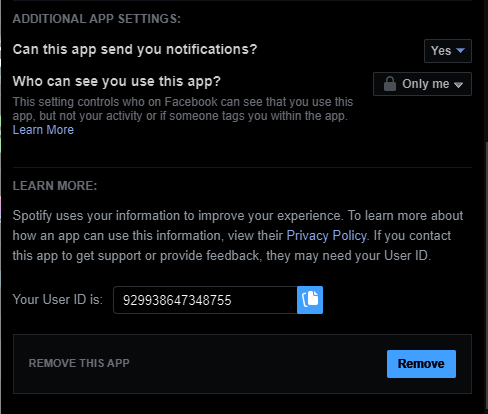
(The reason it says 'added Sep 20' is because I've tried removing and adding it back in the past, but that didn't work either).
Hey @user-removed,
Thanks for the quick reply and the screenshot.
Do you have the option to log in to a friend or family members account on your devices and see if the Fried Activity loads correctly there?
You can also create a free account to test it out here.
Keep us posted with the results 🙂
Hey Mikhail,
Good news, we've narrowed down the problem to my Spotify account.
I created an account with another email of mine, **bleep**, unlinked my Facebook from my current Spotify account (**bleep**), connected the new account to my Facebook, and it worked.
This leads back to my original post. When I created the **bleep** account I did it by signing up with Facebook. For some reason today I can no longer login with Facebook, rather the account is linked to the email, so I sign in with email & password. This seems to be the source of the problem.
The way I see it, unless there is a better solution you can think of, we have 2 options:
1. We somehow unlink my current account with its original 'Facebook sign in' property.
2. We copy over all of the songs, playlists, preferences, settings, content, etc. from my current account to the new account (**bleep**).
Let me know what you think. Thank you again for all your help.
Best,
Avi
Hey @user-removed,
Thanks for getting back to us with the results.
We're happy that everything works fine with your new account. You can follow the steps here and transfer all your music and followers so that nothing gets lost.
Hope this helps. Keep us posted if you have any questions.
Hey Mikhail,
Copying everything over using the directions you sent me would take an extremely long time. Also, there's no way for me to copy over the 400 songs in my Liked Songs playlist, which means I would have to find each one of them, one by one, and like them again on the new profile. Finally, I then would have to cancel my old Premium account and pay again on the new account.
As you can see from the date of my first post, I've been trying to solve this problem for almost 2 months now. It's pretty frustrating that the best solution you could provide me with is 'go make new account and spend hours manually copy everything over from your old account'.
I'm confident, considering the magnitude of Spotify as a company and technological powerhouse, that this process that would take me tens of hours would take someone technological at Spotify less than 5 minutes. If you could please help me copy over the old account info to a new account in a less tedious and less [significantly] time consuming manner it would be very much appreciated.
Hey @user-removed,
Thanks for getting back to us 🙂
No worries. You can mark the first song, scroll to the end, press Ctrl+shift and click on last song. That way all songs of the playlist will be marked. Then you can add them to a playlist. After that you can give these steps so you can enjoy the songs on the new account.
You can also head here and contact our support team. The folks there can look into this further and help you with the transfer.
Hope this helps. We'll be right here if you have any questions.
Hahaha Mikhail, this entire time I thought I was speaking to customer support.
I spoke to them and they helped me with the transfer within minutes!
Thanks so much for all your time and assistance 🙂
Hey @q-mv_gu5b5msa ,
Have you tried all the steps I mentioned above? You can also confirm if you enabled the connection between Spotify and Facebook correctly, I recommend you to check this.
Thanks! 🙂