Home screen troubles

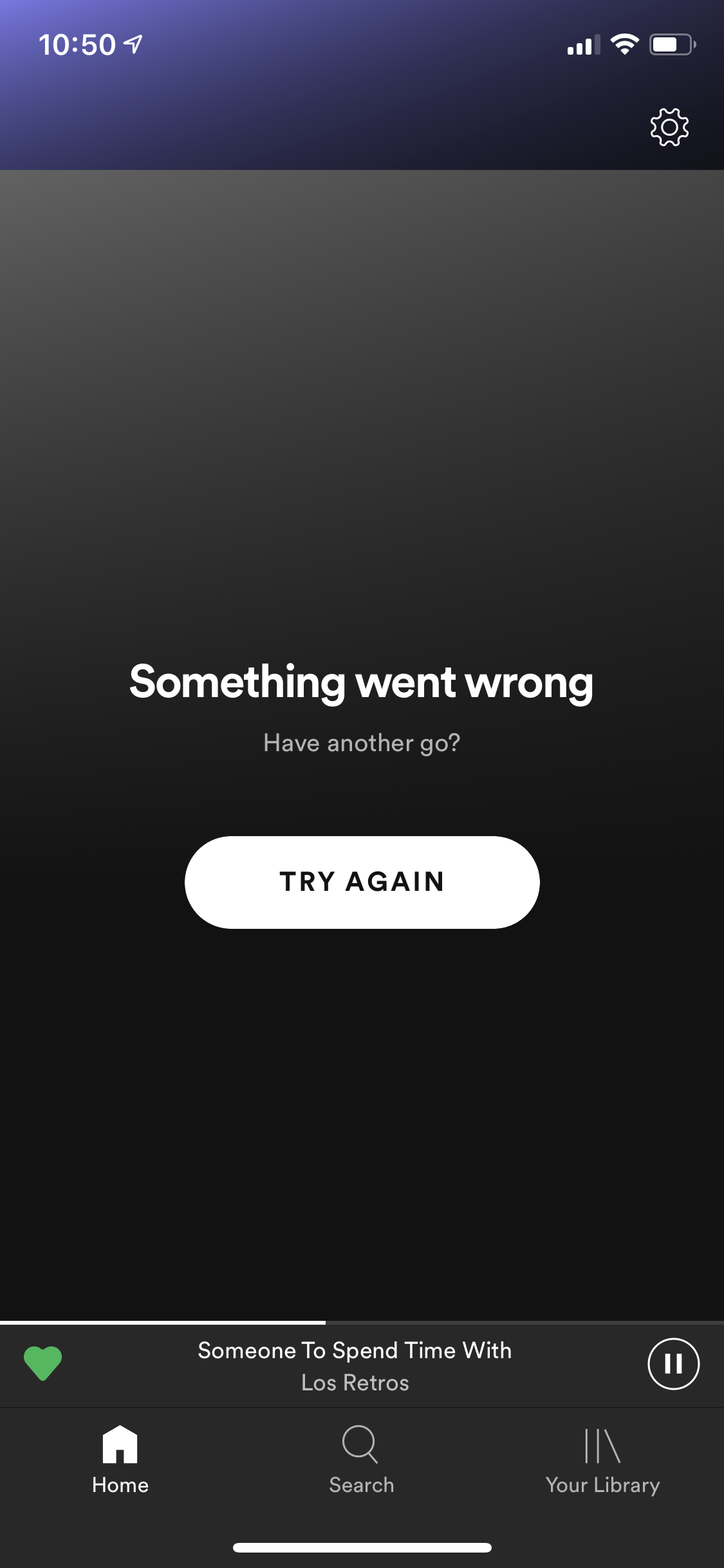
When I go to my home screen it is either blank or it says "something went wrong try again." I have tried deleting the app and downloading it again, restarting my phone, and logging in and out but nothing is changing. Help!
Accepted answers
All comments

Hi @Jalyssa27 and welcome to the Spotify Community! 🙂
Just curious, but have you also tried the steps below for the clean reinstall?
Let me know if it's not resolved and I can try to assist further. Have a great day! 🙂
iPhone
- Open Spotify. In the app's settings (you can access them by going to Home and then tapping the gear icon in the top right corner), tap Storage then Delete Cache.
- Head here and click Remove all devices.
- Head to your device's Settings, then tap General.
- Tap iPhone Storage.
- Select Spotify from the list of apps.
- Tap Offload the app and confirm. This will delete app but its documents data will be kept.
- Then tap Delete App and confirm. This action should delete any leftover documents and data.
- Once the app is deleted, press and hold the Side/Top button and either volume button until the power off slider appears.
- Drag the slider to turn your device completely off.
- After your device turns off, wait a couple of minutes.
- Press and hold the Top (or Side) button again until the display turns on.
- Switch your device back on and install Spotify from the App Store.

I'm having the same issues as well...
This is happening on my iPhone X running iOS 12.3.1
I'm reluctant to run a clean install on my phone as my Windows 10 Dell Latitude is having the same issue.
I am still able to access my playlists and search for music that is not saved offline and play it succesfully with Spotify Connect or Bluetooth.
Spotify version on iOS: 8.5.7.601
Spotify version on Win 10: 1.1.6.113.gb388fe17

The steps did not work for me. Still shows Home not loading and now shows browsing does not work either.

Same issue - followed steps provided and they did not resolve the issue. Running on iPhone X, iOS Version 12.3.1.

Having the same issue. It’s not on users to fix a Spotify’s problems, as it clearly is a global issue with the new version rollout. All of my devices have the same problem. Spotify should announce that affix is on the way, or that they decided to break it and leave it. It’s not usable for exploration except for my current playlist content.
@shunsmuse I partially agree here. Yes it is up to the company to respond and support a fix, but as a GLOBAL company, there are many checks and balances that need to happen before a software update is implemented. There are SOO many different Android devices, builds, and possibly country specifc laws that a company has to take into account for before implementing a half baked update that breaks more functionality.
One more thing to note, I tried clearing the cache in the Spotify app and force closed and reopened on my iPhone. I did get the three dots (in a wave animation like it's trying) briefly after launching and the home screen did appear for a split second and reverted back to "Something went wrong"

Having the same problem on both mobile and desktop. On mobile, I also can't load songs from albums or artists.

Same issues on my laptop. Started about 8 hrs ago. Have tried all sugestions and uninstall reinstall, nothing helps. It's doing this on the computer, smart tv and Amazon fire tv. No home screen, Browse or made for you.
This has to be on Spotify's end. Please fix it asap.

The version on my MacBook Pro also is not working...
None of the so called fixes works. Why has someone from Spotify not addressed this issue. It is obviously on Sotify's end. I noticed this all began about 8hrs ago, when Spotify stoped auto playing. Then the screen issues we have all described started to appear. No fixes are working. Reinstalling does not help.

None of the suggested fixes are working. This is a joke. They need to address the problem and their loyal paying customers! Plain and simple!!
If there are any ways of gathering logs from the apps, I'd be happy to do so to see if we can help find a fix for this.
Thanks,
Tony

Mine is doing the same thing and I’ve tried everything that it says to do if having issues. Nothing I do works..
@tly734, your feedback confirms that the new glitch is a larger user base Spotify issue. By the way, when I said global I meant in the realm of many or all users, rather than international. And, thanks for your response. I presume that it takes numbers to motivate a fix. The idea that users need to jump through a series of time-consuming hoops smacks of lack of responsibility on Spotify‘s part. The new version rollout has problems. Global Problems. It’s on them to fix it with a new rollout that addresses the issue that most people are pointing out – with great consistency.
I am re-posting an abbreviated response to the general forum so that new eyes can see that there is a systemic programming flaw with the new version rollout, and (most likely) nothing to do with their user install:
Multiple user feedback confirms that the new glitch is a larger user base Spotify issue. By the way, when I said global I meant in the realm of many or all users, rather than international. I presume that it takes numbers to motivate a fix. The idea that users need to jump through a series of time-consuming hoops smacks of lack of responsibility on Spotify‘s part. The new version rollout has problems. Global Problems. It’s on them to fix it with a new rollout that addresses the issue that most people are pointing out – with great consistency. Please complain to Spotify cares, and any other Spotify Twitter address.
Hey everyone!
Spotify has acknowledged there's an ongoing issue. It's being looked into at this time. Feel free to check out Twitter for any updates https://twitter.com/SpotifyStatus and hopefully it will all be back in sync soon! 🙂
@All, I am re-posting an abbreviated response to the general forum so that new eyes can see that there is a systemic programming flaw with the new version rollout, and (most likely) nothing to do with their user install:
Multiple user feedback confirms that the new glitch is a larger user base Spotify issue. By the way, when I said global I meant in the realm of many or all users, rather than international. I presume that it takes numbers to motivate a fix. The idea that users need to jump through a series of time-consuming hoops smacks of lack of responsibility on Spotify‘s part. The new version rollout has problems. Global Problems. It’s on them to fix it with a new rollout that addresses the issue that most people are pointing out – with great consistency. Please complain to Spotify cares, and any other Spotify Twitter address.
Removed duplicate entry.
Not sure if this was on Spotify's side, but I now have access to my home screens on all my devices! Kudos for the speedy fix Spotify!
Just checked my home screen and so far it now appears to be working.

Hey folks,
Thanks for posting about this issue in the Community.
We just wanted to let you know that this issue should now be fixed, as was announced in this tweet in the @SpotifyCares Twitter channel.
Thanks for your patience! Stay awesome 😉

Has this bug returned?
My mum would like to switch to Spotify from iPhone but her home page won't load. If she clicks on the Premium button it says "Reload", but she's online.
No point in upgrading to premium the home doesn't work!

Hey there @sWi7zLe,
Thanks for reaching out to us. Don't worry. Help is here 🙂
We'd suggest she stars off by restarting the device. Then she can log out and log back in to the account.
If that doesn't do the trick, she can give these steps a go and run a clean reinstall. By doing that she can make sure the cache is not leading to this issue.
If that doesn't help, she can try on another device. That way we can see if it is a device-related issue.
Let us know how it goes. If you have questions, you know where to find us.
Wow, it only took 2 weeks to get a reply, impressive! Fixed it weeks ago.

Sadly this is not the case, home and browser pages stopped working on my iPad last week!

Hey @colin46,
Thank you for your post in this thread.
Can you confirm if you followed the troubleshooting steps that's provided in here?
If so - can you let us know which version of the app you have?
it would also be great if you can provide us a screenshot.
We'll keep an eye out for your reply.
Cheers!
Thanks for reply, yes I tried all the troubleshoot hints, the only new issue that
arose is a message saying I'm offline but I've checked in settings that this is not the case (as I said I have no problems on my laptop. The iOS version is 9.3.5 (I have reinstalled the app using the option that said it would download a version compatible with this iPad). Any help appreciated as I was given a 6 month subscription as a present which shortly expires - I'd like to continue but see no point if all the functions don't work.
Hey again @colin46,
Thank you for your reply and confirmation.
What happens if you try with another internet connection?
Also - can you try to log in with another account - such as a friend's or a family member's on your device to see if the issue persists?
Keep us posted 🙂
Cheers!
Hi, sorry for delay, community Spotify website kept crashing. I,m afraid that at the moment I am not able to access anybody else's website nor do I know anybody else with a Spotify account.
Hey folks,
Thanks for posting about this issue in the Community.
We just wanted to let you know that this issue should now be fixed, as was announced in this tweet in the @SpotifyCares Twitter channel.
Thanks for your patience! Stay awesome 😉