New update June 2019 sucks SWITCH IT BACK

Premium
USA
LG Stylo 4
Android
The update for june 2019 android sucks i logged in and the layout is different listed by albums not songs which is stupid and I have premium whoever thought is an **bleep**! and should be fired I'm not able to enjoy my music like I want to know I got to search through albums and albums so NO ITS NOT A GOOD IDEA and I'm not the only one who feels this way SO SWITCH IT BACK! it stays this way I'm going to a better app which let's me enjoy my music and can search through the library with ease and I'm not the type to complain at all yet you messing with how I listen to my music...SO AGAIN CHANGE IT BACK IT WAS FINE THE WAY IT WAS PERIOD.
Accepted answers
All comments

I absolutely agree. I don’t care about or listen to podcasts, and why would Spotify ever think it’s a good idea to take my library out of alphabetical order and display the artists music I’ve download based on what they think I’m in the mood to listen to? More often than not, i just want to browse through my entire library before I decide what I want to listen to. It’s an awful system and I really hope they change it back or else my money will be going elsewhere. I only listen to ONE of these artists regularly. I literally couldn’t care less about the others. Please put my artists section back in alphabetical order.

Hey there @J_art,
Thanks for posting about this here in the Community and welcome!
We really appreciate your feedback. In this case, if you'd prefer the old look, we'd suggest heading over to this idea and adding your +VOTE and feedback there as well. This way, you can contribute to the discussion and stay updated on any news we have to pass on regarding this.
There's more info on how your feedback in the Ideas Exchange reaches Spotify here.
On another note, if you're interested to find out more about how you can save music and navigate around with the new Your Library look, we'd recommend taking a look at this detailed Spotify Answer.
Hope this helps! If there's anything else we can help with, don't hesitate to give us a shout.
Have a lovely day 🙂
Hey there @smahoneykeene,
Thanks for posting about this here in the Community and welcome!
No worries, you should be able to sort your artists in an an alphabetical order by following the steps below:
- Tap Artists to access the Artists tab.
- Once you've accessed it (like it looks in your screenshot), swipe down.
- Click Filters:
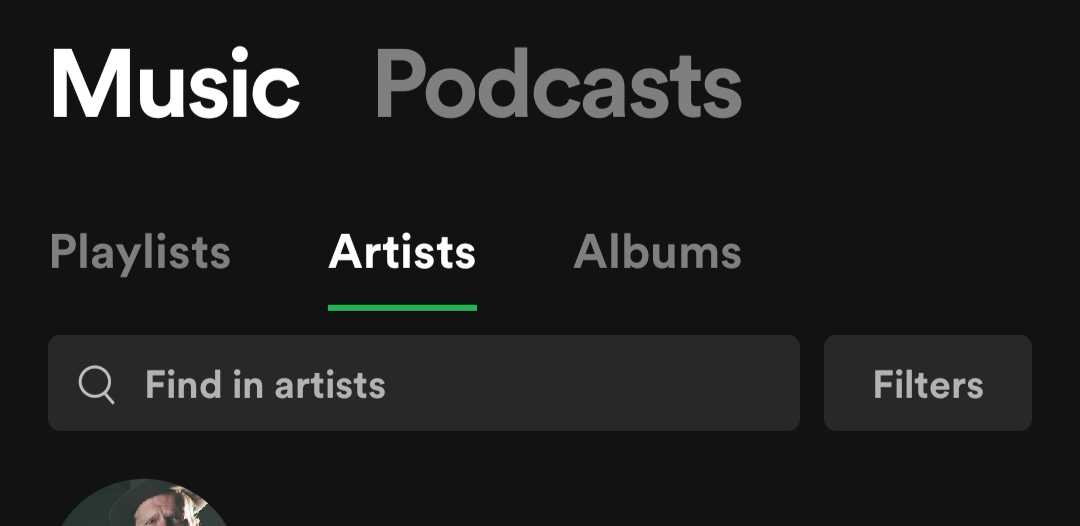
- In the Sort by menu that appears select Artist to view your artists alphabetically, or by Recently Added to view them in the order you followed them:
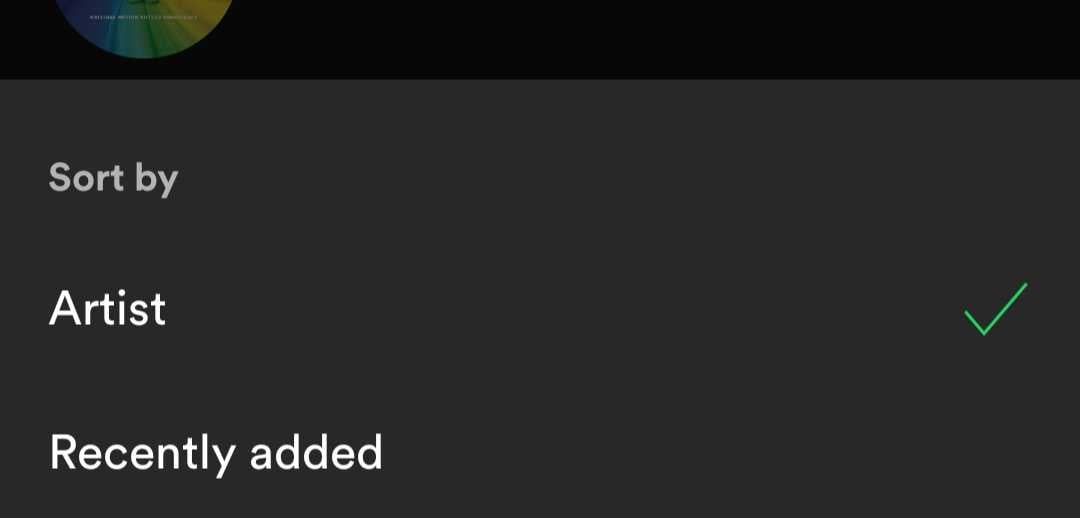
There's more info about sorting and filtering Your Library in this Spotify Answer.
We'd also recommend adding your +VOTE and feedback in a comment in the idea mentioned above if you'd like to be able to use the old look.
Keep in mind that there's more info on how to use the new Your Library look in this Spotify Answer.
Hope this helps clarify things! If you have any further questions, don't hesitate to let us know.
Have a lovely day 🙂

Agreed. Why anyone thought it was a good idea to change the layout so you can’t view the artists whose songs you’ve saved in a nice alphabetical order is beyond me. So annoyed rn, the app was great before now I’m contemplating switching because it’s just so inaccessible now. Change back!
This is stupid because it makes you have to go through and follow every artist whose songs youve saved. Like why tf would you change it from before it was literally so much simpler and better....

This doesn't help because it still requires us to go and follow everyone on of the artists whose songs we've saved. Like why TF would you ever change it to this its actually so stupid. CHANGE IT BACK

This new UI is an absolute mess. Instead of a simple and organized list of artists albums and tracks where you can quickly find what you want, there is now a random list of "recommended artists", a random un-alphabetized list of albums and the "tracks" section has been removed.
My friend has the new update on Android 5.0.1 Samsung S4 but has the old UI. My aunt has the newest Android 9 on her Pixel 3 and also has the old UI. I have Android 9 on Samsung S8+ and have the horrible new UI. Is this new UI only for certain phones?
This new update is a MESS. I pay for a premium family subscription and this will be my last month using the service if this is the new way forward.
"don't fix what ain't broke"
Suggestion: instead of just rolling out a new UI, maybe ask the people that actually pay for the service if it's a good idea? A quick look at the app reviews with all of the 1 stars say I'm not the only one that feels the same.
Hey there @apeters2,
Thanks for reaching out about this!
From now on, Your Library should contain any artists that you follow. Saving an album or song won’t automatically save the artist, so you'll need to follow them like you mention.
Any artists that you weren't following, will not appear in the new Artists section.
If following Artists automatically when saving an album or song is something you'd like to see, don't hesitate to head over to the Ideas Exchange and share it there.
Also, if you'd like more information on how the Ideas Exchange works, make sure to head here. Keep in mind that we are actively bringing your votes and comments from the Ideas Exchange to our internal teams on a regular basis so your feedback is always appreciated.
Let us know how you get on! We'll be right here if there's anything else we can help with.
Have a lovely day 🙂
Hey there @Usernamepasswor,
Thanks for posting and welcome to the Community!
First, keep in mind that this new look isn't for certain devices only.
You should be able from now on to locate all your tracks in Your Library > Playlists > Liked Songs. In that playlist, you can sort your tracks by title, artist, album or recently added, depending on your preferences.
All artists you're following should be now neatly in the Artist tab. You should be able to access it by tapping Your Library > Artists. Here, you can also sort the artists you see by their name or recently added.
If you don't have a large amount of artists or albums saved, you might see Album or Artists recommendations at the bottom of the Album and Artist tabs in Your Library, like you mention. These suggestions should be based on the songs and albums you've liked.
For more tips, we'd recommend taking a look at this Spotify Answer introducing the changes in the new look.
On another note, if you have more feedback regarding these changes, the best place to leave feedback is in the Community Idea Exchange. There other users can vote and comment on your ideas. You can read more about how your feedback reaches Spotify here.
Hope this helps clarify things! If you have any further questions, don't hesitate to let us know. We'll be happy to help.
Have a lovely day 🙂

If you are on android, you can rollback the update and reinstall an older version of spotify to restore the menus that you liked. Make sure to turn off automatic updates on the spotify app. Version 8.4.99.111 has the old menu styles.

There needs to be a way to access songs more quickly though than having to endlessly scroll... please add back the quick jump by letter!

How do I roll back it? I am premium member and this new version makes me want to cancel it all

Get rid of this update ASAP! This update is horrible! All of my albums are no longer in alphabetical order and I have way too many just to scroll up and down through to find out what I wanna listen to. This update is ridiculous. Please revert back to the old version. There was nothing wrong with it.

Ive never commented but jeez, this update is like the dumbest thing in the world, i get that its a regular thing for apps to update and not everyone is happy, but for a music app built for personalization, this is a massive back step, from tiny things like not being able to search for music in your "Liked Songs" playlist without multiple taps to search, to just the scroll bar even, its like behind a banner, its not a good look, be better devs, why break what isnt broken

This **bleep**, if this doesn't get switch back I'm cancelling and going to Pandora. Who the **bleep** thought removing alphabetical order for the artists was a good idea?

Everybody keeps mentioning the album orders and saved songs but there are so many other things. I have to hunt for my “made for you” section instead of it being right there. One that is a deal breaker for me is that I now can’t see how many songs are in my playlist anymore?? wth seriously? This update seems like a purposeful purge of users. For 5 years I’ve been switching people over to Spotify and praising it constantly but this update alone shamed the app beyond repair. JUST CHANGE IT BACK!! Knowing the stubbornness of tech companies that probably won’t happen, but if you gave two pieces of **bleep** you might. Seriously disappointed like I never thought I would be. Disgrace

Hi, how i can find my "all song" list? I dont want to listen single artist at the time... I want all my song in a list and random it! As no longer available?!?! Please RETURN TO THE OLD SYSTEM THAT DROVE ME CRAZY!!!!!!

It used to be simple and easy to organize the music you enjoy based on how the music was sorted alphabetically, with a dial for people with too much to sift through. I used to organize my music by albums, regardless of whether the entire album was downloaded or not. It was a simple way to categorize songs. I had a lot of songs, so the dial felt necessary. If it takes 2 minutes of scrolling to find the song you want to hear, than a mechanic such as the dial is a necessary addition. Simply put, I found the old format for organizing and managing the music one likes was easier and more effective than the current format.

I've never commented before, but feel the need to. The new update is terrible, and what makes it worse is that it's totally unnecessary. An update should not be detrimental to the user experience. Please allow users to select which ui they want, because I am seriously considering terminating my account.

I registered my account to the community just to speak on this.
I fell in love with Spotify years ago. I would think of an artist, raid their discography, and press “like” on all the songs that caught my ear. Then, when I wanted to listen to that artist again, I’d go to my Library and have an instantly curated list of that artist’s songs.
Now you guys have forced me to either listen to whole albums, which I hate doing, or make hundreds of playlists for each and every artist, which clutters up my playlist folder and takes a ton of time. Years of curated playlists are inaccessible now.
Please, switch back to the UI that your users have grown to love. It was intuitive and simple. Thank you for hearing our voices and for working hard on an app that true music lovers can depend on.

@NiteOwl Do you have a link for the older versions to download on an iphone? I see this is for android. Thanks!

The new design has made saving certain albums seemingly impossible. For some (usually deluxe) albums that have bonus tracks or demo tracks added to them, I would save only the songs that were part of the original track listing, then from the library, download the album. Now those tracks that I've saved have become "liked," and in my library, what is "saved" is the entire deluxe album, unwanted tracks and all. Worse still is that the entire album is downloaded, and not just the previously "saved" and "liked" tracks.
Does anyone else have this problem with the new design or is there a way to fix it? This makes me want to cancel my premium subscription.

I agree I want that on the record. GIVE BACK RECENTLY PLAYED.

AGREED!! The main reason I came here was to see if anyone else felt this way. The alphabetical index on the side saves so much time. At least bring that back, please!
@Alex_Ironside wrote:Hi, how i can find my "all song" list? I dont want to listen single artist at the time... I want all my song in a list and random it! As no longer available?!?! Please RETURN TO THE OLD SYSTEM THAT DROVE ME CRAZY!!!!!!
Go to online mode then go to your library.
Go to the playlist tab and where it says "liked songs". That should have all the songs from the artists to downloaded. I had to hit download again so I could listen to them in offline mode. It's dumb but that's what we have to work with.

This update is the absolute worst! First off why would you get rid of the side scroller? If anyone has more than 50 songs saved it infuriating to look at your songs! The menus are ugly, dated and minimal! This “update” makes listening to music a chore! Revert back, otherwise it seems Apple Music will be the go to!

What about the fact that it now only lets you save whole albums and not slected songs!? I don't every song from an album, I would like the four that I like, what am I paying for? I cant just go to itunes instead then, and buy what I want?
Also why do i have to follow and artist, what is that supposed to achive? are you guys trying to do instragm but on spoify? give over.
Liked songs is not all the songs, why isn't there an all songs tab? why did you get rid of that?
This update is awful, just awful.
They got rid of the all songs tab, no more shuffle all.
You can't save indiviual songs, only full albums.
You can't access any artsits unless you follow them (Why is this a thing? We're not on instragram or twitter, you are a streaming service).
The layout is blocky and childish.
Previously the artist's songs that you liked were saved under the artsit, so if you're in the mood for just some John Mayer, (but only the selected songs you enjoy) easy go find him in the artist section and bam shufle all, I'm bopping along.
NOW I can't do that. It's either his entire discography on his artist page (including all the live songs I don't want to listen to) or his individual albums to listen to sperately, but no no not the songs I have chosen ALL OF THEM because screw you paying customer, here's all of them because we know better.
This is just such a disappointment from a service that was so superior and now, well now I'm looking at Apple Music and thinking maybe I should leave Spotify and go to Apple Music.


Never posted but had to come in and say that whoever approved this needs demoted or fired. It's beyond comprehension how someone could ok this update. If it doesn't get changed I'll find a new service
Edit: installed older version, where for Android/note 9 do i disable auto update?
We want you to know that we appreciate all the feedback provided and we're working on continuously improving how everyone enjoys their music with Spotify. In order for us to properly gather your feedback around specific changes, we'll be closing this topic and directing you instead to specific Ideas we'll list below.