Stuck on "Waiting to download"

Plan Premium
Country USA
Device iPhone Xr
Operating System 12.3.1
My Question or Issue
I have a large-ish playlist that I have set on download on the phone app... so when I add new songs to it on the desktop app or on my iPad, it's supposed to automatically add those new songs to the download on my phone when I open it. I can see those newer songs in the playlist on my phone, but they don't have the green "downloaded" icon below them, and the indicator at the top reads "Waiting to download". Been stuck like this for a half hour. Is there a way to force this download to happen right now?
Accepted answers
All comments

Hey @Onelittleworld, thanks for reaching out to the Community!
Could you try a clean reinstall of the Spotify app? If that doesn't help, could you try a different internet connection?
If you're still having issues, please send me a screenshot of the error message being shown.
Let me know how this goes 🙂

Hey there. I'm having the same issue and have tried numerous resolution attempts but nothing is working.
I don't mean to hijack this thread, but could you take a look at mine as well please?
Resolved. For whatever reason, the problem went away when I signed in to another WiFi server. Thanks for responding, Billy-J.
Hey @Onelittleworld,
Awesome! You're very welcome. If you need help with anything in the future, you can always let me know or start up a new thread in the Community.
Have a great day 🙂

I've had this same issue for a week now.
Suddenly nothing would download. I've tried changing the wifi, used my 4G, clean reinstalled the app multiple times (losing all previous downloads!!). I have space on my phone and a good connection.
It's infuriating that nothing seems to help.
Never had this problem with Apple music 🙂

Hey there @umami,
Thanks for reaching out and telling us what steps you've taken to solve this!
How about this:
- You can check this article to make sure we've ticked off every possibility listed there that might be causing this issue.
- We'd advise you to disconnect all of your devices for offline listening.
- Then please reinstall.
- Make sure Spotify is set as an exception for any cache-cleaning apps you might have on your phone.
- Check that Spotify isn't enabled for battery optimization.
If that doesn't do it, let us know your OS and Spotify version!
Thanks 🙂

I have the same problem with my "liked songs" playlist. It's been 2 days I think when I noticed that my spotify is stuck to "waiting to download". I tried connecting to a different wifi, reinstalled the app or even redownloaded the songs on my phone/laptop but unfortunately none of them worked. However, while I was scrolling to my playlist, I noticed that some of the songs are appeared to be grey. Found out that some of them are no longer available on spotify or unavailable to some countries. I tried removing those songs on my playlist and this solved my problem! Hope this will work for you too!

Same here. Tried on different WiFi, cell data. Would be real nice to have this fixed.
i did notice some songs are greyed out (have explicit lyrics turned off so don’t have to worry with kids in the car). Some of those have downloaded though. Just disabled. So doesn’t seem the issue.
manually going through and clicking on songs helped some, but not all.
Didn’t want to uninstall and lose all downloads.
Not sure that’s a great solution.

Mine have been stuck for days. I went into setting and turned off hide unplayable songs and deleted them and it worked like a charm!

Try leaving the Spotify app in the foreground for a long time. Plug your phone in and leave the app open. Eventually I see that some of my albums have actually downloaded. I suspect that iOS is limiting the Spotify app's ability to download if it is in the background.
Of course, apps like Apple Music get special privileges to do things like download in the background.

Switching to the 5G network solved my problem - two playlists and albums that had been waiting downloaded almost instantaneously.

Accept a clean install removes all successful downloads.
How is that a solution?
My Android will show playlists successfully downloaded as green. But the next time I go to app they all have waiting to download!
- I need those downloaded playlists because I travel a lot so need for road music & am mostly without wifi or cell service at places I stay. Again very rural.

Any actual solution to this?
I've been speaking to Spotify support via twitter. Endless amounts of clean installs, I even download each playlist one at a time which was working then all of a sudden my last few playlists would just load for a second then go straight to waiting to download.
Absolute shambles. This should not be happening. I never used to have any issues with my playlists, the last few updates I'm getting issues.
Anyone help?

this just started happening to me this morning. beyond aggravating as I recently upgraded handheld device.
any solution??
now I get**bleep** after complete uninstall/reinstall. can't even access the app. this is unacceptable.
My some of my songs get downloaded eventually, but still incomplete
playlist.

Hey there @hankfrennig and @Shifty_Nifty,
Thank you for your post.
Could you follow the steps bellow:
- Perform a clean reinstall of the app.
- Try with another internet connection.
- Take a look at our support page regarding downloads. You can find the steps here.
- Log in with another account and try to download music to se if the issue persists. You can use a friend's or a family member's account if it's possible.
Keep us posted. We're always one reply away.
Cheers!
thanks for replying!
got fed up (neeeed music for a 1hr work commute!) and a
factory reset
cured the bug; strange, after 2 days on a new device.
hopefully I don't replicate anything preceding error.

Asus Zenfone 6, 64 GB
ASUS_I01WDX
Android 10
Spotify Premium Family member
512 GB SD Card
~26,000 songs, ~250 playlists
That solution did not help me at all.
I have done a factory reset and reinstalled Spotify and downloaded my music again. There are 13 playlists left to download and each one is stuck on "Waiting to Download." I am trying just one PL at a time, still stuck. I have used different wifi networks, rebooted many times, logged out and in many times, cleaned cache many times, created new PL online (one album) and let it appear on my phone and then tried to download it, tried downloading on cellular only, still stuck on "Waiting to Download," the download indicator flashes about 5 times and then there is no more downloading activity.
Now what?
The best solution I have found is Deezer: similar catalogue, similar cost, very dissimilar performance.

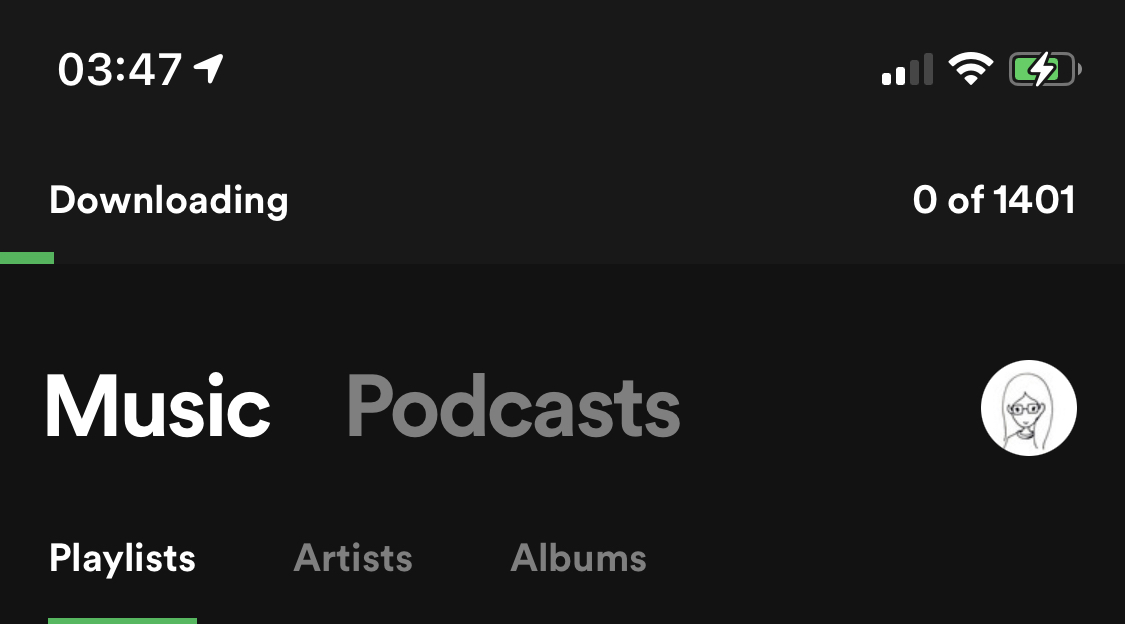
unfortunately, these solutions doesn’t work for me at all. this happened a few days after i updated my phone to ios14.
i noticed that my downloaded podcast episodes were stuck so i tried reinstalling. all it did was make me lose all my downloads. i already tried leaving my phone w spotify on its foreground and removed the auto-lock.
it’s my second day waiting for my 1401 downloads.

Hey there @sayitcharlie,
Thanks for posting about this here and welcome to the Community!
If you haven't already, could you try switching the Download quality from the app's settings to see if that makes a difference?
It's also possible that this is due to an issue with the cache on your device. You mention you've tried reinstalling the app but we'd suggest giving it another try, this time performing a thorough reinstallation to remove the cache of the app as well. There are steps on how to do this in this Spotify Answer. As a heads-up, this process should remove any downloaded content available on your device but you can always download content again once you've reinstalled the app.
Let us know how you get on! We'll be right here if you need more help 🙂

Hi there ! I tried to reinstall the app and performed a clear cache.
I have some liked songs but no arrow next to them. What do you suggest I do?
Thanks !

Hey there @pruel-yloz_db,
Thank you for your post in this thread.
We can see that you mentioned that you performed a reinstall. Can you confirm if you followed these exact steps? This is different than a quick reinstall and could be helpful to get rid of any cached files that might be causing trouble.
If that doesn't do the trick - can you log in with another account - such as a friend's or a family member's to see if the issue persist?
We'll keep an eye out for your reply.
Cheers!




Hey there @Ozzie69,
We're sorry to hear that you're experiencing this.
Could you let us know which troubleshooting steps you've already tried?
If you haven't reinstalled the app following these specific steps @Jeremy sent, we suggest that you try it to check if that makes the difference.
On another note, sending us the exact make/model, operating system and Spotify version of your device would come in handy.
We'll be on the lookout for your reply.
Hi @Ozzie69,
Thanks for your quick reply.
Just to make sure, are you using an SD card? If so, we suggest that you remove it > restart your phone > reinstall the app again and check if this does the trick.
Additionally, in case you're using any battery optimization or power saving apps, we recommend deactivating them for Spotify.
Lastly, we currently don't offer phone support but no worries, we're here to help whenever you need. Also, if you prefer, you can reach out to our Support team here.
We'll keep an eye out for your reply.
<meta charset="UTF-8" />
Hi have gone what you advised didn't make any difference
Hey @Onelittleworld, thanks for reaching out to the Community!
Could you try a clean reinstall of the Spotify app? If that doesn't help, could you try a different internet connection?
If you're still having issues, please send me a screenshot of the error message being shown.
Let me know how this goes 🙂