Issues when trying to connect facebook account.

I recently was going to connect my facebook account to my spotify to get rid of the annoying random number and letter username. Once I connected it the username stayed the same as well as the profile picture.
Child Item
Child Item
Child Item
Accepted answers
All comments
I don't see this "Process my Facebook data" on the website, I also don't see anything about Facebook in the apps except Connect to Facebook.. on mobile.

Hey @chubbywolf59,
thanks for the update !
As i wrote please use a PC meaning the desktop app (or iOS mac) to have all the option open for you.
Let me know how it goes 🙂
Yea, I don't see anything about Facebook on the desktop app either. I made the account with Facebook I think then I removed Facebook now I am trying to reconnect Facebook. It has all the permissions on Facebook as well.
Hey @chubbywolf59.
Can you please provide a screenshot of the account overview page online ?
Make sure to hide any sensitive info.
Untabbing and retabbing the processing tab should refresh things up.
If you're a Premium user all options should be there on the website.
Thanks.
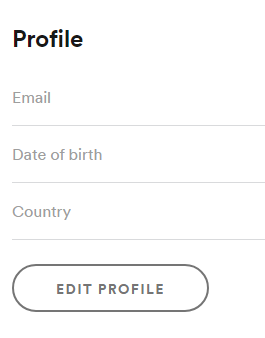
Below that is just Your Plan and Sign out everywhere option.
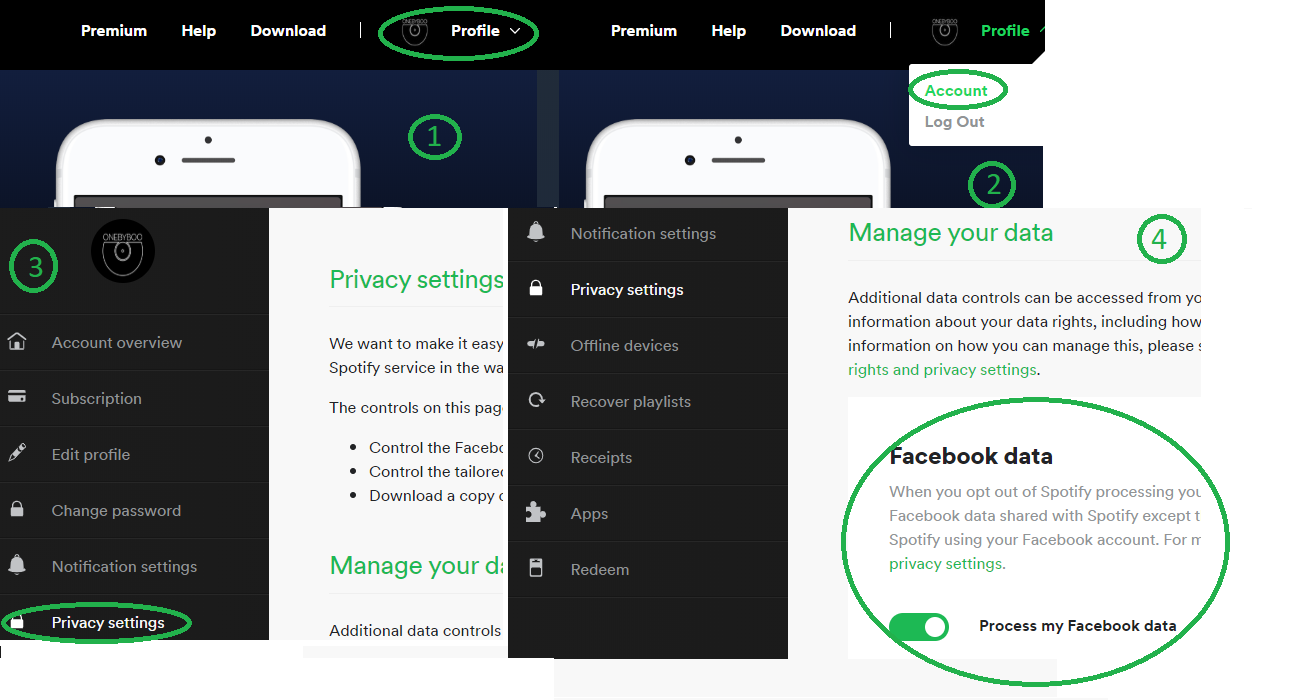
Yea, I found that now. It also worked right after turning that on thank you.
Child Item
Child Item
Hey there @chubbywolf59,
thanks for posting !
Please follow theses steps :
- Reach your FB settings and under the "Social" tab make sure Spotify has all permissions needed
- Reach your settings on the Spotify app (desktop/iOS) and under the "Social" tab make sure to enable Facebook permissions
- Visit your account page over at Spotify.com, click on your account top right corner of the screen and under "Account Overview" make sure that the "Process my Facebook data" is turned on
After you've completed all those steps, it'll take between 24-48hrs for the system to refresh itself.
However, if by any chance these steps didn't help, make sure to reply back to the post and i'll be here to help.
Waiting to hear how you did 🙂