[All Platforms][Playlists] Play only a certain CD from a release

Hi guys,
I've seen some propositions similar to this one, but formulated in a less clear way.
Currently there are a lot of classic albums in Spotify that are getting remastered, re-released etc. packed with bonus tracks, live recordings and whatnot. They have already been grouped on different CDs.
My idea is for you to create an option to play a specific CD from a given release, instead of playing the full release including all CDs only (as is currently). I want to clarify that fiddling with the play queue every time I want to just listen an original album track list is not a real solution.
Thanks!
Comments
Hi Peter,
My previous post disappeared somehow, so I'm writing this again.
The album I have in mind is the following, but I've seen this in many more cases:
Opening it on the desktop client, you can see this:

As you can see, the release is separated in 3 CDs:
- CD1: original release tracklist (8 tracks)
- CD2: Rehearsals, joke and jam tracks (16 tracks)
- CD3: Live recordings and rehearsals (18 tracks)
Currently Spotify does not provide an option to just listen the original 8 tracks on repeat, instead of all 42 (!) tracks on this release. Please keep in mind, that since this is valid for many more other albums, creating a playlist or fiddling with the play queue is not a solution.
Also, since the tracks have already been separated on different CDs, I think the most logical solution would be to just be able to, for example, right-click on one of the CDs, or click a button near the respective CD icon, and play only its tracks, be it one-time or on repeat.

Hey @malkstor,
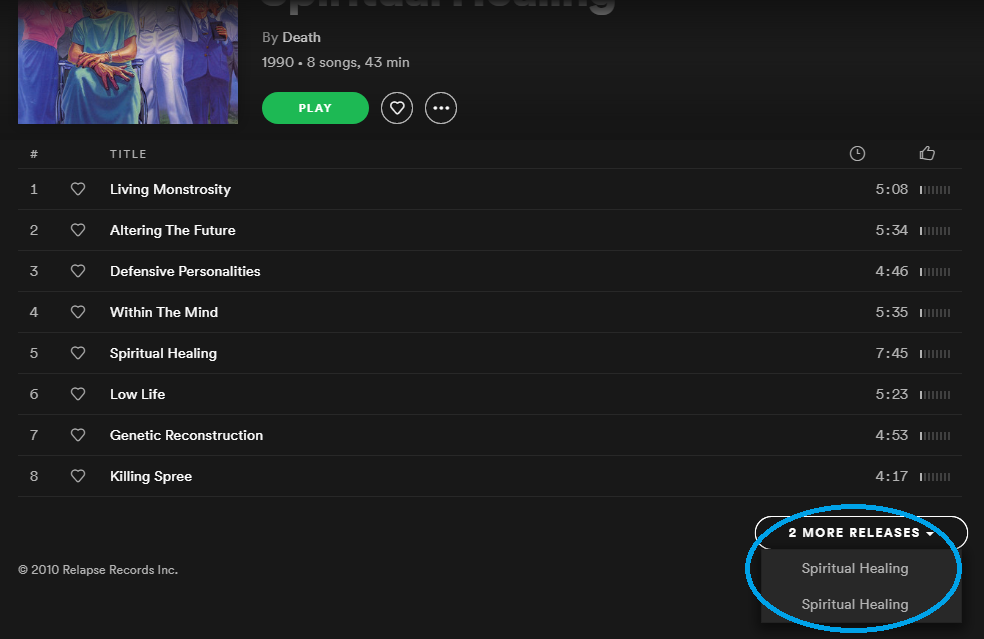
I was able to find the original album by clicking on 2 More Releases as seen below.
Keep in mind that not all albums could have this option. It depends on how the rights holders submit their music to us. Some Artists/Labels might prefer to have the original release removed and only have a remastered version put up on Spotify. Here's the URI for Death's album Spiritual Healing:
spotify:album:42ACFKO2FvLOIUgrXqewTw
Let us know if you are able to find it!
Hello Guido,
As you've mentioned - some of the albums have this options, and some do not. Also, please bear in mind that in many cases the newer releases contain remastered versions of the original tracks that often sound better.
If the physical release has more than 1 CD in it, you can choose which CD to put in your player, so I think you should be able to do the same with the digital version. Not as a default behavior, but as a possibility.
Hey @malkstor,
You are right! That's why you are able to Queue a selection of songs, for example only the first CD. You wouldn't throw away all CDs except for CD1 and put CD1 in your collection of albums.
Were you able to find the original release of Spiritual Healing? Most CD's will have the original release available on Spotify. You'll just need to find the right release. Either by checking all albums that pop up when running a search query or by checking if the album has any other releases available.
Hey Guido,
I found the original release, yep.
On the CD topic - you wouldn't throw away the other CDs of the release, of course. But if you want to listen one of them on repeat, you would be surprised if somebody "magically" starts changing all of them when you press "repeat", no? 🙂
Ok, now I think I finally get what you were trying to explain - if I clear my play queue, then make a selection of tracks, click "add to queue" and then press "repeat" before any of them finishes playing, only the selected tracks remain in the queue and are repeated as expected.
I agree - that does the job.
But it's not really intuitive.
Best regards,
Asen

Hey @malkstor,
Thanks for taking the time to clarify your idea for us.
We're going to go ahead and mark it as a new idea. That way, others will be able to add their vote to it, and if it gathers enough votes, then Spotify will consider implementing it.
Thanks! Stay awesome 🙂
Updated on 2019-10-26
Marked as a new idea 🙂

Updated on 2020-10-25
Hello!
Your idea has been submitted a while ago but unfortunately hasn't gathered enough kudos. In order to keep an overview of the active ideas in this forum, we will close this idea for now. However, this does not mean that your idea has been declined by Spotify.
If you still feel strongly about your request, we encourage you to post your idea in a little different form again! Maybe now is the right time to receive the support of our community for your suggestion!
Do you have any further questions on how the idea exchange is managed? Just click here.
Updated on 2019-10-25
Hey @malkstor,
Thanks for bringing your feedback to the Idea Exchange 🙂
Do you mind clarifying what you mean by giving us an example of an album you listen to?
Thanks! Keep us posted 🙂