[Desktop][Playlists] Resize width of individual columns

I see this feature has been requested multiple times over the years, but the requests have since been closed. Please enable re-size of columns in the Desktop app.
This is especially annoying with classical music, since often there are multiple movements with identical names except for the movement number, which is usually at the very end. I'd like to be able to see the entire string.
Comments
 Peter

THANK YOU. It is absolutely unacceptable that there is no option to do this. Many tracks, especially live recordings, have details added in the song title field that are cut off and un-viewable with no option to widen the column.
This silly voting system is infuriating. If this BASIC FUNCTIONALITY isn't implemented soon i'm cancelling my family plan.
Spotify are you listening? No, you don't actually care or ever look at these. It's just a way to make us feel like our voice is being heard when you actually don't give two **bleep**s.

this, exactly.

The fact that this is still not fixed makes me furious!
Here's an example of where this issue causes problems. If we compact the Spotify window horizontally, the columns are automatically decreased in width (see fig below). Eventually, some columns also begin to disappear (it seems like the TITLE column always stays). As is painfully obvious in the picture, the last, discriminating, part of the track title is not visible.
 Compacting a window successively removes and reduces columns.
To alleviate the issue we try making the window larger in the horizontal direction (see fig below). Unfortunately, there seems to be a max-width to all the columns, after which only empty padding is added to the right and the left of the list! What waste!
We can STILL not see any part of the titles that can be used to distinguish between them! Please note that the screenshot was taken on a large 2560x1440 monitor and with the "View > Zoom Out" on max!
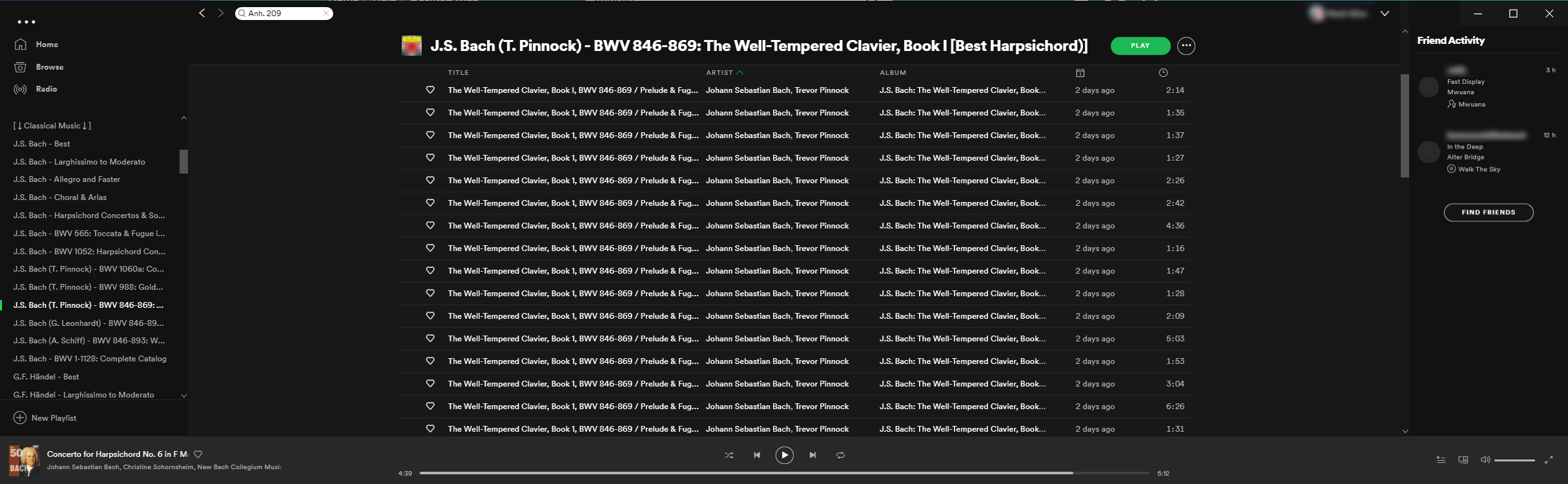 Elongating a window ONLY enlarges column width to a certain max width no matter the size of the window..
Please Spotify developers! Please fix this!
1. Remove the max-width restriction - allow columns to scale with the window size indefinitely.
2. Make the column widths resizable.
3. Allow for a way of quickly seeing the whole text in a particular cell/field (e.g. the Title). Perhaps through hovering with the mouse, or by clicking it in some way.
PLEASE HELP. Let's get this going for more votes.
It's really a shame that we have to plead with Spotify for BASIC FUNCTIONALITY of their service. Don't even attempt to try to keep organized playlists of Grateful Dead recordings. The dates and venues of live recordings are located within the track names and there's no way to expand the columns to see all of the information.

This is the only reason that stops me from updating to a newer version of the Desktop app. 5 years since. What a disgrace those developers

Updated on 2020-11-24
Hello!
Your idea has been submitted a while ago but unfortunately hasn't gathered enough kudos. In order to keep an overview of the active ideas in this forum, we will close this idea for now. However, this does not mean that your idea has been declined by Spotify.
If you still feel strongly about your request, we encourage you to post your idea in a little different form again! Maybe now is the right time to receive the support of our community for your suggestion!
Do you have any further questions on how the idea exchange is managed? Just click here.