"Now Playing" song gets stuck on the same song

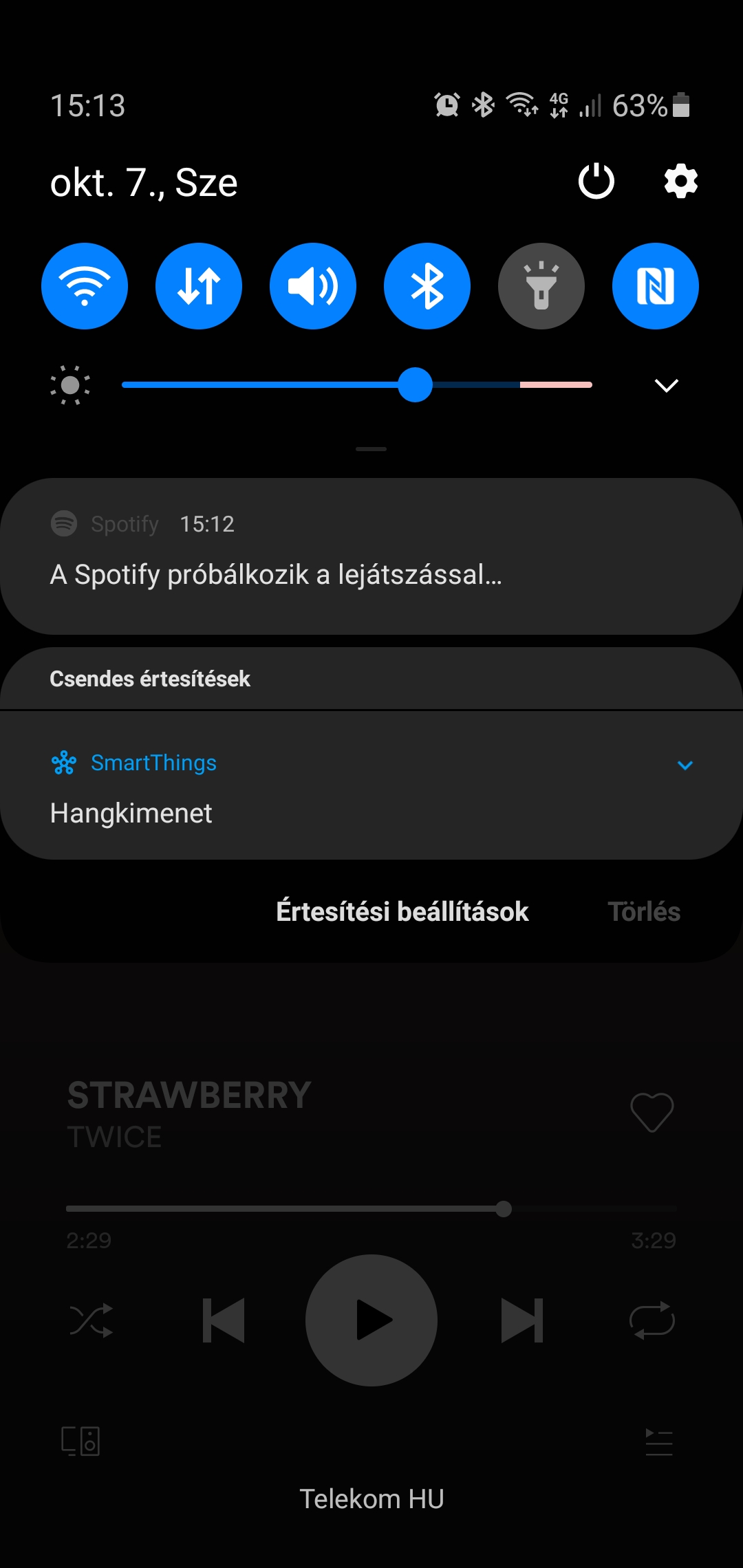
The song listed as currently playing gets stuck on one song. Any song that I play will show as the song that gets stuck, even though my laptop and amazon devices show the correct song that's playing. It fixes itself randomly, but I'm not sure how. Closing the app doesnt fix it. It just seems to go back to normal after several days of being stuck. It might be related to me using the Spotify app on my Samsung Active Watch 2 as a remote, since that makes the app open when ever my arm brushes anything. Sorry about the convoluted explanation. I've attached screenshots of the currently playing song and the playlist showing the song that's actually playing.
Plan
Premium
Country
US
Device
Galaxy Note 10 plus
Operating System
Android
Accepted answers
All comments

I have tried clearing cache, clearing data, and even a clean install.
It didn't work. The problem is intermittent and I currently have to force stop the app to get things to reset. It happens even after clean install.

Hey, @sp91fv08nppcht1
Thanks for the information you've provided. But we need some additional details to give you some relevant tips. So, is this issue occurring only on a certain device or is it happening through different devices? If possible tell me what is the exact version of the Spotify app that you're running on the affected devices and the OS informations (version/number). In the meanwhile, I'd like to suggest that you try to restart your device and then try to play your songs using a different network connection to see if the issue persists.
If there are any other pieces of information that you think would be relevant, tell me, please.
Keep me posted!
Kind Regards,
hezorg


Have this issue, its due to the galaxy watch, i just got the galaxy watch 3. The watch doesn't seem to feedback a song change properly and in turn now playing gets glitches on your phone. The only fix I have for now is to press and hold Spotify and tben go to app info and press force stop. When you re open the now playing will work will break again in the next few days.
I hope Spotify sort this, they are so lazy with watch apps

Many topics about this issue. All seem to point at the Galaxy watch app. until now provided solutions (clear cache, restart, re-install) are only (really) short term solutions...

Agree with this. After I had removed the Spotify app from Galaxy Watch, the problem disappeared.

same exact thing is happening to me, I’m even using the same phone and watch as you. The app was working perfectly until I got the watch and now it gets stuck. It even keeps playing on my phone when i turn off the bluetooth speaker and close the app. I have to force close the app on my phone for the music to stop.
I’ve tried re-installing spotify on both my phone and my watch. I even clean restarted my watch and it still gets stuck.

I thought I was the only one having this problem... Song stuck, I can switch songs, but the bar stays in one place. I can switch songs but it doesn't switch on the screen.
Samsung Galaxy s10e and Galaxy Watch
It seems many people have this issue. There are many topics. Until now Spotify can only recommend clear cache en re-install. This will fix it for only a short time... hope Spotify is investigating or updating the watch app... but until now they haven't mentioned anything about it...
I hope so, or I just uninstall spotify from my watch...
Yup me too. ☹️ I used it quite a lot before it got corrupted...

Seems to definitely be related to the watch then because I suffer the same issue now since I got it about two months ago. I am also experiencing intermittent pausing of songs and have gone through the old fixes of battery optimisation etc.
In fact Spotify no longer displays on the home screen of my phone whilst playing which was a great feature for skipping songs without unlocking.

I am currently having this issue using the app with samsung galaxy buds on samsung s10+

Hey @Selcukk,
Thank you for reaching out to us about this.
Could you follow the steps bellow:
- Perform a clean reinstall of the app.
- Try with another internet connection.
- Log in with another account and try to download music to se if the issue persists. You can use a friend's or a family member's account if it's possible.
Keep us posted. We're always one reply away.
Cheers!


I'm having the same issue, and now the "Now Playing" is at 245 minutes, even though the song actually playing is far past the song on the visual now playing. I don't have the watch, as it happens more when I am connected to a bluetooth speaker or the desktop app via phone app. It also happens when in the car. However, the issue does not occur when I have my Jabra wireless earbuds in while running. Also, the phone app also gets stuck after running several hours.
I will try a reinstall, and see if that works. But it seems others have had issues even after a clean reinstall.
Thanks,
Erik

I have the same problem basically every day. Also I suspect that it is somehow related to having Galaxy Watch Spotify app installed, at least when combined to streaming from phone to e.g. Chromecast audio or similar. Opening of the Galaxy Watch app is not needed to make this issue occur.
Another bug the same issue causes is that playback may be suddenly paused at random - or not paused like it usually does when disconnecting Bluetooth headphones.
The issue existed already in my previous phone few months back. My home network configurations where different at the time, so no help there either. Reinstallation etc. won't make a difference.
Forcing Spotify to close from Android app settings fixes the issue temporarily.

P20Pro
Only started with the latest version of the app.
I have reinstalled to no avail.
I also have a galaxy watch, but importantly I don't have the Spotify app installed on it.
The issue send to occur primarily when I'm connected through Bluetooth to headphone/my car.

Hey @MichaelTapp @SellyOakBlade @joomak @runwitherik @loxleyoutlaw,
Thanks for posting about this here!
We just wanted to let you know that we're aware of this issue and we're currently looking into it.
Make sure to head over to this Ongoing Issue thread, where we'll keep you posted on our progress.
Cheers!

Hi,
I have the same issue tried a clean install still having same issue does appear to be a caching issue with the images not loading after playing new song or podcast seems to have started in the last month.
Spotify version 8.5.78.909
OS oxygen 9.0.11
Kind regards,
Luke
Started happening again. Song plays, bar not moving. The notification says spotify is trying to play the music. Uninstalled the app from my galaxy watch a week ago, so its not because of it.


Hey @Lukefarrar and @Mightbreak!
Thanks for reporting this on the Community.
To help us investigate this, we'll ask you to leave your details and a +Vote here.
You can also subscribe to the thread via the 3-dot menu to get a notification when we have an update!
Cheers!

Also happens to me (Spotify on latest Android 11). I do not have a smartwatch of any kind but use my car stereo (VW) via bluetooth regularly. Clean install only helped for a day or 2.


Same problem. I have reinstalled the app etc, don't own a Samsung watch, mentioned by some. Haven't changed devices or use of Spotify for years but this problem started recently and keeps happening every day now. Very frustrating as I can't see or change what's playing without shutting down everytime.
Hey and thank you for your comments here folks!
In order to better facilitate tracking and reporting of this issue we need users who are experiencing this to go to our Ongoing issue thread and leave any info and a + Vote there.
We regularly gather all the details from the thread and pass it on to the team that investigates this.
We'll be closing this thread for new replies, but feel free to leave your feedback in the ongoing issue.
Thank you!
Hey, @mesosalpinx
Welcome to Spotify Community and thanks for reaching out here!
Initially, I recommend that you try a clean reinstallation of the app. You can find more information about this process here.
Check if this suggestion makes the trick, and keep me posted. If it persists, bring us more information about the issue you're experiencing.
If you have any other further questions or need more help, let me know! I'd love to help!
Best Regards,
hezorg