Disable Shuffle by default on new album view

Plan
Premium
Country
USA
Device
iPhone X
Operating System
iOS 13
My Question or Issue
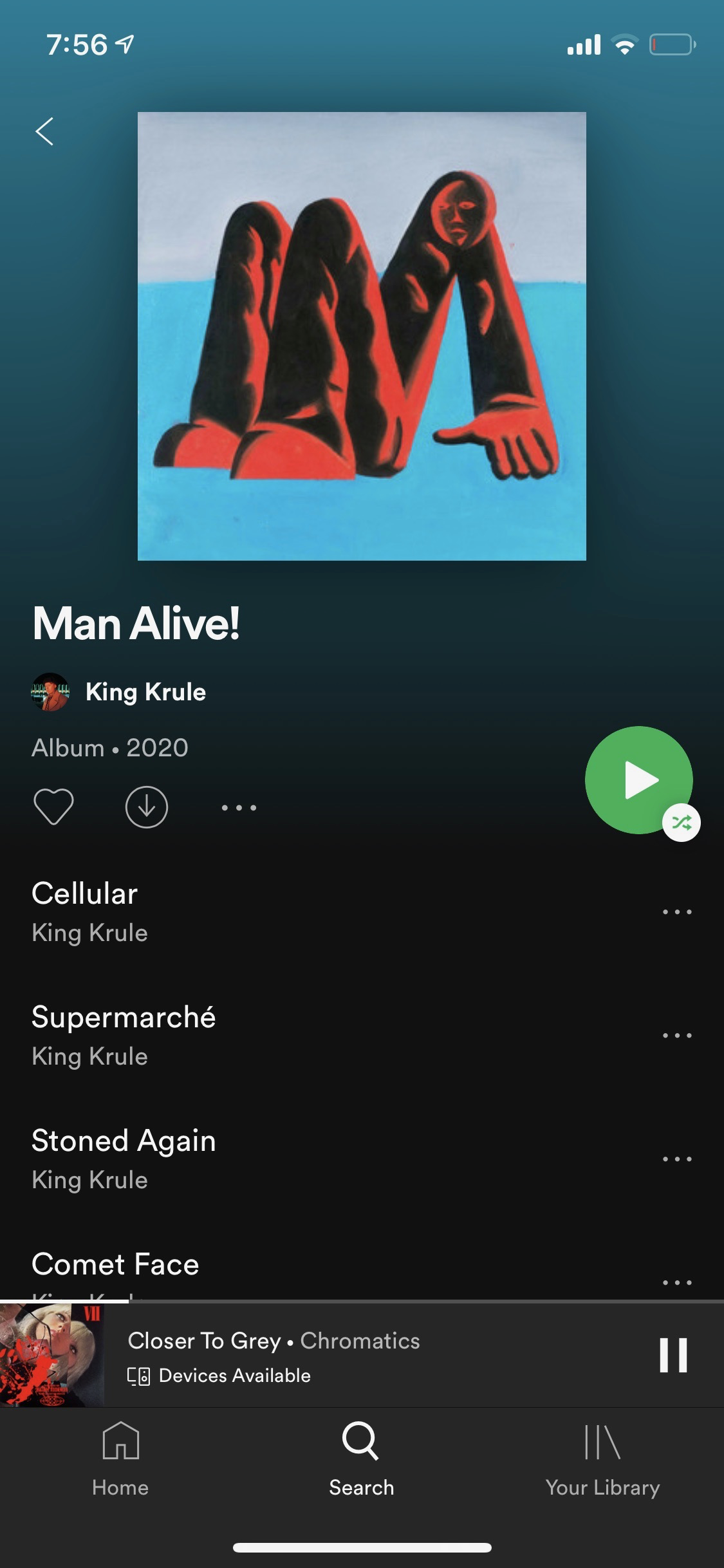
I like the new UI update, but hate that the play button for albums defaults to shuffle play, as seen below. I don't want to shuffle albums, pretty much ever. I would also appreciate the ability to disable it for my playlists where the order of the songs matter.
Accepted answers
All comments

Hi @Glitched,
Thank you for reaching out here in the Community!
If you click the first song in the album, they should play in original order, as long as shuffle is off in the Now Playing bar.
However, you're always welcome to post your ideas in the Idea Exchange part of the community. For more details on that, check this article.
I hope you'll find this helpful!

Plan
Premium
Country
Australia
Device
iPhone XS
Spotify App Version
8.5.54.1127
My Question or Issue
The new playlist/album play button FORCES shuffle mode.
Knowing Spotify's past UX update performance it would not be surprising if this was an "intentional update". But there's zero indication if this is within user control or not.
Pressing play changes the button to pause. If you pause, then hit play again, the song changes in shuffle! Absolutely not the expected result!
Changing such a significant piece of the UI needs to be communicated to customers, if that is the case.
If it's not, please provide information on how to fix this.
Playlists and albums are usually designed to be played back in a specified order (why even allow users to change the order of a playlist if you choose not to honor the specified order???), and this blind UX change has potentially to severely negatively impact a large amount of customer's experience.
An image is attached to show you specifically what the play button looks like.
Please advise on how to resolve this.

Amen to this. So astoundingly, amazingly, infuriatingly annoying. Why is there no press-and-hold to bring up other play options or a way of turning this off in settings? If I want to shuffle an album or playlist I’ll add it to the queue and shuffle that. If I want to listen to an album I want to be able to do this IN THE ORDER THE ARTIST INTENDED!!! Please Spotify don’t assume you know what I want to do or how I want to listen to music.

This has been driving me mad too. There is a typically Spotifyesque work around.
1. Go into one of your own playlists
2. Hit play
3. Go in to the 'currently playing' screen.
4. Turn off shuffle with the 'two crossed arrows' symbol/button.
5. Go back into Release Radar or other Spotify created playlist.
6. Hit play on the first or whatever track and they'll play sequentially. DO NOT USE THE SHUFFLE PLAY BUTTON AT THE TOP OF THE PLAYLIST!
This works for me on Android. I'm not an iOS user so can't say if this'll be a help.
Pretty classic Spotify, top down, daddy knows best updates that have clearly been designed with as little thought as possible. The culture at Spotify is ghastly.
Thanks for this workaround Graeme.
I am also very frustrated with this as shuffle play has historically been widely marketed as a limitation of the free plan. I would not expect to see this shuffle play inconveniently thrust on premium users as well, through UI decisions like this.
On iOS the green play button at the top of albums and playlists is now ALWAYS this forced shuffle play. There is also a similar workaround on iOS, by directly selecting the first track and ignoring the green play button (lol!) -- but fact is, as paying customers we shouldn't have to use workarounds and unintuitive methods to use the app the way it had functioned for the last 5 years.
I do not know what testing this went through, decisions like this are honestly baffling. No value has been added by this change. Only a worse user experience.
It begs the question to Spotify: Why make it harder and significantly less-intuitive for the user to achieve the default task they always have had: play music sequentially?
No other music streaming service makes such a basic task more complex than it needs to be.
A play button has always historically represented sequential play.
A complimentary shuffle button has always historically represented toggle for shuffle play.
But almost a hundred years of learned intuition is disregarded arbitrarily in these mobile apps. Innovation, I think not.
Oh, I see what you mean now, that is a super odd design decision.
On Android where the shuffle toggle button should be there is a button to favourite/add to your library the track playing. Kinda useful but not at the expense of being able to turn shuffle off.

I’m experiencing the same “shuffle only” **bleep** that Spotify for IOS has now become. Support has no clue how to tell me that this is just the way it is now. Spotify, please go back to the straightforward green Play button. Shuffle play can be the option it always was.
The shortest workaround currently is selecting the three dots on the playlist page and selecting “add to queue”.
Are these forums monitored? Any additional information on this?
Most apps onboard major changes in features, but this hasn't been done with Spotify and users have received no explanation... what gives?

Hi, I don’t know if the new update has had an error, but the bar with shuffle etc. that is present on phones won’t appear on the iPad now. All I can do is return or skip songs on the side bar and always on shuffle.
no where is there in the settings an option to turn off shuffle.
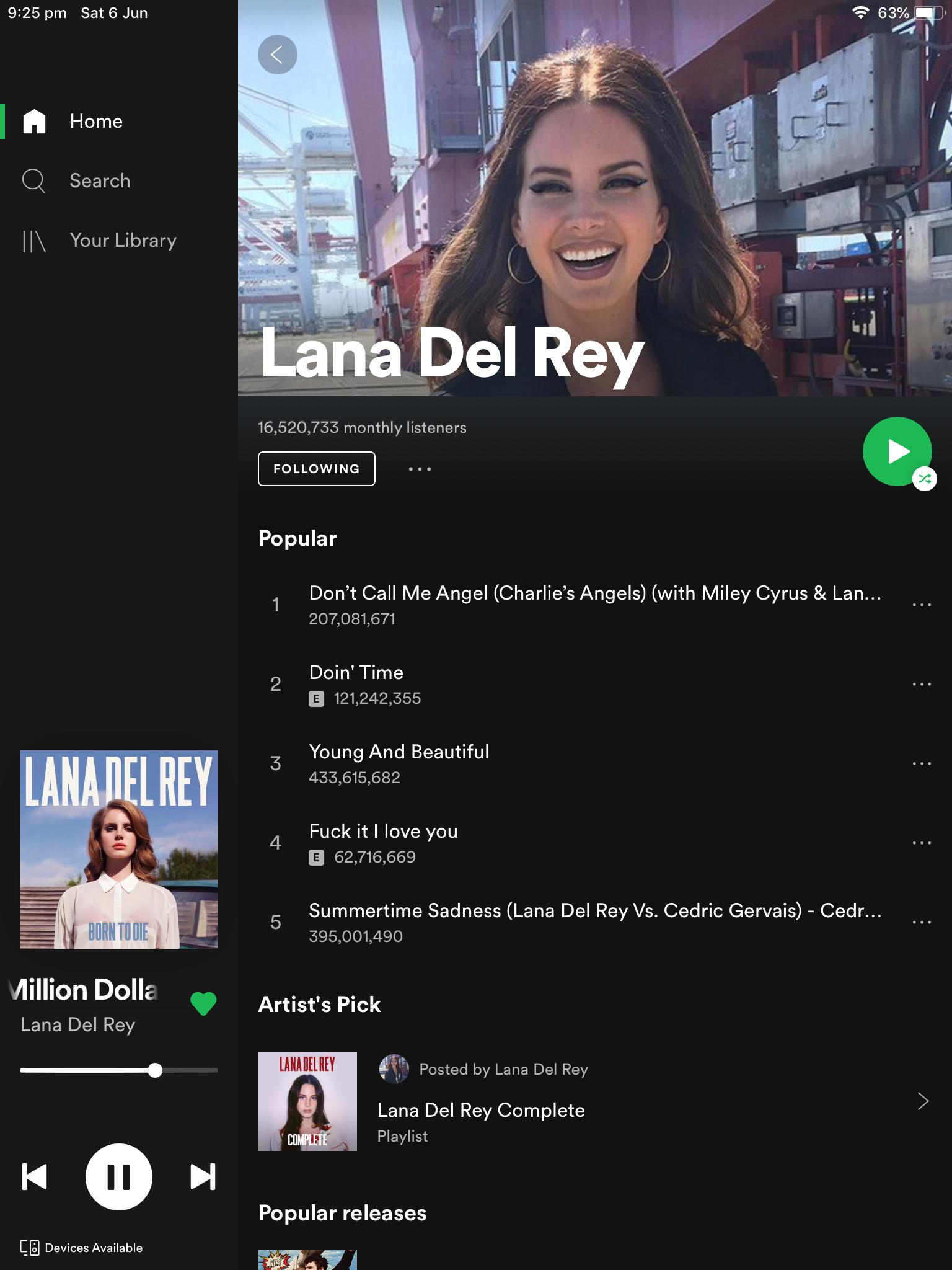
It is always on shuffle, no matter we’re I start playing music from.
That article has the layout of the mobile style, the tablet one looks
different like in the picture I sent.
Cheers
Hello @25bees,
There's a small circle with the Shuffle Play symbol right under the big green Play button on the right. Looks like the Shuffle Play symbol is green which means the feature is activated.
Could you tap on the circle and see if it helps?
Let me know how it goes!
It’s not actually a button, it’s just telling you it’s on shuffle when you
click the big green play button.
Hi @25bees,
Thanks for your response!
In this case, I'd recommend performing clean reinstall of your Spotify app. It's different than regular reinstallation.
Just find your device in this article and follow the steps provided there.
If it doesn't help either, a screenshot of what you see after taping on the album art in the bottom left corner would be helpful.
I hope the clean reinstall helps!

I have the same problem with my iPad Pro
Hello @Knitterbaum,
I'd suggest you to turn the shuffle option off first.
Then you can tap the first song, so the songs are no longer in shuffle mode.
You can find more info about shuffle in this Support Article.
Note: The play button on top of a playlist will always activate shuffle. To play in order, you have to choose the first song of an album/playlist/artist.
If you have any idea on how to improve Spotify, you're always welcome to post it in the Idea Exchange part of the Community.
For more details on that, make sure to check out this series of articles.
Have a great day!

Right, but WHY would anyone want to shuffle by default on an album? A playlist, sure go for it, but the default for an album should absolutely be in order. There is a reason an artist arranges their songs on an album in a specific way.

I have uninstalled and reinstalled spotify, an checked it knows I am a premium account, but still no luck
Hello @slibbidy, the Shuffle button is displayed everywhere in the app, including albums. If you don't want to shuffle, make sure to tap the first song form an album and make sure the shuffle is off. The album should be playing in order.
If you'd like to see just a play button in the albums, you're always welcome to submit a post in the Idea Exchange part of the Community.
More details on it can be found here.
Hi @ktaylor01, you've mentioned reinstalling the app, but have you tried clean reinstall? It's different than regular reinstallation.
Just find your device in this article and follow the steps provided there.
Let me know how it goes!

Same problem here and it's driving me crazy.
I *could* understand for playlist, but for god's sake for albums? They are creation by the artists themselves, and by doing so I think that Spotify is changing these creations.

Hey folks,
Thanks posting here in the Community! We'll gladly shed some light on the situation.
The play button with the two crossed arrows now starts the playlist/ album in shuffle mode. If you want to start playing the tracks sequentially, just tap the song you want to start with. It's a good idea to also make sure that shuffle is not enabled through the now playing bar. You can learn how to do this here.
If that doesn't do the trick it's possible that some of the app files have gotten corrupted. A clean reinstall usually solves this, you can find instructions on how to do this here.
Hope you find this useful. Let us know how you get on.
Hi Mihail,
Thanks for your answer 🙂
In fact, I know this trick, this is the way I'm using it everyday. But I cannot understand why every I need to avoid the "Big Play Button" and use a trick to play an album sequentially, respecting the artist who does that. What is the idea behind that? Do people want to play album in shuffle mode ?
I can understand for playlist, but for album I don't understand.
Best,
Hey @ghislaindj,
Thanks for getting back to us.
We're constantly trying to improve the app and enhance our users experience. This is why some feature might change over time or be available for certain users, and not for all.
If you'd like the shuffle play button removed, we recommend that you post an idea about it. The Idea Exchange is a great way for us to see what our users are interested in and how many people like a certain idea. You can read more about it here.
Hope you find this useful. Keep us posted if you have any questions.

On Ipad, to disable the shuffle, click on 1st song on album, then click on those 3 ... dots and un-select Shuffle. Your album will now play in original order.
This is clearly a poor design oversight by Spotify which listeners have been complaining about for months. There is no Play Bar on the Ipad where the shuffle option usually resides, but I guess Spotify does not realize that, LOL.

Spotify keeps loading up on my android set to shuffle. Is this a new feature because it's f****** irritating!
I keep listening to this album expecting the next song to be... Oh wth!?
I have to disable shuffle again, really?
How do I disable this **bleep**?
Hey @sWi7zLe,
Thanks for searching for the answer you need here!
Do you mean that shuffle is off in the bottom bar of the now playing view and once you select another song it gets turned on again? If that's the case we recommend that you log out and back in to your account.
If that doesn't fix things it's possible that some of apps files have gotten damaged. This is usually resolved by performing a clean reinstall using these steps. Make sure to also restart your device. This is a very effective, but often overlooked step.
Hope this is helpful but don't hesitate to let us know if you have any further questions!

Hi, I'm using iPhone here and have a similar (same?) problem...
As an example, let's say I am listening to an album from the Album page.
Shuffle is off.
There are two play/pause buttons- the big green one (middle right screen) and the small one (bottom right).
The issue is with using the green button. If I pause the song and want to resume using the green play/pause, the song does not resume but shuffles to a different song.
I've attached a screenshot for clarity.
Is there a way to turn off the shuffle on the green play/pause button, or is that how it is supposed to be?

Hey @ntimmerman12,
Thanks for getting in touch with us 🙂
No worries. You can click on the first song in the album and the rest of the songs should be played in order. If you click on the green button, you can play them in shuffle mode.
We appreciate your feedback and will make sure to pass it on to the right team. You can also have a look in our Idea Exchange to see if someone else has already made a similar suggestion, and if not post your own. If there isn't, you can check these steps on how to create an idea. That way other users can also support it. Rest assured that the higher the number of votes an idea gets, the more likely it is for it to be implemented.
Hope this was helpful for you. If you have more questions, we are here for you.

Could a long press on the play button give people a choice between play & shuffle?



Hey @adriancross,
Thank you for your post.
At the moment this is not an available feature. We're constantly aiming to improve our features so thank you for the feedback.
We're always testing things by adding or removing features to make Spotify better overall. We’re sorry that this means you’re not able to use the play/shuffle button as you wish to do at the moment.
If you have any questions we're always one reply away 🙂
Cheers!
Hey folks,
Thanks for posting on this thread.
Just to clarify, the green Play button is indeed for shuffle play an album or playlist, as it shows the shuffle icon on its bottom right side. You can find more info in this article.
However, this doesn't mean that you must or are forced to hear the album in shuffle. As previously mentioned, to listen to an album in the order it's listed, you only need to tap on the first song of the album instead of the green Play button and make sure that the Shuffle option is disabled (white).
You can easily find the Shuffle icon on the Now Playing view and just need to tap on it to enable/disable it.
We hope this clears things up.
Cheers!