[iOS] Unable to turn off Shuffle for Podcast playlist

Plan
Premium
Country
Canada
Device
(iPhone 6s)
Operating System
(iOS 13)
Hi All,
Since the update I have been unable to turn off shuffle for podcast playlists I created or follow.
I have tried pressing the button to toggle, going to the actual track and looking for the shuffle option but it's not available, deleting the playlist and populating again, but to no avail.
The only thing that worked was doing a fresh install, which displayed the playlists as they looked before the update, and the shuffle option was back, but upon re-opening the app, the issue returned.
Music playlists are working normally.
Accepted answers

Hey there folks,
We really appreciate your patience so far!
We've heard back from the teams looking into this that playlists containing podcasts will start on Shuffle when clicking on the Play button on the top of the playlist. When this happens, the Shuffle button will not show up in the Now Playing view or the context menu.
A workaround you can try is to press play on the play button on the episode card in the play list. @VanillaSan has also shared a workaround you can try:
While the shuffle feature is fixed, I have found sort of a way around it by downloading the episodes I want to listen starting with the most recent, and finishing with the oldest, and then playing them from the podcast downloads section in my library.
Since this is expected behavior and not an issue, we'll be moving this thread back to our Help boards.
Keep in mind though that we're always working on improving the app. Make sure to enable automatic updates so you don't miss the latest improvements and fixes coming your way!
Hope this is helpful but don't hesitate to give us a shout if there's anything else - we'll be happy to take a look.
Have a lovely day 🙂

I had similar issue on Android. I have a list of podcasts and for some reason it starts to play in random order. When I press on the pause/play button on the top-right corner a small shuffle icon appears, but I see not possibility to turn it off.
Workaround: Add any non-podcast item to the list. Start to play this item. Turn off shuffle, then remove this item from the list. An voil`a, shuffle turned off! 🙂
All comments

Hey @VanillaSan, welcome to the Community.
Hope you're doing great!
In the Now Playing Screen tap the … top. right side and you will be able to disable the Shuffle option.
Hope it helps and take care 🙂
option to turn it off.
It seems to only happen with podcast playlists, where you mix episodes to
listen in a certain order.

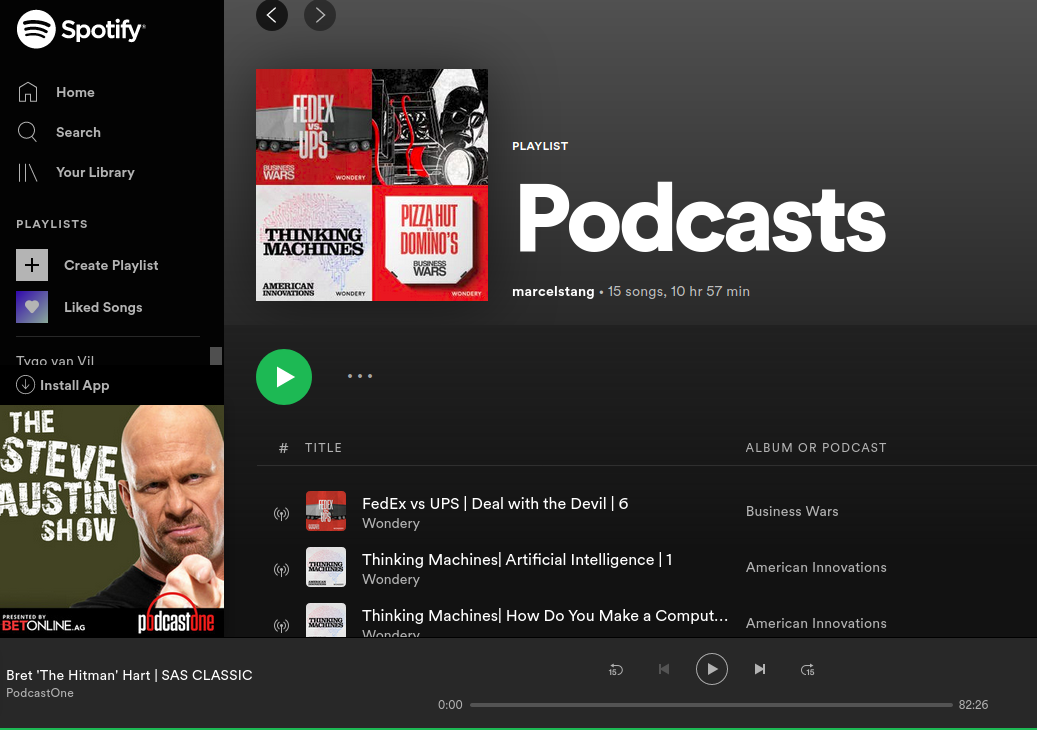
Same issue here, screenshots attached.
this is really annoying as I usually play podcasts trough CarPlay or during sports and after each show I manually need to point it to the next episode.

Hey there @VanillaSan, @MarcelSt and @Loxer,
Thanks for posting on the Community about this.
Make sure you perform a clean reinstall of the app first. This will get you the latest app version with all necessary updates. In case the clean reinstall makes no difference, try with another Internet connection to see if the issue persists.
Let us also know if you observe this on one or multiple devices. This will help us see if the issue might be device-related.
Hope this helps. Keep us posted.
Clean reinstall done, now running release 8.5.77.1201 (no change)
Tried with iPhone both on multiple WiFi and a 4G mobile connection (no change)
Tried with web player, it says it isn't on shuffle, nor seems there to be a shuffle option either
Tried with Spotify on Android (tablet), the only option on playing the playlist is using shuffle play
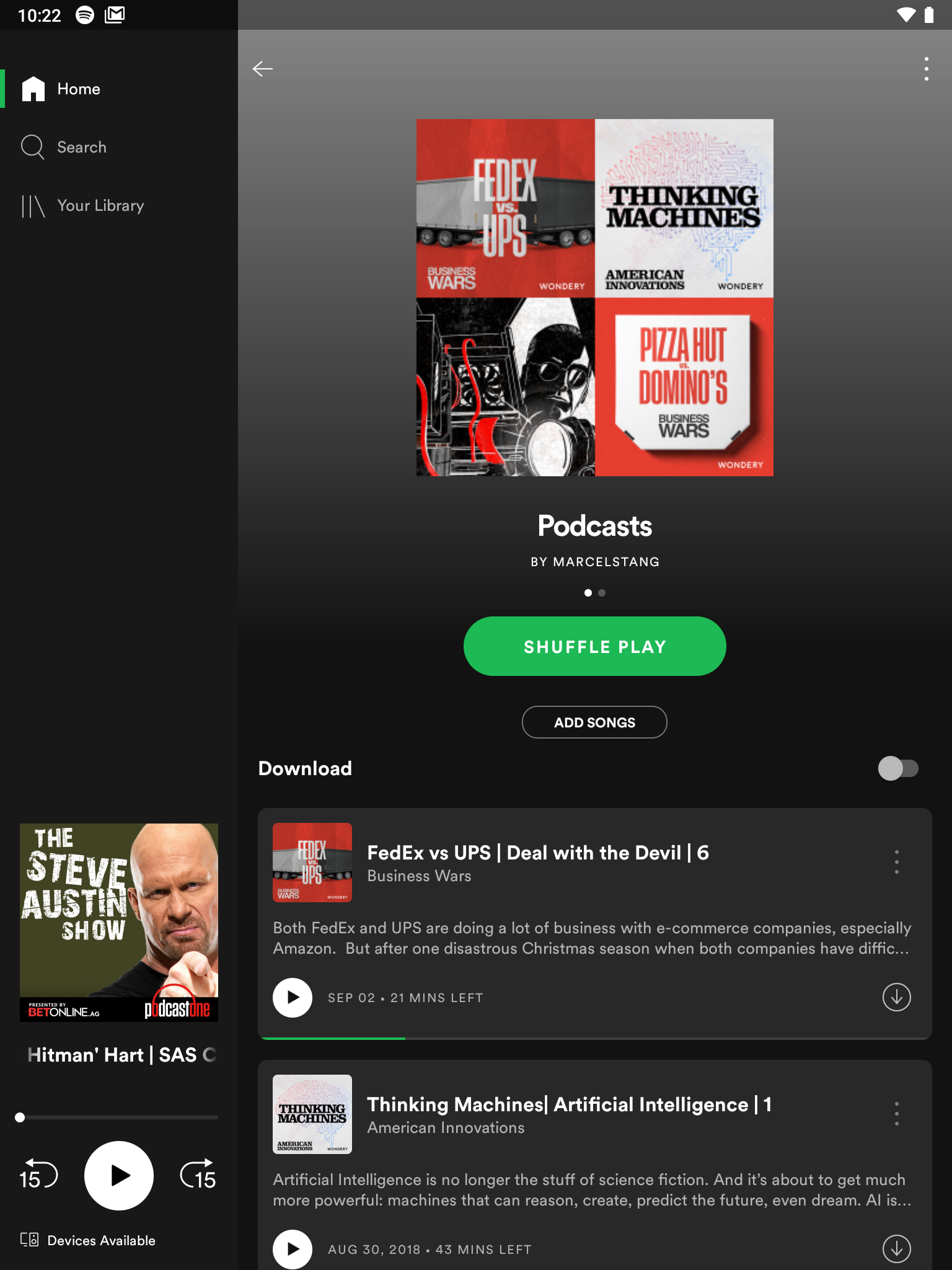
Same as the previous user said.
I have just had to manually pick the episodes but they won’t play in a series as intended for example, in an episodic podcast.
Hey @VanillaSan and @MarcelSt,
Thanks for getting back to us and providing us with more details.
Based on the info you provided we've contacted the relevant technical team and reported the issue.
Our best folks are already investigating this in search for a solution. We'll be posting any updates on the issue in this thread, so make sure you Subscribe via the three-dots menu in the top right corner next to the title.
Hope this helps. Let us know if you have any questions.
Hey there folks,
We appreciate taking the time to report this here in the Community!
We've reported this with the right teams who are looking into this.
If you're also having troubles turning Shuffle off on podcast playlists, make sure to add your +VOTE and leave a comment below with all the related details as these help the teams looking into this better reproduce what's happening:
- Your device and its OS (operating system) version
- The exact version of the Spotify app you're on (you can follow the steps here to find this info out)
- Did a clean reinstall help?
- Any other troubleshooting steps you've tried and their results
- (optional) a screenrecording of what's happening - just make sure that there's no private/sensitive info displayed
We'll keep you updated here, thanks!
Hello Everyone:
While the shuffle feature is fixed, I have found sort of a way around it by downloading the episodes I want to listen starting with the most recent, and finishing with the oldest, and then playing them from the podcast downloads section in my library.
It takes a bit of work, and it’s not quite a fix, but at least I don’t have to be manually fixing the order while I’m driving, for example.
Hope this helps in the meantime 🙂

I have premium and can not turn off shuffle play. It has become so irritating that I'm looking into a different music app.

This not being able to shuffle is so frustrating. I listen and drive so it is not even useful that podcasts shuffle. Two clean installs did not help. Same issue on iPad Pro as my iPhone 7.
iOS 13.7
Spotify 8.5.81.1110
I have a premium account.
i also spent over an hour chatting with Jose from your support who had no clue. After all the troubleshooting and screenshots, he told me that it was by design. Is this going to be a quick fix or do I need to use a different app to listen to podcasts?
I am having this problem
Spotify 8.5.81.1110
ios 13.7
clean reinstall 2x and It does not work. I don’t think even the celan reinstall worked. I cleared cache, offloaded app, deleted app, hard reset my iPhone, and reinstalled from App Store . As soon as I open newly downloaded app, I am already logged in. I listen in the car and can’t fiddle with this. Please fix this so that the app is actually useful for listening to podcasts.
Hey there folks,
We really appreciate your patience so far!
We've heard back from the teams looking into this that playlists containing podcasts will start on Shuffle when clicking on the Play button on the top of the playlist. When this happens, the Shuffle button will not show up in the Now Playing view or the context menu.
A workaround you can try is to press play on the play button on the episode card in the play list. @VanillaSan has also shared a workaround you can try:
While the shuffle feature is fixed, I have found sort of a way around it by downloading the episodes I want to listen starting with the most recent, and finishing with the oldest, and then playing them from the podcast downloads section in my library.
Since this is expected behavior and not an issue, we'll be moving this thread back to our Help boards.
Keep in mind though that we're always working on improving the app. Make sure to enable automatic updates so you don't miss the latest improvements and fixes coming your way!
Hope this is helpful but don't hesitate to give us a shout if there's anything else - we'll be happy to take a look.
Have a lovely day 🙂
Spotify is clearly able to see that the contents of the playlist is podcasts and there is no clear reason (to me, nor provided by Spotify) why there is an option to select/deselect shuffle play in playlist with music but not in playlists with podcasts.
I request you bring this issue back to your technical staff to find a more fitting resolution.
With kind regards

Hey there @MarcelSt,
Thank you for your post and feedback.
We're constantly aiming to improve our features. We're always testing things by adding or removing features to make Spotify better overall. We’re sorry that this means you’re not able to use Spotify like you wish to do at the moment.
You can read more about how your feedback reach Spotify here.
If you have any questions we're always one reply away 🙂
Cheers!
Hi there @Jeremy,
You're telling me that you and your colleagues are always working to improve Spotify by adding and removing features. That i can understand as it is the natural process of improvement. However, we as users/customers are telling you that during that process you guys broke something, it happens, we're not mad, we're not making a fuss of it, but we simply request that you fix the issue.
Instead we're now told "it's a feature" and " make a suggestion by contacting Spotify".
Forgive me, but are you serious???
Always on shuffle play is not a feature, the feature was that you can turn it on and off.
We had that feature, you removed it, so it's not a feature.
And for the suggestion option, we already made a suggestion, we suggested you guys to fix what you have broken.
So i'm asking you guys again, please fix the issue.

Solution ??? You can't be serious ! This is not a solution at all !
I registered premium in order to listen to podcasts and it appears there still isn't a convenient way to use a playlist without shuffle. I nearly had a car crash trying to listen to the episodes in the right order.
Seems like a sad joke, I can't believe this app is so poorly designed.
Still no answer to this though simple problem before I switch to Apple music ?
The fact that we are 3 weeks without any response is clearly showing that Spotify doesn’t care about user issues as soon as they convince themselves it’s not an issue.
I’ve switched to Apple Podcasts. A lot saver to use while driving. Apple might not listen to consumers very well either, but at least they don’t provide a broken product and call that “a feature”.

Hi there folks,
Thanks for expressing your thoughts on this.
If you have an idea on how the experience can be improved, go ahead and create an idea on the relevant idea board. We always take new ideas and feedback into consideration to improve the app. Here you can read more on how ideas work.
We also suggest checking this help article for useful tips on how to submit an idea. As a heads-up, it's good to know that the higher the number of votes an idea gets, the more likely it is for the idea to be implemented.
For now this is not something that the developers are working on as far as we're informed, so the best way around this would be to follow the workarounds that has @Katerina suggested.
Hope this helps. Let us know if you have any more questions.
They're definitely making fun of us, I can't believe they're being so rude
Hi @Alex,
are you actually reading our posts or are you just adding a reply without actually having any clue on what is going on?
@Katerina is not providing a usable workaround, and that being said, a workaround is not a solution.
Suggesting (again) that we should make an idea suggestion is nothing more than disrespecting your paying customers.

That's ridiculous. Why would anybody want to shuffle podcasts that are supposed to be listened to in episodic order?

I have found a workaround for this! Since hitting play on a specific episode will not actually unshuffle the playlist - if you add one song to it, it will register as a normal playlist and you will get the shuffle button back. You can turn off shuffle, then remove the song and enjoy the playlist in the intended order.

Nothing will fix the locked on shuffle, it's a premium account feature to turn shuffle on and off. Only way to fix it is to pay for premium or install a "non official" spotify installer...


Plan
Premium Plus
Country
Australia
Device
iPhone 15 Pro, Macbook Pro 2022
Operating System
iOS 17.3, OS 14.2.1 (23C71)
My Question or Issue
Yesterday my podcasts stopped playing in recent > oldest order, and now shuffle.
I don't have a shuffle button available anywhere. I tried turning it off in my music playlist, but still won't work.
Signed out of both IOS and OS, still won't work.
It's really strange behaviour. My queue will play a few podcasts from others that I follow, but then stop. If I turn shuffle off, it removes some but then only has 2 left.
And when I now click on the podcast, it goes way back to the first one in the entire series...
IOS version doesn't even have a skip button, just the 15 second skip.
I'm completely confused. Why is it this complicated? As someone who likes to listen to one particular series of podcasts as I go to sleep, this is not good enough.
Any suggestions?
Not really sure why my post has been put in this thread... presumably so it can be ignored.
"Expected behaviour"? Are you serious?
I want to listen to one particular podcast in sequential order, without it shuffling to other podcasts... And it's expected behaviour that I can't?
Whoever the product owner for Spotify Podcasts is, they need to take a long hard look at themselves.
I had similar issue on Android. I have a list of podcasts and for some reason it starts to play in random order. When I press on the pause/play button on the top-right corner a small shuffle icon appears, but I see not possibility to turn it off.
Workaround: Add any non-podcast item to the list. Start to play this item. Turn off shuffle, then remove this item from the list. An voil`a, shuffle turned off! 🙂
Hello Everyone:
While the shuffle feature is fixed, I have found sort of a way around it by downloading the episodes I want to listen starting with the most recent, and finishing with the oldest, and then playing them from the podcast downloads section in my library.
It takes a bit of work, and it’s not quite a fix, but at least I don’t have to be manually fixing the order while I’m driving, for example.
Hope this helps in the meantime 🙂