Can't search within liked songs/playlists

Plan
Premium
Country
USA
Device
Windows
Operating System
Windows 10
My Question or Issue
Searching within Liked Songs seems to have gone away, or I just can't find it with the new design. Makes it very hard to navigate through 1000s of saved songs.
Accepted answers
All comments

Hey there @Twoheart,
Thanks for reaching out - we’re here to help!
We’re often testing and launching improvements and new features. This means you might see something on the app your friend doesn’t, or get a new feature to try temporarily.
We suggest you check this help article for more info about test features.
Tip: Make sure you don't miss a thing by enabling automatic updates on your device.
Hope this helps. Let us know if you have any more questions.

I’d like to be able to search for songs that I’ve liked but haven’t saved the whole album. I really prefer the Apple Music layout but I wanted to support the JRE Most likely will go back if this isn’t fixed

Hey there @Liquorswordz,
Thanks for reaching out about this.
You can find all your saved songs in Your Library > Liked songs. For more info, we suggest that you check this article.
If you have any questions or need a hand with anything else, just let us know.

is this a joke? the OP is saying that they cannot search through the liked songs and a so-called "Moderator" and a "Spotify Legend" reply with where to find the liked songs or where to get more info about test features.

Absolutely terrible feature to remove

If you're not going to bother reading what people say and only have a non-relevant canned response to offer, don't waste our time by replying. Please find someone else who knows what they're doing to leave a response instead.

You can do this in the iOS app. Go to liked songs and scroll down (like in Messages) you'll see a search box pop up!
-crizcraig

The search feature disappears if you click "Enhance" on your liked songs. If you deselect the "Enhance" the search bar in your liked songs reappears.

I checked the article, it doesn't explain how to search my liked songs
I never clicked 'Enhance', how do I un-'Enhance'?

Hi there @RyanCat,
Thanks for the post.
You should be able to see the Enhance button when you open your Liked Songs in the mobile app. It looks like this.

Hope this helps.

This stinks...they really took away the search option of Liked Songs list? Why would they do that!?! Is this going to be fixed?

Hey @mstahl,
Thanks for your reply.
We can confirm it's possible to use the search option in the desktop app and the mobile version app. This is not possible on the web player though.
So, to find out the search option in the mobile app, you'll have to scroll down the screen while on your liked song playlist. When you open this playlist on a Premium account, on a mobile phone, it looks like this:

When you scroll down, you can see the search bar at the top of the screen, along with the sorting option for the playlist:

On desktop looks like this:

You just need to hit the search icon to open the search bar and type in the name of the song, artist, or album you're searching for.
If anything else comes up, the Community will always be here for you.

In the android mobile app, you can't search for songs if you have the enhanced playlist option on. This feels like a major flaw. I still want to find new things, but I also want to be able to search through my 1,000+ song playlist when I'm looking for something specific and don't want to leave my playlist.

Hey @Siadabomb,
Thanks for reaching out.
Indeed, it's not possible to filter or sort a playlist while using the Enhance feature. We understand your point and we've made sure to forward your feedback from this thread to the relevant team at Spotify.
Let us know if there's anything else.

That doesn't work for me anymore. I uninstalled and reinstalled the app. still no search bar in my liked songs

Try hitting the shuffle button. There’s 3 settings I found. Off. Shuffle. Smart shuffle. When I hit the shuffle button and turned it off, my search bar came back. Give that a shot.

This worked for me! Turned the shuffle off and scrolled all the way back up and boom, search bar again! Thanks!
I have an iPhone11 Pro Max if that helps anyone!

Hey everyone, i just figured it out. In the new update, the enhance feature has been switched to “Smart Shuffle”. If it’s on then the search bar will disappear. To turn it iff, just press on the shuffle button and you will now not only be able to see the search bar when scrolling down, but also see the download button on the far left. Hope this helps!

this is bad and i don’t like it. one of my favorite features was being able to quickly switch between genres and now it’s just gone? seems like for no reason. what is the reason for removing this feature from the app?

Please add this feature! I use the web player at work and the mobile app otherwise, and this would be really useful.

THANK YOU!!!! This was so annoying. Doesn't make any sense why you can't search in your liked songs when smart shuffle is on. Hopefully Spotify fixes this soon

No it doesn't.
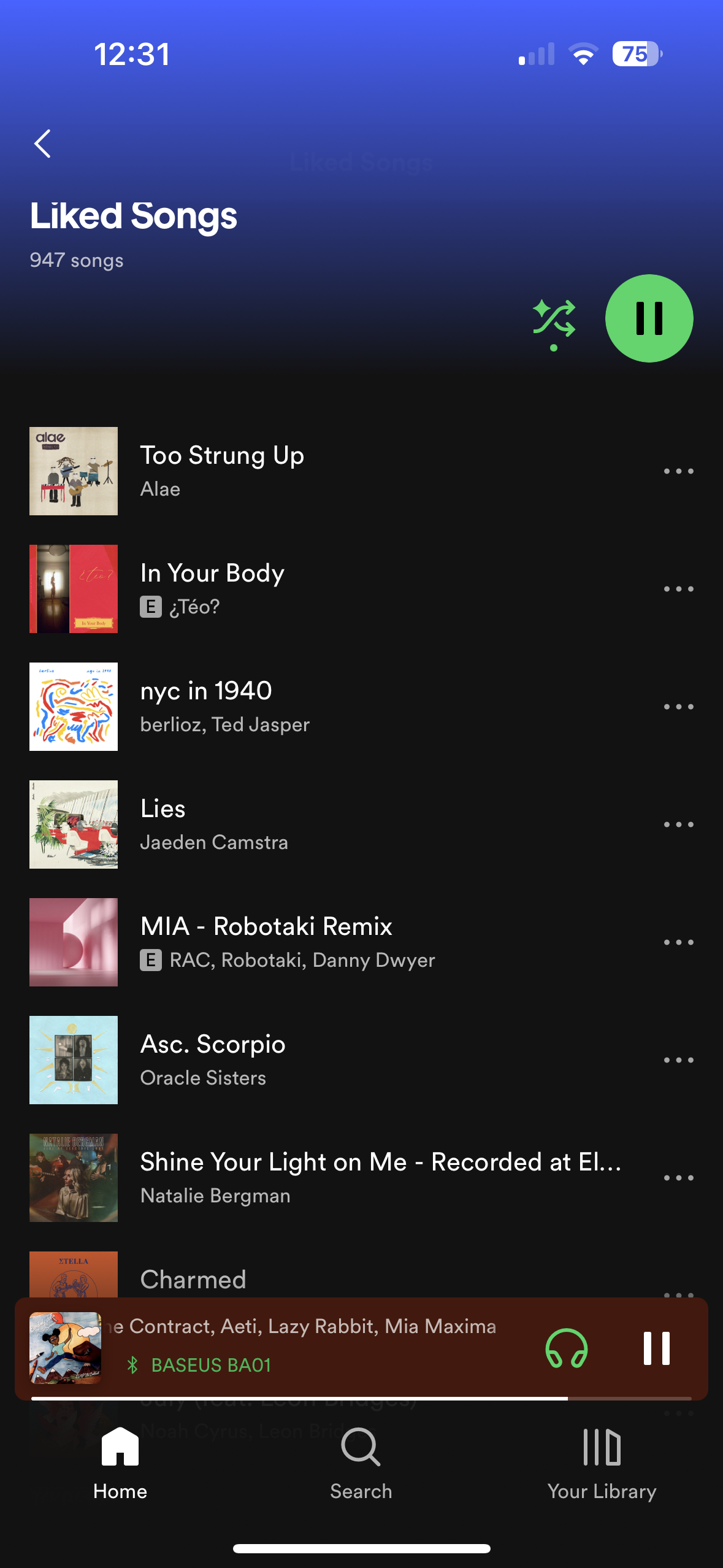 this is how it looks now. No enhance, no search, no nothing.
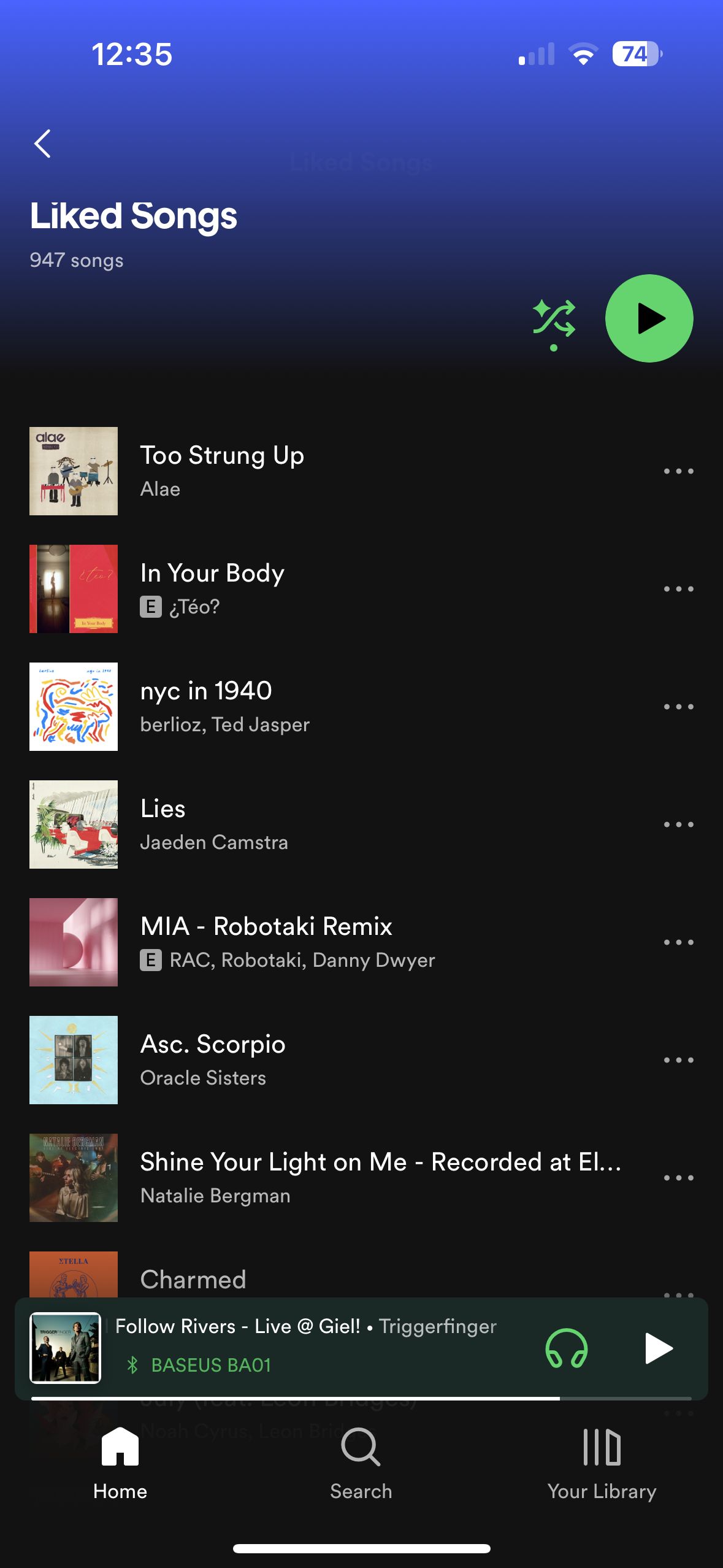
For me it looks like this and nothing happens when I scroll down.
This was it. Thanks a lot! 🙌🏻
It was the smart shuffle feature. You have to turn it off for search to appear. Not very user friendly, gotta admit.

Clicking on the shuffle button fixes the problem..Why has Spotify not fixed this bug? This post was 3 years ago!

Brilliant! Smart Shuffle seems to turn off the search bar (which is dumb). Regular shuffle still has the search bar.
Also the "Liked" indicator isn't displaying on songs in lists, including Discover Weekly. The only way I can tell if I've already liked a song is to right click and see the option "Remove from your Liked Songs" instead of "Save to your Liked Songs."
These things aren't on purpose, right? Fingers crossed I'm just a victim of an accidental release.