Spotify STILL pausing at 9 seconds in

Plan
Premium
Country
USA
Device
Spotify Web Player AND Android App
Operating System
Acer Chromebook 15
My Question or Issue
Despite changing some flags settings on Chrome, clearing cookies and caches, Spotify continues to pause *every* song at 9 seconds before resuming play. This has been marked as "Solved" in other threads but it hasn't actually. One user - NOT a Spotify employee of any kind - suggested the flags to help with the problem. It helped me for a few weeks before the issue resumed.
It would be nice if this was an issue that Spotify would actually look into and truly work on solving. I've been a Spotify user since it was in beta in the US but honestly, this is almost enough to make me switch platforms. It's a small thing but it's wildly irritating.
Accepted answers
All comments

I have this same problem and have spent many an hour trying to sort it unsuccessfully, checking all these threads and doing all the things that everyone suggests and it does not work. One "solution" says its a network problem. That seems like a cop out to me. I would love spotify to come up with something because this is a hoorible glitch to have on every single song


Hey folks,
Thank you for your posts. We're sorry to hear that you experiencing this. We're happy to assist you.
Make sure that your browsers are on the latest available version. If you're unsure, you can look online on what's the current version of the browser you're using to double check.
If that doesn't do the trick - would you mind to try out with another internet connection to see if the issue persists?
It would also be great if you'd let us know if this occurs on one specific device or multiple devices using the Web Player?
Keep us posted. We'll have an eye out for your replies.
Cheers!

It works in firefox, but it doesn't with ironchrome
It has to be an Spotify issue because any other streaming service is working fine with ironchrome
Hey there @us3r,
Thank you for your post in this thread.
The browsers currently supported are Chrome 45+, Firefox 47+ and Edge 14+ Chrome 62+ and Safari 11+.
If you have any questions we're always one reply away.
Cheers!

hello,
I encounter this problem and I tried every web browser available to check if the problem still happens (chrome, Firefox, Edge (the new one), Even Vivaldi and Opera)
And I also changed network, public IP adress, different accounts, cleared the cache, tried to downgrade my Chrome or upgrade it.
Still the same problem.
I checked within the developper debugging console and indeed I find some errors like the following:
Failed to load resource: the server responded with a status of 503 ()
6vendor~web-player.0cdc4f4e.js:1 Uncaught (in promise) TransportError: Token provider returned the same token twice.
at D._parseProvidedToken (https://open.scdn.co/cdn/build/web-player/vendor~web-player.0cdc4f4e.js:1:1352340)
DevTools failed to load SourceMap: Could not load content for https://open.scdn.co/cdn/build/web-player/vendor~web-player.0cdc4f4e.js.map: HTTP error: status code 404, net::ERR_HTTP_RESPONSE_CODE_FAILURE
DevTools failed to load SourceMap: Could not load content for https://open.scdn.co/cdn/build/web-player/395.44ebcc34.js.map: HTTP error: status code 404, net::ERR_HTTP_RESPONSE_CODE_FAILURE
DevTools failed to load SourceMap: Could not load content for https://open.scdn.co/cdn/build/web-player/673.8f8433ff.js.map: HTTP error: status code 404, net::ERR_HTTP_RESPONSE_CODE_FAILURE
DevTools failed to load SourceMap: Could not load content for https://open.scdn.co/cdn/build/web-player/xpui-routes-playlist.6975aa85.js.map: HTTP error: status code 404, net::ERR_HTTP_RESPONSE_CODE_FAILURE
DevTools failed to load SourceMap: Could not load content for https://open.scdn.co/cdn/build/web-player/web-player.70706db4.js.map: HTTP error: status code 404, net::ERR_HTTP_RESPONSE_CODE_FAILURE
No it does not come from my network because I tried several networks, I don't have a firewall blocking anything, It worked great previously.
If you could direct me toward a solution that would be great.

Hi @Claymobil,
Thanks for reaching out about this in the Community!
Can you try to clear any entries containing Spotify from the host files on your computer.
Follow the instructions in this Solution.
Let us know if that helped.
Cheers.
Hello, Thanks for the reply !
I already tried it and I have no entries in my host file so nothing to delete I'm afraid.
Claymobil.

Hey there @Claymobil,
Thanks for keeping us posted.
Can you let us know if this also happens with the desktop and mobile apps, or just with the web player?
Also, does it persist when using an incognito/private window?
We'll be looking out for your reply.
It only happens with the web player indeed. The account on the app works but on this machine this isntallation is not possible, I even have sometimes an error like in the attached file.
EDIT: I also tried in incognito mode and the 9 seconds stop is also there.
Hey @Claymobil,
Thanks for the extra info.
Could you try the solution mentioned on this thread? It seems to have worked for some other users too.
Let us know if it does the trick.
I already went though this method and activated one of the two flags (smooth scrolling) because the other option is not available.
still no luck
Hi @Claymobil,
Thanks for bearing with us.
Can you let us know the make, model and OS version of the computer where you're having this issue? We'd also like to know the version of the browsers you've tried.
Also and if possible, could you try with a different computer using the same network and let us know how it works?
We'll keep an eye out for your reply.

I've had the same. Experimented with chrome flags similar to those mentioned here and it worked for some time, then came back...
So I went to chrome://flags and started experimenting again. ATM it works again, so I'm sharing the flags I used:
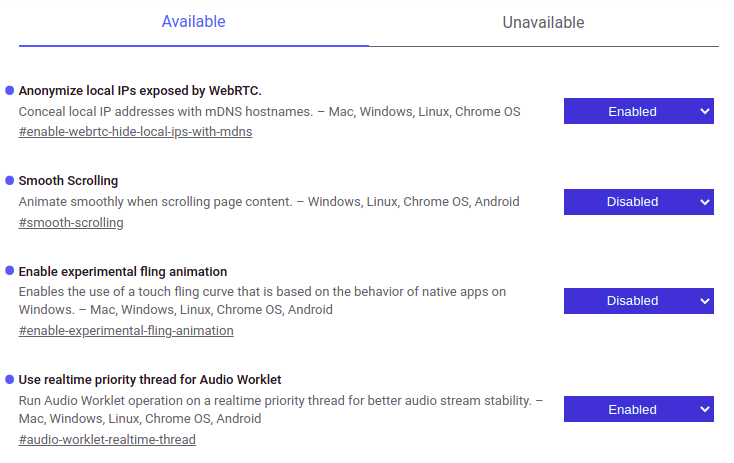

Experiencing the same glitch, pausing at 9 seconds. It happens on two different machines, two different networks, always with Chrome on Windows 10.
Kind of ironic now that I stopped using the desktop app because it was too buggy.

Hi @scottfours,
Thanks for reaching out about this.
Could you let us know if the issue persist using the web player from an incognito window or a different browser?
Additionally, we suggest that you clear your cache and cookies in your browser and check if that makes the difference.
Keep us posted 🙂
Hello,
I tried yesterday to change those flags and it seems that it's not better yet. but thanks for the tips 🙂
I emptied the cache once again, I tried several accounts and still no luck.
We whanged time last week end and it seems to be around the same time that the problem came back.
I also created a different virtual machine on a server to check with a different OS > same problem.
Hey folks,
thanks for the detailed info and the troubleshooting you're going through.
Can you let us know if you can try connecting to a different network and disabling any Firewall or other traffic management software that could be blocking Spotify.
Keep us posted on how you get on.
I checked and I don't have any firewall or Antivirus software installed on my computer.
I relaunched a new window with incognito and I will check if that's better.
the flags did not change anything also

I tried to play music in incognito mode > no change.
I rebooted everything connected in my house > no change.
I tried to renew my public IP adress > No change.
Apart from the tim change, there was nothing that has changed on my network

Hey folks,
Thanks for your replies.
Could you send over a video where we can take a better look at this issue?
You can attach it to your next response to us by using the Insert Video option in the post editor or you can send a link to it, just make sure to exclude any personal info from the video.
We'll be on the lookout.
I could not take a video but her is a screenshot with the paused song.
If i click next, the next song plays well but otherwise it stays that way
Hi @clay-mobil,
Thanks for getting back to us.
Could you try logging in to the web player using a different device and the same internet connection?
Let us know how it goes.
I did not have a computer at hand so I created a virtual machine to test i and I encounterred the same problem, but this time I had a pause at 9 seconds and 39 seconds. no idea why
I changed the network card to change the mac adress of the machine and no change
Hello,
Today I tried on a different web browser (the new edge) all seemed to be working but at one point, it also paused at 9 seconds.
If you could find a solution I would be reeeeally grateful ^^
thanks
Thanks for the info and your help in troubleshooting this.
Can you let us know if you can try creating a mobile hotspot from your phone and connect your computer to that one. This will help us determine if the issue is network related or related to any System administration software on your pc itself.
You can also try to enable Smooth Scrolling in Google chrome:
1. Open Google Chrome.
2. Copy and paste the link below into the address bar of Chrome, and press Enter.
chrome://flags/#smooth-scrolling
3. Select Enabled.
The Default setting has smooth scrolling enabled, but it could automatically disable smooth scrolling when you have too many tabs open or it could be manually done by your Administrator.
Keep us posted on how you get on.

I have the same problem. Fresh system, fresh web browser, and at 9 sec spotify stops.
This is very annoying. In the morning I like listening to the music, but I have to come to click 'next' at almost every song. And after a few 'next' click and I turn it off and play music at 'google music' because it works without interruption.
And I have a premium version.
Hey @dominikk,
Thanks for reaching out about this.
Just to confirm, is this only happening in the web player?
It would also be helpful to know which troubleshooting steps you've already tried. This will help us give you better suggestions.
Keep us posted.


I have the same problem. Fresh system, fresh web browser, and at 9 sec spotify stops.
I think you will loose your customers and listeners in short time, if doesnt fix this bug!!!
I have had this issue for years, and it's really sad that Spotify either doesn't care or pretends it doesn't exist.