Light Mode for desktop / mobile app

Hi,
I've been a premium user for almost a decade now and have a Mac and iPhone, but this topic goes beyond platforms in general.
I was wondering if there are any plans to have a Light Mode for the app. The extreme contrast difference between the black background and white text wreaks havoc on my eyes and I have trouble looking at other things for a little while, if I've looked at a Spotify window for too long (example, reading the bio of an artist), reading through the tracks of an album or playlist etc.
If not, are there any plans to have themes in Spotify? The app is almost 10 years old in the US alone, and I'm quite surprised there has been nothing been done in this direction for the app.
Thanks!
Accepted answers
All comments


Dear friend, be polite

Hi there folks,
Thank you for your posts and feedback in this thread.
There's currently an idea about this - [All Platforms] Light Mode Toggle. You can leave a +VOTE and Subscribe to the thread for any updates. Even if its status is closed for now, you can still keep an eye there for any news we have to share around this.
Let us know if we can help you with anything else 🙂
Take care!

The only way to do this currently is to use Spicetify.
Spicetify lets you customize your Spotify desktop app - Here's how to use it (xda-developers.com)

please support for new idea
https://community.spotify.com/t5/Idea-Submissions/light-mode/idi-p/5255245

I've thought of this ever since I found this app and I don't know why there has to be a vote???? Pathetic. Almost every other program or app lets you choose light or dark mode.
Is this supposed to be cool? If it is then its the reason I still use google podcast as my podcast app.

This is exactly what i was thinking! This is standard across most popular apps. When dark mode was first introduced in apps and in windows, I thought it was really cool. But I've found that 5 - 10 minutes into using any app (outlook, word, excel, etc) in dark mode, I get really irritated by it and switch back to light mode. This is one of the main reasons I don't use Spotify very often, even though I have a family license.

That idea is from april 2014 and still nothing happened.
So thanks for NOTHING.
That's the reason I'm still using Deezer instead.

**bleep** is bussing info. Thank you for your time.😁

We shouldn't even have to request this as a "feature." It's simple accessibility design specs. Then again, you UI/UX team has always been a bit stupid and is directly the reason I stopped paying at all.

Where is the "LIGHT" Mode? It's 2022 and you still don't have this feature?

This is the perfect solution for me!
This light green theme is exactly what I have always wanted Spotify to look like.
After installing spicetify community themes you can add this configuration with these three lines in the shell/terminal:
spicetify config current_theme ZIRO
spicetify config color_scheme green-light
spicetify apply
And how is this spicetify installed on devices?
You install it from the command line. The installation instructions for windows, mac, etc., are here.
After you install it, you install the community themes here. This is a list of what they look like.
The installation is very straightforward if you have any experience using the command line. If you do not, well, this might not be the solution for you. This is a solution for the Spotify desktop app. I'm not aware of a way to modify the mobile apps.
It's not what I'm looking for, but thanks. I want a white, grey/ lighter background.

I have struggled for years to find a solution to this problem. I cannot use dark mode backgrounds like in Spotify and it drives me away from using this app. I can’t use it for more than 20 seconds with sore eyes and headache forming. Same with the Garmin app. 😀
however, Apple iPhone has a solution in Accessibility with Per App Settings. And you can turn on Smart Invert for just Spotify or any other app that doesn’t have a Light Mode.
hope that works for thousands of you out there that have been ignore.
https://support.apple.com/en-gb/guide/iphone/iph1f48544ab/ios

A true hero.

I do not use a mobile device and don't know what the app looks like. All I know is the desktop site has light text on a dark background, and it gives me insane headaches. I do not use Spotify because of the poor site design and inability to use any kind of light mode to fix the problem. Unfortunately, the folks in charge of the music ministry at church decided they were going to use Spotify to list upcoming music instead of the Google Drive solution they HAD been using, so I will be kind of forced to use Spotify more than I want to given the circumstances. It appears many - in the thousands - of users have been begging for a light mode solution for something on the order of a decade with no hope in sight. This seems a profound oversight on the part of the Spotify developers and something that could or should be relatively easy to fix if they so chose to do it.

I am a developer. This is not that hard to do. After 10 years, nothing from Spotify when people are shelling out $100's per year for the service. Spotify, please think about accessibility. Not ever can view dark mode and A LOT of people DON'T like it. Stop with other features that you THINK people want and implement LIGHT mode on web and devices. Or at least on the web.
Light theme solution for iPhone.
Smart Invert in iOS
1. Open settings.
2. Search for Per-App Settings and add Spotify to the list.
3. Select Spotify from the list and look for Smart Invert option and turn it on. (You don't want to turn it on for entire iOS).
4. Restart Spotify app.
For desktop use Spicetify : https://spicetify.app/
hello idk if this will help but a simple way to get light mode for Spotify on iphone is to go to accessibility in settings, go to per-app settings, add spotify, then find smart invert. pictures on it wont invert, only emojis and text. and it makes the green parts pink so thats a plus (at least for me)

PLEASE for the LIFE OF ME!!! PLEASE make this happen! I've always hated dark mode and especially the older I'm getting I'm finding it absolutely difficult seeing dark things and I only put dark mode on my phone from sunset to sunrise when I'm in bed etc watching YouTube etc or just browsing etc...
I would love if Spotify made a Light Mode theme for their Desktop/Android Phone app etc. I don't see why this hasn't already been implemented or even a discussion to ask for this as so many other apps have this simple feature...
I think it should be the customer WHO IS PAYING FOR A SERVICE have the choice to choose if they want to have use dark or light settings. I can't stand it!
The dark green Spotify Logo, the Dark Purple... along with a very dark black/brown background... It's hard for me to focus. I'm actually OVER IT!!! I actually have to go in settings on my Mac (and because Apple doesn't believe there should be an option to change display/font sizes etc (I actually have to change display resolutions to make things bigger) and the quality is horrendous)... On my Samsung, I have to use the font/screen zoom to view/high to see properly.
I've been thinking (right now just thinking) of trying another music provider or see if there's any other apps people have created with Spotify integration... I haven't really read through the forum properly so I apologise for the hostile post or the arrogance... (I'm just letting off some steam)... I'll probably come back to this later and read through peoples posts when I've calmed down but I needed to get this out...
I also cannot be bothered going through that option or finding github/alternative apps/programs/install this, install that, do this, do that, watch videos, go through 5,000 videos on YouTube to watch tutorials or read on sh#t when there the official app should honestly think about people with viewing difficulties/blind vision/poor vision etc. It's an absolute joke!!!
This is what my Desktop looks like ATM so I can see... OMGGGGG!!!!!!!!!!!!!!! It's honestly so frustrating!!! NOT HAPPY JAN...ET!
Dan.

It is now 2024? How long do we have to wait for this basic feature?

2024 still hoping for light mode on desktop...

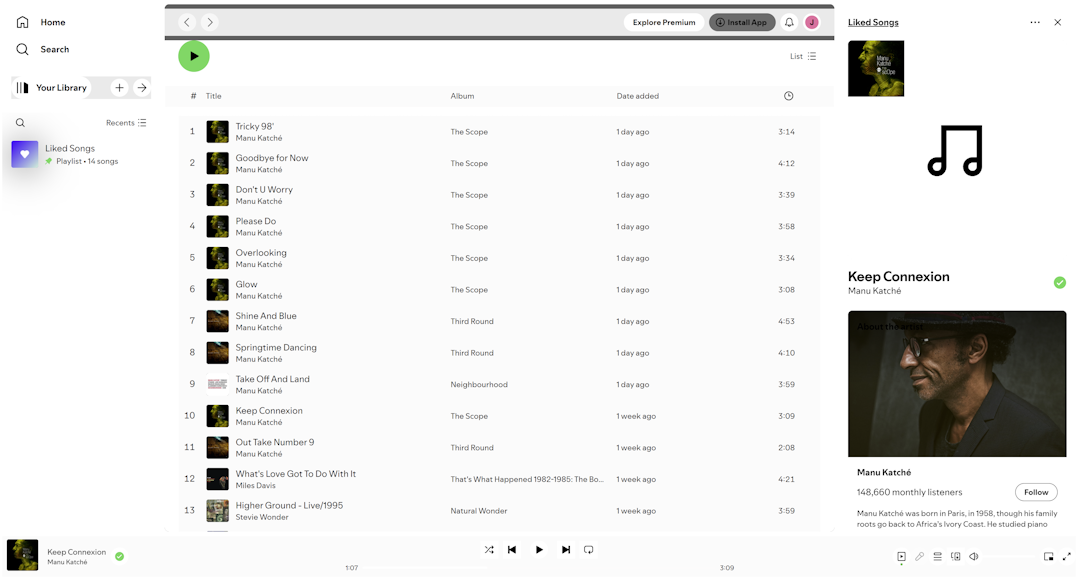
If you're willing to use Spotify on web instead of desktop app then I have a Tampermonkey script for you that makes the background white and text black:
// ==UserScript==
// @name Spotify Customizer
// @namespace http://tampermonkey.net/
// @version 0.3
// @description Customize Spotify web app colors
// @author Your Name
// @match https://open.spotify.com/*
// @grant none
// ==/UserScript==
(function() {
'use strict';
function addCustomStyles() {
var style = document.createElement('style');
style.innerHTML = `
#Desktop_LeftSidebar_Id > nav > div {
background-color: white !important;
}
#main > .Root > div {
background-color: white !important;
}
section > div > div {
background-color: white !important;
}
div.main-view-container__scroll-node-child {
background-color: white !important;
}
#Desktop_PanelContainer_Id, button {
background-color: white !important;
}
#Desktop_LeftSidebar_Id {
background-color: white !important;
}
div, button, a, span, h1, h2, h3, h4 {
color:black !important;
}
.main-view-container__mh-footer-container, main-view-container__mh-footer-container > nav {
background-color: white !important;
}
main > section > div {
background-color: white !important;
background-image: none !important;
}
.main-view-container__mh-footer-container > nav {
background-color: white !important;
background-image: none !important;
}
img {
max-width: 100px !important;
max-height: 100px !important;
}
div > a > div > div {
background-color: white !important;
background-image: none !important;
}
main > section > div.contentSpacing > div > div {
background-color: #fbfbfb !important;
}
header > div {
background-color: #eaeaea !important;
}
#main > div > div > div > footer {
background-color: #fbfbfb !important;
}
`;
document.head.appendChild(style);
}
addCustomStyles();
var observer = new MutationObserver(function(mutations) {
mutations.forEach(function(mutation) {
addCustomStyles();
});
});
observer.observe(document.body, { childList: true, subtree: true });
})();
this is how it looks with the Tampermonkey script:
Hey @stygianmessiah, thanks for reaching out to the Community!
I can see how your idea can be useful. If this is something you would like to see in the future, you can start a new Idea about this here. Make sure to VOTE to it, and get other supporters to VOTE for it as well.
I'll be here if you need anything else!