[Desktop] Video size in podcasts

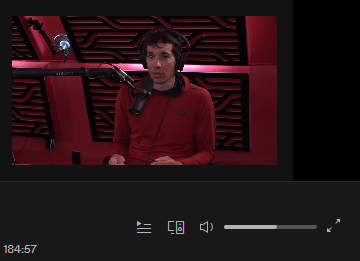
You can currently only choose between a small video size and full screen.
I wish you could stretch the video to the rest of the window, as the rest of it is really a waste of space. Full screen would be alright but then I can't do anything else with that screen.
Comments

I also find this "either small or fullscreen" view extremely annoying and limiting for podcast video. I work with two screens and usually have a youtube podcast going on half of the second screen so I can still use the other half for work. I want to be able to scale the video to the size I want it to be like I can do with youtube theater mode. This is a MUST!!

I kinda though that free floating video window would be a no-brainer nowadays. I have pretty much always two or three windows open in my screen. Please, fix this asap.

100% agree with the comments above, I use the exact same two-screen set up with YouTube on the side. Spotify provides a dramatically reduced service from the YouTube experience - and I'm being charged a premium for it!??

100% agree! This design is terrible.
Nearly every other video platform has 3 options: default (not ridiculously tiny), large, full-screen.
And each option resizes the page elements based on screen size. This is standard stuff.
Many people split their desktops while working. One side has their work, the other side has youtube, netflix, etc...
No one is watching that comically tiny little video in the most awkward placement imaginable.

The new intermediate size is also too small. The intermediate size should be able to to be sized in proportion to the size of the spotify window or sized to take up half of the spotify app window if size cannot be adjusted. Ideally, the video window could be popped out and sized separately to user's taste.
I don't quite understand why this has been so difficult to implement a user controlled experience. The more control you offer to match or better Youtube user control the more views and subscribers you'll get. Also, with JRE, users miss the comments section.

Yes please do this! This is REALLY annoying.

yeah their looking into it. and SPOTIFY SUCKS D i k 4 coke a REGULAR 12 OZ. COKE. they can invest in BRAINZ, but they cant invest in changing anything cuz SPOTIFY SUCKS D i k 4 coke a REGULAR 12 OZ. COKE

I love seeing others recognize this serious shortfall in Spotify video viewing.
I find it annoying that @SirSlani's original comment needs a "necessary number of votes" to implement. Are you effing kidding me? How much overhead could possibly be added to the code to allow for variable window sizing or a tear off viewing window. Who would oppose such a basic, expected level of viewing OPTION?

+1. I can't add anything that hasn't been said. First time watching JRE on spotify and I was very surprised to see only tiny screen or full screen options available! So much empty black space on the screen. Would be nice to look something like the original JRE experience on Youtube.

I agree with @radiobajesus. @Elena what is the 'necessary' number of votes? Whatever the number is I'll make sure this gets to it, tons of people want this. Not everyone is going to spend the time to complain to you idiots to fix your platform, the only ones doing it are the ones very annoyed that you've disrupted their viewing experience on Joe's podcast. If you had this feature you would have already had me watching dozens of hours of his podcast this month, yet because I the viewing experience sucks so much compared to YouTube I've watched maybe a couple hours, haven't managed to finish a single podcast. I'm sure I'm not the only one, thanks.
I found a temporary solution for people who are somewhat technically inclined, press Ctrl+Shift+I while on the podcast you want to watch on the Spotify web player, go to the Elements tab if not already on it, you will see this a bit below the middle <div id="main">...</div>, double click that to open it, then open up the Root div, then open up Root__media and then Root__video-player and then "VideoPlayer VideoPlayer--floating" etc. then click VideoPlayer__container, on the right side in the styles tab you will see --video-player-min-width, set that higher as you see fit. Works for me for now, time to binge watch the past month of podcasts.


"We've gone ahead and marked this as a new idea. Spotify Staff will look into this idea once it reaches the necessary amount of votes."
The fact that this a new idea instead of being implemented from the start says a lot...

So poor expirience of spotify video (((
I cant open a video to fullscreen on windows app.
agree !

This is pretty much why I don't watch any podcasts on Spotify.

It is an absolute shame for such a platform to propose podcasts and have the utter inability to provide you with the simple, Oh so simple option to adjust the size of the video to your liking. It really shows a lot. All other platforms or apps are able to do it, Why not you Spotify ?

Can we get an update on this? Literally can't believe that you cant at least pop out the video and resize it.

I literally can't watch in fullscreen on my secondary monitor using my laptop when I have a game open. The default player size is way too small. Why is these even having to be voted on, fix it already!

Desktop app: have the video pop-up out (just the video) like Opera does, so then you can resize it as you wish and move it anywhere.

cant watch Rogan on a tiny ass screen.. i rather not watch it at all..

Yeah I'm watching and I have to blow up the scaling on Spotify settings when I watch the video to avoid having it take up my whole monitor... very surprising no customization.

Hey Spotify!
You need to get on that videoplayer problem for PC!
It's been like almost half a year!

This needs to be a thing. Would be nice if we could get a resizable full-screen window, so the Spotify app doesn't render my screen useless.

Maybe adding a "pop-out window" button to separate the video player from the Spotify window? I am having issues looking at other episodes since the video snaps to the default size in the middle of the screen. Makes queuing up additional episodes harder. Also maybe a way to designate if newer episodes play or older episodes play next.

I just figured out an easy (although clunky and silly) workaround to this while watching podcasts in a browser. Making the browser window wider will make the video player size grow. The height of the browser window doesn't seem to affect the video player size. Right now I have a podcast open in a window that's invisibly hanging quite a ways off of the side of my monitor.

As of version 1.1.55.498.gf9a83c60-a of the desktop app the video output is even smaller! Now it's on the lower right of the window and literally thumbnail sized. Why are you making it even worse than it already was?!
Why does the video not use the horizontal space of the window like YouTube theater mode does?
For now I use the Stylish Chrome plugin and this snippet as the style;
#main > div > div.Root__top-container > div.Root__now-playing-bar > footer > div {
	height: 70px;
}

#main > div > div.Root__top-container > div.Root__now-playing-bar > footer > div > div.now-playing-bar__center > div > div.playback-bar {
    width: 140%;
}

#main > div > div.Root__media > div.Root__video-player > div {
    --video-player-min-width: 1500px;
    right: 20px;
    bottom: 70px;
    z-index: 9999
}
On URLs starting with; https://open.spotify.com/
It's not perfect or the cleanest but for me it's better than using the desktop app. It's really unfortunate being someone who's learning coding and seeing it take them so long to come up with a solution to this, this should have been a feature a long time ago and it doesn't take long to do if you actually have the source to the desktop app. I even considered trying to reverse engineer it just to modify it but that's a bit much.. maybe Spotify could actually improve their platform instead?

I made an account just to upvote this.
PLEASE add this feature. I am not really sure why it isn't there already, or why it is taking so long. I am very aware that the main reason Spotify added video AT ALL was to placate Joe Rogan's requests for coming over to the platform: I know that Spotify did not want ANY video at all, and he had to convince Spotify before he was willing to join. But please, for the love of all of your users here: LET US RESIZE THE VIDEO TO A SIZE THAT IS IN BETWEEN FULLSCREEN AND A TEENY TINY CORNER OF ABOUT 60 PIXELS!
I have 2 monitors, a 2k and a 4k monitor, that I use for a variety of types of work. Not having an in-between legitimately kills my ability to listen/watch the podcast while doing ANY other work. The default non-full screen size is SO SMALL, especially on monitors of this resolution, that it is borderline useless; the other option is to take up the ENTIRE 2560x1440 or 3840x2160, which makes the monitor effectively useless for any type of work that IS NOT watching the podcast. And although I know I have some large resolutions at play here, I also am aware that THIS IS STILL A PROBLEM AT 1080p RESOLUTIONS, as I have seen the same problem myself, firsthand, with another user who has a 1080p monitor.
One reason that I used YouTube to watch his podcast in the first place, was the fact that YouTube worked in a browser: it allowed you to resize the window as the user sees fit.
I am no whiz-kid programmer myself, but I am VERY CONFIDENT that it should not take the programmers Spotify has at their desks the amount of time it has so far to get ANY sort of in-between of full screen and micro window. Even a THEATER MODE would be a blessing!
Again, I am NOT someone who has been complaining non-stop about Rogan (and other podcasters, for that matters) move to Spotify: I do NOT believe you are trying to stifle him, or his free-speech, as so many do. What my complaints ARE, however, are VERY PRACTICAL and completely obvious to anyone who uses these features. I just don't understand what is taking you guy so long. This is a VERY BASIC quality of life feature, the ability to stream at different resolutions besides full screen or tiny window no bigger than a postage stamp. Please folks, for the love of all of your users out there: provide us a solution!
Again, I would even settle for something as mediocre as THEATER MODE in meantime while you guys figure out how to code something as basic as resizing a window and the resolution that the window takes up. You already allow it to take up a variety of resolutions (see my resolutions listed earlier: both work in full screen, meaning that you already allowing adjustable resolutions for the stream). And again, I'm no whiz-kid programmer, but this should not be taking as much time as it has to solve this issue. If it IS, that speaks to some problems you guys have already on your backend/API, and makes me question what kind of code makes up the bulk of the Spotify web browser as it is.
It is IMPOSSIBLE to watch the show in the default tiny window provided, ESPECIALLY SO when I need to resize that window right off the back to take up half screen, or quarter screen, which means that the TINY WINDOW is now ALSO half screen/tiny screen, etc.
We are willfully paying for the service: let us use the service in a practical way!
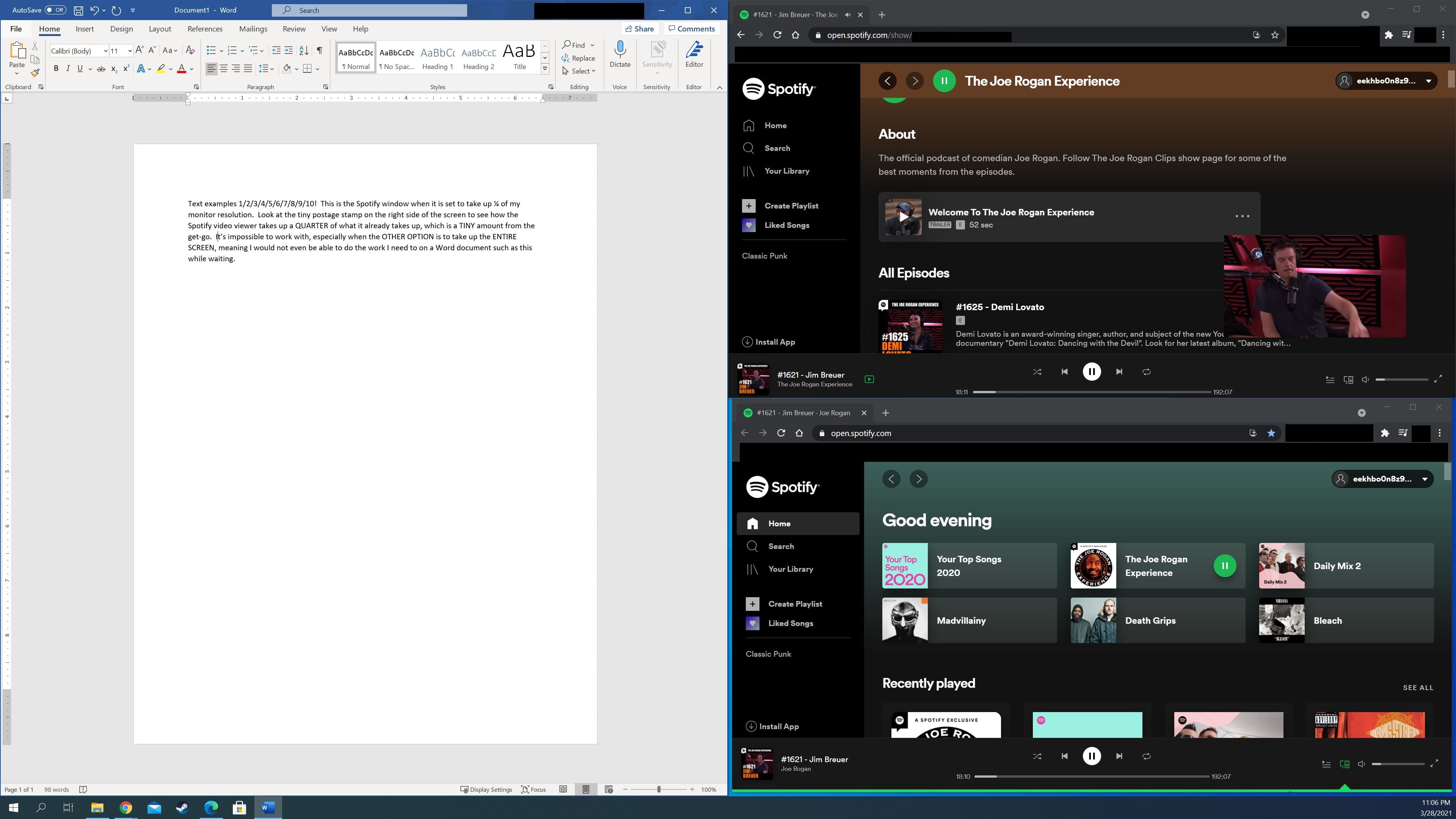
Attached are some examples so you can see how tiny the Window is at a 4k resolution. It will probably not mean much to someone viewing the image at a lower resolution (i.e. 1080p), but for someone who views them at 4k, or even 2k, you will see just how drastically small those windows are.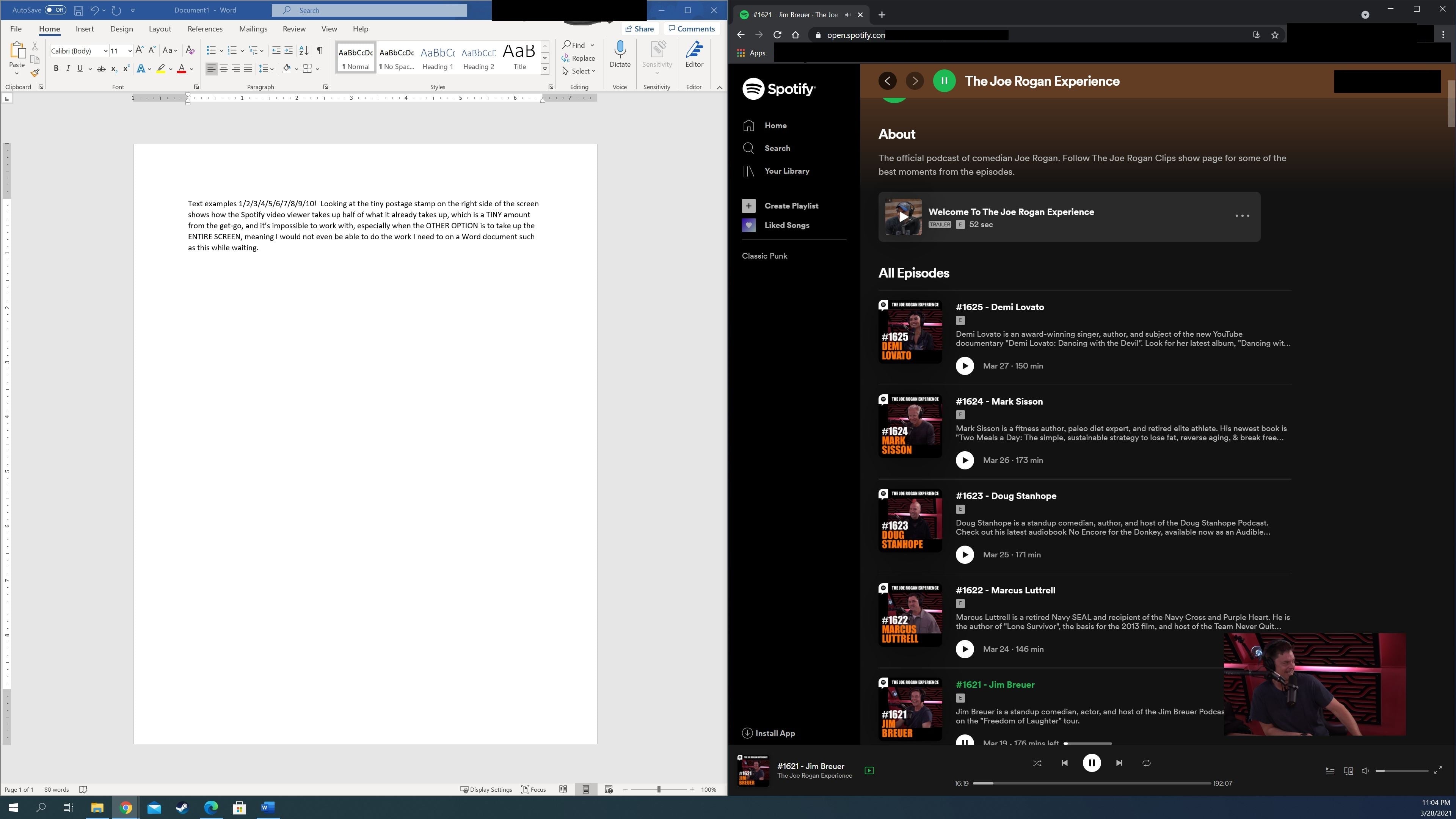
FractionReserve I could NOT AGREE ANYMORE! I am no whiz-kid programmer, in fact I'd consider myself a poor coder as of now. But even I could see how easily this could be resolved. Again, unless there is something REALLY WEIRD on their stack backend, or their API in general, since it was not designed for video AT ALL to begin with and they only capitulated, as far as I am aware, because of how big Rogan is and because he essentially demanded there to be video. Even still though, you created a solution using a 3rd party browser PLUGIN how quickly? Thank you for this, by the way. Again, I consider myself a poor programmer as of now (I'm a hardware guy through and through), but even I BELIEVE I could have solved it eventually (albeit slower than you have). So, again, THANK YOU for your fix.
Again, @Spotify to reiterate:
We are willfully paying for the service: let us use the service in a practical way!
I made two edits to this post: first, to thank @FractionReserve for the fix he created using a PLUGIN; second, to correct myself and state that it was using a PLUGIN (according to @FractionReserve) and NOT an extension, as there is a difference between the two.

+1 - Watching a podcast on my 34" Ultrawide whilst doing other work is a real nuisance, we need pop out video like you get in chrome.
Updated on 2020-09-01
Hey @sirSlani,
Thanks for submitting your idea to the Idea Exchange!
We've gone ahead and marked this as a new idea. Spotify Staff will look into this idea once it reaches the necessary amount of votes.
More info on how your feedback reaches Spotify via the Idea Exchange can be found here.
Cheers!